Instagram is wonderful until someone turns your comment section into a tiny public courtroom. Maybe it is an overexcited follower, a nosy coworker, a stranger with too much free time, or that one person who treats every Story reply like a personal podcast. This is where Instagram’s Restrict feature quietly enters the room wearing soft shoes.
So, what does Restrict mean on Instagram? In simple terms, restricting someone limits how they can interact with your account without fully blocking them and without sending them a dramatic “You have been restricted” announcement. Their comments become less visible, their direct messages move away from your main inbox, and they cannot easily tell when you are active or whether you have read their messages.
Think of Instagram Restrict as a digital velvet rope. The person is not thrown out of the building, but they no longer get full access to your attention, your notifications, or your public comment space. It is designed for subtle control, especially when blocking feels too intense or could create unnecessary awkwardness.
What Does Restrict Mean on Instagram?
To restrict someone on Instagram means to quietly limit that person’s ability to interact with you. The restricted user can still see your profile, posts, Reels, and Stories if your privacy settings allow it. However, their comments and messages are handled differently from normal interactions.
When someone is restricted, Instagram does not notify them. From their side, things may look mostly normal. They can type comments, send messages, and visit your profile. Behind the scenes, Instagram gives you more control over whether you see, approve, ignore, or respond to those interactions.
This makes Restrict useful when you want to reduce unwanted contact without causing the social explosion that sometimes comes with blocking. It is especially helpful for dealing with low-level harassment, awkward acquaintances, pushy followers, spam-like comments, or people you do not want to fully cut off.
What Happens When You Restrict Someone on Instagram?
Instagram Restrict affects three main areas: comments, direct messages, and activity visibility. It does not erase the person from your Instagram universe, but it does place a protective filter between you and their interactions.
1. Their Comments Are Hidden Unless You Approve Them
When a restricted person comments on your post, their comment is not automatically visible to everyone. In most cases, only they can see it unless you choose to approve it. This is one of the biggest benefits of using Restrict.
For example, imagine someone keeps leaving sarcastic comments under your photos. You do not want to block them because they are a cousin, classmate, client, or friend of a friend. By restricting them, they can still comment, but their comment does not instantly become part of your public post. You can review it quietly and decide what to do.
You typically have three choices: approve the comment so others can see it, delete it, or leave it hidden. In other words, the restricted person may feel like they are still speaking into the room, but Instagram has quietly turned down their microphone.
2. Their Messages Move to Message Requests
When a restricted account sends you a direct message, it usually goes to your Message Requests instead of your main inbox. You also do not receive normal message notifications from them. This is useful when someone keeps sending unwanted DMs but you are not ready to block them.
Another major detail: the restricted person cannot see when you have read their message. That means no awkward read receipt pressure. You can open, review, ignore, or delete the message without giving them the satisfaction of knowing you saw it.
This small privacy layer can make a big difference. Sometimes peace is not about deleting people from your life; it is about moving their messages to a less annoying folder.
3. They Cannot See Your Activity Status
Restricted users generally cannot see when you are active on Instagram. If you have Activity Status enabled, people you message may normally see when you are online or recently active. Restrict cuts that visibility off for the restricted person.
This is helpful if someone watches your online status and immediately sends a message like, “I know you are online.” Nobody needs that level of surveillance with their morning coffee.
4. Instagram Does Not Notify Them
One of the most common questions is: Will someone know if I restrict them on Instagram? Instagram does not send a notification when you restrict someone. They will not receive a pop-up, email, alert, or banner saying they have been restricted.
However, they might eventually suspect something if their comments never appear publicly, their messages do not show read receipts, or they cannot see your active status anymore. Still, those signs are indirect. They do not prove anything because many users turn off activity status, ignore DMs, or moderate comments for many reasons.
How to Restrict Someone on Instagram
Instagram gives users several ways to restrict an account. The exact wording may change slightly depending on app updates, device type, and region, but the process usually follows the same idea.
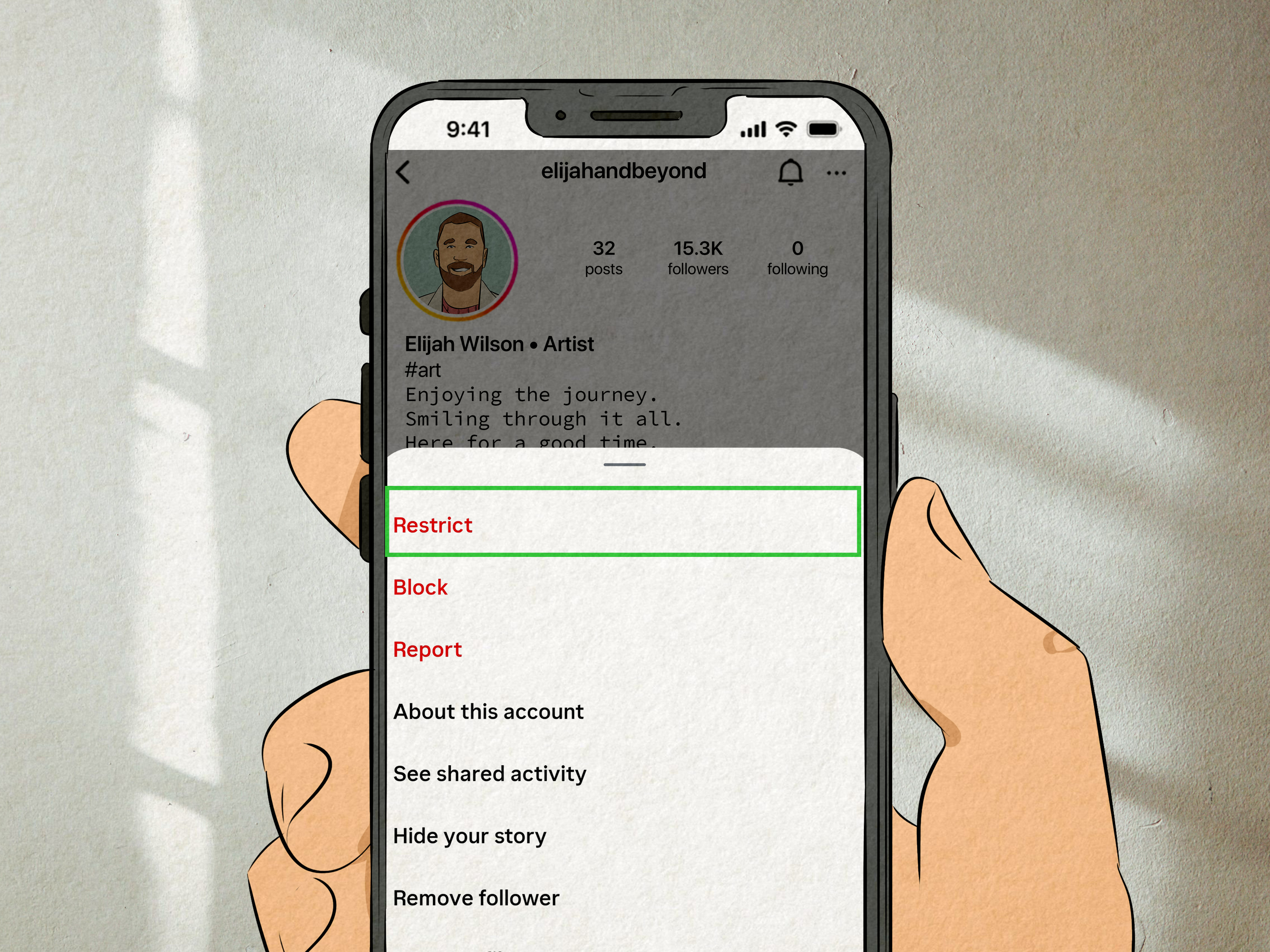
Restrict from Their Profile
- Open Instagram.
- Go to the profile of the person you want to restrict.
- Tap the three-dot menu in the top-right corner.
- Select Restrict.
- Confirm your choice if Instagram asks.
This is the simplest method. It works well when you already know the account you want to limit.
Restrict from a Comment
- Open your Instagram post.
- Go to the comments section.
- Find the comment from the person you want to restrict.
- Tap and hold the comment or swipe left, depending on your device.
- Choose the option to restrict the account.
This method is especially useful when someone leaves a rude, strange, or uncomfortable comment. Instead of starting an argument in the comments, you can quietly restrict and keep your post from turning into a group project in chaos management.
Restrict from Settings
- Go to your Instagram profile.
- Tap the menu icon.
- Open Settings and privacy.
- Look for privacy or interaction controls.
- Find Restricted accounts.
- Search for the account and tap Restrict.
This option is helpful if you want to manage multiple restricted accounts or review who you have restricted in the past.
How to Unrestrict Someone on Instagram
Restrict is reversible. If you change your mind, you can unrestrict someone at any time. Go back to their profile, tap the menu, and choose Unrestrict. You can also manage restricted accounts from Instagram’s privacy settings.
Once you unrestrict someone, their future comments and messages behave more normally again. Previous hidden comments may still need to be handled separately depending on what you approved, deleted, or ignored.
Restrict vs. Block vs. Mute: What Is the Difference?
Instagram gives users several tools for managing attention, privacy, and safety. Restrict, Block, and Mute may sound similar, but they are not the same thing.
Restrict
Restrict limits how someone interacts with you. Their comments are controlled, their messages move to requests, and they cannot see certain activity information. They can usually still view your content if your account settings allow it. Restrict is quiet, subtle, and reversible.
Block
Blocking is stronger. When you block someone, they generally cannot find your profile, view your posts, message you, or interact with your content from that account. Blocking is best when you want to fully cut off contact.
Mute
Muting affects what you see, not what they can do. If you mute someone, their posts, Stories, Notes, or other content may stop appearing in your feed, but they can still interact with you normally. Mute is perfect for when someone posts 47 vacation Stories before breakfast and your thumb needs a break.
Does Restrict Hide Your Posts or Stories?
No, restricting someone does not automatically hide your posts or Stories from them. If your account is public, a restricted user may still be able to view your public content. If your account is private and they already follow you, they may still see your posts unless you remove them as a follower or block them.
If your goal is to stop someone from seeing your Stories, use Instagram’s Hide Story setting. If your goal is to stop them from seeing your profile and content entirely, blocking is the stronger option.
Can Restricted Accounts Like Your Posts?
Restrict mainly focuses on comments, messages, and activity visibility. It does not work like a complete barrier around your account. A restricted user may still be able to like posts, view content, or interact in limited ways depending on your privacy settings.
If likes, views, or access to your content are the main problem, Restrict may not be enough. In that case, consider making your account private, removing the follower, hiding Stories, limiting mentions, or blocking the account.
Can a Restricted Person Tag or Mention You?
Instagram’s tools for comments, tags, mentions, and interactions have changed over time, and available options may vary. In general, restricting someone is designed to reduce unwanted interaction, while separate settings allow you to control who can mention or tag you.
For stronger control, check your Instagram settings for Tags and mentions. You can often choose whether everyone, people you follow, or no one can mention or tag you. For creators, brands, and public accounts, these settings are worth reviewing regularly.
When Should You Use Restrict on Instagram?
Restrict is best for situations where you want less contact without making a public scene. It is not just for serious harassment; it can also be useful for everyday social media weirdness.
Use Restrict When Someone Leaves Uncomfortable Comments
If someone keeps leaving comments that are rude, passive-aggressive, overly personal, or just plain exhausting, Restrict can keep those comments from appearing publicly unless you approve them.
Use Restrict When You Want to Avoid Drama
Sometimes blocking someone creates more conflict than it solves. Restrict lets you reduce interaction without making it obvious. This can be useful for acquaintances, coworkers, classmates, distant relatives, or anyone who would turn a block into a five-part documentary.
Use Restrict When You Need Space from DMs
If someone keeps messaging you and you do not want notifications from them, Restrict moves their messages away from your main inbox. You can check them later or not at all. Beautiful.
Use Restrict for Light Moderation on Public Accounts
Creators, small businesses, and community pages can use Restrict to manage difficult commenters without immediately blocking potential customers, followers, or viewers. It gives account owners a middle option between ignoring behavior and completely removing access.
When Restrict Is Not Enough
Restrict is useful, but it is not a magic force field. If someone is threatening you, repeatedly harassing you, impersonating you, spreading private information, or making you feel unsafe, stronger action may be necessary.
In those cases, consider blocking the account, reporting the behavior to Instagram, saving screenshots for documentation, adjusting privacy settings, and asking a trusted person for help. If the situation involves real-world safety concerns, do not rely only on an app setting.
How Restrict Helps with Instagram Privacy
Instagram privacy is not just about hiding your profile. It is also about controlling your attention. Every notification, message, and comment asks for a little piece of your brain. Restrict helps protect that space.
For personal users, Restrict can reduce stress from unwanted interactions. For creators, it can help keep comment sections cleaner. For businesses, it can prevent one disruptive account from dominating a post. For teens, families, and everyday users, it can create a quieter experience without requiring a full block.
The feature fits into a larger Instagram privacy toolkit that includes private accounts, comment filters, hidden words, message controls, story hiding, Close Friends, blocking, reporting, and limits. Restrict is not the only tool, but it is one of the most discreet.
Common Myths About Restrict on Instagram
Myth 1: Restricting Someone Blocks Them
False. Restrict is not the same as Block. Restricted users may still see your content depending on your privacy settings. Blocking is much stronger.
Myth 2: Instagram Tells People They Are Restricted
False. Instagram does not notify someone when you restrict them.
Myth 3: Restrict Hides Your Stories Automatically
False. If you want to hide Stories from someone, use the Story privacy setting or block them.
Myth 4: Restrict Solves Every Privacy Problem
False. Restrict is helpful for soft boundaries, but serious harassment or safety concerns may require blocking, reporting, or other action.
Practical Examples of Using Restrict
Let’s say you run a small baking account and someone keeps commenting, “Too much frosting,” under every cupcake photo. First of all, rude. Second, Restrict lets you review that person’s comments before the rest of your audience sees them. Your frosting empire remains peaceful.
Or imagine an old classmate sends repeated messages asking why you do not reply. You do not want a confrontation, but you also do not want your phone buzzing every time they remember you exist. Restrict moves their messages to requests and removes read receipt pressure.
Another example: you have a public profile and a stranger leaves weird comments that are not clearly reportable but still feel uncomfortable. Restrict gives you a low-friction way to reduce their visibility while you decide whether to block or report later.
Experience-Based Section: What Using Instagram Restrict Feels Like in Real Life
In real-world use, Instagram Restrict feels less like slamming a door and more like quietly closing a window. That is why many users prefer it when they are dealing with someone who is annoying, intrusive, or socially complicated rather than obviously dangerous. A block can feel final. Restrict feels like a boundary with a dimmer switch.
One common experience is relief from comment anxiety. If you have ever posted something and immediately worried that a certain person would jump into the comments with a weird joke, criticism, or attention-seeking remark, you know how quickly one account can ruin the mood. Restrict gives you back control. You can post without mentally preparing for battle in the comment section. Their words may still arrive, but they do not automatically become everyone else’s business.
Another noticeable benefit is the removal of message pressure. Instagram DMs can feel casual, but read receipts make them strangely intense. When someone sees that you read a message but did not respond, they may send more messages, ask why you are ignoring them, or become dramatic enough to deserve their own weather warning. Restrict helps by keeping those messages in requests and hiding read status. You can decide when, whether, and how to respond.
For creators and business accounts, Restrict can be a practical moderation tool. Not every negative comment deserves a block. Sometimes a person is just being repetitive, off-topic, or mildly unpleasant. Restrict lets the account owner prevent that person from setting the tone under every post. This is especially useful when maintaining a friendly public image matters. You are not starting a fight; you are managing the room.
For personal accounts, the feature is often used in socially delicate situations. Maybe the person is a relative who comments on everything. Maybe it is a coworker who sends too many after-hours messages. Maybe it is someone you know offline, and blocking them would create an awkward conversation at school, work, or the next family gathering. Restrict lets you create space without sending a loud signal.
That said, the experience is not perfect. Restrict does not make someone disappear. If they can view your content, they may still watch your Stories, like posts, or notice changes over time. If someone is determined to bother you, they may use another account or switch tactics. This is why Restrict works best for mild to moderate boundary-setting, not serious harassment.
The best approach is to think of Restrict as one tool in a privacy toolbox. Use it when you want quiet control. Use Block when you want full separation. Use Report when someone breaks platform rules or makes you feel unsafe. Use privacy settings when you want broader protection. In everyday Instagram life, Restrict is the “please lower the volume” button, not the emergency exit.
Final Thoughts: Is Restrict Worth Using?
Yes, Instagram Restrict is worth using when you want a quiet, flexible way to manage unwanted interactions. It gives you more control over comments, direct messages, and activity visibility without fully blocking someone. It is subtle, reversible, and useful for avoiding unnecessary drama.
The most important thing to remember is that Restrict does not hide your entire account from someone. It limits how they interact with you, but it does not always stop them from seeing your public content. For stronger privacy, combine Restrict with other Instagram tools such as private account settings, hidden words, story controls, comment filters, blocking, and reporting.
In short: Restrict is Instagram’s polite but firm boundary tool. It says, “You may remain in the audience, but you no longer control the microphone.” And honestly, sometimes that is exactly what your peace of mind ordered.
Note: This article is written for web publishing and is based on current Instagram privacy and safety behavior, including how Restrict affects comments, messages, activity visibility, and interaction control. Feature names and menu paths may vary slightly as Instagram updates its app.