Some robot projects arrive wearing a tuxedo: custom PCBs, polished enclosures, laser-cut perfection, and enough documentation to frighten a graduate student. Others roll in like a shopping cart with a camera taped to it and somehow steal the show. The ESP32-powered FPV car from the 2022 Hackaday FPV Contest sits delightfully between those worlds. It is clever, accessible, open-source, and just weird enough to make hardware people lean closer to the screen and say, “Wait, the little ESP32 is doing what?”
The short answer: not everything. And that is exactly why the build works so well.
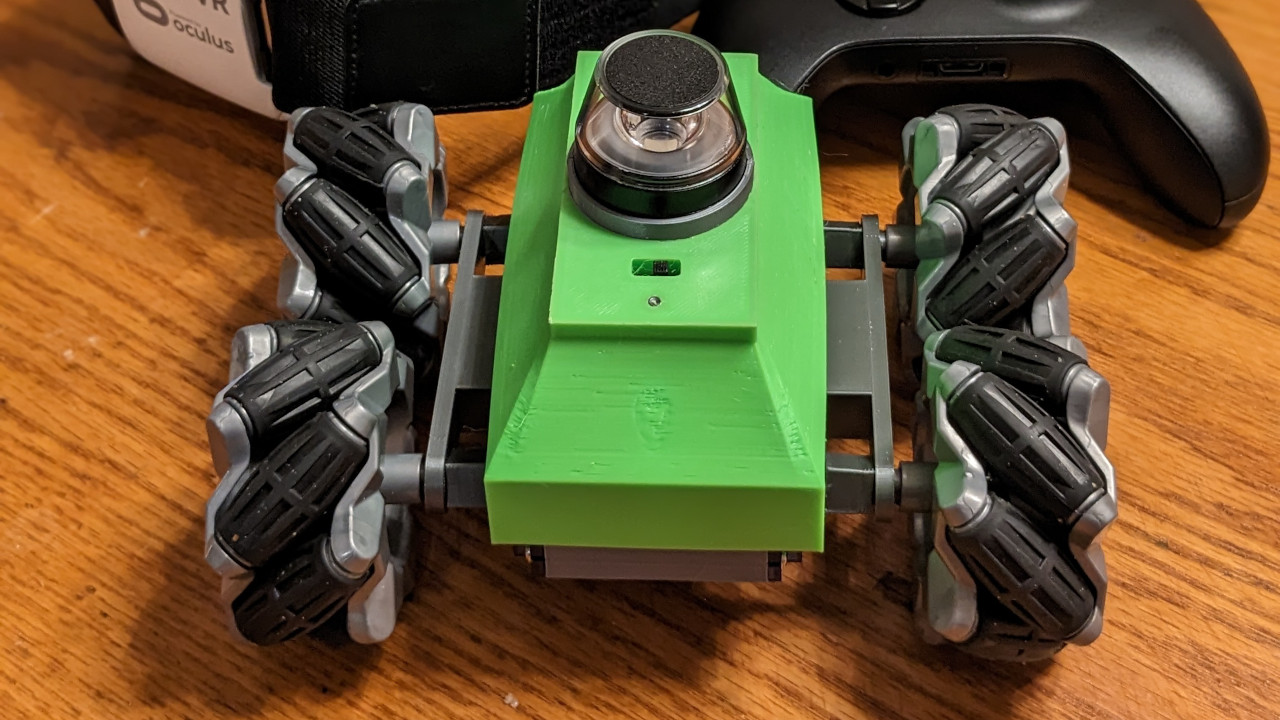
This project, known as PanoBot, uses an ESP32-CAM board, a small omnidirectional chassis, panoramic optics, WebSockets, JavaScript, WebXR, and WebGL to create a browser-based VR first-person-view experience. Instead of forcing a tiny microcontroller to behave like a gaming PC, the builder lets the ESP32 handle what it is good at: Wi-Fi, camera capture, basic control, and serving a web interface. The phone, VR headset, or browser does the visual heavy lifting. That architectural decision is the magic trick, and no rabbits were harmed, although a few servos were probably nervous.
What Was the 2022 FPV Contest?
The 2022 FPV Contest invited makers to build machines that let the operator feel as if they were inside the vehicle. FPV means “first-person view,” and while many people immediately think of racing drones, the category is much wider. A rover, submarine, boat, tank, truck, train, or tiny camera car can all qualify if it gives the driver that cockpit-like experience.
PanoBot fit the theme beautifully because it did not merely put a camera on a remote-controlled car. It pushed toward immersion. The project combined a land rover with a panoramic video system and a VR-style interface. The result was less “remote toy car” and more “budget telepresence robot with a browser brain and a mild caffeine problem.”
The Core Idea: A Tiny Car With a Big Browser Brain
The headline feature is simple to describe: an ESP32-CAM FPV car streams video over Wi-Fi, and JavaScript in the browser turns that video into an immersive viewing experience. The car uses a small chassis with Mecanum-style movement, allowing it to move in multiple directions rather than simply forward, backward, left, and right. Regular 9g servos drive the wheels, which keeps the hardware approachable for hobbyists.
The camera system uses an ESP32 camera board and panoramic optics. That means the video is not just a flat rectangle from a normal forward-facing camera. The optical setup captures a wider scene, and the browser-side software reshapes that incoming image so it feels more natural in VR. This is where the project becomes much more interesting than a typical “camera on wheels” weekend build.
In the original documented version, the ESP32 served a raw video stream at 720 by 720 resolution, a practical compromise between image detail and frame rate. Later project notes mentioned 1024 by 1024 streaming in updated software. Either way, the principle remains the same: keep the embedded side lean, then let the client device do the fancy visual work.
Why the ESP32-CAM Is a Maker Favorite
The ESP32-CAM is popular because it places Wi-Fi, Bluetooth capability, a camera interface, and microcontroller flexibility into a very small and inexpensive package. It is not a supercomputer. It is not going to render a cinematic 3D world while also brewing coffee and filing your taxes. But it can capture images, serve a webpage, communicate over Wi-Fi, and control motors or servos when used carefully.
That makes it ideal for DIY robotics and IoT projects. In an FPV car, the ESP32-CAM can act as the camera module, web server, and control hub. A user connects to the car through a phone or browser, sees the camera feed, and sends commands back to the vehicle. No native mobile app is required. No complicated installation ritual. No “please create an account to turn left.” Just connect, load the page, and drive.
Small Hardware, Smart Division of Labor
The smartest part of PanoBot is not that it uses an ESP32. Plenty of projects do that. The smartest part is how the work is divided. The ESP32 handles the embedded tasks. The browser handles the immersive interface. This keeps the car affordable and printable while taking advantage of the phone’s far more powerful processor and graphics hardware.
It is a classic maker move: use cheap hardware, then compensate with clever software. Or, to put it less politely, make the expensive device already in your pocket do the hard part.
How JavaScript Creates the VR Magic
The phrase JavaScript VR magic sounds like the kind of thing that should be written on a conference lanyard, but in this case it is accurate. The ESP32 serves client-side JavaScript to the browser. That JavaScript uses modern web APIs to display the video feed, build a user interface, interpret controls, and render an immersive scene.
The project uses WebXR, a browser technology designed for virtual reality and augmented reality experiences. WebXR can work with supported VR headsets and immersive browsers, allowing web content to behave like a VR application without requiring a traditional app-store install. For a maker project, that is a huge advantage. The interface can be hosted directly by the robot, and the driver can access it from compatible hardware through a web browser.
Then there is WebGL, the graphics technology that lets JavaScript render high-performance 2D and 3D visuals in a browser canvas. In PanoBot, WebGL shaders help de-warp the panoramic camera image. In plain English, the raw camera view is optically distorted, so the browser reshapes it into something that looks natural when viewed through VR mode. It is like giving the browser a pair of digital glasses and telling it, “Make this fisheye chaos behave.”
WebSockets: The Quiet Hero of the Build
Behind the visuals, WebSockets keep the communication flowing. Traditional HTTP works well for loading pages, but FPV control needs fast, repeated communication. The car has to send video data, and the browser has to send control inputs without constantly restarting a request-response conversation like two awkward people at a networking event.
WebSockets create a persistent two-way connection between the browser and the ESP32. This makes them useful for real-time projects such as robots, games, dashboards, and IoT controls. In an FPV rover, that responsiveness matters. If the driver presses forward and the car waits around like it is checking its calendar, the magic disappears quickly.
Why This Is Not “True 3D” and Why That Is Fine
PanoBot does not need to pretend it is a Hollywood-grade VR rig. With a single low-resolution camera and panoramic optics, the system produces an immersive or faux-3D viewing experience rather than true stereoscopic depth from two synchronized cameras. That distinction matters, but it does not weaken the project. In fact, it makes the build more elegant.
True stereo vision requires two cameras, careful alignment, synchronization, extra bandwidth, and more processing. For a tiny ESP32-powered platform, that can become a quick trip to the land of dropped frames and sad batteries. PanoBot’s approach is more practical: capture a wide view, stream it efficiently, de-warp it in the browser, and give the user a convincing cockpit-like perspective.
The Mecanum Chassis Makes It More Than a Camera Cart
A normal RC car steers like a car. That is fine for racing around the driveway, but it is limiting for telepresence. Mecanum wheels allow a vehicle to slide sideways, rotate, and maneuver in tight spaces. For an FPV robot, this is a major usability upgrade. The driver can explore a room, line up a view, or reposition without doing a twelve-point turn next to the chair leg of doom.
The car’s use of small servos keeps the design approachable. Standard 9g servos are cheap, widely available, and familiar to anyone who has built a small robot, plane, or questionable Halloween decoration. That matters because a good contest project should inspire people to build, not merely admire from a safe distance.
Browser-Based Control: No App, No Problem
One reason this build feels modern is its browser-first design. The ESP32 serves the web interface, and the user interacts through a phone, headset browser, or compatible device. The software includes VR mode and a 2D touch-control mode, which makes the project more flexible. If VR is not available, the car can still be driven from a normal screen.
This matters for accessibility and longevity. Native apps break. Mobile operating systems change. App stores add rules. Old phones get retired into kitchen drawers, where they live among rubber bands and mystery keys. A web interface can be much easier to maintain, especially for open-source maker projects.
What Makers Can Learn From PanoBot
1. Offload the Hard Work
The ESP32 does not have to solve every problem. In this project, the microcontroller captures and streams video while the client device handles WebXR, WebGL, de-warping, and interaction. That division is efficient and realistic.
2. Use Existing Devices Creatively
A smartphone or VR headset already has a screen, sensors, wireless networking, a browser, and graphics acceleration. Instead of building all of that from scratch, PanoBot borrows it. This is not cheating. This is engineering with a coupon code.
3. Design for Experimentation
The open-source files, FreeCAD design, and browser-based code make the project a learning platform. Makers can study how WebSockets move data, how WebXR creates immersion, how WebGL shaders reshape imagery, and how an ESP32 can act as both a robot controller and tiny web server.
4. Accept Imperfection
The original project notes discussed browser quirks, mobile VR limitations, headset issues, and the usual maker-project gremlins. That honesty is valuable. FPV robotics is a dance between latency, bandwidth, optics, power, and control. Nobody gets everything perfect on the first try unless they are lying or have access to suspiciously advanced squirrels.
Real-World Use Cases Beyond the Contest
An ESP32-powered FPV car like this is more than a fun contest entry. The same architecture can inspire educational robots, telepresence experiments, inspection vehicles, classroom demos, warehouse toys, museum interactives, and low-cost robotics platforms. Students can learn embedded programming, web development, computer graphics, networking, and mechanical design in one project.
For educators, this is a gold mine. One build touches C++ firmware, JavaScript, Wi-Fi networking, 3D printing, optics, browser APIs, motor control, and user experience design. That is a lot of learning packed into a small robot. It is also more exciting than another blinking LED, although blinking LEDs deserve respect for their service.
For hobbyists, the project shows a practical path toward immersive robotics without buying professional FPV gear. For developers, it demonstrates how the web can be more than pages and forms. A browser can become a robot dashboard, a VR renderer, a control station, and a video client all at once.
Limitations and Challenges
The build is impressive, but it is not magic in the supernatural sense. There are real technical constraints. Wi-Fi range affects control and video quality. ESP32-CAM streaming performance depends on resolution, frame rate, power stability, and code efficiency. Browser support for WebXR varies by device and platform. Mobile VR has a history of abandoned ecosystems, changing browser behavior, and headsets that age faster than milk in July.
Latency is another key concern. FPV driving depends on the delay between movement, camera capture, transmission, rendering, and driver reaction. A small delay is manageable. Too much delay turns driving into a guessing game where the wall always wins. The project’s practical resolution choices reflect that reality. Higher resolution looks nicer, but smoother control often matters more.
Power is also important. Servos can draw sudden current spikes, and camera modules can behave badly when voltage sags. A reliable FPV car needs thoughtful wiring, a suitable battery, and enough power headroom. The software may be glamorous, but the electrons still demand snacks.
Why This Build Still Feels Fresh
Even years after the 2022 contest, PanoBot remains interesting because it points toward a broader idea: immersive robotics does not have to be expensive or closed. The combination of ESP32-CAM, JavaScript, WebXR, WebGL, and WebSockets creates a stack that is surprisingly approachable. It uses technologies that web developers and hardware hackers can both understand.
The best maker projects often feel obvious after someone builds them. Of course the ESP32 should serve the page. Of course the browser should do the rendering. Of course a phone in a headset can become the cockpit. But those “of course” moments are only obvious after somebody connects the dots. PanoBot connects them with style.
Hands-On Experience Notes: What Building an ESP32 FPV VR Car Teaches You
Spending time with a project like this teaches a lesson that every maker eventually learns: the glamorous part is rarely the hardest part. People see the VR view and say, “That is the magic.” It is magic, but the real battle is usually making the stream stable, keeping the servos from jittering, preventing the battery from collapsing under load, and persuading the browser to behave like a cooperative adult.
The first experience most builders have with an ESP32-CAM FPV robot is amazement followed quickly by troubleshooting. The board boots, the access point appears, the camera stream loads, and suddenly you are looking through the eyes of a tiny machine. Then the frame rate dips. Then the Wi-Fi signal gets moody. Then one servo twitches like it heard a ghost. This is not failure. This is the project introducing itself.
A good build process starts with the simplest possible version. Get the ESP32-CAM streaming video before adding VR. Test motor control before mounting everything inside the chassis. Drive the robot in 2D mode before strapping a phone to your face. VR is fun, but debugging while wearing a headset can make you look like a confused cyber-beetle.
One practical lesson is that cable management matters even on a tiny rover. Loose wires can block wheels, tug on connectors, or create intermittent faults that make software look guilty. Another lesson is that lighting changes everything. Small camera sensors need help. A room that looks bright to human eyes may look like a cave to an ESP32-CAM. Adding a small LED or testing in consistent light can dramatically improve the FPV experience.
The browser side teaches a different mindset. Web developers are used to pages, buttons, and layouts. In this kind of project, the webpage becomes an instrument panel. Touch controls, gamepad input, headset orientation, video rendering, and WebSocket messages all need to feel immediate. A beautiful interface that responds slowly is not beautiful; it is furniture.
The most satisfying moment comes when the whole chain works together. The car rolls forward, the video responds, the view turns immersive, and the operator feels present inside a machine built from inexpensive parts and stubborn optimism. That moment explains why projects like PanoBot matter. They lower the barrier to experimentation. They show that virtual reality, robotics, and web technology can meet on a workbench without requiring a corporate lab or a dramatic movie soundtrack.
For anyone planning a similar build, the best advice is to treat the project as a system, not a pile of parts. Tune resolution for responsiveness. Keep power clean. Use WebSockets for real-time control. Let the phone or headset do the graphics work. Document every wiring change. And when something breaks, check the simple things first, because the simple things have an undefeated record of embarrassing smart people.
Conclusion
The 2022 FPV Contest ESP32-powered FPV car stands out because it uses humble hardware in an unusually smart way. PanoBot does not try to turn the ESP32-CAM into a VR workstation. Instead, it lets the ESP32 stream video and serve controls while JavaScript, WebXR, and WebGL transform the experience on the client side. That makes the project accessible, educational, and genuinely fun.
It is a reminder that great maker projects are not always about using the most powerful hardware. Sometimes the winning move is knowing where each piece of the system belongs. The ESP32 drives the robot. The browser bends the image. The headset creates the illusion. The maker gets to grin like a wizard who found all the parts in a drawer.