There is a special kind of silence that happens when aircraft avionics fail. It is not peaceful silence. It is the “why is that screen dark?” silence. The “why did the autopilot just quit being my friend?” silence. The “who invited this blinking red message to the cockpit?” silence. Avionics are the nervous system of modern aviation: radios, GPS receivers, electronic flight displays, transponders, autopilots, flight directors, sensors, antennas, wiring, cooling fans, circuit protection, databases, and software all working together so pilots can navigate, communicate, monitor, and manage the aircraft.
When everything behaves, avionics feel like magic. A pilot taps a few buttons, a magenta line appears, a display paints weather and terrain, and the airplane politely follows instructions. When something breaks, the magic suddenly becomes a very expensive box of questions. Busted avionics are not just “dead electronics.” They are a puzzle involving power, heat, vibration, corrosion, installation quality, software configuration, pilot training, and sometimes plain old age. In aviation, a loose connector can be just as dramatic as a failed computer, and a misunderstood autopilot mode can be more dangerous than a cracked screen.
This article takes an up-close look at failed avionics: what breaks, why it matters, how technicians think through the problem, and what pilots can learn from the mess. No screwdriver heroics required. In fact, unless you are properly trained and authorized, the best tool you can bring to broken avionics is humilitywith maybe a flashlight and a healthy respect for maintenance logs.
What Counts as “Avionics” Anyway?
Avionics is short for aviation electronics, but that simple definition undersells the job. In a small general aviation aircraft, avionics may include a VHF communication radio, navigation receiver, GPS navigator, transponder, ADS-B equipment, audio panel, engine monitor, autopilot, electronic flight display, and emergency locator transmitter. In more complex aircraft, avionics expand into integrated flight decks, flight management systems, radar, traffic collision avoidance systems, weather radar, satellite communications, data buses, and layers of redundancy that make the cockpit look like a polite spaceship.
Older avionics often came as separate line-replaceable units, sometimes called LRUs. A distance measuring equipment unit, for example, might sit in the panel or avionics bay and perform one narrow task: measuring slant-range distance from a ground station. Newer integrated systems combine navigation, communication, surveillance, engine data, and autopilot control into glass displays. That integration is convenient, but it also means one fault can create a confusing chain reaction. A bad sensor, weak ground, software mismatch, or incorrect configuration may produce symptoms far away from the original cause.
Why Old Avionics Are So Fascinating
Legacy avionics have a certain charm. They were built for a harsh world: vibration, temperature swings, electrical noise, moisture, and decades of pilots pressing buttons with varying degrees of tenderness. Open an older unit and you may find dense circuit boards, shielding, hand-labeled components, discrete logic, rugged connectors, and design choices that reveal how engineers solved aviation problems before today’s touchscreens and software menus took over.
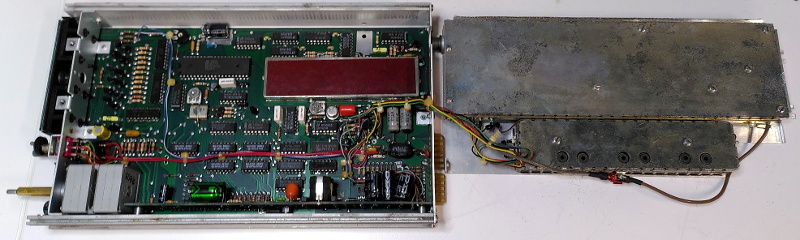
One famous example among hardware enthusiasts involved a broken Narco DME 890, a piece of distance measuring equipment that was taken apart after being headed for the trash. What made the teardown interesting was not just the failure itself, but the level of engineering packed into a “simple” avionics box. DME equipment must transmit and receive precisely timed radio signals, reject interference, and present reliable information in an environment where reliability is not decorativeit is the whole point.
That is the first lesson of busted avionics: even outdated equipment is rarely crude. A box that looks ancient beside a modern tablet may still represent careful radio-frequency design, power conditioning, shielding, thermal planning, and certification-minded engineering. Old does not automatically mean sloppy. But old does mean components age, connectors oxidize, capacitors dry out, displays fade, solder joints crack, and support becomes harder to find.
The Usual Suspects: What Actually Breaks?
1. Power Problems
Avionics love clean, stable power. Aircraft electrical systems do not always provide spa-like conditions. Weak batteries, alternator trouble, bad voltage regulators, poor grounding, loose breakers, and corroded terminals can make avionics flicker, reboot, fail self-tests, or die at the worst possible time. Sometimes the avionics are innocent. They are simply reacting to a power supply that is having a dramatic personal crisis.
2. Wiring and Connectors
Many avionics failures begin outside the shiny black box. Wiring harnesses live behind panels, under floors, near heat, near moisture, and around vibrating structures. Over time, wires can chafe, shielding can degrade, connectors can loosen, and pins can corrode. A GPS that loses position may have an antenna or coax issue. A radio with scratchy transmission may have a grounding problem. A display that blinks may be telling you less about its screen and more about the electrical path feeding it.
3. Cooling and Heat
Heat is the enemy of electronics, and avionics stacks can get toasty. Cooling fans, vents, and proper spacing matter. A failing avionics cooling fan can lead to intermittent faults that appear after the aircraft has been running for a while. These are the worst kind of gremlins: everything works during a quick ground check, then misbehaves in the air when the box gets warm. That is not a ghost. That is thermal stress wearing a tiny villain costume.
4. Antennas and Signal Paths
Modern avionics depend on antennas for GPS, VHF communications, transponders, ADS-B, satellite weather, and navigation receivers. A cracked antenna base, water intrusion, poor bonding, damaged coaxial cable, or bad connector can look like a failed radio or navigator. Technicians often have to separate “the box is bad” from “the box cannot hear the outside world.” The difference matters because replacing an expensive unit will not fix a broken antenna path.
5. Software, Databases, and Configuration
Today’s avionics are computers with wings attached. Navigation databases expire. Software versions matter. Configuration modules must match the aircraft and installed equipment. A newly installed device may be perfectly healthy but incorrectly configured. An autopilot may not follow the expected path if the navigator, flight director, and mode selection are not properly integrated. In the glass-cockpit era, avionics troubleshooting includes both electrons and settings.
When the Autopilot Goes From Helper to Heckler
Autopilot is one of aviation’s great workload reducersuntil it is misunderstood, misconfigured, or malfunctioning. NASA Aviation Safety Reporting System CALLBACK reports have repeatedly highlighted how autopilot problems can contribute to loss-of-control scenarios. The issue is not always a broken servo or computer. Sometimes the machine is doing exactly what it was told, while the pilot thinks it was told something else.
This is where “mode awareness” becomes essential. On a GPS approach, for example, pilots must confirm that the correct approach mode is armed and active before descending. A flight director bar, autopilot annunciation, or navigation source selection can quietly determine whether the aircraft tracks the desired course or wanders off with great confidence. The airplane may be wrong, but it will be wrong with excellent posture.
Real accident case studies have shown how automation confusion can become deadly, especially in night, instrument meteorological conditions, or mountainous terrain. A pilot who expects the aircraft to turn, climb, or capture a course may lose precious time before realizing the autopilot is not doing the intended job. The lesson is brutally simple: automation is a tool, not a co-pilot with a law degree. It must be monitored, verified, and disconnected when necessary.
Glass Cockpits: Beautiful, Brilliant, and Occasionally Bossy
Electronic flight displays have transformed cockpits. They combine attitude, airspeed, altitude, vertical speed, navigation, traffic, terrain, weather, engine data, and system alerts into compact visual presentations. Compared with old round gauges, a glass cockpit can give pilots extraordinary situational awareness. But it also introduces new failure modes and new training requirements.
A blank primary flight display is not just a missing instrument; it may be the disappearance of several instruments at once. Backup instruments, standby batteries, reversionary modes, and pilot proficiency become critical. Pilots must know what information remains available after a display failure, how to transfer data to another screen if possible, and how to fly partial panel without wrestling the technology like it owes them rent.
The FAA has issued guidance on electronic flight displays because installation and integration are not casual weekend projects. Display location, readability, failure annunciation, sensor sources, power supply, electromagnetic compatibility, and pilot workload all matter. In aviation, “it turns on” is not the same as “it is safely integrated.”
The Human Factor: Busted Avionics Meet Busted Assumptions
Not every avionics-related incident starts with a component failure. Sometimes the hardware works, but the human mental model does not. Advanced avionics can create button-pushing confidence without deep system understanding. A pilot may know how to load a flight plan but not how the navigator sequences legs, how the autopilot captures vertical guidance, or what happens when GPS integrity drops.
This matters because avionics failures rarely arrive politely during calm daylight cruise with a cup of coffee nearby. They appear during departure, in clouds, at night, near terrain, during an approach, or while the pilot is already managing weather, radio calls, passengers, and workload. Training that includes abnormal scenariosloss of GPS, display failure, autopilot disconnect, alternator failure, stuck microphone, audio panel confusionbuilds the mental muscle needed when the cockpit suddenly becomes less friendly.
FAA safety material has warned against overreliance on automation in general aviation. The message is not anti-technology. It is pro-skill. Pilots should use avionics fully, but they should also practice hand-flying, raw-data navigation, basic attitude instrument flying, and old-fashioned “where am I?” thinking. The best avionics system in the world is still improved by a pilot who can fly the airplane first and troubleshoot second.
Maintenance: The Detective Work Behind the Panel
Avionics maintenance is less glamorous than a movie cockpit scene, but it is where the mystery gets solved. A technician starts with the squawk: “COM 1 intermittent,” “GPS drops signal,” “autopilot porpoises,” “PFD flickers,” “transponder failed check,” or the always-popular “it did something weird.” The phrase “something weird” is not a diagnosis. It is a cry for documentation.
Good troubleshooting begins with patterns. Does the problem happen cold or hot? On battery or alternator? On the ground or in flight? During transmit? In turbulence? After rain? With landing lights on? After a software update? With a specific headset plugged in? These details help separate a failed unit from a wiring, antenna, power, or configuration issue.
Technicians use approved procedures, wiring diagrams, test equipment, built-in test functions, logbook history, service bulletins, and manufacturer guidance. In certified aircraft, avionics repairs and installations must follow regulatory requirements. This is not the place for “my cousin fixed a stereo once” energy. Aircraft wiring, grounding, circuit protection, electromagnetic compatibility, and documentation all affect airworthiness.
Corrosion: The Sneaky Avionics Villain
Corrosion is aviation’s slow-motion prankster. It creeps into connectors, circuit boards, antenna bases, bonding straps, and grounding points. Aircraft that live near salt air, humid climates, or poor hangar conditions are especially vulnerable, but no aircraft is immune. Corrosion may create resistance, intermittent signals, or complete failure. It can also be visually subtle until the connector is opened and everyone makes the same unhappy face.
FAA guidance on corrosion prevention and repair for avionics equipment emphasizes inspection, prevention, and proper repair practices. That makes sense because avionics are not isolated boxes; they are connected to the airframe electrically and physically. A corroded connector can make a modern navigator look guilty. A poor ground can create noise that turns radio calls into underwater poetry.
Specific Examples of Avionics Trouble
The Silent Radio
A pilot reports that the radio receives but does not transmit clearly. The obvious suspect is the radio itself. But the real problem could be a microphone jack, headset, push-to-talk switch, antenna, coax cable, grounding issue, or audio panel fault. Replacing the radio without checking the system is like buying new shoes because your driveway has a pothole.
The GPS That Wanders
A GPS navigator that loses signal may be suffering from antenna placement issues, damaged coax, water intrusion, interference, outdated software, or satellite reception limitations. In some cases, GPS interference or jamming outside the aircraft can affect navigation. Pilots should be prepared to cross-check with other navigation sources instead of treating GPS as an oracle with perfect manners.
The Autopilot That Won’t Hold Altitude
An autopilot altitude-hold problem may involve a servo, pitch trim, static system, air data computer, configuration issue, software, or pilot mode selection. If the aircraft hunts up and down, the cause may be mechanical, electronic, or procedural. The safest pilot response is not to argue with the autopilot. Disconnect, fly the airplane, and troubleshoot only when workload allows.
The Display That Flickers
A flickering display may point to internal display failure, low voltage, poor grounding, connector problems, overheating, or a failing cooling fan. Intermittent display issues deserve careful attention because they can be early warnings. Avionics often whisper before they shout.
How Pilots Can Prepare for Busted Avionics
Pilots do not need to become avionics engineers, but they should understand the systems they rely on. That means reading the pilot guides, practicing failure scenarios with an instructor, keeping databases current, knowing backup power limits, checking annunciations, and resisting the urge to “heads-down” troubleshoot while the airplane needs flying.
A practical avionics failure plan includes three habits. First, maintain aircraft control. Second, simplify the cockpit. Third, use backup resources. That may mean disconnecting automation, switching to a backup radio, using standby instruments, asking air traffic control for help, or diverting. There is no shame in declaring a problem early. Radios, displays, and autopilots are replaceable. Calm decision-making is harder to buy.
Preflight checks also matter. Confirm that avionics power up normally, cooling fans operate if applicable, databases are valid, antennas are intact, circuit breakers are in, backup batteries are charged, and required inspections are current. A rushed preflight can miss the clue that would have prevented the airborne surprise party nobody wanted.
Why Busted Avionics Still Make Aviation Better
Every failed unit tells a story. Sometimes it reveals a design weakness. Sometimes it exposes poor installation. Sometimes it shows that maintenance documentation was incomplete. Sometimes it teaches pilots not to trust automation blindly. Aviation safety improves because people report problems, investigate failures, update procedures, redesign components, and train better.
That is why NASA ASRS reports, NTSB investigations, FAA guidance, AOPA safety analysis, manufacturer service information, and maintenance experience all matter. They turn individual failures into shared knowledge. A flickering display in one airplane can become a checklist item, training scenario, service bulletin, or safety article that helps someone else avoid a much worse day.
Extra Experience Section: Lessons From Getting Close to Busted Avionics
Spend enough time around aircraft maintenance hangars, avionics benches, and pilot debriefs, and one theme appears again and again: avionics rarely fail in a way that matches the first guess. The pilot says, “The GPS is bad.” The technician asks, “Which antenna, which software version, which power bus, and what happened right before it failed?” That gap between symptom and cause is where the real learning happens.
One of the most memorable experiences around busted avionics is watching how patient good technicians are. They do not attack the panel with heroic confidence. They listen. They ask when the failure occurred, whether it happened after engine start, during transmit, after hitting turbulence, or only when another system was turned on. Then they look for repeatable evidence. In a world where everyone wants instant answers, avionics troubleshooting rewards the person willing to move slowly and think clearly.
Another lesson is that pilots often remember the dramatic part but forget the boring clue. The display went dark in flightthat is dramatic. But the avionics fan warning from last month, the slightly weak battery start, the intermittent headset noise, or the rainwater found near the antenna base may be the breadcrumb that matters. Busted avionics teach humility because the aircraft does not care which detail sounded important at the time. It cares about electrons, signals, heat, software, and physics.
There is also a psychological experience that comes with avionics failure. A pilot trained on a beautiful glass panel can feel suddenly transported backward in time when the screen goes blank. The cockpit gets quieter and louder at the same time: fewer digital cues, more mental noise. That is when old skills become priceless. Can you hold attitude? Can you navigate with backup instruments? Can you communicate clearly? Can you stop troubleshooting and simply fly? The best pilots treat avionics as powerful assistants, not emotional support animals.
Close-up encounters with failed avionics also create respect for design. Even an old unit headed for the scrap bin can contain thoughtful shielding, careful board layout, durable connectors, and mechanical construction meant to survive years of vibration. It is easy to laugh at outdated displays and chunky buttons until the cover comes off and the engineering becomes visible. Aviation electronics are not consumer gadgets with wings. They are built, tested, installed, and maintained under expectations that ordinary electronics never meet.
The final experience is the most useful one: busted avionics make you a better skeptic. Not cynicalskeptical. You learn to verify the navigation source. You learn to check the annunciation. You learn to ask whether the autopilot is actually coupled or merely pretending to be helpful. You learn that a breaker popping is not an invitation to keep resetting it like a stubborn toaster. You learn that maintenance logs are part of the aircraft’s memory. Most of all, you learn that technology is wonderful, but disciplined human attention is still the best safety system ever installed in an airplane.
Conclusion
Getting up close and personal with busted avionics is a reminder that aviation safety lives in the details. A failed display, confused autopilot, noisy radio, weak GPS signal, corroded connector, or tired cooling fan may seem like a small technical nuisance, but each one can affect workload, situational awareness, and decision-making. The solution is not fear of technology. It is better understanding, better maintenance, better training, and better habits.
Modern avionics are astonishing. They help pilots navigate with precision, avoid weather, communicate clearly, monitor engines, and manage complex flights. But they are still machines, and machines need power, cooling, clean signals, correct configuration, and human supervision. When avionics break, they reveal the hidden architecture behind the polished panel. They remind us that every magenta line, radio call, altitude capture, and traffic alert depends on a chain of hardware, software, wiring, antennas, sensors, and decisions.
The smartest response to busted avionics is not panic or blind replacement. It is disciplined troubleshooting, honest reporting, proper maintenance, and regular training. Fly the airplane first. Verify the automation. Respect the wiring. Keep the databases current. Listen when the panel whispers. Because in aviation, the small weird thing is often the aircraft trying to tell you a much bigger story.