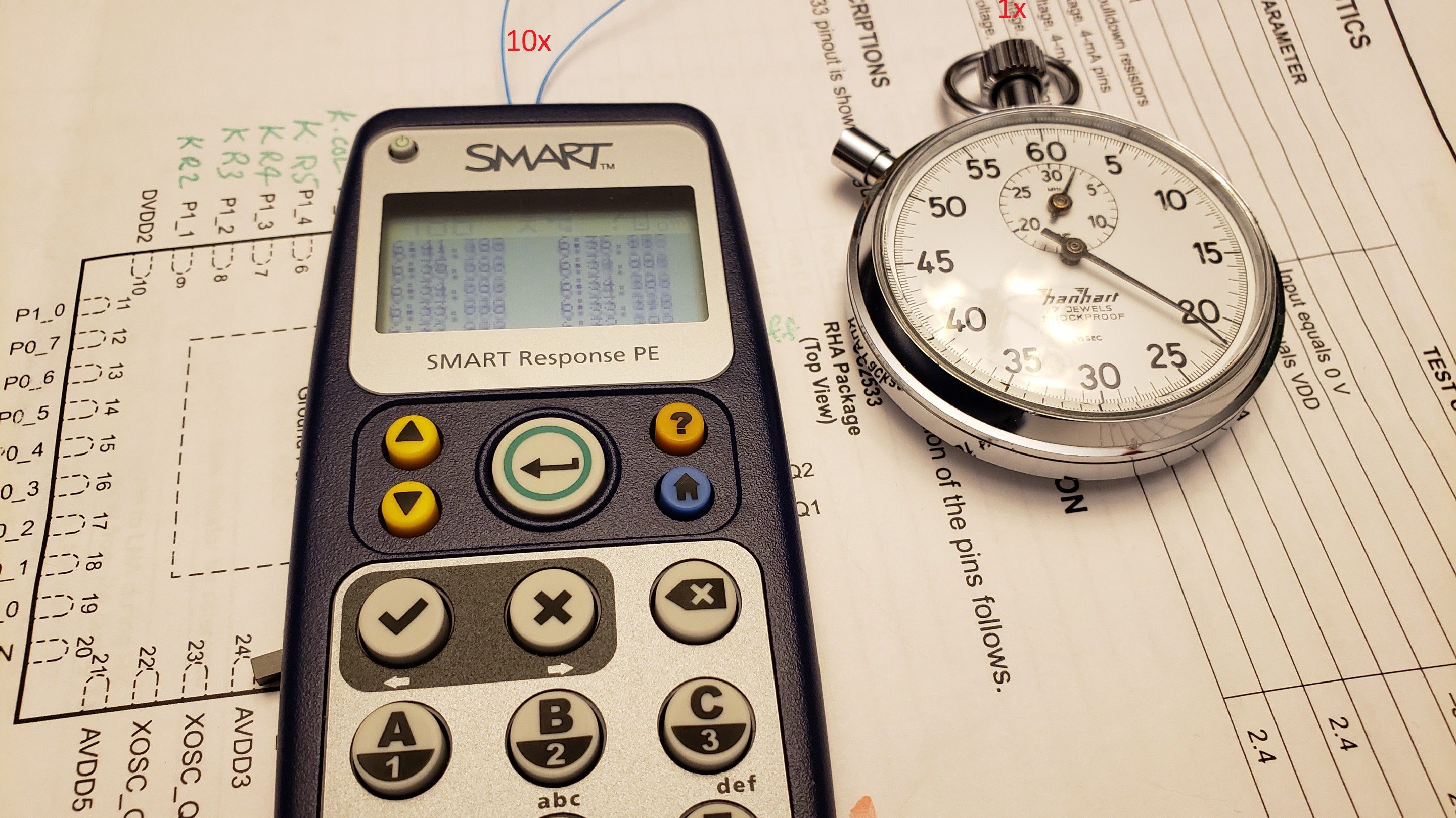
A retired classroom clicker is not the obvious starting point for a stopwatch. It is even less obvious as the starting point for ten stopwatches. Yet the 2025 One Hertz Challenge encouraged exactly this kind of useful mischief: build a device in which something happens once per second. Maker Ray Burne responded by transforming a surplus SMART Response PE educational handset into a compact bank of ten independently started timers.
The project is part practical instrument, part embedded-programming lesson, and part glorious answer to the question, “What else can this old gadget do?” Instead of buying a new microcontroller board, display, keypad, enclosure, and battery holder, Burne unlocked hardware that was already assembled and waiting for a second career.
What Was the 2025 One Hertz Challenge?
One hertz means one event or cycle per second. Hackaday turned that fundamental frequency into a contest rule: an entry could blink, click, move, count, ring, or behave in some wonderfully unnecessary fashion, as long as something occurred once each second. The contest ran from June 26 through August 19, 2025, received 115 submissions, and included categories for precision, absurdity, clockmaking, and projects that “Could Have Used a 555.”
Some builders chased extreme accuracy. Others created mechanisms that looked as though a laboratory had developed a sense of humor. Burne’s ten-stopwatch project occupied a charming middle ground: technically interesting, compact, potentially useful, and odd enough to inspire the perfectly reasonable question, “Why ten?” The equally reasonable answer is, “Because the keypad had ten numbers.”
From Classroom Response Tool to Maker Platform
The SMART Response PE was designed as part of a classroom assessment system. Students used handheld clickers to answer questions, while teachers collected responses through a receiver and companion software. Official SMART documentation describes the system as a tool for formative and summative assessment that provides immediate feedback. In its original life, the numeric keypad entered answers. In its new life, those same keys start timers.
The device resembles an old candy-bar mobile phone, with a monochrome LCD, numeric keyboard, dedicated control keys, and a battery compartment. That integrated package makes it attractive for hardware reuse. Recreating the same physical platform from scratch would mean sourcing several parts, wiring them together, designing a case, and eventually searching the floor for one tiny button that has joined the witness protection program.
The CC2533 Microcontroller Inside
The project documentation identifies the main controller as a Texas Instruments CC2533, a system-on-chip created for IEEE 802.15.4 remote-control applications. The family combines an 8051-compatible processor, programmable flash, RAM, timers, radio hardware, and low-power modes. Some variants offer up to 96 KB of flash and 6 KB of RAMmodest by smartphone standards, but more than enough to scan keys, track time, format text, and maintain ten stopwatch states.
An open-source repository maintained by GitHub user serisman provides pinouts, libraries, examples, and hardware notes for hacking CC2430- and CC2533-based SMART Response PE units. Burne describes the environment as Arduino-like, although the code is conventional embedded C rather than a standard Arduino sketch.
How One Clicker Becomes 10 Stopwatches
The user interface is refreshingly direct. Pressing a number from 0 through 9 activates the corresponding timer and links it to the device’s millisecond clock. Each key represents one independent stopwatch, so no menus or setup screens are required.
The LCD arranges ten values in two columns: 1 and 2 on the first row, then 3 and 4, continuing until 9 and 0 appear on the last row. Each timer uses the format MM:SS.xxx, showing minutes, seconds, and milliseconds. Hours can be tracked internally but are hidden because the display has limited space. The LCD is useful, but it has not received the memo about widescreen entertainment.
Simple Controls, Clear Behavior
- Number keys 0–9: Activate the matching stopwatch.
- Enter: Freeze the displayed readings while the underlying timers continue counting; press again to resume live updates.
- Home: Clear the screen and reset all ten timers for a new session.
Freezing the screen without stopping the timers is especially clever. It creates a temporary lap-style snapshot that is easy to read or record while the experiment continues. With only a few controls available, the project extracts a surprising amount of functionality without turning the clicker into a keyboard porcupine.
The Software Lesson: Measure Time Without Blocking
A multi-stopwatch program demonstrates an important embedded-systems principle: measuring elapsed time is not the same as making the processor wait. A blocking delay would prevent the software from responding smoothly to the keypad, refreshing the LCD, and servicing several timers at once.
A better approach reads a continuously advancing millisecond counter and stores a start reference for each stopwatch. Elapsed time is calculated from the current tick count minus that stored value. This resembles the nonblocking timing pattern documented in Arduino’s millis() reference and “Blink Without Delay” guidance. The processor remains free to scan inputs and update every active counter.
Mechanical keys add another complication: contact bounce can make one press look like several rapid presses. Debouncing logic filters those false transitions. Arduino and SparkFun both treat debounce handling as a basic requirement for reliable pushbutton input. On a ten-key timing interface, dependable scanning matters far more than decorative graphics.
The One-Millisecond Optimization Nobody Needed
Burne tested the delay between each physical keypress and the software variable that started its timer. Because keys appear at different locations in the scan matrix and in the program’s switch logic, he added small compensation constants, approximately one millisecond apart. He later concluded that the practical difference was invisible in normal use and that the optimization had probably been unnecessary.
That honest note is an excellent engineering lesson. A possible error should be measured, but an optimization should also match the application. One millisecond may matter in specialized instrumentation; it rarely matters when timing eggs, science samples, or workshop tests. This gadget is clever, but nobody should use it to certify an Olympic final.
Programming, Flashing, and Physical Modifications
The firmware was built with the Small Device C Compiler, or SDCC, a free open-source compiler suite supporting 8051-family targets. Burne’s downloadable archive includes source files and batch files that assist with compiling, linking, and converting the firmware into a HEX image. Programming requires a compatible CC debugger and the appropriate Texas Instruments flashing utility.
The documented hardware changes add a true power switch, a power indicator LED with a current-limiting resistor, and easier access to the programming connections beneath the battery cover. These improvements make the device more convenient to store, power down, and reflash. Once the programming pins are accessible, the clicker can become a stopwatch today, a calculator tomorrow, and perhaps a tiny sandwich-rating computer by Friday.
Anyone attempting similar work should remove the batteries before opening the enclosure, protect the circuit board from drilling debris, verify switch wiring with a meter, and confirm polarity before applying power. One continuity check can prevent a promising project from becoming a warm plastic anecdote.
Why This Hack Matters
It Fits the New Function to the Existing Hardware
The best feature of the project is not the number of timers. It is the way the new function emerges from the hardware already present. Ten numeric keys naturally suggest ten channels. The LCD can show a compact grid of values. The processor can count milliseconds. The enclosure is portable and battery powered. Instead of forcing a random idea onto the clicker, the project discovers an idea that suits it.
It Demonstrates Meaningful Electronics Reuse
The U.S. Environmental Protection Agency notes that reusing functioning electronics extends product life and keeps valuable equipment out of the waste stream. Repair and reuse advocates similarly emphasize that longer device lifetimes reduce replacement demand and delay disposal. Turning an obsolete classroom clicker into a usable instrument is a small but concrete example of circular design.
Reuse also teaches skills that a fresh development board may hide: reading pinouts, identifying programming interfaces, dealing with constrained memory, adapting an existing user interface, and learning an unfamiliar toolchain. A new board may be easier. A repurposed device is often more educational.
It Can Become an Educational Project Again
The conversion brings the device back to its educational roots in a new way. Students can explore frequency, elapsed-time arithmetic, keypad matrices, state machines, debouncing, LCD formatting, firmware flashing, and measurement error. They can compare readings with a reference timer, graph long-term drift, and discuss why a display showing milliseconds does not automatically guarantee millisecond accuracy.
Where 10 Stopwatches Could Be Useful
Ten simultaneous timers are less ridiculous once real scenarios appear. A science teacher could time several reaction samples. A coach could track athletes beginning at different moments. A workshop could compare battery discharge tests, motor runs, resin cures, or 3D-print post-processing steps. A board-game organizer could monitor parallel rounds. A kitchen tester could compare batches, although ten pans may trigger a second project called the One Smoke Alarm Challenge.
The device is best treated as a practical comparative timer, not calibrated laboratory equipment. Its advantage is physical immediacy: no account, no app update, no advertisements, and no invitation to subscribe to Stopwatch Premium.
Practical Experience: What Using the 10-Stopwatch Tool Feels Like
The strongest part of the user experience is immediacy. A phone can run multiple timers, but reaching them often involves waking the screen, unlocking the device, opening an app, creating timers, naming them, and tapping small controls. The hacked SMART Response PE takes the opposite approach. A number is a timer. Press it, and timing begins. That relationship is easy to remember when attention is divided across a classroom or workbench.
Imagine testing ten small motors. Each motor starts when its matching number is pressed. The display presents every elapsed value in one compact grid, so comparisons are visible without switching screens. When one motor begins making a noise that sounds professionally expensive, pressing Enter freezes the displayed readings long enough to write them down. The clocks continue internally, and another press restores live updates.
The monochrome screen is both a strength and a limitation. It delivers dense information without animation, color, or clutter. Ten values fit because the layout is disciplined. However, the user must remember which timer corresponds to which object. Numbered labels on containers, lanes, samples, or test leads would be essential. Without labels, timer 7 can quickly become “the blue one, unless blue was 6,” which is how experimental data begins writing its resignation letter.
The millisecond-level key differences documented by Burne would be irrelevant for cooking, classroom demonstrations, and most workshop tests. In reaction-time research, they might matter, although human button-press variation would usually be larger. Serious measurement would benefit from calibrated timing and external trigger inputs. For ordinary comparative work, the existing physical keypad offers a fast and satisfying interface.
The Home key creates a batch-oriented workflow because it resets every timer together. That is ideal when ten items belong to one test session: prepare the samples, start them as needed, record the results, and then clear everything. It is less convenient when only one timer must be restarted while nine others continue. A future firmware version could add selective reset behavior, labels, countdown modes, saved laps, or an audible one-second tick.
Portability also improves the experience. The original enclosure was designed to survive student use, so the finished project feels like a real handheld product rather than a breadboard carrying a nervous bundle of jumper wires. A true power switch makes storage more predictable, while accessible programming pins make later firmware experiments less tedious.
For the builder, the emotional payoff arrives in stages. First comes the discovery that an obsolete clicker contains a capable processor, keypad, LCD, battery system, and radio. Then one timer appears correctly on the screen. Finally, all ten counters run independently while the interface remains responsive. At that point, the device no longer feels obsolete. It feels like a compact embedded platform that happened to spend its first career collecting quiz answers.
The most lasting experience is a change in perspective. Surplus electronics become easier to evaluate by function rather than branding. A classroom clicker is also a battery-powered enclosure with inputs, output, processing power, and communication hardware. Once those pieces are recognized, the original product identity becomes only one possible firmware choice. The ten stopwatches are fun; learning to see hidden tools inside discarded devices is the bigger reward.
Conclusion
The 2025 One Hertz Challenge: Educational Tool Becomes 10 Stopwatches project succeeds because it respects both the contest theme and the donor hardware. One-second timing provides the concept, while the SMART Response PE keypad supplies a natural ten-channel interface. Burne’s firmware turns number keys into independent stopwatches, Enter into a display-freeze control, and Home into a global reset.
More broadly, the build is a compact lesson in embedded design, open documentation, and electronic reuse. It proves that retired educational technology does not have to remain retired. Sometimes it graduates, changes careers, and becomes ten stopwatchesa surprisingly ambitious résumé update for a classroom clicker.
Note: This article synthesizes documented project behavior, official component details, contest rules, classroom-system materials, open-source toolchain references, and established electronics-reuse guidance. The stopwatch conversion was a featured challenge entry, not one of the contest’s three overall winners.