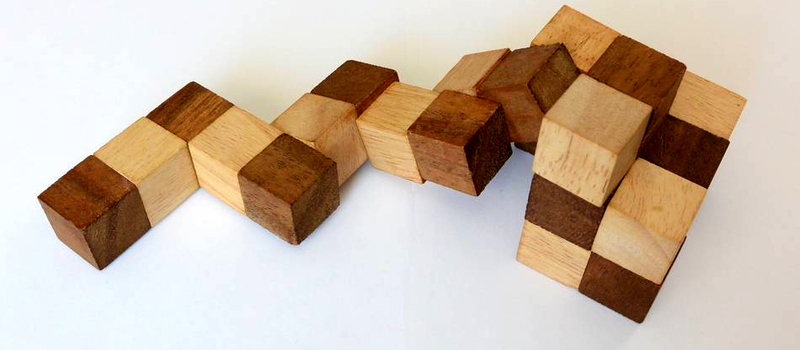
The snake cube puzzle looks innocent in the same way a sleeping cat looks innocent: cute, compact, and almost certainly planning emotional damage. It is usually a chain of 27 small cubes connected by an elastic cord, and the goal is to fold that floppy wooden serpent back into a perfect 3x3x3 cube. The puzzle is tactile, charming, and deeply unforgiving. One wrong twist and your “almost solved” cube becomes a wooden noodle with attitude.
Fortunately, Python is very good at handling exactly this kind of problem. A snake cube is not magic. It is a search problem with rules. Each cube must occupy one position in a 3D grid. No two cubes can share the same space. The chain must follow its fixed pattern of straight runs and 90-degree turns. Once we translate those rules into coordinates, the puzzle becomes a classic backtracking challenge: try a move, test whether it is legal, continue if it works, and undo it if it fails.
In this guide, we will break down a practical Python solution to a snake cube puzzle. We will cover how to represent the puzzle, how recursive backtracking finds a solution, why pruning matters, and how to avoid the little mistakes that make a solver chase its own tail like a caffeinated puppy.
What Is a Snake Cube Puzzle?
A snake cube puzzle is a mechanical puzzle made from small cubelets linked by an elastic string or cord. Some cubelets allow the cord to pass straight through, while others create a 90-degree bend. When the puzzle is stretched out, it resembles a segmented snake. When solved, it becomes a neat cube, commonly 3x3x3.
The popular 3x3x3 version contains 27 cubelets. Because every position in a 3x3x3 cube must be filled exactly once, the final shape has 27 occupied coordinates. In programming terms, that gives us a beautifully clear target: fill every coordinate from (0, 0, 0) to (2, 2, 2) without collisions and without leaving the box.
The Segment-Length View
One convenient way to describe the snake is by segment lengths. A segment is a straight run of cubelets before the chain turns. Many commercial snake cubes can be represented as a sequence of 2-cube and 3-cube runs. Neighboring segments share a turning cube, so the math is slightly sneaky: the total number of cubelets is not the simple sum of all segment lengths. Instead, the first segment places its full length, and each later segment adds length - 1 new cubes.
For example, a 17-segment snake with nine 3-cube runs and eight 2-cube runs has a segment sum of 43. Since adjacent segments overlap at joints, the total cubelets are:
That overlap rule is where many first-time solvers stumble. If your program tries to place every segment as completely separate, congratulations: you have invented a 43-cube monster, not solved the puzzle.
Why Python Works Well for This Puzzle
Python is a strong fit for a snake cube solver because the problem is more about clarity than raw speed. A 3x3x3 cube has only 27 cells, and a clean recursive solution can search the space quickly enough for learning, experimenting, and debugging. Python also makes it easy to store coordinates as tuples, track occupied cells with a set, and write readable recursive functions.
The key technique is backtracking. Backtracking is a disciplined form of trial and error. The program tries a direction for the next segment. If that segment stays inside the cube and does not collide with already placed cubelets, the solver continues. If the move fails later, the program reverses that choice and tries another direction. It is like assembling furniture with the rare luxury of an undo button.
The Core Algorithm
To solve the snake cube puzzle in Python, the program needs five basic ingredients:
- A representation of the 3D cube grid.
- A list of segment lengths for the snake.
- A set of occupied coordinates.
- A function that tests whether a move is legal.
- A recursive backtracking function that explores possible folds.
Coordinates and Directions
A 3x3x3 cube can be represented with coordinates. Each coordinate has three values: x, y, and z. Every value must be 0, 1, or 2. The six possible movement directions are positive and negative along each axis:
When one segment ends, the next segment must turn at a right angle. That means the new direction must be perpendicular to the previous direction. If the current segment goes along the x-axis, the next segment must go along the y-axis or z-axis, not continue along x and not reverse backward.
A Clear Python Snake Cube Solver
Below is a compact Python example that demonstrates the main idea. The segment list is only an example pattern; for a real puzzle, measure your own snake from one end to the other and replace the list with your exact sequence.
How the Solver Thinks
The program begins by fixing the first segment along the positive x-axis. This is not cheating. It is symmetry reduction. A solved cube can be rotated in space, so there is no need to try every possible starting orientation. By anchoring the first segment, we remove duplicate versions of the same solution and save the program from doing unnecessary gymnastics.
Next, the solver places one segment at a time. For each segment, it calculates the possible perpendicular directions. It then tries to add the required number of new cube coordinates. If a coordinate falls outside the cube, the move is rejected. If a coordinate is already occupied, the move is rejected. If the segment fits, the solver continues recursively.
The important part is the undo step. After testing a direction, the code removes the new points before trying another branch. This is what makes backtracking work. Without undoing, your program becomes a digital hoarder, keeping every bad decision forever. That is not a solver. That is a garage.
Why This Is a Constraint Satisfaction Problem
A snake cube puzzle is a natural example of a constraint satisfaction problem. We are not optimizing for the shortest path or the prettiest fold. We simply need an arrangement that satisfies all constraints:
- Every cubelet must occupy one grid cell.
- No grid cell can be used twice.
- Every position must remain inside the 3x3x3 boundary.
- Each segment must follow the puzzle’s fixed sequence.
- Adjacent segments must turn at 90 degrees.
These constraints are powerful because they prune the search tree early. The solver does not need to build an entire snake before discovering that cubelet 26 is floating somewhere in Nebraska. It can reject a partial path as soon as a segment leaves the cube or crashes into an occupied cell.
Common Bugs in a Python Snake Cube Solution
1. Counting Shared Cubes Incorrectly
The most common error is treating every segment as separate. Remember: a new segment begins at the last cube of the previous segment. If a segment length is 3, it adds only two new positions because the first cube is already present as the joint.
2. Allowing Illegal Directions
If you use segment lengths, every new segment must be perpendicular to the previous one. Do not allow the same direction, because that would merge two segments into one longer segment. Do not allow the reverse direction, either, because the snake cannot fold directly back through the cube it just occupied.
3. Forgetting to Backtrack Cleanly
A recursive solver must restore the previous state after a failed branch. If the code adds coordinates to path and occupied, it must remove exactly those same coordinates when it returns from that branch. One extra coordinate left behind can make a valid puzzle look impossible.
4. Using the Wrong Segment Pattern
Not every snake cube has the same layout. Some puzzles look similar but have different bend sequences. Before blaming Python, measure your actual puzzle. Count straight runs from one end to the other and write down each run length carefully. The solver is only as good as the snake description you feed it.
How to Improve the Solver
The simple version above is excellent for learning, but it can be improved. One upgrade is to search from both ends of the snake and choose the end that produces fewer branches. Another is to return all solutions instead of stopping at the first one. You can also add a 3D visualization using Matplotlib or export the coordinates to a small web viewer.
For larger puzzles, such as 4x4x4 snake cubes, optimization becomes more important. The search space grows quickly, and brute force can become painfully slow. Techniques such as memoization, symmetry elimination, forward checking, and smarter ordering can help. Still, the heart of the solution remains the same: represent the puzzle accurately, place legal segments, and backtrack when the snake gets itself into trouble.
Specific Example: Reading the Output
Suppose the solver prints coordinates like this:
This means cubelet 0 starts at the origin. Cubelets 1 and 2 extend along the x-axis. Cubelets 3 and 4 then turn upward along the y-axis. The full output gives a numbered route through the cube. To make it usable for a physical puzzle, you can convert those coordinates into turn instructions such as “right,” “up,” “back,” and “left,” depending on how you hold the snake.
That final translation is often the funniest part. The computer may say, “Place cubelet 14 at coordinate (1, 2, 0),” while your hands reply, “I have no idea what that means, but I am willing to panic.” A visual diagram or layer-by-layer printout can make the result much easier to follow.
Why Solving It With Code Is Still Satisfying
Some puzzle lovers worry that using Python “spoils” the puzzle. That is fair if your only goal is the tactile challenge. But writing a solver is a different kind of play. Instead of asking, “Can my hands solve this?” you ask, “Can my brain describe this clearly enough that a computer can solve it?” That is a fantastic programming exercise.
A Python solution to a snake cube puzzle teaches recursion, 3D coordinates, constraint checking, state management, and debugging. It also teaches humility, because the first version of your code will probably find a solution to a cube that exists only in a parallel universe. That is normal. Puzzles are very good at revealing assumptions.
Experience Notes: What Solving a Snake Cube With Python Feels Like
Building a Python snake cube solver is one of those projects that starts as a “quick little script” and then politely eats your afternoon. The first emotional stage is optimism. You look at the puzzle and think, “It is only 27 cubes. How hard can it be?” This sentence has caused more programming suffering than semicolons.
The second stage is representation. You realize that the physical puzzle is not the hard part; describing it precisely is. You have to decide whether to encode every cube as straight or turning, or whether to compress the snake into segment lengths. Segment lengths are cleaner, but only if you remember that adjacent segments share a joint cube. This is the moment when a notebook, pencil, and mild snack become essential engineering tools.
The third stage is the first run. The code executes, the fan spins, and you wait for victory. Instead, Python calmly prints “No solution found.” At this point, the correct response is not despair. The correct response is suspicion. Maybe the segment list is reversed. Maybe one segment was counted wrong. Maybe the solver is allowing a direction it should not. Maybe you accidentally created a 3x3x2.5 cube, which is illegal in both mathematics and furniture.
Once the solver finally produces coordinates, the project becomes surprisingly rewarding. You can see the puzzle as a path through a tiny 3D city. Every coordinate is a room. Every segment is a hallway. Every failed branch is a hallway that runs into a wall, which is rude but informative. The backtracking process starts to feel less like brute force and more like patient exploration.
The biggest practical lesson is that visualization matters. A list of coordinates is technically a solution, but it is not always a human-friendly solution. Printing the cube layer by layer helps. For example, you can show the bottom, middle, and top layers with cubelet numbers in each cell. That turns abstract coordinates into assembly instructions. If you want to go further, a small 3D plot can make the solution much easier to understand.
Another lesson is that elegant code usually comes after messy code. The first version may have repeated logic, awkward variable names, and enough print statements to qualify as confetti. That is fine. Get the model correct first. Then clean up the functions, isolate the collision checks, and make the recursion readable. A snake cube solver is a great reminder that programming is not about typing perfect code on the first try. It is about creating a conversation between your idea, your program, and the bug that refuses to leave.
In the end, solving a snake cube with Python does not make the physical puzzle less interesting. It makes it more interesting. You understand why it is difficult, why some folds fail early, and why a small wooden toy can become a serious lesson in algorithms. Also, you get the rare pleasure of telling people that you used Python to defeat a snake. That alone is worth at least one victory lap.
Conclusion
A Python solution to a snake cube puzzle is a perfect meeting point between playful problem-solving and practical computer science. The puzzle gives us a physical challenge, while Python gives us a way to model the challenge with coordinates, constraints, recursion, and backtracking. By representing the snake as segment lengths, checking legal moves, and undoing failed attempts, a solver can search the folding possibilities until it finds a complete 3x3x3 cube.
The best part is that the same thinking applies far beyond wooden puzzles. Backtracking appears in Sudoku solvers, scheduling systems, pathfinding problems, layout tools, and many other areas where choices must satisfy strict rules. So yes, solving a snake cube with Python is fun. But it is also a small, satisfying doorway into algorithmic thinking. And unlike the physical puzzle, your Python code will not roll under the couch.