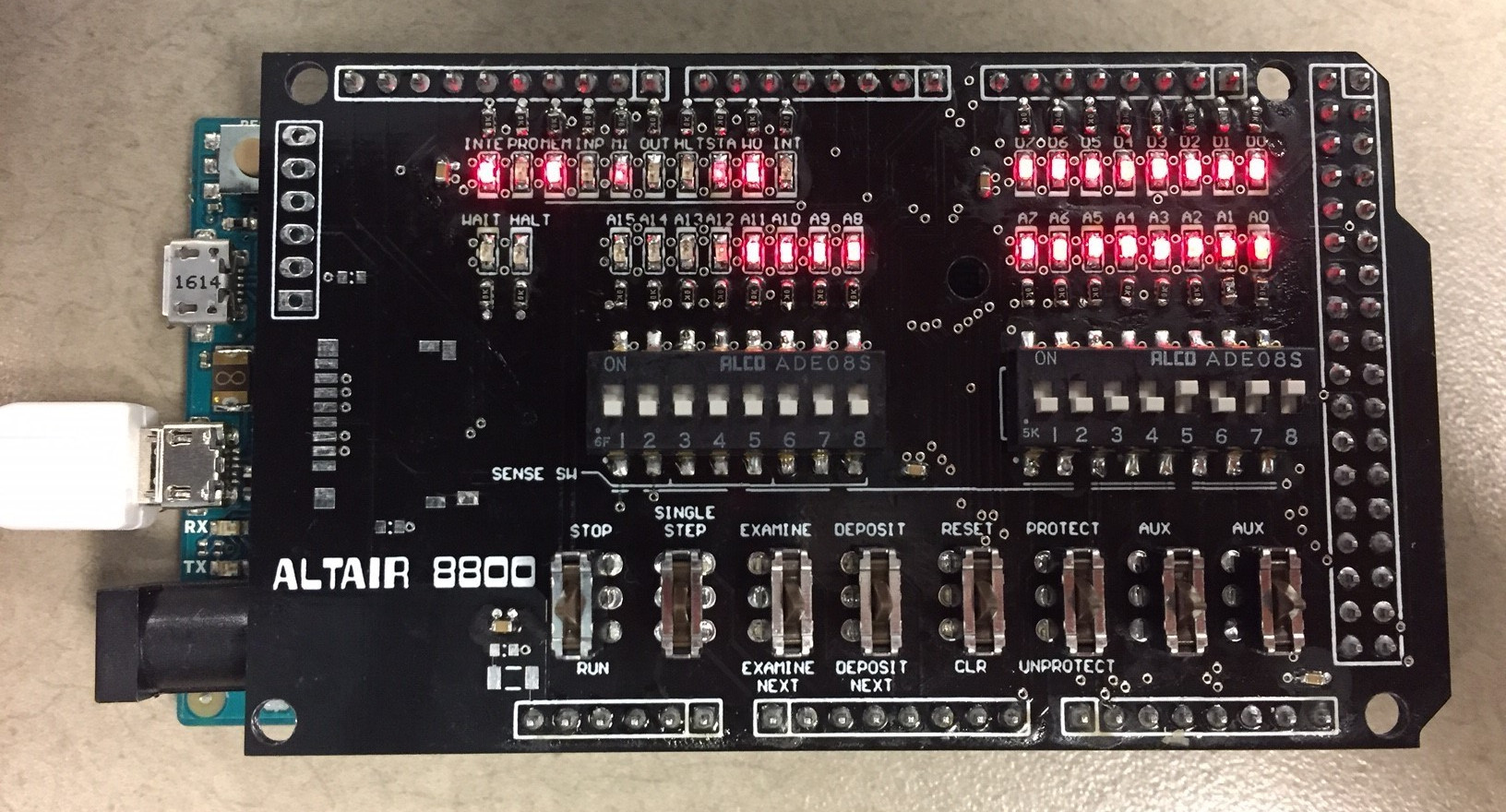
The Altair Shield sounds like something a sci-fi hero would raise before a laser battle, but in the world of retro computing, it is something even better: a tiny love letter to one of the most important computers ever built. At its heart, The Altair Shield is a compact Arduino-based front panel interface inspired by the legendary MITS Altair 8800, the machine that helped drag personal computing out of laboratories and into garages, basements, classrooms, and the occasional kitchen table covered in wires.
To understand why this small board matters, you need to appreciate the original Altair 8800. Released in the mid-1970s, the Altair was not a sleek laptop, a friendly desktop, or anything remotely close to “plug and play.” It was a kit computer with switches, lights, circuit boards, and a learning curve that looked like a mountain wearing hiking boots. Yet it captured the imagination of hobbyists because it offered something radical: ordinary people could own a real computer.
The Altair Shield brings that magic into a smaller, more approachable package. It recreates the tactile experience of operating an Altair-style front panel while relying on modern microcontroller hardware, especially the Arduino Due, to emulate the machine underneath. In other words, it gives you the blinking lights, binary thinking, and retro computing charm without requiring a full-sized vintage computer that weighs more than a sleepy bulldog.
What Is The Altair Shield?
The Altair Shield is a miniature front panel board designed to sit on an Arduino Due and work with an Altair 8800 emulator. It was created as a small, functional version of the Altair 8800’s famous control panel. Instead of a large metal case full of boards, it uses compact components: LEDs, DIP switches, spring-loaded switches, a microSD card reader, and headers for serial communication.
The idea is beautifully simple. The Arduino Due runs software that simulates the behavior of the Altair 8800. The shield gives users a physical way to interact with that simulation. You can set binary values, watch lights respond, load programs, and experience the ritual of computing before keyboards and screens became the default doorway into every machine.
Calling it “just an emulator” undersells the point. Software emulators are wonderful, but clicking virtual switches on a screen is not the same as touching actual controls. The Altair Shield turns computing history into something physical. It reminds you that early personal computers were not invisible appliances. They demanded attention, patience, and a willingness to count in binary before your coffee had fully activated.
Why the Original Altair 8800 Still Matters
The original MITS Altair 8800 is often remembered as one of the machines that launched the personal computer revolution. It appeared on the cover of Popular Electronics in January 1975 and immediately attracted hobbyists who wanted to build, own, and program their own computers. Unlike modern consumer devices, the Altair arrived as a kit. Buyers had to assemble it, understand it, expand it, and often troubleshoot it themselves.
That do-it-yourself culture was not a side effect. It was the whole show. The Altair 8800 made computing feel personal because owners were deeply involved in the machine. They did not merely use it; they wrestled with it, upgraded it, and taught it to do useful things one board at a time.
The Altair was built around the Intel 8080 microprocessor and used an expandable bus architecture that later became known as S-100. Early systems had very limited memory by modern standards, but they gave hobbyists a platform that could grow. Add memory. Add storage. Add serial communication. Add software. Slowly, a blinking metal box became a usable computer.
The machine also played a major role in the beginning of Microsoft. Bill Gates and Paul Allen saw the Altair 8800 and recognized that it needed accessible software. Their BASIC interpreter for the Altair became Microsoft’s first major product, proving that personal computers needed not only hardware but also languages, tools, and applications that humans could actually use.
How The Altair Shield Recreates the Front Panel Experience
The most iconic part of the Altair 8800 is its front panel. Rows of lights and switches made the computer look like a control console from a 1970s space program. Those controls were not decorative. They allowed users to enter instructions, inspect memory, set addresses, start execution, stop programs, and diagnose what the machine was doing.
The Altair Shield compresses that experience into the size of an Arduino shield. It uses small LEDs to represent status and data lights, DIP switches for binary input, and momentary switches for front-panel actions. The layout is smaller than the original, of course, but the concept is the same: computing becomes visible.
That visibility is the project’s secret sauce. Modern computers hide almost everything. You press a power button, a logo appears, and millions of invisible operations politely happen somewhere behind the curtain. With an Altair-style front panel, the curtain is gone. You see addresses. You see data. You see the machine’s state represented in light.
For beginners, this can make low-level computing easier to understand. Binary is no longer just a chapter in a textbook. It becomes a pattern of switches and lights. Memory addresses stop being abstract numbers and start behaving like places you can visit. The Altair Shield makes the computer feel less like a mystery box and more like a machine with understandable rules.
Why the Arduino Due Is a Smart Choice
The Altair Shield targets the Arduino Due because the Due offers more performance and memory than older Arduino boards such as the Mega. The Due is based on a 32-bit ARM Cortex-M3 microcontroller running at 84 MHz, with 512 KB of flash memory and 96 KB of SRAM. That gives it enough breathing room to run an Altair 8800 simulator at roughly the speed of the original machine while supporting a full 64 KB of emulated RAM.
This is important because an Altair recreation is not only about blinking lights. It needs to run actual software from the era, including BASIC, assemblers, games, operating systems, and other programs that show what the Altair ecosystem was really like. The more capable Arduino Due helps the project feel less like a toy and more like a compact historical workstation.
The Due also provides enough I/O pins for the front panel hardware. That matters because the shield is not just displaying one or two indicator lights. It needs to manage many LEDs and switches while still supporting storage and communication options. In a project where physical interaction is the star, I/O capacity is not a luxury; it is the stage crew.
The Role of David Hansel’s Altair 8800 Simulator
The Altair Shield builds on the work of David Hansel’s Arduino Altair 8800 Simulator, an open-source project designed to reproduce the behavior of the original machine. The simulator can run classic Altair software, provide emulated memory, support storage, and reproduce the front panel behavior closely enough to make the experience meaningful.
This combination of emulator and physical shield is powerful. The software does the historical heavy lifting by simulating the Intel 8080-based environment. The hardware provides the human interface. Together, they turn a modern microcontroller into a time machine with headers.
The simulator’s support for classic programs is one of its biggest strengths. Running BASIC on a reproduction Altair environment is more than nostalgic fun. It shows why BASIC mattered. It gave early personal computer owners a way to write programs without hand-entering machine code for every task. For a hobbyist in the 1970s, that was not a convenience; it was a lifeline.
Educational Value: Why Blinking Lights Still Teach
The Altair Shield is a strong educational tool because it slows computing down in the best possible way. Modern devices are fast, polished, and abstract. That is wonderful for productivity, but not always ideal for learning. When everything happens instantly, it becomes harder to see what is actually happening.
With an Altair-style interface, learners must think about data, addresses, instructions, and control flow. They begin to understand that computers follow precise steps. They see that memory is organized. They discover that input and output are not magic but carefully managed signals.
This makes The Altair Shield useful for students, makers, retro computing fans, and anyone who wants to understand computing below the glossy surface. It can support lessons on binary numbers, machine language, microprocessors, memory, emulation, embedded systems, and the history of personal computing.
It also teaches patience, which may be the most underrated technical skill. You cannot rush a front panel the way you can swipe a phone screen. You must observe, set, test, and correct. The machine rewards careful thinking. It punishes assumptions with blinking indifference. In short, it is a terrific teacher, though not always a gentle one.
Design Challenges in a Pocket-Sized Altair
Shrinking the Altair front panel into an Arduino shield creates several design challenges. The original computer had enough physical space for large toggle switches and bright panel lamps. A shield-sized board has no such luxury. Every component must earn its spot.
That is why The Altair Shield uses compact DIP switches, small LEDs, and spring-loaded switches that fit within the board footprint. The designer also had to think about brightness, switch feel, wiring, pin assignments, microSD access, and the practical reality of soldering small surface-mount parts. Retro computing may look charming from the outside, but the circuit board does not care about charm. It cares about traces, pads, clearances, and whether your soldering hand had too much caffeine.
The result is a clever compromise. The shield cannot reproduce the physical size and drama of a full Altair 8800, but it captures the essential behavior and interaction. It is portable, cheaper to build, easier to store, and more realistic for modern hobbyists who want the experience without adopting a 65-pound museum piece.
What You Can Do With The Altair Shield
The Altair Shield can be used to explore classic programs, run BASIC, test simple machine-language routines, play with front-panel operation, and understand how early computers were bootstrapped. Users can experience tasks that were once routine for computer hobbyists: entering values, watching status lights, loading software, and connecting through a serial terminal.
One of the most enjoyable examples is the front-panel game often known as “Kill the Bit,” where lights and switches become a simple interactive challenge. It is not graphically rich by modern standards, unless your definition of “graphics” is “a dot is running away and I must defeat it with binary.” But that is exactly the charm. It shows how much creativity early programmers squeezed from minimal hardware.
The project can also support a deeper appreciation for CP/M, early BASIC programming, serial terminals, storage emulation, and the relationship between hardware and software. It bridges the gap between museum history and active experimentation.
The Altair Shield and the Maker Movement
The Altair Shield fits naturally into the maker movement because it combines open-source software, custom hardware, historical curiosity, and hands-on learning. It is not merely a consumer product. It is the kind of project that invites modification, discussion, repair, and improvement.
That spirit mirrors the culture around the original Altair 8800. Early owners were not passive users. They joined clubs, exchanged notes, copied programs, built accessories, and solved problems together. Today’s maker communities do something similar with GitHub repositories, project logs, forums, PCB services, and online tutorials. The tools have changed, but the energy is familiar.
The project also proves that historical computing is not frozen in glass. You do not have to visit a museum and whisper respectfully at a display case. You can build a working recreation, connect a terminal, run software, and discover why people were so excited in 1975.
Why Retro Computing Projects Still Matter
Retro computing is not just nostalgia wearing an anti-static wrist strap. It gives modern users a clearer understanding of how today’s technology evolved. When you interact with The Altair Shield, you see the roots of personal computing: memory limits, manual control, early programming languages, serial communication, expansion boards, and community-driven innovation.
That perspective is valuable. Modern computers are so powerful that waste is easy. Early systems forced programmers to think carefully. Every byte mattered. Every instruction mattered. Every expansion card solved a real limitation. Working with an Altair-style system teaches efficiency in a way that no motivational poster ever could.
It also reminds us that progress often begins with awkward machines. The Altair 8800 was not elegant by modern standards, but it was accessible enough, exciting enough, and open enough to inspire a generation. The Altair Shield keeps that story alive by making the experience small enough to fit on a desk and meaningful enough to spark curiosity.
Experience Notes: Building, Booting, and Learning With The Altair Shield
The experience of working with The Altair Shield is best described as a conversation with computing history. It does not greet you with a polished welcome screen or a cheerful setup wizard. Instead, it asks you to slow down, look closely, and think like an early computer hobbyist. That shift can feel strange at first. We are used to devices that hide their inner workings. The Altair Shield proudly puts the machinery back on stage.
The first memorable moment is visual. Once the LEDs come alive, the board feels less like a collection of components and more like a tiny control panel. The lights are not decorative sprinkles on an electronic cupcake. They represent information. They tell you what the simulated machine is doing, where it is looking in memory, and how it is responding to input. Even if you do not fully understand every signal at first, the effect is magnetic. You want to keep watching.
The second experience is tactile. Flipping switches to set binary values changes the way you think about data. A number is no longer just something you type. It becomes a physical pattern. Up, down, up, up, down. Suddenly, binary stops feeling like an abstract classroom topic and starts feeling like a manual language. It is slower than typing, obviously, but that is the point. The slowness creates understanding.
Booting or loading a program through an Altair-style setup can also be surprisingly satisfying. Modern computers start so quickly that we barely notice the process. With The Altair Shield, each step feels earned. You learn that computers do not simply “know” what to do. They need instructions, storage, memory, and a path from input to execution. When a program finally runs, even a tiny one, it feels like you persuaded a small electronic creature to cooperate.
For makers, the build experience adds another layer. Soldering small LEDs, switches, headers, and storage components requires care. Mistakes are part of the process. A reversed switch, a bright LED, or a tricky connector can become a lesson in board design and debugging. That may sound frustrating, and sometimes it is. But it is the productive kind of frustration, the kind that ends with “Oh, now I get it,” which is one of the best sentences in engineering.
For teachers and learners, The Altair Shield can turn a dry explanation into a hands-on discovery. Instead of saying, “A computer reads instructions from memory,” you can demonstrate it. Instead of saying, “Binary values control machine behavior,” you can let students set those values and watch the result. The board becomes a bridge between theory and experience.
The strongest impression is respect. After spending time with an Altair-style interface, you gain respect for early programmers, hardware designers, and hobbyists. They worked with limited tools, limited memory, and very few shortcuts. Yet they helped create the foundations of the digital world we now treat as normal. The Altair Shield makes that history feel alive, not dusty. It is small, clever, and wonderfully nerdy in the best possible way.
Conclusion
The Altair Shield is more than a miniature retro computer accessory. It is a compact tribute to the Altair 8800, a teaching tool for low-level computing, and a reminder that personal computing began with curiosity, courage, solder, and a lot of blinking lights. By combining an Arduino Due, an Altair 8800 simulator, and a physical front panel interface, the project lets modern users experience the logic and limitations that shaped early personal computers.
For retro computing fans, The Altair Shield offers nostalgia with substance. For students, it makes abstract concepts visible. For makers, it provides a rewarding hardware challenge. And for anyone who thinks computers have become too mysterious, it opens the box and says, “Look, this is how the magic learned to blink.”