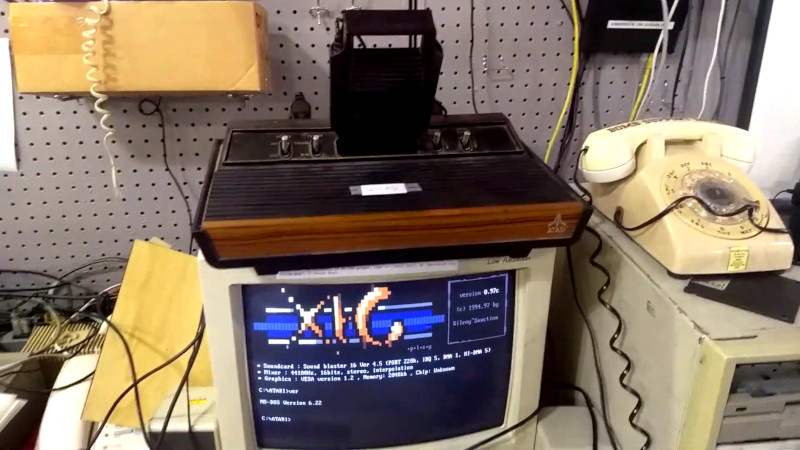
Some development environments greet you with cloud sync, autocomplete, and a friendly button that says “Run.” An Atari 2600 development suite greets you with 6502 assembly, scanline timing, a ROM file, a sound card, and the humbling realization that your toaster probably has more memory than the console. And yet, that is exactly why it is so fascinating.
The Atari 2600 is not just an old game machine. It is a tiny puzzle box from the late 1970s that still teaches modern programmers discipline, creativity, and respect for hardware limits. The idea behind an Atari 2600 development suite is simple: give hobbyists, hackerspace members, and retro game fans a complete path from writing code to seeing it run on real vintage hardware. The execution, however, is delightfully weird in the best possible way.
The development setup popularized by the HeatSync Labs project combines old-school tools with practical workflow design. A programmer writes 6502 source code on an IBM PC-compatible machine, assembles it into an Atari ROM, converts that ROM into an audio file, and plays the audio into a Starpath Supercharger cartridge connected to an Atari 2600. In other words, your game travels from text file to machine code to sound wave to cartridge memory. If that sounds like cyberpunk archaeology, congratulations: you understand the assignment.
What Is an Atari 2600 Development Suite?
An Atari 2600 development suite is a collection of hardware, software, documentation, and workflow steps used to create games for the Atari Video Computer System, better known as the Atari 2600. Unlike modern consoles, the 2600 was not designed around friendly developer kits, big memory buffers, or flexible graphics APIs. It was built around tight cost constraints and brilliant hardware shortcuts.
A practical development suite usually includes a text editor, an assembler such as DASM, Atari-specific header files, documentation like the Stella Programmer’s Guide, an emulator such as Stella, and, for real-hardware testing, a way to load code onto the console. The HeatSync Labs-style setup adds a wonderfully physical twist by using a DOS-era PC, a Sound Blaster-style audio output, and a Starpath Supercharger cartridge.
The result is not merely a toolchain. It is a miniature museum exhibit that actually works. Instead of just reading about retro computing, users can sit down, type code, assemble a ROM, and watch their own pixels appear on a real Atari 2600. That moment is powerful. It turns “old hardware” into living hardware.
Why the Atari 2600 Is So Different From Modern Game Development
Modern game development often starts with engines, assets, layers, physics systems, and thousands of helper functions. Atari 2600 development starts with a question that feels rude: “Can you draw the screen while the television beam is moving?”
The Atari 2600 does not have a conventional frame buffer. That means you cannot calmly draw a full picture into memory and let the machine display it later. Instead, the programmer must update the Television Interface Adapter, or TIA, as the screen is being drawn. This is why the display routine is called a kernel. It is not just important; it is the beating heart of the game.
The console uses a MOS Technology 6507 processor, a close relative of the famous 6502. The machine has only 128 bytes of RAM. Not 128 kilobytes. Not 128 megabytes. Just 128 bytes. That tiny memory space must support variables, stack usage, game state, player positions, scores, counters, and whatever else your game needs to survive. If modern development is a spacious kitchen, Atari 2600 development is cooking dinner inside a lunchbox.
This limitation is exactly what makes the platform educational. You learn quickly that every byte matters, every cycle matters, and every design choice has consequences. A simple object moving across the screen is not “just a sprite.” It is timing, registers, positioning tricks, and carefully planned updates.
Inside the Classic Development Workflow
The Atari 2600 development suite described by Hackaday and Hackaday.io follows a charmingly practical workflow. It avoids turning the process into a pile of mysterious loose parts. Instead, it gives users a clear path from idea to real hardware.
1. Start With Documentation
The first tool is not software. It is a manual. Atari 2600 programming depends on understanding the machine’s timing, memory map, TIA registers, display behavior, and controller input. Printed documentation may sound old-fashioned, but for this kind of development it is perfect. You can flip between timing diagrams, register names, and example code without losing your place or opening thirty-seven browser tabs like a raccoon with a mechanical keyboard.
The Stella Programmer’s Guide remains one of the key references because it explains how the TIA draws scanlines, how the CPU controls vertical timing, how playfield graphics work, how player objects are positioned, and how collision registers can be read. For beginners, this documentation turns the console from “mysterious wooden box” into “mysterious wooden box with labels.” Progress!
2. Write 6502 Assembly on a PC
The next step is writing source code. In the period-flavored development suite, this happens on an IBM PC-compatible machine running DOS. The developer writes plain text assembly code, usually targeting the 6507/6502 instruction set and using Atari 2600 labels from common header files.
This is not the easiest starting point for a total programming beginner. Assembly language asks you to think close to the hardware: registers, memory addresses, branches, flags, and cycle counts. But for experienced coders, it can feel refreshingly direct. There are no layers of abstraction hiding what the machine is doing. When your program works, it works because you convinced a tiny processor to dance in rhythm with a television signal.
3. Assemble the Source With DASM
DASM is one of the standard assemblers used in Atari 2600 development. It supports the 6502 and 6507 family and is commonly paired with Atari-specific files such as VCS.H and MACRO.H. These files provide readable labels and macros so programmers do not have to memorize every hardware address like they are preparing for the world’s nerdiest spelling bee.
The assembler converts human-readable source code into a binary ROM image. That ROM can then be tested in an emulator or transferred to real hardware. This is the point where the project stops being “a text file full of brave intentions” and becomes something the Atari can actually execute.
4. Convert the ROM Into Audio
The Starpath Supercharger is the secret sauce in this style of development suite. Originally, the Supercharger allowed games to be loaded from cassette audio. The development workflow takes advantage of that design by converting an Atari ROM into a WAV file. The PC then plays the audio signal into the Supercharger, which loads the program for the Atari 2600 to run.
This step feels magical because it is so unlike modern deployment. Today, developers push builds to cloud servers, upload packages, or click a deploy button. Here, the build becomes sound. Your game briefly exists as a screechy audio file before becoming pixels on a television. It is ridiculous, beautiful, and very Atari.
5. Run the Program on Real Hardware
Finally, the Atari 2600 is powered on, the Supercharger is connected, and the audio is played from the PC into the cartridge. If everything is correct, the code runs on the actual console. This is the payoff: real hardware, real timing, real limitations, and real satisfaction.
Emulators are essential, but original hardware has a special gravity. Seeing your own code run on a machine from 1977 makes the entire process feel less like software development and more like time travel with syntax errors.
Modern Tools That Make Atari 2600 Coding Easier
The classic development suite is exciting, but today’s retro developers also have modern options. These tools lower the barrier to entry while preserving the joy of coding for difficult hardware.
Stella Emulator
Stella is one of the most important Atari 2600 emulators available. It is cross-platform, widely used, and valuable not only for playing games but also for development. Its integrated debugger helps programmers inspect machine state, step through code, view memory, and understand what the console is doing. For Atari 2600 development, a debugger is not a luxury. It is a flashlight in a cave where the cave is made of timing bugs.
8bitworkshop
8bitworkshop offers a browser-based development environment for classic systems, including the Atari 2600/VCS. It lets users write code, build projects, run them in an emulator, and export ROM files. For beginners, this is a huge advantage because it removes much of the setup friction. You can start experimenting without first wrestling with old operating systems, command lines, and archive files from the ancient internet swamp.
batari Basic
batari Basic gives new developers a friendlier path into Atari 2600 game creation. It is a BASIC-like language that compiles into assembly code, which can then be assembled into a ROM. It does not remove the console’s limitations, but it does help beginners focus on game logic before diving completely into hand-written assembly.
That makes batari Basic a useful stepping stone. You can build simple games, learn how kernels and sprites behave, and gradually move toward more advanced 6502 programming. It is like learning to ride a bicycle before entering a unicycle race on a tightrope.
Gopher2600
Gopher2600 is another powerful emulator with development-focused debugging features. It is especially interesting for advanced homebrew work involving modern cartridge formats and ARM-assisted cartridges. While beginners may not need that level of depth immediately, it shows how active and technically ambitious the Atari 2600 development community remains.
What Can You Actually Build?
A first Atari 2600 project should be small. Very small. Smaller than your confidence after your first scanline bug. Good starter projects include moving a player object with a joystick, changing background colors, drawing a simple playfield, creating a bouncing ball, or detecting a collision.
From there, you can build toward a simple score display, enemy movement, sound effects, and game states such as title screen, play mode, and game over. The best Atari 2600 projects embrace the machine’s strengths instead of fighting its limits. Big colorful character animation is difficult. Fast, abstract, clever arcade action is right at home.
Think in terms of strong mechanics rather than detailed art. The Atari 2600 rewards games that are readable, responsive, and inventive. A clever one-screen action game may fit the system better than a giant fantasy epic with twelve inventory menus and a dragon who needs 97 frames of animation.
Why This Development Suite Still Matters
The Atari 2600 development suite is more than a retro novelty. It is a hands-on lesson in computer history, low-level programming, and creative constraint. It shows how early game developers solved problems with almost no memory, no GPU in the modern sense, and very little room for waste.
It also makes programming social. In a hackerspace, a shared development station invites people to gather around the machine, ask questions, try code, break things, fix things, and cheer when a blocky sprite finally appears. That matters. Retro development can look intimidating online, but a working station turns it into a workshop activity.
There is also something honest about the workflow. Every stage is visible. Source code becomes a ROM. A ROM becomes audio. Audio loads into a cartridge. The cartridge runs on a console. No invisible cloud service. No mysterious launcher. No 40 GB update because somebody changed the font in the settings menu.
Beginner Tips for Atari 2600 Development
Start by learning the screen. The hardest part of Atari 2600 programming is not making decisions or storing variables; it is understanding how the display is generated. Learn what VSYNC, VBLANK, visible scanlines, overscan, WSYNC, and TIA registers do. Once the screen makes sense, everything else becomes less terrifying.
Use an emulator early and often. Even if your final goal is real hardware, emulators such as Stella make testing faster. You can inspect memory, pause execution, and step through problems without replaying audio into a cartridge every time you change one instruction.
Keep your first game brutally simple. One player, one object, one rule. Add features slowly. On the Atari 2600, “just one more thing” can turn into a full evening of cycle counting and quiet muttering.
Read other people’s source code. Atari 2600 homebrew developers have shared examples, tutorials, and tools for years. Studying working code helps you understand patterns that documentation alone may not make obvious.
Finally, do not be discouraged when the screen rolls, flickers, or displays psychedelic nonsense. That is not failure. That is the Atari 2600’s way of saying, “Welcome. You are touching the beam now.”
Common Mistakes to Avoid
One common mistake is assuming the Atari 2600 behaves like later game consoles. It does not. There is no simple tile map system, no comfortable sprite engine, and no frame buffer waiting patiently for your art. You must design around the TIA.
Another mistake is trying to build too much too soon. A beginner who starts with a scrolling platformer may quickly discover why early 2600 games often look so abstract. The hardware can do impressive things, but it demands careful planning.
A third mistake is ignoring timing. Code that seems logically correct can still fail visually if it writes to the TIA too late or too early. Atari 2600 programming is part software engineering and part choreography. The television beam is moving, and it does not care about your feelings.
Hands-On Experience: What It Feels Like to Use an Atari 2600 Development Suite
Using an Atari 2600 development suite feels different from opening a modern IDE. There is less polish, but more personality. You sit down in front of a machine that looks like it has stories to tell. The keyboard may be attached to an old PC. The monitor may glow with DOS text. Nearby, the Atari 2600 waits with that familiar black-and-woodgrain look, like a tiny appliance from a parallel universe where video games were invented by furniture designers.
The first experience is usually humbling. You write a few lines of assembly and expect something dramatic. Instead, you may get a blank screen, a rolling picture, or colors that look like the console is trying to communicate with ocean creatures. But then you fix one register, adjust one timing loop, or add one missing sync instruction, and suddenly the screen stabilizes. That small victory feels enormous.
The workflow teaches patience. Compiling a ROM is straightforward, but the real-hardware path adds ritual. Convert the ROM to audio. Check the connection. Play the WAV. Watch the Supercharger load. Wait for the Atari to respond. It is slower than clicking “Run,” but that slowness creates anticipation. When your code finally appears, it feels earned.
There is also a physical comedy to it. A game becoming an audio file sounds absurd until you remember that early home computing often used cassette storage. The squeal of data loading is not elegant, but it is memorable. It makes the invisible visible, or at least audible. You can hear your program traveling into the machine.
The best part is how quickly the Atari 2600 changes the way you think. You stop asking, “What feature should I add?” and start asking, “Can I afford this feature?” You count bytes. You simplify graphics. You reuse objects. You learn that constraints are not just obstacles; they are creative prompts. A limitation can become a style.
For teachers, clubs, and hackerspaces, this makes the development suite especially valuable. It gives learners a concrete demonstration of how hardware and software cooperate. The CPU, TIA, RAM, cartridge, controller, and television signal are no longer abstract terms. They become parts of a living system. Students can see that games are not magic. They are timing, logic, memory, and clever tricks stacked together until fun happens.
For experienced programmers, the experience is refreshing because it strips development down to fundamentals. There are no massive frameworks to blame. No dependency tree shaped like a haunted forest. Just code, hardware, and the truth. If something breaks, the bug is probably yours. Rude, yes. Educational, absolutely.
Most importantly, using this kind of suite reminds you why retro development still has a loyal community. It is not only nostalgia. It is the joy of solving hard problems inside tiny boxes. It is the thrill of making new work for old machines. And it is the wonderfully strange satisfaction of saying, “I wrote a game, turned it into sound, and played it into an Atari.” That sentence alone deserves a high score screen.
Conclusion
The Atari 2600 development suite is a beautiful bridge between computing history and hands-on creativity. It combines assembly programming, real hardware, classic documentation, clever cartridge loading, and modern emulator support into one unforgettable learning experience. It is not the easiest way to make a video game, but it may be one of the most rewarding.
Whether you use a period-correct DOS PC and Starpath Supercharger or a modern browser-based IDE and Stella emulator, Atari 2600 development forces you to understand the machine. It teaches timing, memory discipline, hardware awareness, and design simplicity. It also teaches humility, usually within the first ten minutes.
For retro computing fans, hobbyist developers, educators, and curious coders, this development suite is more than a project. It is an invitation to code close to the metal, where every byte has a job and every scanline is a deadline. The Atari 2600 may be old, but as a programming teacher, it still has plenty of game left.
Note: This article is written from synthesized public technical documentation, real Atari 2600 development workflows, emulator documentation, assembler resources, and homebrew programming references. It avoids copied source text and is prepared for web publication in original wording.