In the world of hacker conference badges, nothing says “community engineering” quite like a tiny circuit board with blinking LEDs, a questionable joke on the silkscreen, and just enough electrical discipline to not instantly release the magic smoke. That is where the Shitty Add-On V1.69bis standard, often shortened to SAO v1.69bis, enters the room wearing a lanyard, glowing in RGB, and pretending it read the documentation.
Despite the intentionally ridiculous name, the Shitty Add-On standard is one of the most important little ideas in badgelife culture. It gives makers a simple way to attach small printed circuit boards, or PCBs, to larger electronic conference badges. These add-ons can be decorative, interactive, collectible, programmable, tradable, or all of the above. Some are nothing more than cute LED art. Others contain microcontrollers, EEPROMs, sensors, games, serial interfaces, or tiny displays. In other words, an SAO can be a sticker, a toy, a business card, a puzzle, or a personality test for people who own too many soldering irons.
The V1.69bis version matters because it turned a playful community hack into a more capable hardware interface. It kept the approachable spirit of the original SAO idea while improving the connector, mechanical strength, pin count, and expansion options. The result is a small, cheap, friendly, and wonderfully chaotic standard that helped turn badge add-ons into a recognizable part of hacker conference culture.
What Is the Shitty Add-On V1.69bis Standard?
The Shitty Add-On V1.69bis standard is a hardware connection standard for attaching small add-on boards to electronic badges, especially badges used at hacker conferences such as DEF CON, Hackaday Supercon, BSides events, and independent badgelife gatherings. The core idea is simple: put a compatible connector on the main badge, put the matching connector on the add-on, and let makers plug one board into another without inventing a brand-new wiring mess every time.
In practical terms, SAO v1.69bis uses a standard 2×3, 0.1-inch pitch connector. That gives the add-on six pins: 3.3V power, ground, I2C clock, I2C data, and two additional GPIO pins. This small set of connections is enough for simple LED art, I2C peripherals, microcontroller-based add-ons, serial communication, and addressable RGB LED effects.
The name is deliberately unserious, but the purpose is real. Badgelife thrives on interoperability. Without a shared connector, every badge would need custom accessories, and every add-on maker would need to guess how a host badge supplies power and communication. With SAO v1.69bis, a creator can design a small board with a reasonable expectation that it will plug into many compatible badges. That is the magic: not perfect standardization, but practical compatibility.
Why Badge Add-Ons Needed a Standard
Electronic conference badges started as event credentials and gradually evolved into wearable hardware platforms. At many hacker events, the badge is no longer just proof that you paid for admission. It may be a puzzle box, radio device, game console, LED sculpture, social token, or open-source development board. Naturally, once badges became interesting, people wanted to customize them.
The first wave of badge add-ons was creative but messy. Makers could build beautiful little boards, but each badge had its own layout, power expectations, connectors, and quirks. That is fun for the first ten minutes and then becomes a drawer full of incompatible blinky things. The original SAO idea solved this by defining a very small common interface: power, ground, and I2C. It was intentionally lightweight, easy to understand, and cheap to implement.
The standard worked because it did not try to be a tiny USB-C. It did not demand complex negotiation, high-speed signaling, or expensive parts. It gave makers just enough structure to build something charming. That low barrier mattered. A first-time PCB designer could build a simple SAO with LEDs and resistors. A more advanced designer could add a microcontroller, I2C device, memory chip, or animated light engine. Everyone could participate, from “I made my first board” beginners to “I routed this at 3 a.m. in a hotel room” veterans.
What Changed in V1.69bis?
The V1.69bis revision improved the original idea without bulldozing it. The older SAO approach was useful, but it had two obvious limitations: the connector was not mechanically ideal, and four pins did not leave much room for richer interactions. V1.69bis moved to a 2×3 connector and added two GPIO pins while preserving backward compatibility with earlier add-ons as much as possible.
A Stronger and More Practical Connector
One of the biggest changes was mechanical. The V1.69bis standard uses a 2×3 connector with a 0.1-inch pitch. Badges typically provide the female side, while add-ons use male pins. Through-hole connectors are commonly recommended because conference badges live rough lives. They are worn on lanyards, bumped into tables, tossed into backpacks, traded in hallways, and occasionally subjected to the ancient engineering test known as “someone hugged me while I was wearing electronics.”
A stronger connector helps prevent an SAO from wobbling, twisting, or tearing pads off the board. That matters because SAOs are often worn in public for hours or days. A connector that works on a desk may fail when attached to a moving human powered by coffee, curiosity, and hotel carpeting static.
Two Extra GPIO Pins
The other major improvement is the addition of two general-purpose pins. These pins make the standard more flexible. They can be used for addressable RGB LED data, serial communication, badge-to-add-on signaling, or custom interactions depending on the host badge and the add-on design.
This is where SAO v1.69bis becomes more than a power plug. With GPIO support, badges can animate connected add-ons, synchronize light patterns, send serial data, or detect certain behaviors. The standard still has limits, and not every badge supports every possible feature, but the extra pins opened the door to more ambitious designs.
The SAO V1.69bis Pinout Explained
The typical Shitty Add-On V1.69bis pinout includes six connections:
- 3.3V: Power supplied by the host badge.
- GND: Common ground.
- SCL: I2C clock line.
- SDA: I2C data line.
- GPIO1: General-purpose signal, often used for badge-to-add-on data.
- GPIO2: General-purpose signal, often used for add-on-to-badge data or serial return.
The beauty of this pinout is that it keeps simple projects simple. If your SAO is just a glowing skull, a tiny robot face, a pizza slice with LEDs, or a badge-sized raccoon committing tax fraud, you may only need 3.3V and ground. The other pins can remain unused. If your design needs to talk to the badge, I2C is available. If your design needs a custom signal, the GPIO pins are there waiting patiently like tiny copper interns.
What Can You Build With SAO V1.69bis?
The easiest answer is: almost anything that fits the power budget, connector, and your patience. SAOs have appeared as decorative PCB art, LED animations, miniature game pieces, character badges, interactive puzzles, hardware demos, sensor boards, memory devices, display modules, and ridiculous jokes that somehow required four-layer PCB fabrication.
LED Art and Blinky Add-Ons
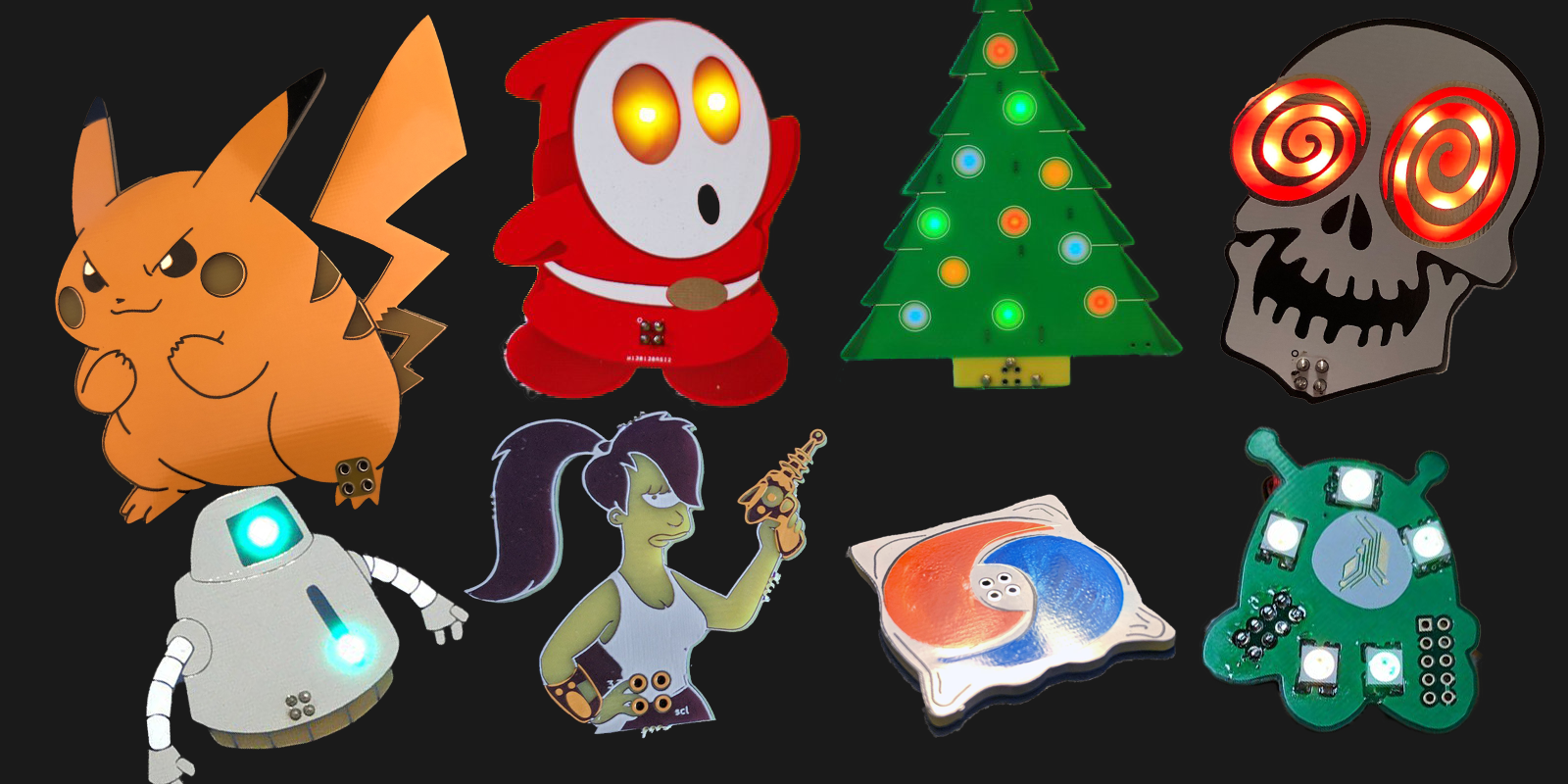
The classic SAO is a small artistic PCB with LEDs. It might be shaped like a cartoon character, spaceship, food item, logo, creature, meme, or conference mascot. Many use simple single-color LEDs. Others use WS2812 or similar addressable RGB LEDs to create animations. V1.69bis makes these designs more interesting because the GPIO pins can carry LED data from the badge or from a small controller on the add-on.
I2C Devices
Because the standard includes SDA and SCL, makers can add I2C components. That might include EEPROMs, sensors, tiny displays, GPIO expanders, or microcontrollers acting as I2C devices. A badge can query an add-on, display information, unlock a feature, or interact with multiple connected boards. This is where SAOs stop being decorative jewelry and start behaving like modular hardware.
Serial Communication
The two GPIO pins can also support serial-style communication when both the host badge and the add-on are designed for it. This requires coordination because not every badge implements the same behavior. Still, it gives advanced makers another path for creative interaction. A small SAO can become a tiny terminal companion, a mini game cartridge, a puzzle token, or a debug interface pretending to be fashionable.
Why the Standard Became Popular
SAO v1.69bis became popular because it hits the rare sweet spot between useful and silly. It is cheap enough for hobbyists, simple enough for beginners, flexible enough for experts, and weird enough to feel at home in hacker culture. It does not demand a huge bill of materials. It does not require a complex protocol. It does not require a license, certification lab, or committee that meets quarterly in a room with bad coffee.
The standard also encourages trading. At conferences, SAOs can function like hardware stickers. People make batches, hand them out, sell them, hide them in puzzles, attach them to badges, or display them on totems. Some attendees build SAO holders with multiple ports just to show off collections. This gives hardware a social life. A small PCB becomes a conversation starter: “Nice blinking possum. Did you route that yourself?”
Another reason the standard works is that it supports different skill levels. A beginner can design a two-LED board and learn footprints, polarity, ordering PCBs, soldering, and power limits. An intermediate maker can add an ATtiny, RP2040, STM8, or other small controller. An advanced maker can build a dense LED matrix, I2C-aware device, badge puzzle, or multi-add-on ecosystem. The same connector welcomes all of them.
Design Tips for Building a Better SAO
If you want to design a Shitty Add-On V1.69bis board, start with the connector and pinout. Double-check orientation. Then check it again. Then ask someone else to check it. Many SAO mistakes are not caused by difficult electronics; they are caused by mirrored connectors, rotated headers, or assuming the badge-side and add-on-side views are the same. They are not always the same, and copper does not care about your optimism.
Respect the Power Budget
The host badge usually supplies 3.3V, and your add-on should not behave like it has been plugged into a wall outlet. Addressable LEDs can draw more current than expected, especially at full white brightness. If your SAO contains many LEDs, design conservative animations, include current-limiting strategies where appropriate, and test with a real power source. “It only resets the badge sometimes” is not a feature.
Use the I2C Bus Politely
If your SAO includes I2C, choose addresses carefully and document them. Avoid bus conflicts. Consider pull-up resistors thoughtfully, since the host badge may already include them. If several SAOs are connected through a totem or hub, duplicated I2C addresses can turn a fun badge into a silent courtroom drama.
Think About Mechanical Stress
SAOs are worn, bumped, displayed, and traded. Use a solid connector footprint. Consider board thickness, overhang, and leverage. Large or heavy add-ons may need extra support. Sharp corners may look cool until they jab someone’s badge, shirt, or dignity. PCB art is still hardware, and hardware exists in the physical universe, where gravity remains annoyingly undefeated.
SAO V1.69bis and the Culture of Badgelife
The Shitty Add-On standard is more than a connector. It represents the personality of badgelife: open, chaotic, funny, collaborative, and deeply technical under the jokes. A badge can be a polished product, but an SAO often feels like a maker’s signature. It may show off someone’s PCB art style, soldering confidence, firmware humor, favorite meme, or favorite way to make LEDs do crimes against battery life.
Badgelife has often been described as a hardware demoscene, and that comparison fits. Like software demos, badges and SAOs combine technical constraint with artistic expression. The board is small. The power is limited. The connector is humble. Yet within those limits, makers build identity, interaction, and spectacle. The constraint is not a prison; it is the punchline setup.
The Name Problem: Shitty, Simple, Standardized, or Superior?
The original name is part of the joke, but many communities now use friendlier expansions such as Simple Add-On, Standardized Add-On, or Superior Add-On. This matters for classrooms, family-friendly events, corporate workshops, and public documentation. The hardware idea survives just fine under a cleaner name.
In SEO terms, people search for all of these phrases: Shitty Add-On, SAO badge, Simple Add-On, Standardized Add-On, SAO v1.69bis, badgelife add-on, and DEF CON badge add-on. In community terms, the phrase you choose depends on the room. At a hacker con hallway table, the original name may get a laugh. In a school electronics club, “Simple Add-On” may keep the teacher from aging five years in three seconds.
Common Mistakes to Avoid
The first mistake is reversing the connector. This is so common that it deserves its own tiny sad violin. Always verify the badge-side and add-on-side orientation. Use a known-good footprint or reference design when possible.
The second mistake is drawing too much current. A few LEDs are friendly. A tiny artificial sun powered by 3.3V from a conference badge is less friendly. Test brightness, animation patterns, and worst-case current.
The third mistake is assuming every host badge supports every SAO feature. Some badges may provide only power. Others may support I2C. Others may use GPIO pins for LED data or serial communication. Design your SAO so it fails gracefully. If it receives only power and ground, it should still do something reasonable or at least not sulk electrically.
The fourth mistake is skipping documentation. Even a playful board benefits from a small README, pinout note, I2C address, firmware link, or silkscreen clue. Documentation does not ruin the joke. It helps other people enjoy the joke without needing a microscope and a séance.
Experiences Related to Introducing The Shitty Add-On V1.69bis Standard
The best way to understand the Shitty Add-On V1.69bis standard is to imagine the first time a maker brings a newly assembled SAO to a conference. The board probably started as a joke in a group chat. Someone said, “Wouldn’t it be funny if we made a tiny badge shaped like a haunted toaster?” Then, because hardware people are dangerous when encouraged, the joke became a KiCad file, the KiCad file became a PCB order, and the PCB order became a late-night soldering session under questionable lighting.
The first experience is usually humility. A tiny board looks simple until you realize the connector footprint is mirrored, one LED footprint came from a library with the cathode marking on the opposite side, and the silkscreen joke is hidden under the header. This is not failure. This is the traditional initiation ceremony. Every SAO designer eventually learns that the board house will manufacture exactly what you submitted, not what you meant emotionally.
The second experience is delight. The first time the SAO lights up on a real badge, it feels absurdly satisfying. It may only blink. It may only display a tiny animation. It may only identify itself over I2C with a name that seemed funnier at 2 a.m. But it works. More importantly, it works on someone else’s badge. That moment explains why the standard matters. Interoperability turns a personal project into a shared object.
The third experience is social. SAOs are made to be seen, traded, admired, and occasionally roasted. Someone will ask where you got it. Someone else will ask whether you have extras. A third person will pull a small bag of their own boards from a backpack like a hardware goblin offering treasure. Within minutes, the SAO becomes part of a conversation about fabrication, firmware, solder paste, shipping deadlines, LED protocols, and which hotel desk has the best emergency soldering surface. The board may be small, but it creates a large excuse to talk to people.
The fourth experience is iteration. After one batch, you immediately see improvements. The next version needs a better connector. The art could be sharper. The LEDs should face outward. The I2C address should be selectable. The GPIO pin should drive an animation. The battery-free version needs lower current. The badge compatibility list needs testing. Suddenly, you are not just making a trinket; you are practicing product design at miniature scale.
The fifth experience is appreciation for standards, even silly ones. SAO v1.69bis is not perfect, and that is part of its charm. It leaves room for interpretation, experimentation, and harmless chaos. Yet it provides enough agreement for a community to build on top of it. That balance is rare. Too little structure creates incompatibility. Too much structure crushes fun. V1.69bis sits in the middle, grinning, blinking, and asking whether you remembered the pull-up resistors.
Introducing the Shitty Add-On V1.69bis standard, then, is not just about announcing six pins on a connector. It is about giving makers a shared playground. It lowers the cost of participation, invites beginners into PCB design, gives experts a tiny canvas for clever ideas, and turns wearable electronics into a social exchange. The standard may have a deliberately ridiculous name, but its impact is practical, creative, and surprisingly durable.
Conclusion
The Shitty Add-On V1.69bis standard is proof that a good hardware idea does not need a serious name to become useful. By standardizing a small 2×3 connector with 3.3V power, ground, I2C, and two GPIO pins, SAO v1.69bis made badge add-ons easier to design, easier to share, and easier to enjoy across different conference badges. It strengthened the mechanical side of the original idea while expanding the electrical possibilities for LEDs, serial communication, sensors, memory devices, and interactive badge experiences.
For beginners, it is a friendly gateway into PCB design. For experienced makers, it is a compact platform for creative engineering. For badgelife culture, it is a shared language: six pins, infinite jokes, and just enough structure to keep the blinky chaos compatible. Whether you call it Shitty Add-On, Simple Add-On, Standardized Add-On, or Superior Add-On, the V1.69bis standard remains one of the most entertaining examples of community-driven hardware design.