Liquid cooling sounds like something a mad scientist would install next to a glowing reactor core, but in everyday technology, it is much less dramatic and far more useful. At its simplest, liquid cooling is a method of moving heat away from hot components, such as a computer processor, graphics card, gaming PC, workstation, or data center server, by using liquid as the main heat-transfer medium.
Why does that matter? Because modern electronics are tiny little furnaces wearing silicon pajamas. CPUs and GPUs process billions of operations per second, and much of the electrical energy they use becomes heat. If that heat is not moved away efficiently, performance drops, fans scream, components throttle, and your expensive machine starts acting like it just jogged through Arizona in July.
Liquid cooling helps solve this problem by carrying heat from the source to a radiator, heat exchanger, or cooling system where it can be released more efficiently. It is common in gaming PCs, overclocked systems, high-performance workstations, electric vehicles, industrial equipment, and increasingly, AI-focused data centers. In other words, liquid cooling is not just for people who enjoy RGB lights and tubing that looks like futuristic spaghetti. It is a serious thermal management technology.
What Is Liquid Cooling in Simple Terms?
Liquid cooling is a cooling method that uses a fluid, usually a water-based coolant, to absorb heat from a hot component and move it somewhere else. In a PC, that hot component is often the CPU or GPU. In a data center, it might be a rack full of AI accelerators. In both cases, the goal is the same: remove heat quickly, safely, and consistently.
The basic process works like this: a cold plate or water block sits on top of the heat-producing component. Thermal paste helps fill tiny gaps between the component and the block. A pump moves coolant through the block, where the liquid absorbs heat. The heated liquid then travels through tubes to a radiator or heat exchanger. Fans or facility cooling systems remove the heat from the liquid, and the cooled liquid cycles back to repeat the process.
Think of it like a tiny delivery service for heat. The coolant picks up unwanted thermal baggage from your CPU, drives it to the radiator, dumps it off, and returns for another trip. Very polite. Very efficient. No awkward small talk.
How Does Liquid Cooling Work?
A liquid cooling system relies on several parts working together. The exact design depends on whether the system is an all-in-one cooler, a custom loop, or a large data center cooling setup, but the core idea remains the same.
1. The Cold Plate or Water Block
The cold plate, also called a water block in PC cooling, is the part that touches the hot component. It is usually made of copper or another highly conductive metal. Its job is to pull heat from the CPU or GPU and transfer it into the coolant flowing through tiny channels inside the block.
2. The Coolant
The coolant is the liquid that carries heat through the system. Many PC liquid coolers use a water-based mixture with additives that help prevent corrosion, algae growth, and freezing. In data centers, the coolant may be water-based, glycol-based, or a specialized dielectric fluid depending on the design.
3. The Pump
The pump keeps the coolant moving. Without it, the liquid would sit there like a lazy pond while your processor gets hotter than a laptop on a blanket. In an all-in-one liquid cooler, the pump is often built into the CPU block. In custom loops, the pump may be a separate component connected to a reservoir.
4. Tubing
Tubes carry coolant between the cold plate, pump, radiator, reservoir, and other components. AIO coolers use sealed flexible tubes. Custom PC loops may use soft tubing or rigid hardline tubing made from acrylic, PETG, or metal. Hardline tubing can look stunning, but it also demands more patience than assembling furniture with vague instructions.
5. The Radiator or Heat Exchanger
The radiator is where heat leaves the liquid. In a gaming PC, fans blow air through the radiator fins to remove heat from the coolant. Radiators come in common sizes such as 120mm, 240mm, 280mm, 360mm, and 420mm. More radiator surface area usually means more cooling potential, although case airflow, fan quality, pump speed, and installation all matter.
Liquid Cooling vs. Air Cooling
Air cooling is the traditional method. A metal heatsink sits on the CPU, heat pipes move heat into a stack of fins, and fans blow air across those fins. It is simple, affordable, reliable, and often good enough for many users.
Liquid cooling does not magically destroy heat. It moves heat more efficiently from one place to another. Because liquid has a higher capacity to absorb and transport heat than air, liquid cooling can be especially useful when a system produces a lot of heat in a small space.
When Air Cooling Is Enough
For everyday office computers, budget gaming PCs, and many mid-range processors, a quality air cooler is often perfectly adequate. Air coolers are easier to install, usually cheaper, and have fewer potential failure points. A big tower air cooler can perform very well, especially when installed in a case with good airflow.
When Liquid Cooling Makes More Sense
Liquid cooling becomes more attractive when you are dealing with high-end CPUs, powerful GPUs, overclocking, compact cases, heavy rendering workloads, workstation tasks, or a build where noise reduction and aesthetics matter. It can move heat to a radiator mounted away from the CPU socket, which can help reduce clutter around the motherboard and improve compatibility with tall memory modules.
In short: air cooling is like a reliable pickup truck. Liquid cooling is like a performance vehicle with more parts, more style, and more responsibility. Both can get the job done. One just arrives with more tubing.
Main Types of Liquid Cooling
All-in-One Liquid Coolers
An all-in-one liquid cooler, often called an AIO cooler, is a sealed liquid cooling system designed for easy installation. It typically includes a pump, cold plate, tubing, radiator, coolant, and fans in one preassembled unit. The user mounts the pump block to the CPU, attaches the radiator to the case, plugs in the fans and pump cables, and lets the cooler do its chilly little dance.
AIO coolers are popular because they offer many benefits of liquid cooling without the complexity of building a full custom loop. They are common in gaming PCs, prebuilt desktops, and enthusiast builds. AIOs are usually maintenance-light because the loop is sealed at the factory, although they do not last forever. Pumps can wear out, coolant can slowly evaporate through tubing over years, and fans may need replacement.
Custom Liquid Cooling Loops
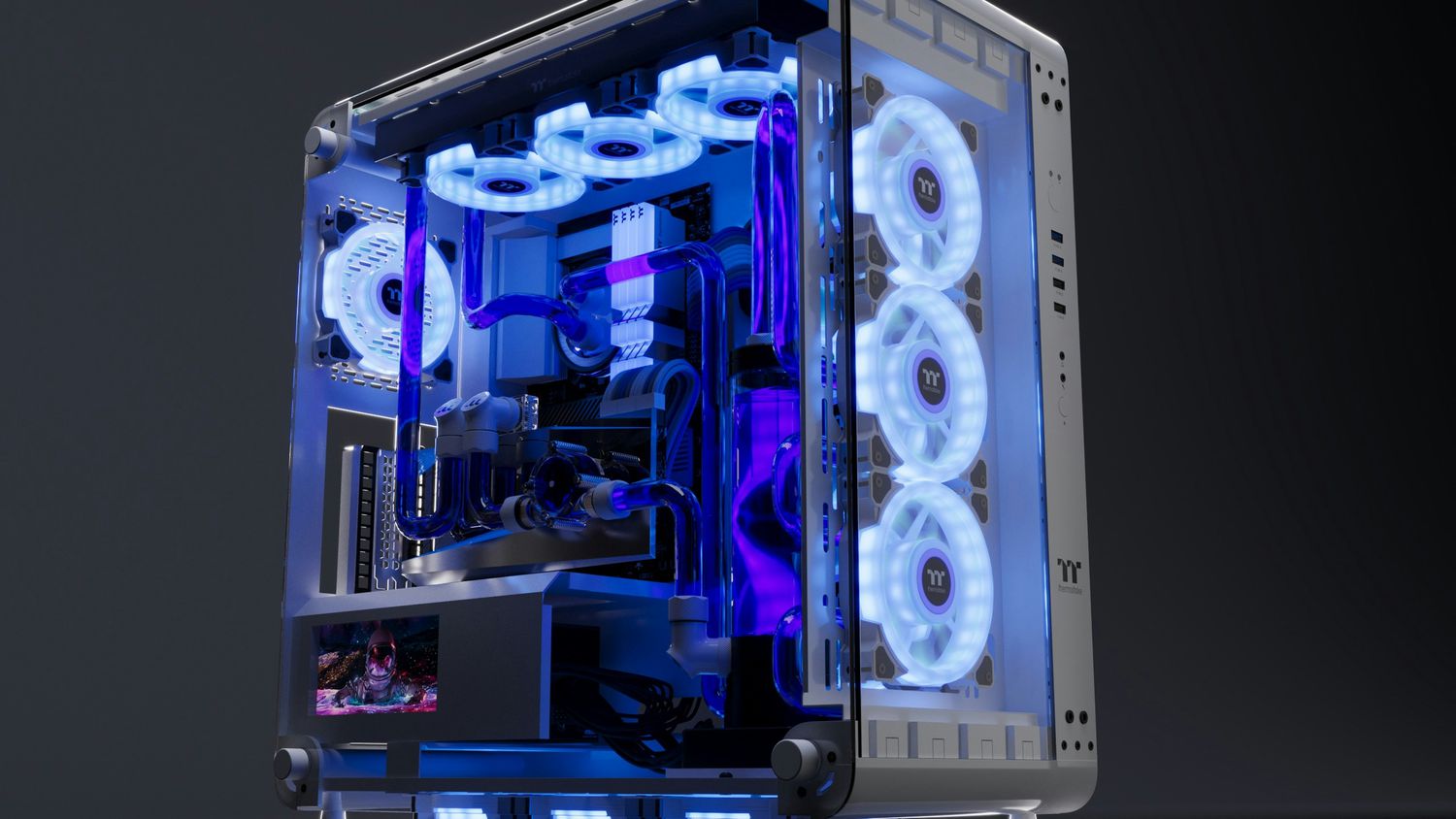
A custom loop is a liquid cooling system built piece by piece. It may cool the CPU, GPU, motherboard VRMs, or even multiple graphics cards. A typical custom loop includes water blocks, a pump, reservoir, fittings, tubing, radiators, fans, and coolant.
Custom loops offer excellent flexibility and visual appeal. Builders can choose clear tubing, colored coolant, polished fittings, large radiators, and layouts that look like modern art with better thermal conductivity. However, custom loops are more expensive, more complex, and require maintenance. They may need flushing, refilling, leak testing, and periodic inspection.
For many users, custom liquid cooling is not just a cooling solution; it is a hobby. The performance can be excellent, but the real appeal often includes silence, aesthetics, pride of craftsmanship, and the joy of saying, “Yes, I bent those tubes myself,” at least three times per gathering.
Direct-to-Chip Liquid Cooling
Direct-to-chip liquid cooling is commonly used in servers and data centers. Instead of using large air coolers, cold plates are mounted directly onto high-heat components such as CPUs, GPUs, and AI accelerators. Coolant flows through those plates and carries heat away to a coolant distribution unit or facility heat exchanger.
This approach is becoming more important as AI workloads push server power density higher. Dense racks full of accelerators can produce enormous heat. Traditional air cooling can struggle to remove that heat efficiently, especially when chips are packed tightly together. Direct-to-chip cooling brings the cooling closer to the source, which helps maintain performance and reduce thermal stress.
Immersion Cooling
Immersion cooling takes the idea even further. Instead of attaching a cold plate to a chip, hardware is submerged in a non-conductive dielectric liquid. The fluid absorbs heat from components directly. In single-phase immersion cooling, the fluid remains liquid as it circulates through a heat exchanger. In two-phase immersion cooling, the fluid boils at a controlled temperature, turns into vapor, condenses, and returns to liquid.
Immersion cooling is more common in specialized data centers than in home PCs. It can be powerful, but it requires special infrastructure, compatible hardware, service planning, and careful fluid management. It is not something most people casually install between homework, dinner, and a quick round of games.
Benefits of Liquid Cooling
Better Heat Transfer
The biggest benefit of liquid cooling is efficient heat transfer. Liquid can carry heat away from a component more effectively than air in many high-heat scenarios. This can help keep CPUs and GPUs at safer operating temperatures during gaming, video editing, 3D rendering, simulation, or AI workloads.
Potentially Lower Noise
Liquid cooling can reduce noise when properly configured because heat is spread across a larger radiator surface. Instead of one small fan working like it has a personal grudge, larger radiator fans can spin more slowly while still moving enough air. However, liquid cooling is not automatically silent. Pump noise, fan curves, radiator size, and case airflow all influence the final sound profile.
More Thermal Headroom
High-performance processors often boost their clock speeds when temperatures allow. Better cooling can help a system sustain higher performance for longer periods. This does not mean liquid cooling turns a mid-range chip into a supercomputer, but it can reduce thermal throttling and improve stability under heavy loads.
Cleaner Interior Layout
An AIO cooler can free space around the CPU socket compared with a massive air tower. This can make the inside of the case look cleaner and may help with memory clearance. Custom loops can also create a stunning build, especially when combined with thoughtful cable management and tasteful lighting.
Drawbacks of Liquid Cooling
Higher Cost
Liquid coolers usually cost more than basic air coolers. AIO coolers vary widely in price, and custom loops can become expensive quickly once you add radiators, blocks, fittings, pumps, reservoirs, coolant, and specialty tools. The phrase “just one more fitting” has emptied many wallets.
More Complexity
Liquid cooling introduces more parts: pumps, tubes, fittings, radiators, and coolant. More parts mean more things to install, monitor, and occasionally troubleshoot. A good AIO is straightforward, but a custom loop requires planning and patience.
Leak Risk
Modern liquid coolers are generally safe when properly installed, but any system containing liquid has some level of leak risk. AIO coolers are sealed and factory-tested, which reduces the risk. Custom loops depend heavily on fitting quality, assembly, and leak testing.
Pump Failure
Air coolers have fans, and fans are easy to replace. Liquid coolers also have fans, but they add a pump. If the pump fails, coolant stops circulating, and temperatures can rise quickly. Many modern systems will throttle or shut down to protect components, but pump reliability is still an important factor.
Who Should Use Liquid Cooling?
Liquid cooling is a smart choice for users who run high-performance hardware, care about lower temperatures under sustained workloads, want a quieter system under load, or prefer the clean look of an AIO or custom loop. Gamers with powerful CPUs, creators who render video, engineers running simulations, streamers, overclockers, and workstation users may all benefit.
Liquid cooling may not be necessary for basic office work, web browsing, light school assignments, or casual computing. If your system runs cool and quiet with air cooling, upgrading to liquid cooling may not deliver a meaningful real-world improvement. The best cooler is not the fanciest one; it is the one that matches your hardware, workload, budget, and tolerance for tinkering.
Liquid Cooling in Data Centers
Liquid cooling is no longer just a PC enthusiast topic. Data centers are adopting liquid cooling because modern servers, especially AI systems, are consuming more power and producing more heat per rack. High-density computing makes airflow harder to manage. At some point, blowing more air through the room becomes inefficient, noisy, and expensive.
Direct-to-chip liquid cooling allows data centers to capture heat at the source. The heated coolant can then move through a coolant distribution unit and transfer heat to building-level systems. Some facilities use hybrid systems where liquid cools the hottest chips while air still cools memory, storage, power supplies, and other components.
Immersion cooling is also gaining attention for specialized high-density deployments. By surrounding hardware with dielectric fluid, immersion systems can remove heat efficiently and reduce reliance on traditional fan-heavy server designs. However, deployment is more complicated than simply dunking servers into a tub and calling it a Tuesday. Operators must consider maintenance, fluid compatibility, service procedures, warranty support, and facility design.
Common Myths About Liquid Cooling
Myth 1: Liquid Cooling Is Always Better Than Air Cooling
Not always. A high-end air cooler can outperform a small or poorly installed liquid cooler. Cooling performance depends on radiator size, fan quality, airflow, CPU heat output, pump design, case layout, and ambient room temperature.
Myth 2: Liquid Cooling Requires Constant Maintenance
AIO coolers are sealed and usually require little maintenance beyond cleaning dust from the radiator and fans. Custom loops need more attention, including occasional flushing, coolant checks, and inspection.
Myth 3: Liquid Cooling Is Only for Overclockers
Overclockers love liquid cooling, but they are not the only users. Many people choose liquid cooling for quiet operation, cleaner aesthetics, high-end CPUs, compact cases, or sustained workloads such as rendering and streaming.
Myth 4: Liquid Cooling Means Your PC Is Full of Water
Technically, there is liquid inside the cooler, but modern systems use controlled loops, sealed tubes, fittings, and purpose-made coolants. An AIO is not a garden hose having a midlife crisis inside your case.
How to Choose a Liquid Cooler
Start with your CPU or GPU heat output. A low-power processor does not need a giant 360mm AIO unless you want the look or future upgrade flexibility. A high-end processor, especially one used for rendering or long gaming sessions, may benefit from a larger radiator.
Next, check your case compatibility. Not every case supports every radiator size. A 360mm radiator may fit at the front but not at the top. A thick radiator plus fans may interfere with motherboard heatsinks or memory. Measure first. Your future self will thank you.
Also consider fan noise, warranty, pump design, software control, cable management, and ease of installation. For most people, a reliable AIO from a reputable brand is the practical middle ground. For advanced builders, a custom loop offers more control, better aesthetics, and more opportunities to say words like “fittings” with surprising emotional intensity.
Practical Experiences With Liquid Cooling
Anyone who has spent time around liquid-cooled PCs quickly learns that liquid cooling is both impressive and humbling. The first experience is usually visual. A clean AIO build looks modern and tidy, especially compared with a giant air cooler hanging over the motherboard like a metal apartment building. The pump block sits neatly on the CPU, the tubes curve toward the radiator, and the whole system feels more premium. It is the kind of upgrade that makes people open the side panel just to admire the machine, even when nobody asked.
The second experience is acoustic. A well-configured liquid cooling system can feel calmer under load. During gaming or video editing, the fans may ramp up more gradually because the coolant absorbs heat and spreads it across the radiator. Instead of sudden fan bursts, you often get smoother temperature behavior. That said, setup matters. A small radiator with aggressive fan curves can still get loud. A pump running at an unpleasant speed can create a faint hum or buzz. Liquid cooling rewards careful tuning.
Installation teaches another lesson: radiator placement matters. Mounting a radiator at the top of the case often works well because warm air naturally exits upward. Front mounting can provide cooler intake air for the CPU, but it may push warmer air into the case, affecting GPU temperatures. The best choice depends on the case layout, fans, GPU design, and total heat output. Liquid cooling is not magic; it still obeys airflow physics, which is rude but fair.
Dust is another real-world issue. People sometimes assume liquid cooling means less cleaning, but radiators collect dust like they are building a tiny gray sweater. A dusty radiator reduces airflow and hurts performance. Cleaning the radiator and fans every few months can make a noticeable difference, especially in homes with pets, carpets, or windows that invite the outside world to come inside and shed particles everywhere.
Custom loops create a different kind of experience. They can be beautiful, quiet, and powerful, but they demand planning. You need to think about drain ports, fill ports, tube runs, radiator capacity, component order, and leak testing. The first successful custom loop feels amazing. The first tiny fitting leak feels like your soul leaving your body for a quick walk. Builders learn patience, precision, and the importance of paper towels during leak testing.
The most practical lesson is this: liquid cooling is best when it solves a real problem. If your CPU is too hot, your fans are too loud, your case is cramped, or your workload is heavy, liquid cooling can be a meaningful upgrade. If your current temperatures are fine and your system is quiet, liquid cooling may be more about aesthetics and enjoyment than necessity. And that is okay. Computers are tools, but they are also personal projects. Sometimes the reason is performance. Sometimes the reason is silence. Sometimes the reason is simply, “It looks cool.” In liquid cooling, that phrase is finally technically accurate.
Conclusion
Liquid cooling is a thermal management method that uses coolant to move heat away from components such as CPUs, GPUs, and high-density server chips. It can improve heat transfer, reduce noise under the right conditions, support high-performance workloads, and create a cleaner-looking system. However, it also costs more, adds complexity, and may require more planning than traditional air cooling.
For everyday users, air cooling remains simple and effective. For gamers, creators, workstation users, overclockers, and data center operators dealing with serious heat, liquid cooling can be a powerful solution. The key is choosing the right type of cooling for the job. A good cooler is not about bragging rights; it is about keeping performance steady, hardware healthy, and fans from sounding like a tiny airport preparing for takeoff.