Some keyboards are designed for gamers. Some are designed for accountants. Some are designed for people who believe RGB lighting is a personality trait. And then there is the Toast keyboard: a tiny, open-source split ergonomic keyboard made for a very specific hand problem that many people never notice until a keyboard points it out with the subtlety of a dinner guest measuring your fingers with a ruler.
The Toast keyboard is built around a simple observation: not every hand reaches keys the same way. For people whose index fingers are noticeably shorter than their ring fingers, the inner columns of many keyboards can feel like they were placed by someone with spider legs instead of hands. Toast answers with aggressive column stagger, a compact 34-key split layout, and an attitude that says, “Your fingers are not wrong. The keyboard might be.”
That idea sounds funny, but it sits inside a serious movement in custom mechanical keyboards: designing input devices around bodies instead of forcing bodies to adapt to rectangular slabs. Toast is not just a cute name. It is a toast, glass raised high, to short index fingers, neutral wrists, open-source tinkering, and the wonderfully strange future of ergonomic keyboard design.
What Is the Toast Keyboard?
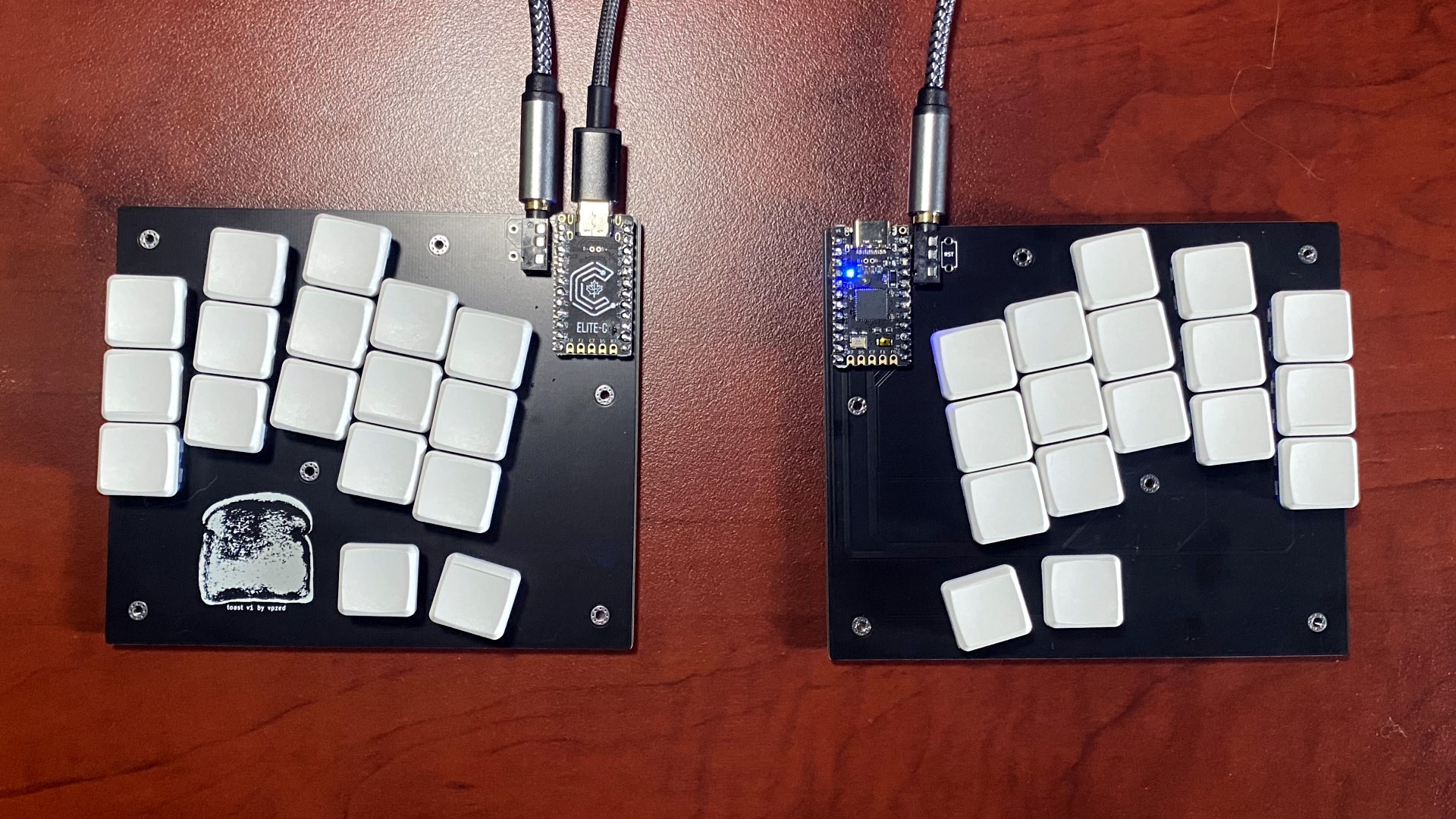
Toast is a 34-key split ergonomic keyboard design created by vpzed and shared as an open-source project. It uses two separate halves, one for each hand, rather than a single traditional board. Each half has a compact arrangement of keys shaped around finger movement, not around the old typewriter-style row stagger most of us inherited without asking questions.
The design was made with Ergogen, a tool used by DIY keyboard builders to generate ergonomic layouts, plates, and printed circuit board files. In practical terms, that means Toast is not a mass-market keyboard you grab from an office supply shelf between printer paper and regret. It is a maker-friendly design for people who are comfortable with parts, firmware, PCB files, switches, keycaps, controllers, and the occasional “why is nothing working?” evening.
The official Toast layout highlights several ergonomic features: no traditional row stagger, aggressive column stagger, very aggressive index-finger stagger, a five-degree splay angle on the pinky and ring columns, no splay on the index column, and an 11-degree middle-column angle intended to support a more neutral wrist position. It also places the home thumb key around the inner index row and gives the second thumb key a motion that moves toward the palm.
That is a lot of tiny geometry for a keyboard with fewer keys than a TV remote has mystery buttons. But in ergonomic design, small changes matter. A few millimeters of reach, a few degrees of angle, or one missing inner key can decide whether a keyboard feels natural or feels like your hand is doing yoga without consent.
Why Short Index Fingers Matter
The phrase “short index fingers” refers to the relationship between the second digit, the index finger, and the fourth digit, the ring finger. Researchers often call this the 2D:4D ratio. A lower ratio means the index finger is shorter compared with the ring finger. This variation is common, and many people have one hand where the difference is more obvious than the other.
Some popular explanations have connected 2D:4D ratio with prenatal hormone exposure, especially testosterone, but the science is more complicated than internet trivia usually admits. Modern research has found that the relationship is not a simple personality test, health fortune cookie, or proof that your keyboard should come with a horoscope. Finger ratios vary by individual, sex, population, measurement method, and hand. The safest takeaway is modest: hands differ, and those differences can influence comfort.
For typing, the index finger often handles a demanding workload. On a standard QWERTY keyboard, it reaches inward for keys like T, Y, G, H, B, N, 5, and 6, depending on typing style. If your index finger is relatively short, those inner reaches can feel awkward. You may compensate by moving the whole hand, twisting the wrist, stretching the fingers, or quietly blaming yourself for missing the 6 key again.
Toast takes that problem personally. Instead of asking the index finger to reach into uncomfortable territory, it pulls the key positions into a layout that better respects shorter reach. It also avoids inner keys that would demand heroic index-finger lunges. In other words, Toast does not tell your index finger to work harder. It tells the keyboard to stop being rude.
The Ergonomic Logic Behind the Layout
Column stagger instead of row stagger
Most traditional keyboards use row stagger because mechanical typewriters needed room for physical linkages. Your laptop no longer has little metal arms flying around inside it, yet the stagger remains like a ghost from an office in 1895. Column-staggered keyboards take a different approach: they arrange keys vertically according to finger length and natural movement.
On Toast, the column stagger is especially aggressive. This is the main ergonomic joke and the main ergonomic point. The index column is shifted to better suit users whose index fingers do not reach as far as their middle or ring fingers. Rather than pretending every finger is equally long and equally enthusiastic, the layout admits the obvious: hands are weird, and good tools should be weird in matching ways.
A split design for better shoulder and wrist position
Split keyboards can help people place their hands closer to shoulder width, instead of forcing both hands together in front of the body. That can reduce sideways wrist bend and make the forearms sit in a more natural line. Ergonomic guidance from workplace safety organizations often emphasizes straight wrists, relaxed shoulders, elbows close to the body, and a keyboard position that keeps the hands and forearms aligned.
Toast follows that philosophy by separating the board into two halves. Users can place the halves where their shoulders, elbows, and wrists prefer them. Some people keep the halves close together. Others spread them wide, angle them outward, or tent them using accessories. The point is choice. A conventional keyboard says, “Here is the rectangle; good luck.” A split ergonomic keyboard says, “Where do your arms actually want to be?”
Fewer keys, less reach
Toast has 34 keys, which sounds alarming if you are used to a full-size keyboard with a number pad, function row, navigation cluster, and enough keys to pilot a small submarine. But minimalist ergonomic keyboards rely on layers. Instead of giving every function a dedicated physical key, they use key combinations to access numbers, symbols, navigation, media controls, and shortcuts.
This approach reduces finger travel. Your hands stay closer to home position, and common commands can be placed under stronger fingers or thumbs. The tradeoff is learning curve. A 34-key keyboard is not something most people master before lunch. It asks for patience, a custom keymap, and the emotional resilience to type a password incorrectly six times because the symbol layer has moved to another dimension.
Hardware: Small Board, Big Personality
The Toast bill of materials includes two reversible PCBs, 34 Kailh Choc v1 low-profile switches, Choc keycaps, two TRRS jacks, two Pro Micro-compatible controllers, cables, rubber bumpers, and optional sockets and reset switches. The reversible PCB design is clever because a small batch of boards can produce both left and right halves, with extras available if a build goes sideways. In keyboard projects, “extra” is not pessimism. It is wisdom wearing safety goggles.
Kailh Choc v1 switches are low-profile mechanical switches often used in compact ergonomic builds. Their shorter height can help create a thinner keyboard, which may support a flatter wrist posture when the board is placed correctly. The keycap compatibility note matters too: Toast expects Choc keycaps of a suitable size, not oversized low-profile caps that crowd the layout.
The controller choice is also part of the DIY charm. Pro Micro-compatible boards and Elite-C-style controllers are common in the custom keyboard world because they are small, affordable, and well supported. A TRRS cable connects the halves so the two sides can communicate. To anyone outside the hobby, this may sound like assembling a robot sandwich. To keyboard builders, it sounds like a calm Tuesday.
Firmware: Where the Tiny Keyboard Learns Big Tricks
Toast uses existing QMK-compatible firmware based on the a_dux keyboard. QMK is one of the most important open-source firmware ecosystems in the mechanical keyboard community. It lets users define keymaps, layers, macros, tap-hold behavior, combos, mod-taps, one-shot modifiers, and other features that make small keyboards practical.
That matters because 34 keys only work when the firmware does more than send letters. A thumb key might act as Space when tapped and as a layer switch when held. A home-row key might type “A” when tapped and behave as Control when held. Combos can turn two nearby keys into Escape, Tab, Enter, or Backspace. With a thoughtful keymap, a tiny board can do the work of a much larger one while keeping fingers close to home.
Of course, firmware freedom can become firmware rabbit-hole. One minute you are moving Backspace to your thumb. Three hours later you are debating whether semicolon deserves a dedicated key or should be banished to Layer 3 like a Victorian nephew. This is normal. The custom keyboard community runs partly on solder, partly on firmware, and partly on people saying, “I think I finally found my perfect layout,” shortly before changing it again.
Who Is Toast For?
Toast is best for keyboard enthusiasts, ergonomic experimenters, makers, programmers, writers, and anyone who already suspects that standard keyboards are not the final form of human-computer input. It is especially interesting for typists whose index fingers are shorter than their ring fingers and who feel strain or awkwardness reaching inner keys.
It may not be ideal for someone who wants a plug-and-play office keyboard with a familiar layout. There is no giant number pad. There is no dedicated function row. There may not even be labels on the keycaps, depending on the build. If you hand Toast to a random coworker, they may stare at it the way a raccoon stares at a tax form.
But for the right user, Toast can feel liberating. It turns the keyboard from a fixed object into a personal tool. It says your hands are allowed to have preferences. It also says the solution to discomfort might not be “try harder,” but “move the keys.” That is a surprisingly humane idea for a device made of fiberglass, switches, and firmware.
Toast and the Larger Ergonomic Keyboard Movement
Toast belongs to a broader wave of custom ergonomic keyboards that includes split boards, ortholinear boards, column-staggered layouts, low-profile builds, tented designs, and sculpted keyboards. The movement is driven by a simple truth: people type for hours every day, yet many still use keyboards designed more around manufacturing history than anatomy.
Workplace ergonomics generally recommends keeping wrists straight, forearms aligned, shoulders relaxed, and input devices positioned to avoid reaching. Research on split and alternative keyboards has shown that properly configured split designs can reduce wrist deviation compared with conventional layouts. That does not mean every split keyboard prevents injury, and it does not mean Toast is a medical device. It does mean layout and posture matter.
The custom keyboard community adds another layer: personal experimentation. Instead of assuming one ergonomic keyboard should serve everyone, builders test shapes, angles, switches, keycaps, thumb clusters, and keymaps. Some designs are carefully refined. Some look like futuristic beetles. Some are so minimal they make a calculator look bloated. Toast sits in the delightful middle: small, purposeful, and just odd enough to make you smile.
Benefits of the Toast Keyboard
It respects natural finger reach
The biggest advantage is the index-finger-aware layout. By moving columns and removing painful inner reaches, Toast gives shorter index fingers less acrobatic work. This can make typing feel more centered and less stretched, especially for users who have always felt that certain keys were suspiciously far away.
It encourages better posture
Because Toast is split, each half can be positioned independently. That helps users experiment with shoulder width, wrist angle, and desk placement. A compact layout also leaves room for the mouse closer to the body, reducing long reaches across a full-size board.
It is open-source and builder-friendly
Open-source hardware invites modification. Builders can study the design, order PCBs, change keymaps, adjust cases, experiment with tenting, and adapt the board to their own needs. Toast is not just a keyboard; it is a conversation starter between anatomy and electronics.
Possible Drawbacks
The first drawback is the learning curve. Moving from a standard keyboard to a 34-key split board can feel like learning to type in a very polite alien language. Layers take time. Combos take time. Thumb keys take time. Your first week may include a lot of backspacing, sighing, and asking why the letter P has betrayed you.
The second drawback is build complexity. Toast is not the best first keyboard for someone who has never soldered, flashed firmware, or identified the difference between a TRRS cable and a charging cable. It is approachable for hobbyists, but it still requires care.
The third drawback is specialization. Toast is designed around a particular hand geometry. If your index fingers are long or your typing habits are deeply tied to a conventional layout, the aggressive index stagger may feel strange rather than helpful. Ergonomics is personal. What feels like a miracle to one person can feel like a puzzle box to another.
Real-World Typing Experience: Living With the Toast Idea
Imagine sitting down at a normal keyboard after years of typing. Your hands know where to go, but not always comfortably. The right index finger reaches for Y and H. The left index finger stretches toward T and G. The 6 key sits in the middle like a tiny plastic dare. You hit it sometimes. You miss it sometimes. You blame coffee.
Now imagine a keyboard that has shifted those responsibilities inward, downward, or away from the worst stretch zones. The first sensation is not instant speed. It is relief mixed with confusion. Your fingers stop reaching as far, but your brain still expects the old map. This is the awkward beauty of ergonomic keyboards: the body may approve before the mind signs the paperwork.
After a few days, a layout like Toast can begin to feel less like a novelty and more like a tailored tool. The thumb keys become important. Backspace on the thumb may feel luxurious. Enter under a thumb or layer key can make the pinky retire from some of its unpaid overtime. Symbols may move to a layer that feels strange at first but eventually becomes faster than reaching across a wide board.
For writers, the biggest change is rhythm. A smaller keyboard can make typing quieter in the body, even if the switches are satisfyingly clicky or thocky. Your hands move less. Your wrists twist less. The work feels closer. Drafting a paragraph becomes less like playing piano on a cafeteria tray and more like speaking through your fingertips.
For programmers, layers can become a superpower. Brackets, braces, parentheses, underscores, arrows, and navigation keys can be placed where they make sense. This is where tiny keyboards either win people forever or send them running back to full-size boards. If the symbol layer is designed well, coding can feel efficient. If it is designed badly, every function call feels like opening a safe.
For gaming, Toast is more complicated. Some games expect clusters like WASD, number keys, Escape, Tab, Shift, Control, and Space in familiar places. A custom keymap can handle much of that, but ultra-compact ergonomic boards are usually better for typing than for plug-and-play gaming. That said, for certain games, a dedicated layer can be surprisingly comfortable.
Experience Notes: What Toast Teaches About Keyboards, Hands, and Humility
The most valuable experience related to Toast is not simply building it or typing on it. It is the moment you realize that “standard” does not mean “natural.” A standard keyboard is just a design that became common. It is not a sacred object carved into a mountain by the gods of productivity. Once you see that, every keyboard becomes negotiable.
Start by looking at your own hands. Relax them on the desk. Notice how the fingers fall. The middle finger usually reaches farther than the index. The ring finger may be longer than expected. The pinky angles outward like it has its own weekend plans. Now place those same hands on a rectangular keyboard. You can feel the mismatch immediately. The board is straight; the hands are not. The rows are staggered for historical reasons; your fingers are staggered for biological ones.
That mismatch is why a design like Toast feels both ridiculous and sensible. It is funny because it is so specific: a keyboard for short index fingers. But it is sensible because specificity is exactly what ergonomics often needs. The average user is not a real person. The average hand does not sit at your desk, write your emails, edit your code, or miss your number row keys. You do.
One practical experience is measuring discomfort, not just speed. Many people judge keyboards by words per minute, but speed is only part of the story. Ask better questions. Do your shoulders rise while typing? Do your wrists bend outward? Do your pinkies feel overworked? Does your index finger stretch for inner keys? Do you move your whole hand to hit keys that should be easy? Toast invites these questions because its design is unapologetically based on hand anatomy.
Another experience is learning that small keyboards reward gradual adoption. Do not expect to switch to a 34-key layout on Monday and deliver a flawless presentation by Tuesday. Begin with short sessions. Use typing practice sites. Keep your old keyboard nearby for emergencies. Build layers slowly. Put common keys where your hands expect comfort, not where tradition expects obedience. The best keymap is not the cleverest one. It is the one you can actually use when tired.
There is also a psychological benefit. Building or using a keyboard like Toast makes technology feel less fixed. You stop being merely a consumer of devices and become a participant in design. Maybe you change a thumb key. Maybe you adjust a layer. Maybe you decide that the default placement of Escape has been wrong your whole life. These are small acts, but they restore agency. Your tools should serve your work, not bully your tendons.
The humor helps too. Ergonomics can sound dull, clinical, and vaguely scolding. Sit straight. Adjust this. Do not bend that. Take breaks. Toast makes the same conversation more inviting. It has a name that sounds like breakfast and celebration. It solves a real problem with a wink. That matters because people are more likely to experiment with comfort when the process feels playful instead of punitive.
The biggest lesson is that comfort is iterative. Toast may be perfect for some hands and wrong for others. That is not failure. That is the point. The future of keyboards is not one magic layout for everyone. It is a broader menu of shapes, sizes, angles, switches, and firmware choices that help more people find their own fit. Toast raises a glass to short index fingers, but it also raises a bigger question: what other tiny mismatches have we been ignoring?
Conclusion
Toast is a small keyboard with a big ergonomic argument. By focusing on users with shorter index fingers, it highlights something the keyboard world is finally learning to say out loud: hands are personal, and keyboards should be more personal too. Its 34-key split layout, aggressive column stagger, low-profile switch support, QMK firmware compatibility, and open-source design make it a charming example of how maker culture can solve problems mainstream hardware rarely notices.
It is not for everyone, and it does not pretend to be. That is part of its appeal. Toast is specialized, opinionated, and delightfully strange. It asks typists to think about finger reach, wrist angle, shoulder position, and the inherited weirdness of traditional keyboard layouts. It may not replace every keyboard on every desk, but it proves that better input devices can begin with one honest observation: “My hand does not fit this thing.”
So here is to Toast: the keyboard that looked at short index fingers, raised a glass, and said, “Finally, someone designed the party around you.”