A portable Raspberry Pi palmtop sounds like something that fell out of a 1990s sci-fi movie, bounced across a maker’s workbench, and landed in the modern age with Wi-Fi, Linux, and a mechanical keyboard. Yet that is exactly why projects like the Portable Pi 80 are so charming. They are not trying to replace your MacBook, gaming laptop, or phone. They are trying to answer a more interesting question: how much real computing power can you carry in a small, self-contained device that you can repair, modify, and understand?
The answer, happily, is “plenty.” A well-designed Raspberry Pi palmtop can handle writing, coding, remote server access, light browsing, retro computing, note-taking, electronics work, and general tinkering. It is a pocketable computer for people who enjoy the idea of a machine that does not hide all its secrets behind glue, glass, and corporate mystery.
The phrase “Portable Pi Palmtop Provides Plenty” captures the appeal perfectly. It suggests a device that is compact but capable, playful but practical, and small enough to feel personal. In a world where most portable computers look like slightly different rectangles from the same design committee, a DIY Pi palmtop has personality. It says, “Yes, I am tiny. Yes, I run Linux. And yes, I probably have more screws than your tablet.”
What Is a Raspberry Pi Palmtop?
A Raspberry Pi palmtop is a compact portable computer built around a Raspberry Pi single-board computer. Instead of using the Pi as a board on a desk connected to a monitor, keyboard, and power supply, the maker builds all of those parts into one mobile device. The result can look like a miniature laptop, a cyberdeck, a retro handheld, or a chunky personal digital assistant from the golden age of beige plastic.
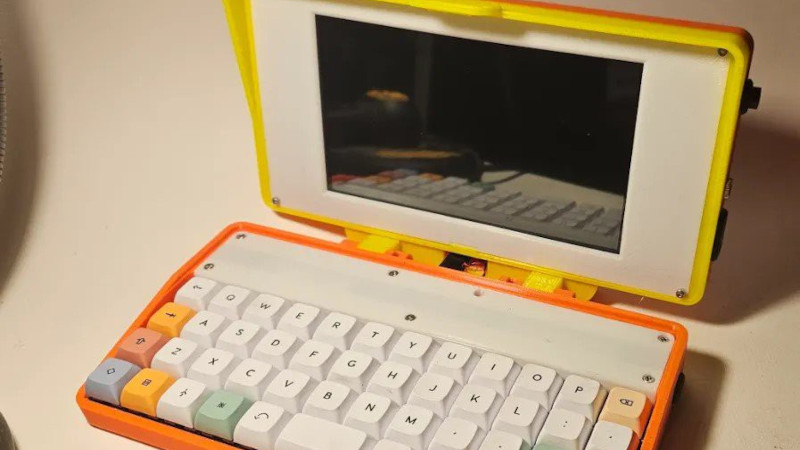
The Portable Pi 80, created by Michael Mayer, is a strong example of this idea. It uses a Raspberry Pi Zero 2 W as the core computer, a small display, a compact mechanical keyboard, batteries, power modules, and a custom 3D-printed case. It is not just a Raspberry Pi with a screen taped to it. The design focuses on making the device usable as a real palmtop computer, not merely a novelty that boots once for a photo and then retires to a drawer.
This matters because portable Raspberry Pi projects live or die by usability. A project may be technically impressive, but if the keyboard is painful, the screen is unreadable, or the battery setup is awkward, it quickly becomes “desk art with Linux.” The best Pi palmtops balance size, power, input, display quality, and durability.
Why the Raspberry Pi Zero 2 W Makes Sense
The Raspberry Pi Zero 2 W is a smart choice for a small portable computer because it offers a useful mix of size, efficiency, and capability. It uses a quad-core 64-bit Arm Cortex-A53 processor running at 1 GHz and includes 512 MB of RAM, wireless LAN, Bluetooth, a microSD card slot, USB 2.0 OTG, and a 40-pin GPIO footprint. That specification will not make a workstation nervous, but it is more than enough for many portable tasks.
The Pi Zero 2 W also keeps heat and power demands lower than larger boards such as the Raspberry Pi 5. A Pi 5 is far more powerful, with a quad-core Arm Cortex-A76 processor at 2.4 GHz and RAM options that can reach much higher capacities. But more power also means more heat, more battery demand, and more design complexity. For a handheld or palmtop build, restraint is often a feature, not a flaw.
Think of the Pi Zero 2 W as the efficient little engine in a tiny field vehicle. It will not tow a building, but it will get you through the trail, run your tools, and sip power instead of gulping it like a thirsty desktop chip. For a portable Linux terminal, writing deck, lightweight coding device, or network troubleshooting box, that is exactly the personality you want.
The Keyboard Is the Deal-Breaker
Many portable DIY computers look exciting until you try typing on them. Then the romance ends, usually around the third typo. A palmtop computer needs a keyboard that is small enough to fit the design but good enough to make text entry possible. That is a difficult balance.
The Portable Pi 80 uses a 40% mechanical keyboard layout, which is compact but still physical. This is important. Touchscreens are convenient, but for programming, terminal commands, journaling, markdown notes, configuration edits, and SSH sessions, real keys matter. A small mechanical keyboard gives the device a tactile identity. It also makes the palmtop feel like a real computer rather than a tablet wearing a cosplay outfit.
There are compromises, of course. A 40% keyboard requires layers and shortcuts for numbers, symbols, function keys, and navigation. That means new users need a little patience. However, for people who already enjoy compact keyboards, custom layouts, or mechanical switches, this becomes part of the fun. It is not a limitation; it is a tiny puzzle you get better at every day.
The Display: Small, Useful, and Honest
A portable Pi palmtop needs a display that is large enough for actual work but small enough to keep the device mobile. The Portable Pi 80 design uses a small Waveshare display, giving it a clamshell-style experience closer to a retro palmtop than a modern tablet. This size works well for terminal windows, simple text editing, lightweight desktop apps, dashboards, and retro-inspired interfaces.
Screen size is one of the biggest decisions in any Raspberry Pi palmtop project. A 4-inch screen makes the device adorable but can feel cramped. A 7-inch or 7.9-inch display gives more breathing room while still keeping the build compact. A 10-inch screen becomes easier to use but starts moving the project toward cyberdeck or mini-laptop territory.
The best choice depends on the job. If the goal is SSH access, system monitoring, writing short notes, or running scripts, a smaller display is fine. If the goal is web browsing, documentation reading, or coding with multiple panes, a larger display will save your eyes from filing a complaint.
Battery Power and Portability
The magic of a palmtop is that it is not chained to a wall. Battery power turns a Raspberry Pi project from a desktop experiment into a carry-anywhere tool. The Portable Pi 80 includes a battery-based power system, which is essential for the concept. Without a battery, a palmtop is just a small computer asking politely for an outlet.
Battery design, however, deserves respect. Lithium-ion cells can be excellent for portable electronics, but they must be handled with proper charging, protection, wiring, and enclosure design. A good portable Pi project should use appropriate power-management hardware, avoid exposed contacts, protect against shorts, and leave enough room inside the case for safe assembly. This is one area where “good enough” is not good enough.
From a user-experience perspective, battery life affects how the device feels. If it lasts only a few minutes, it becomes a demo. If it lasts long enough for a writing session, a train ride, a café visit, or an afternoon of tinkering, it becomes a companion. The Pi Zero 2 W helps here because it is modest in power consumption compared with larger Raspberry Pi boards.
Why the Case Design Matters So Much
In many DIY computer projects, the case is where the difference between “cool idea” and “finished device” becomes obvious. Electronics can be impressive, but a clean enclosure makes the project usable. It protects the parts, improves ergonomics, manages airflow, organizes ports, and gives the machine its visual identity.
The Portable Pi 80 stands out because its 3D-printable case brings the components together in a polished way. A Raspberry Pi, display, keyboard, batteries, and boards are all separate modules. The case turns them into one device. That is the quiet genius of good design: it makes a collection of parts feel inevitable.
A strong palmtop case also solves practical problems. Where does the keyboard controller go? How do the wires route without becoming spaghetti? Can the screen close safely? Are the ports reachable? Can the device sit on a table without wobbling like a nervous penguin? These details may not sound glamorous, but they decide whether the computer is pleasant to use.
What Can You Actually Do With a Portable Pi Palmtop?
A Raspberry Pi palmtop is not just a conversation starter, though it is very good at starting conversations. It can be genuinely useful for many lightweight computing tasks.
Portable Linux Terminal
For developers, sysadmins, and hobbyists, a Pi palmtop can be a portable terminal. It can connect to servers through SSH, manage files, run scripts, test network tools, edit configuration files, and serve as a compact emergency workstation. It is the kind of device you can keep in a backpack for those moments when a phone is too limited and a laptop feels like overkill.
Writing and Note-Taking
With a lightweight text editor, markdown app, or command-line journaling tool, a Pi palmtop becomes a distraction-light writing machine. It does not beg you to open twenty browser tabs. It does not flash social media notifications every eight seconds. It simply sits there and says, “You brought me here to write, remember?” Rude, but helpful.
Learning Linux and Programming
Raspberry Pi OS is the official supported operating system for Raspberry Pi computers, and it gives beginners a friendly route into Linux. A palmtop build makes that learning experience physical. You are not just installing software; you are using a computer you can open, inspect, and improve. That hands-on relationship is one of the reasons Raspberry Pi remains popular in education and maker culture.
Retro Computing and Emulation
The palmtop form factor naturally suits retro computing. It feels like a spiritual cousin of old HP palmtops, Psion organizers, early PDAs, and compact luggable machines. With the right software, a Pi palmtop can run vintage-style applications, terminal-based games, lightweight emulators, and old-school productivity tools. It is nostalgia with a modern kernel.
Electronics and IoT Projects
The GPIO capability of Raspberry Pi boards makes them useful for hardware projects. A palmtop can become a portable controller, field logger, sensor dashboard, or testing station. For makers working with microcontrollers, sensors, robotics, or smart-home prototypes, a self-contained Pi computer can be very handy.
Portable Pi Palmtop vs. Laptop, Tablet, and Phone
A fair question is: why build or use a Pi palmtop when cheap laptops, tablets, and smartphones already exist? The answer is control. A laptop is more powerful. A tablet is sleeker. A phone is more convenient. But a Raspberry Pi palmtop is more personal and more understandable.
You can modify the case, change the keyboard layout, swap software, add scripts, expose ports, connect sensors, and tune the machine to your exact workflow. It is not designed for the average consumer. It is designed for the curious user who wants a computer that feels like a tool rather than an appliance.
That does not mean everyone needs one. Most people will be happier with a regular laptop. But for makers, writers, Linux learners, field technicians, retro-computing fans, and cyberdeck enthusiasts, a Pi palmtop scratches an itch that mainstream devices ignore.
Strengths of a Portable Pi Palmtop
The biggest strength is flexibility. A Raspberry Pi palmtop can be a writing deck today, a coding terminal tomorrow, and a hardware diagnostic tool next weekend. The software stack is open, the hardware ecosystem is huge, and the community is full of people documenting experiments, fixes, and improvements.
Another advantage is repairability. If a cable fails, a switch breaks, or a printed part cracks, the owner has a fighting chance of fixing it. That is refreshing in an era when many portable devices are sealed so tightly that opening them feels like negotiating with a tiny glass bank vault.
The learning value is also enormous. Building or even studying a project like the Portable Pi 80 teaches lessons about power, display interfaces, keyboard matrices, case design, thermal behavior, Linux configuration, and practical ergonomics. You get a computer, yes, but you also get a complete course in applied tinkering.
Limitations to Expect
A Pi palmtop is not perfect, and pretending otherwise would be silly. The small screen can feel cramped. The keyboard may require adjustment. Performance is limited compared with modern laptops. Heavy websites can be slow. Multitasking should be modest. Battery management adds complexity. Assembly requires care.
Also, pocket-sized does not always mean pocket-friendly. Some palmtop builds are closer to “small brick with ambition” than “slip it into your jeans.” But that is part of the charm. These machines are portable in the way classic field tools are portable: compact, rugged, purposeful, and slightly chunky.
The key is to judge a Pi palmtop by its mission. If the mission is video editing, no. If the mission is lightweight Linux computing in a custom, repairable, conversation-starting package, yes. Very much yes.
Why Maker Culture Loves Cyberdecks and Palmtops
Cyberdecks and palmtops appeal because they turn computing back into something visible. Modern devices are smooth, sealed, and anonymous. Maker-built portable computers are the opposite. They show their design choices. They invite customization. They turn limitations into style.
The recent popularity of Raspberry Pi cyberdecks shows that people still enjoy unusual computers. Some builds use rugged cases. Others use mechanical keyboards, swiveling screens, exposed GPIO headers, or retro-futuristic designs. The Portable Pi 80 belongs to this wider movement, but its palmtop shape gives it a practical sweetness. It is small enough to imagine using daily, yet unusual enough to make any tech enthusiast lean closer.
In that sense, the Portable Pi Palmtop provides plenty not because it has the most powerful processor, but because it delivers a rare combination: portability, personality, openness, and usefulness.
Experience Notes: Living With a Portable Pi Palmtop
Using a portable Pi palmtop is a different experience from using a normal laptop. The first thing you notice is the scale. Everything feels more intentional. Opening a compact clamshell computer with a small mechanical keyboard makes even a simple terminal command feel like you are operating a tiny mission-control station. It is not faster than a laptop, but it feels more focused.
The second thing you notice is that the device encourages lighter workflows. You stop trying to do everything at once. Instead of running a browser with thirty tabs, a chat app, a video call, a spreadsheet, and three mystery processes named “helper,” you choose one task. Write a note. Edit a script. Check a server. Review a configuration file. Run a Python program. That simplicity can be surprisingly productive.
A Pi palmtop also changes where computing feels possible. At a café, it takes up less space than a laptop. On a train, it can be easier to balance. On a workbench, it becomes a compact companion for looking up commands or controlling hardware. In a backpack, it feels less precious than an expensive ultrabook. You are more willing to bring it along because it feels like a tool, not a fragile luxury object wrapped in anxiety.
The keyboard experience is where your patience gets tested and rewarded. A compact layout forces you to learn layers and shortcuts. At first, symbols may hide from you like mischievous raccoons. After a little practice, though, the layout starts to make sense. You develop muscle memory. You learn which tasks suit the machine. Long essays may still be better on a full-size keyboard, but quick notes, commands, and code edits feel natural.
The screen teaches similar discipline. A small display is not ideal for huge dashboards or complex design work, but it is excellent for focused windows. Terminal apps shine. Markdown editors behave nicely. Simple development environments are workable. Retro interfaces look fantastic. The palmtop gently nudges you toward efficient tools, which is not a bad thing. Sometimes modern computing gives us too much space, and we immediately fill it with distractions.
Battery life becomes part of the rhythm. You think about power the way photographers think about memory cards. You charge before leaving, keep realistic expectations, and avoid wasteful workloads. This creates a pleasant awareness of the machine’s limits. Instead of feeling restricted, the limits make the device feel alive and understandable.
The best experience, however, is social. Pull out a Raspberry Pi palmtop near other tech-minded people and someone will ask about it. The device tells a story before you say a word. It shows that computing can still be playful, handmade, and deeply personal. That may be the biggest reason these projects matter. They remind us that computers are not only products to consume. They can also be projects to shape, tools to learn from, and tiny adventures with keyboards.
Conclusion
The Portable Pi Palmtop Provides Plenty because it delivers more than its size suggests. It is a compact Linux computer, a DIY learning platform, a portable writing deck, a retro-inspired gadget, and a maker showcase all at once. The Portable Pi 80 demonstrates how a Raspberry Pi Zero 2 W, a small display, a compact mechanical keyboard, battery power, and a thoughtful 3D-printed case can become something genuinely useful.
No, it will not replace a powerful laptop. It is not supposed to. Its value is in focus, repairability, customization, and the joy of using a computer that feels handcrafted. For Raspberry Pi fans, cyberdeck builders, Linux learners, and anyone who misses the weird confidence of old palmtop computers, this kind of project is a reminder that small machines can still have big personalities.
In short: a portable Pi palmtop provides plenty of utility, plenty of learning, plenty of charm, and plenty of reasons to keep a screwdriver nearby.