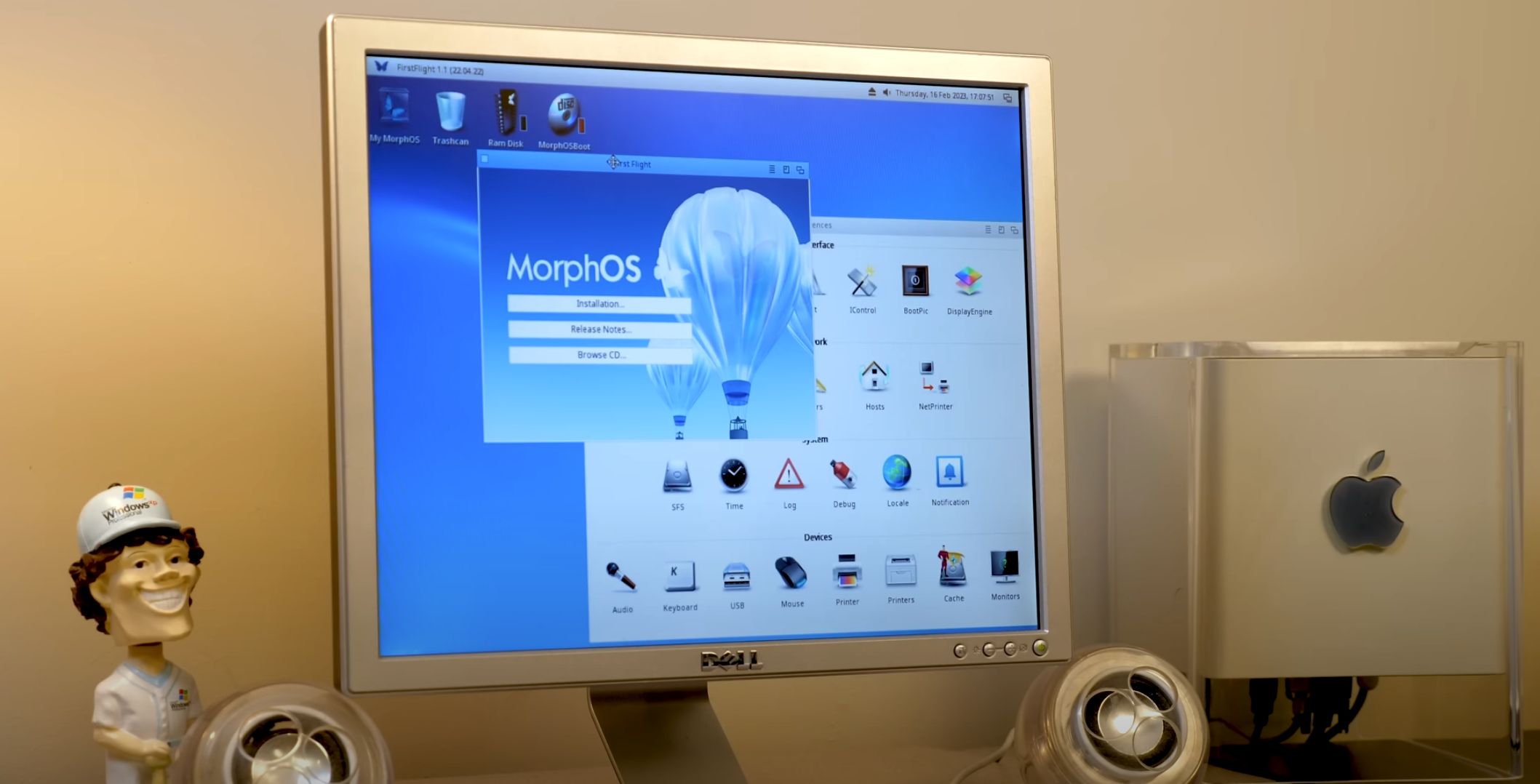
In a world where most operating systems seem determined to eat your RAM for breakfast and then ask for dessert, MorphOS feels almost rebellious. It is fast, compact, colorful, and proudly built for PowerPC hardwarea processor family that mainstream computing politely waved goodbye to years ago. Yet MorphOS did not get the memo. It is still here, still maintained, and still giving old PowerPC Macs and Amiga-inspired systems a surprisingly lively second act.
MorphOS is not trying to be Windows, macOS, or Linux in a butterfly costume. It is an Amiga-like operating system with its own personality, its own architecture, and its own loyal community. For users who love alternative operating systems, vintage Apple hardware, retro computing, or the Amiga way of doing things, MorphOS offers something rare: a modern-feeling desktop experience on machines that many people would otherwise leave in a closet next to mystery cables and a printer from 2006.
What Is MorphOS?
MorphOS is a lightweight operating system designed for PowerPC-based computers. It was originally connected to the post-Commodore Amiga scene, where developers and enthusiasts wanted to preserve the speed, elegance, and responsiveness of AmigaOS while moving the platform forward onto PowerPC hardware.
At its core, MorphOS combines Amiga compatibility with a modernized system design. It uses the Quark microkernel, includes a native desktop environment called Ambient, and supports a range of PowerPC machines such as the Mac mini G4, PowerBook G4, Power Mac G4, selected Power Mac G5 models, Pegasos systems, Efika, Sam460 boards, and AmigaOne X5000 hardware. That hardware list is very specific, so MorphOS is not something you casually install on any old laptop while drinking coffee and feeling optimistic. Compatibility matters.
The result is an operating system that feels quick even on older hardware. MorphOS is known for short boot times, responsive windows, efficient memory use, and a desktop that can be customized deeply without feeling like a science project wrapped in duct tape.
Why PowerPC Still Matters
PowerPC used to be a major player in personal computing. Apple used PowerPC processors in Macs before switching to Intel in 2006. The architecture also powered game consoles, embedded systems, and various workstation-class machines. Today, PowerPC is no longer a mainstream desktop platform, but that does not mean it is useless.
For retro-computing fans, PowerPC hardware sits in a sweet spot. It is old enough to be interesting, but not so old that every task feels like asking a toaster to edit video. A Mac mini G4, PowerBook G4, or compatible Power Mac can still feel snappy when paired with an operating system built for efficiency rather than bloat.
This is where MorphOS shines. Instead of forcing modern heavyweight software onto aging hardware, MorphOS respects the machine. It gives PowerPC computers a purpose beyond nostalgia. You can browse files, run native applications, enjoy Amiga-compatible software, customize the desktop, experiment with development tools, and explore a computing environment that does not behave like everything else.
The Amiga Connection
To understand MorphOS, you have to understand the Amiga influence. The original Amiga computers were famous for multitasking, multimedia capabilities, and a fast graphical environment at a time when many computers were still figuring out how to look friendly without tripping over their own shoelaces.
MorphOS inherits much of that spirit. It is not a direct continuation of Commodore’s AmigaOS, but it is designed to be compatible with many AmigaOS-style applications and concepts. It supports a familiar system structure, Amiga-like libraries, ARexx-style scripting possibilities, and classic workflow ideas that longtime Amiga users recognize immediately.
One major compatibility feature is Trance, a just-in-time compiler used to run many 68k Amiga applications. Instead of treating legacy software like a museum exhibit behind glass, MorphOS lets a large amount of older software operate in a more modern PowerPC environment. That does not mean every classic Amiga game runs directly. Many old games relied on custom Amiga chips, so emulation through UAE is often needed for those. But for many system-friendly applications, MorphOS can feel like a natural bridge between eras.
Ambient: The MorphOS Desktop
Ambient is the native desktop environment of MorphOS, and it is one of the system’s most important features. It is fast, asynchronous, highly configurable, and designed around the idea that users should be able to shape the interface to their liking.
The desktop supports multiple icon formats, file previews, customizable panels, toolbars, hotkeys, thumbnails, built-in viewers, and flexible file management. Users can browse folders in different modes, configure file types, assign actions, and tune the desktop until it feels personal. This is not the kind of customization where you change the wallpaper and pretend you are now a power user. MorphOS lets you adjust behavior, appearance, workflows, and application-level interface details.
Ambient also reflects the Amiga philosophy of speed. Opening windows, browsing directories, and launching small tools feels immediate. On a supported PowerPC Mac, the system often feels more responsive than expected, especially if your last memory of that machine involved a tired old Mac OS X installation gasping under modern web expectations.
MUI: A Customization Playground
MorphOS uses Magic User Interface, better known as MUI, as its main graphical toolkit. MUI has deep roots in the Amiga world and is famous for giving users an unusual level of control over how applications look and behave.
With MUI, developers can build flexible interfaces while users can adjust fonts, colors, spacing, window behavior, gadgets, and layout details. This gives MorphOS a distinct personality. Instead of forcing every user into one rigid interface style, it allows the desktop to become a reflection of personal taste. In practical terms, that means one MorphOS setup can look sleek and modern while another looks gloriously retro, like it escaped from a 1990s computer magazine and learned new tricks.
Modern Features in a Lightweight Package
MorphOS is small, but it is not primitive. The system includes support for USB through the Poseidon USB stack, 2D and 3D graphics features, audio systems, networking, file systems, development tools, and modernized media handling through technologies such as Reggae.
Reggae is MorphOS’s modular media streaming framework. Rather than loading entire media files into memory, it processes streams through connected components. This helps keep memory usage low and makes the system better suited to older machines. Supported media types include common image and audio formats, and the framework is designed to be expandable.
For graphics, MorphOS includes TinyGL, a MorphOS-specific implementation inspired by OpenGL concepts and optimized for supported 3D hardware. It also includes compatibility layers such as Goa for software originally written around older Amiga 3D systems. This is especially important for games, demos, and graphics applications from the Amiga and PowerPC Amiga ecosystem.
Web Browsing With Wayfarer
Web browsing is one of the hardest problems for any niche operating system. Modern websites are not exactly gentle. They behave like they are trying to launch a streaming service, a spreadsheet, a chat app, and a small moon mission inside one tab.
MorphOS addresses this challenge with Wayfarer, a WebKit-based browser built specifically for MorphOS. Wayfarer supports many modern websites, includes features such as audio playback, video support, downloads, bookmarks, ad-blocking support, encrypted password storage, and custom certificate handling. It is one of the most important applications in the current MorphOS ecosystem because it keeps the operating system connected to the modern web.
Still, expectations should be realistic. A 1.5 GHz PowerPC G4 is not going to behave like a modern Apple Silicon Mac or a high-end Windows PC. Heavy websites, video platforms, and script-loaded pages may push the hardware hard. But compared with many other options for vintage PowerPC machines, MorphOS with Wayfarer can feel surprisingly capable.
Supported Hardware: Choose Carefully
MorphOS hardware support is one of its strengths and limitations at the same time. It supports a curated list of systems rather than every PowerPC device ever made. This helps the developers provide a polished experience, but it also means users must check compatibility before installing.
Popular MorphOS Hardware Choices
The Mac mini G4 is often considered one of the easiest entry points. It is compact, quiet, widely known, and supported by MorphOS. PowerBook G4 models with Radeon graphics are also popular because they offer a portable MorphOS experience. Power Mac G4 and selected Power Mac G5 systems can provide more expansion options, though users need to pay close attention to graphics card and model limitations.
Non-Apple options include Pegasos I and II, Efika, Sam460, and AmigaOne X5000 systems. These machines appeal more directly to Amiga and alternative OS enthusiasts, while old Apple PowerPC Macs are often easier for newcomers to find.
Graphics and Expansion Matter
MorphOS support depends heavily on graphics hardware. Many supported systems use ATI or AMD Radeon cards, while some NVIDIA-equipped Power Mac models are not supported or have limitations. Sound, Ethernet, SATA, USB, and wireless support also vary depending on the machine. Before buying a vintage Mac for MorphOS, the smart move is to check the exact model identifier and graphics card. Retro computing is fun, but surprise incompatibility is the kind of surprise nobody wants unless they enjoy dramatic sighing.
Installation and Trial Experience
MorphOS can be downloaded and tested before registration. The free trial is full-featured but time-limited during each session. After the trial period expires, performance becomes restricted until the user reboots or registers the system. This lets curious users test hardware compatibility and explore the desktop before committing.
On many supported Apple machines, installation involves booting from CD or compatible boot media, checking hardware, and installing MorphOS to a dedicated partition or drive. Users coming from macOS should be careful with partitioning. It is possible to dual-boot in some setups, but anyone new to MorphOS should back up data first. Old computers have a mischievous sense of humor, and storage devices from the early 2000s are not famous for emotional stability.
Software Ecosystem
MorphOS has a smaller software ecosystem than mainstream operating systems, but it includes several useful native applications and ports. Users can find tools for file management, graphics, text editing, development, media playback, networking, PDF viewing, archive handling, and system customization.
The operating system also benefits from Amiga software compatibility. This gives MorphOS access to a unique library of older productivity tools, utilities, creative software, and community applications. Native MorphOS programs tend to be fast and lightweight, following the system’s overall design philosophy.
That said, MorphOS is not ideal for users who need current versions of mainstream commercial software. You are not installing Adobe Creative Cloud, Microsoft Office, Steam, or the latest Chrome build here. MorphOS is best understood as an enthusiast operating system, a retro-modern workstation, and a specialized environment for people who value speed, personality, and alternative computing.
MorphOS vs. Linux on PowerPC
Linux remains an option for some PowerPC machines, especially through community ports and BSD alternatives such as OpenBSD or NetBSD. However, mainstream Linux support for older 32-bit PowerPC systems has become more complicated over time. Package availability, browser performance, installation quirks, and driver limitations can make the experience uneven.
MorphOS takes a different approach. It does not try to bring a general-purpose Linux desktop to PowerPC. Instead, it offers a tightly integrated environment designed specifically for its supported hardware. The result can feel faster and more coherent, especially for users who enjoy the Amiga-style workflow.
Linux may still be better for users who want Unix tools, server packages, or open-source flexibility. MorphOS is better for users who want a polished Amiga-like desktop, responsive interaction, and a computing experience that feels distinct from the usual choices.
Strengths of MorphOS
The biggest strength of MorphOS is speed. It boots quickly, launches applications rapidly, and makes old PowerPC hardware feel useful again. Its small footprint is refreshing in an era when software updates sometimes seem larger than entire operating systems used to be.
Another strength is personality. MorphOS has a strong visual identity, a customizable interface, and a workflow that rewards exploration. It also benefits from a knowledgeable community that understands both the Amiga heritage and the realities of vintage PowerPC hardware.
Compatibility with Amiga-style software is another major advantage. For longtime Amiga users, MorphOS feels familiar without being frozen in time. It offers a practical path for running many legacy applications while enjoying a more modern desktop and better hardware performance.
Limitations You Should Know
MorphOS is not for everyone. Its hardware support is limited, its software library is niche, and its commercial license is tied to individual machines. The operating system is also mostly proprietary, which may matter to users who prefer fully open-source systems.
Web browsing, while impressive through Wayfarer, is still constrained by the age of PowerPC hardware. Heavy web apps can be slow. Video playback depends on codec support, site behavior, and CPU power. Modern expectations should be adjusted accordingly.
There is also the issue of hardware age. PowerPC Macs are now vintage machines. Capacitors, hard drives, optical drives, batteries, fans, and power supplies can fail. Running MorphOS may revive the machine, but it cannot magically make a 20-year-old laptop battery believe in itself again.
Who Should Try MorphOS?
MorphOS is ideal for retro-computing fans, Amiga enthusiasts, PowerPC collectors, alternative OS explorers, and users who enjoy lightweight systems. It is also a great choice for people who own compatible PowerPC Macs and want to do something more interesting than reinstalling an old version of Mac OS X for the fifteenth time.
It is less suitable for users who need modern commercial applications, heavy multitasking with current web services, or plug-and-play compatibility with random hardware. MorphOS rewards curiosity, patience, and a willingness to learn its ecosystem.
Practical Experiences With MorphOS: What It Feels Like to Use
Using MorphOS for the first time can feel like stepping into an alternate timeline where the Amiga idea survived, bought a PowerPC Mac, and decided to keep things efficient. The desktop appears quickly, windows respond instantly, and the system feels refreshingly direct. There is very little waiting around. On a compatible G4 machine, opening folders and launching smaller tools can feel almost shockingly fast compared with an aging Mac OS X installation.
The first experience is often visual. MorphOS has a distinctive look: colorful, sharp, customizable, and slightly playful without becoming childish. The butterfly branding fits. This is not a gray corporate operating system wearing a tie and asking about quarterly projections. It feels like a system made by people who genuinely enjoy computers.
File management through Ambient is one of the most pleasant parts of the experience. You can browse folders, adjust views, work with icons, assign file types, and configure behavior in ways that make the desktop feel alive. Users who enjoy tuning their workspace will find plenty to explore. Users who dislike settings menus may feel like they have wandered into a control room, but at least the buttons are interesting.
Web browsing with Wayfarer is both impressive and humbling. It is impressive because a PowerPC machine from the early 2000s can still access many modern websites through a maintained WebKit-based browser. It is humbling because modern websites are heavy. Simple pages, documentation, forums, blogs, and lightweight services can work well. Complex web apps may remind you that the machine is old enough to legally have strong opinions about the iPod.
Native MorphOS applications generally feel quick. Utilities open without drama. System tools are compact and understandable. The shell offers power for users who like command-line work, while the graphical environment remains friendly enough for desktop use. The combination gives MorphOS a nice balance: it is approachable, but not shallow.
The Amiga compatibility layer adds another layer of fun. Running older Amiga-style applications on PowerPC hardware creates a strange but satisfying feeling, like finding a classic car that starts instantly and has Bluetooth installed by a very clever mechanic. Not every old program will work perfectly, and classic games often need UAE because of custom chip dependencies, but the overall compatibility story is one of MorphOS’s most compelling strengths.
Hardware preparation is part of the adventure. A Mac mini G4 can be a clean and friendly starting point, while a PowerBook G4 gives you the charm of a portable MorphOS system. A Power Mac G5 may offer more horsepower, but model support must be checked carefully. The best experience comes from choosing hardware that is known to work well rather than buying the first dusty PowerPC machine you find and hoping the butterfly will bless it.
After a few days with MorphOS, the biggest impression is not that it replaces a modern PC. It does not. The real charm is that it makes old hardware feel intentional again. Instead of being a slow relic, a compatible PowerPC machine becomes a responsive, specialized, enjoyable computer with a purpose. That is the magic. MorphOS does not pretend the PowerPC era never ended; it simply proves there is still something delightful left to do with it.
Conclusion
MorphOS is one of the most fascinating operating systems still actively serving the PowerPC world. It is lightweight, responsive, Amiga-inspired, visually customizable, and surprisingly modern in the right places. With Ambient, MUI, Wayfarer, Trance, Reggae, TinyGL, and carefully selected hardware support, MorphOS turns compatible PowerPC machines into useful and enjoyable systems again.
It is not a mainstream operating system, and that is part of the appeal. MorphOS is for people who like computers with character. It is for users who see an old PowerBook G4 and think, “You are not done yet.” It is for Amiga fans, vintage Mac collectors, and anyone tired of operating systems that need a small data center just to open a settings panel.
In short, MorphOS is proof that modern computing does not always require modern hardware. Sometimes it requires smart engineering, a passionate community, and a blue butterfly landing gracefully on a PowerPC machine that still has plenty of life left.
Note: This article is written for web publishing and synthesizes real technical information about MorphOS, PowerPC hardware support, Amiga compatibility, MorphOS 3.x features, and current browser development in the MorphOS ecosystem.