Trying to see when someone was last active on WhatsApp can feel a little like checking whether your pizza delivery driver is moving on the map: you want information, you want it now, and you may or may not be refreshing more than necessary. The good news is that WhatsApp does show activity clues such as Last Seen and Online. The not-so-funny-but-very-important news is that those clues are controlled by privacy settings, which means you cannot always see them.
This guide explains exactly how to check someone’s WhatsApp Last Seen status, what “online” really means, why the information may disappear, and what you can do without crossing privacy lines. Because yes, curiosity is normal. Turning into a full-time digital detective with a trench coat and suspiciously intense coffee habit? Less ideal.
What Does “Last Seen” Mean on WhatsApp?
On WhatsApp, Last Seen shows the last time a person used WhatsApp or had the app active enough to connect to the service. You may see something like “last seen today at 8:42 PM” under the contact’s name in a chat. This does not necessarily mean they read your message, ignored your message, analyzed your message, showed it to a committee, or dramatically stared at it while making tea. It simply means WhatsApp recorded their last visible activity time.
The Online label is different. When a person appears online, it means WhatsApp is open on their device and connected to the internet. However, being online does not automatically mean they are looking at your chat. They could be replying to a group, checking a voice note, changing a setting, or opening the app by accident while trying to find the calculator. Technology is messy like that.
How To See When Someone Was Last Active on WhatsApp
The easiest way to see when someone was last active is to open your chat with that person and look directly below their name. If their privacy settings allow it, you will see either their Last Seen time or their Online status.
Step-by-Step Instructions
- Open WhatsApp on your phone.
- Go to the Chats tab.
- Tap the conversation with the person you want to check.
- Look under their name at the top of the chat screen.
- If visible, you may see “online” or “last seen” followed by a date and time.
For example, if the top of the chat says last seen today at 10:15 AM, that means WhatsApp last showed that user as active at that time. If it says online, the person is currently connected to WhatsApp. If you see nothing under their name, do not panic. It does not automatically mean something dramatic happened. WhatsApp privacy settings are probably doing their job.
How To Check Last Seen on WhatsApp for iPhone
On iPhone, checking Last Seen is simple. Open WhatsApp, tap Chats, choose a conversation, and look under the person’s name. If their Last Seen is available to you, it will appear at the top of the conversation.
If you do not see it, you can also check your own privacy settings because WhatsApp often works on a two-way privacy principle. In many cases, if you hide your own Last Seen, you may not be able to see other people’s Last Seen either.
How To Check Your Own Last Seen Settings on iPhone
- Open WhatsApp.
- Tap Settings.
- Tap Privacy.
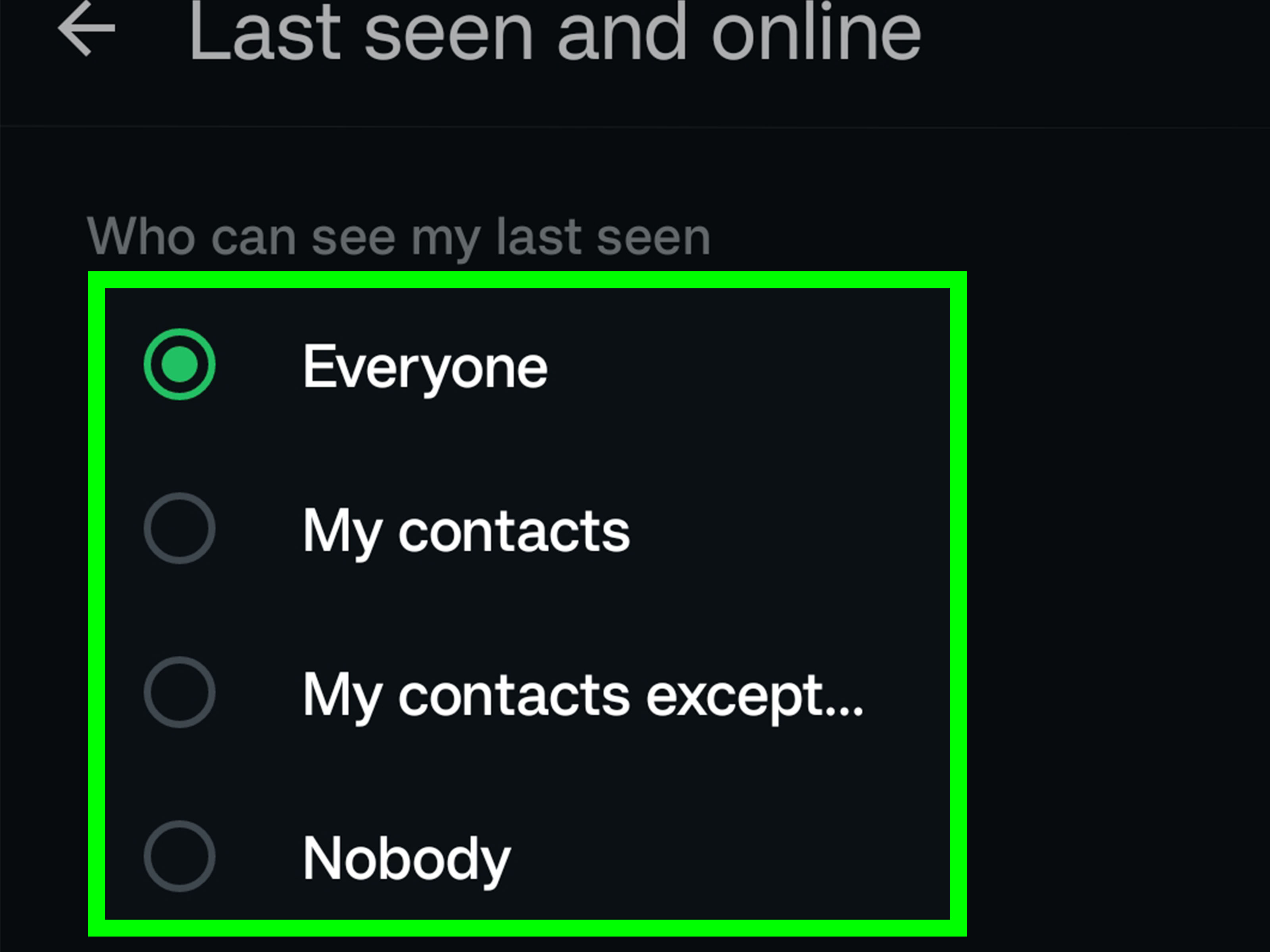
- Tap Last Seen & Online.
- Review who can see your Last Seen and Online status.
The available options may include settings such as Everyone, My Contacts, My Contacts Except…, and Nobody. For Online status, WhatsApp may let you choose whether everyone can see you online or whether your online visibility follows your Last Seen setting.
How To Check Last Seen on WhatsApp for Android
On Android, the process is almost the same. Open WhatsApp, choose the chat, and look under the contact’s name. If the person allows you to see their activity, the Last Seen or Online label will be displayed there.
How To Check Your Own Last Seen Settings on Android
- Open WhatsApp.
- Tap the three-dot menu in the top-right corner.
- Tap Settings.
- Tap Privacy.
- Tap Last Seen & Online.
- Choose who can see your Last Seen and Online activity.
If your setting is set to Nobody, you may lose the ability to view other people’s Last Seen information. This is WhatsApp’s polite way of saying, “Privacy is a two-way street, my friend.”
Why Can’t I See Someone’s Last Seen on WhatsApp?
If someone’s Last Seen is not showing, there are several possible reasons. Some are technical. Some are personal. Some are simply WhatsApp being WhatsApp.
1. They Changed Their Privacy Settings
The most common reason is that the person has hidden their Last Seen. WhatsApp lets users control who can see this information. They may have set it to Nobody, limited it to My Contacts, or excluded specific people using My Contacts Except….
2. You Hid Your Own Last Seen
If you turned off your own Last Seen, WhatsApp may prevent you from seeing other people’s Last Seen. This creates a fair exchange: if you want privacy, other users get privacy too. It is like bringing chips to a party. If you show up empty-handed, do not be shocked when the guacamole mysteriously avoids you.
3. You Are Not in Their Contacts
If the person only shares Last Seen with contacts and your number is not saved in their phone, you may not be able to see their activity. This is especially common when messaging someone new, a business contact, or someone who recently changed phones.
4. They May Have Blocked You
Not seeing Last Seen can be one sign that you may have been blocked, but it is not proof by itself. WhatsApp intentionally avoids clearly confirming blocks to protect privacy. Other signs may include messages staying on one check mark, missing profile photo updates, or calls not connecting. Even then, these signs can have other explanations, such as poor internet connection or a changed phone number.
5. Their Internet Connection Is Off
If the person has no internet connection, WhatsApp cannot update their activity status. A phone in airplane mode, a dead battery, a weak signal, or a Wi-Fi router having a tiny emotional breakdown can all affect what you see.
6. WhatsApp Is Temporarily Glitching
Apps sometimes misbehave. If Last Seen disappears briefly, close WhatsApp, reopen it, check your connection, and make sure the app is updated. A simple restart can fix more problems than we like to admit, which is humbling for everyone involved.
Can You See Someone’s Last Seen If They Hide It?
No, not through legitimate WhatsApp features. If someone hides their Last Seen from you, WhatsApp does not provide a secret button, hidden menu, or magical “reveal activity” trick. Any website or app claiming it can always show hidden Last Seen information should be treated with serious caution.
Third-party tracking apps may promise to monitor WhatsApp activity, but they can be unreliable, invasive, and risky. Some may collect your data, spam you with ads, violate platform rules, or create security problems on your phone. The safest and most respectful approach is to use WhatsApp’s built-in features only.
How To Tell If Someone Is Online on WhatsApp
To see if someone is online, open the chat and look under their name. If they are currently using WhatsApp and their settings allow you to see it, you may see the word online.
However, “online” is not the same as “available.” Someone can be online and still unable to reply. They might be in another conversation, on a call, working, studying, driving with the phone mounted but not touching it, or simply not in the mood to type a response that begins with “haha” and ends with emotional responsibility.
Last Seen vs. Online vs. Read Receipts
WhatsApp has several activity clues, and mixing them up can cause confusion. Here is the difference:
Last Seen
This shows the last time someone was active on WhatsApp, if their privacy settings allow it.
Online
This shows that someone currently has WhatsApp open and connected to the internet, if visible to you.
Read Receipts
Read receipts are the blue check marks that appear when someone has read your message. They are separate from Last Seen. A person can hide Last Seen but still have read receipts on, or turn off read receipts while still showing Last Seen.
Typing
The typing indicator appears when someone is actively typing a message in your chat. This does not necessarily mean the message will be sent. We have all written a reply, deleted it, rewritten it, stared into space, and decided that an emoji was safer.
How To Change Your Own Last Seen and Online Settings
Knowing how Last Seen works also helps you manage your own privacy. If you do not want everyone to know when you were last active, WhatsApp gives you control.
On iPhone
- Open WhatsApp.
- Tap Settings.
- Tap Privacy.
- Tap Last Seen & Online.
- Choose who can see your Last Seen.
- Choose who can see when you are online.
On Android
- Open WhatsApp.
- Tap the three-dot menu.
- Tap Settings.
- Tap Privacy.
- Tap Last Seen & Online.
- Select your preferred visibility options.
If you value privacy, a balanced option is My Contacts. This keeps your activity away from unknown numbers while still allowing friends, family, and saved contacts to see it. If you want more control, My Contacts Except… lets you hide your Last Seen from specific people without blocking them.
How To Use Message Info Instead of Last Seen
If your real question is whether someone received or read a specific message, Last Seen may not be the best clue. Instead, use WhatsApp’s message info feature.
How To Check Message Info
- Open the chat.
- Press and hold the message you sent.
- Tap the information icon or choose Info.
- Check whether the message was delivered or read.
This can show delivery and read times when read receipts are enabled. If read receipts are turned off, you may not see read confirmation in individual chats. In group chats, read information may still work differently depending on the message and group behavior.
What the WhatsApp Check Marks Mean
Check marks can give you useful information without relying only on Last Seen.
- One gray check mark: Your message was sent but not delivered to the recipient’s device.
- Two gray check marks: Your message was delivered but not necessarily read.
- Two blue check marks: Your message was read, if read receipts are enabled.
One gray check mark does not always mean you are blocked. It can also mean the person’s phone is off, they have no connection, they changed numbers, or WhatsApp is not currently reachable on their device. In other words, do not let one lonely check mark write an entire soap opera in your head.
Can WhatsApp Web Show Last Seen?
Yes, WhatsApp Web and the desktop app can show Last Seen or Online status in a chat if that information is visible to you. Open the conversation and look near the contact’s name, just like on mobile. If the person has hidden their Last Seen or if your own settings prevent you from viewing it, the desktop version will not magically reveal it.
WhatsApp Web mirrors much of the phone experience. It is useful for typing faster, sending files, and pretending you are extremely productive while actually arranging stickers in a group chat. But it does not bypass privacy controls.
Is It Accurate When WhatsApp Shows Last Seen?
WhatsApp Last Seen is generally useful, but it should not be treated like courtroom evidence. Several factors can affect timing, including background app activity, internet delays, phone settings, and whether the person is using WhatsApp across linked devices.
If someone’s Last Seen says they were active at 6:10 PM, it usually means that was the last visible time WhatsApp recorded their activity. It does not tell you what they were doing, whose chat they opened, whether they saw your message, or whether they are avoiding you. For that level of certainty, humans still require the ancient technology known as “asking politely.”
Privacy Etiquette: The Part Everyone Should Read
Checking someone’s Last Seen once in a while is normal. Obsessively refreshing it every five minutes is not great for your peace of mind. WhatsApp’s privacy tools exist because people deserve control over their availability. Not every delayed reply is personal. Not every hidden Last Seen is suspicious. Sometimes people are busy, tired, overwhelmed, or simply offline living their non-notification-based lives.
If the matter is important, send a clear message. If it is urgent, call once or use another appropriate contact method. If someone has chosen not to respond, respect that boundary. Good communication beats digital guessing games almost every time.
Common Mistakes People Make When Checking Last Seen
Assuming Last Seen Means “Read”
Last Seen does not prove someone read your message. They may have opened WhatsApp for another chat or closed the app before seeing yours.
Assuming No Last Seen Means Blocked
A missing Last Seen can mean blocked, but it can also mean hidden privacy settings, unsaved contacts, no internet, or app issues.
Using Untrusted Tracking Apps
Avoid apps that claim to track hidden activity. They may expose your data, violate privacy, or simply fail to work.
Reading Too Much Into Online Status
Being online does not mean someone is free to respond. Availability and activity are not the same thing.
Practical Examples
Example 1: You See “Last Seen Today at 7:30 AM”
This means the person was last visibly active on WhatsApp at 7:30 AM. It does not confirm whether they saw your message unless read receipts or message info show that they did.
Example 2: You See “Online”
The person is currently using WhatsApp or has the app open and connected. They may be in another chat, checking a group, or using another WhatsApp feature.
Example 3: You See Nothing Under Their Name
Their Last Seen may be hidden, your own Last Seen may be hidden, you may not be in their contacts, or there may be a connection issue. Do not jump straight to the most dramatic conclusion. Save that energy for reality TV.
of Real-World Experience: What Checking Last Seen Teaches You
In everyday life, WhatsApp Last Seen is useful, but it can also become a tiny emotional treadmill if you are not careful. Many people first learn about Last Seen because they are waiting for an important reply. Maybe it is a job contact, a close friend, a family member, a customer, or someone they are trying to make plans with. You open the chat, see the timestamp, and immediately start building a theory. They were online at 9:05. You sent the message at 9:03. They did not reply. Clearly, a global mystery has begun.
The experience often teaches one simple lesson: digital signals are incomplete. A Last Seen time can tell you that someone used WhatsApp, but it cannot tell you their mood, intention, schedule, or attention level. Someone may open the app quickly while walking into class, entering a meeting, boarding a bus, or answering a family group chat with the emotional weight of twelve unread auntie messages. They may not even notice your message, especially if they receive many chats.
Another common experience is the “missing Last Seen” moment. You used to see a person’s activity, and now it is gone. The first instinct may be to wonder if you were blocked. Sometimes that is possible, but in many cases the person simply updated their privacy settings. More people are becoming aware of digital boundaries. They may not want coworkers, casual contacts, or unknown numbers to know when they are online. That is not suspicious by default; it is often just healthy privacy.
For business communication, Last Seen can be helpful but should not replace professional follow-up. If a client was last active yesterday and has not replied, send a polite follow-up instead of assuming they are ignoring you. A short message such as “Just checking whether you had a chance to review this” works better than silently watching timestamps like a hawk wearing reading glasses.
For friendships and relationships, the healthiest approach is even simpler: use Last Seen as a light clue, not a final verdict. If delayed replies bother you, talk about communication expectations directly. Some people reply instantly. Others respond when they have energy. Some people treat WhatsApp like a living room; others treat it like a mailbox they check when emotionally prepared. Both styles can be normal.
The best experience-based rule is this: check once, understand the context, and move on. If something is urgent, call. If something is sensitive, ask respectfully. If someone has hidden their activity, accept it. WhatsApp gives people privacy controls for a reason, and using the app well means respecting those controls. Last Seen is a feature, not a relationship test, not a courtroom exhibit, and definitely not a reason to lose sleep over a timestamp.
Conclusion
To see when someone was last active on WhatsApp, open their chat and check the area below their name. If their settings allow it, you will see their Last Seen time or Online status. If you cannot see anything, the reason may be privacy settings, your own hidden Last Seen, contact restrictions, a weak connection, or a possible block. The important thing is to use WhatsApp’s built-in tools responsibly and avoid third-party tracking apps that promise more than they should.
WhatsApp activity status can be helpful, but it is not a complete story. Last Seen tells you when someone was last visible on the app, not what they read, felt, meant, or planned. For anything important, clear communication is still the best feature availableand thankfully, it does not require a software update.