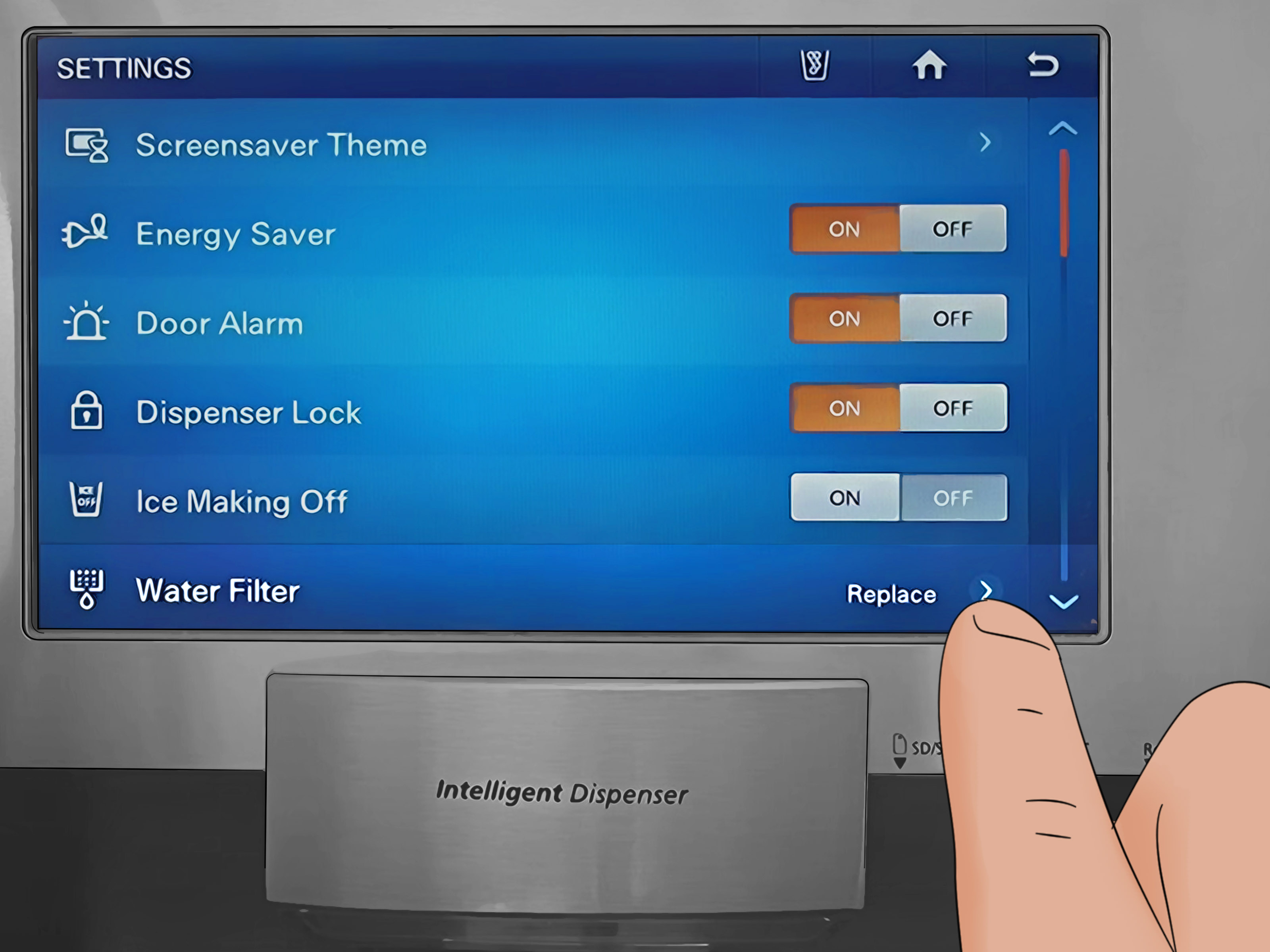
That little red filter light on your Samsung refrigerator is not judging you, but it is trying to tell you something. Most of the time, it means the refrigerator’s water filter timer has reached its replacement point. After you install a fresh filter, the light usually does not disappear by magic. You need to reset it manually, because apparently even smart refrigerators enjoy a tiny bit of paperwork.
The good news? Resetting a Samsung filter light is usually fast. On many models, you press and hold a button labeled Filter Reset, Water Filter, Alarm, Ice/Water, or a similar control for about three seconds. On touchscreen models, such as Samsung Family Hub refrigerators, the reset happens through the on-screen refrigerator settings. The exact method depends on your model, but the logic is the same: replace the filter, reset the indicator, flush the water system, and enjoy clean-tasting water again.
This guide walks you through the most common Samsung refrigerator filter light reset methods, why the light turns red, what to do if it will not reset, and how to avoid future filter drama. Let’s make that red light vanish like leftovers after midnight.
What Does the Samsung Filter Light Mean?
The Samsung refrigerator filter light is a maintenance reminder for the water filter. In most Samsung refrigerators, the indicator works on a time-based schedule, usually around six months. It does not test your water in real time, sniff your ice cubes, or perform laboratory science behind the dispenser. It is a reminder system designed to help you replace the filter before water flow, taste, and filtration performance decline.
Depending on your Samsung model, the filter indicator may show different colors. A blue or green light usually means the filter is still considered good. A purple, pink, orange, or yellow shade may suggest the filter is getting closer to replacement time. A red light typically means it is time to replace the water filter and reset the timer.
Does the Red Filter Light Mean the Refrigerator Is Broken?
No. A red Samsung filter light usually does not mean your refrigerator is broken. It most often means the water filter timer has reached the replacement interval. Think of it like the oil-change sticker on a car windshield. The sticker does not know whether you drove gently to the grocery store or raced a shopping cart through the parking lot. It simply reminds you that maintenance is due.
However, if the red light appears along with slow water flow, bad-tasting water, leaking near the filter, or error codes on the panel, you should investigate further. The filter may be clogged, incorrectly installed, incompatible, or not fully locked into place.
Before You Reset the Filter Light: Replace the Filter First
Do not reset the Samsung filter light just to silence it if the old filter is still installed. That is like changing the batteries in a smoke alarm by removing the smoke alarm. Technically quiet, spiritually questionable.
Samsung generally recommends replacing the refrigerator water filter about every six months for optimal performance. Homes with heavy dispenser use, hard water, well water, or noticeable changes in taste or flow may need replacement sooner. If the water stream slows down, the ice tastes strange, or the water smells off, the filter may be ready for retirement even before the light turns red.
Common Samsung Water Filter Types
Samsung refrigerators commonly use filter models such as HAF-CIN, HAF-QIN, and HAFCU1, depending on the refrigerator design. The easiest way to identify the correct filter is to check the model number printed on the old filter, look inside your refrigerator near the filter housing, or search by your refrigerator model number in the user manual.
Using the correct replacement matters. A filter that almost fits is not the same as a filter that fits. If the filter is not compatible, it may fail to lock properly, reduce water flow, cause leaks, or prevent the filter indicator from behaving normally.
Quick Answer: How to Reset a Samsung Filter Light
For most Samsung refrigerators, follow these quick steps:
- Install the correct new Samsung-compatible water filter.
- Make sure the filter is fully locked into place.
- Unlock the control panel if Child Lock or Control Lock is active.
- Find the button labeled Filter Reset, Water Filter, Alarm, Ice/Water, or a button with “3 sec” printed below it.
- Press and hold the reset button for about three seconds.
- Wait for the light to turn off or return to its normal color.
- Flush the dispenser by running several gallons of water through the system.
That is the basic version. Now let’s get into the model-specific methods, because Samsung refrigerators have more button personalities than a TV remote at a family reunion.
Method 1: Reset With the Filter Reset Button
The simplest Samsung filter light reset method is the dedicated Filter Reset button. Many Samsung French door, side-by-side, and bottom-freezer models include this option on the control panel.
Steps
- Look at the display panel on the front dispenser or inside the refrigerator.
- Find Filter Reset or a button with small text that says Hold 3 sec for Filter Reset.
- Press and hold the button for about three seconds.
- Release the button when the filter light turns off, changes color, or the panel chimes.
On some models, the button may have another main function, such as Alarm or Ice Maker, while the filter reset function is printed underneath in smaller text. Look carefully. Samsung loves tiny secondary labels, probably to keep refrigerator owners humble.
Method 2: Reset Using the Alarm Button
On many Samsung refrigerators, the Alarm button doubles as the water filter reset control. This is common when the panel shows “Alarm / Filter Reset” or “Hold 3 sec.”
Steps
- Confirm that the new filter is installed correctly.
- Locate the Alarm button on the control panel.
- Press and hold Alarm for three seconds.
- Watch for the filter icon to reset, turn off, or return to blue or green.
If nothing happens, check whether the control panel is locked. If Child Lock or Control Lock is enabled, the panel may ignore your button press with the cold indifference of a teenager asked to unload the dishwasher.
Method 3: Reset Using Ice Type, Ice Maker, or Ice/Water
Some Samsung refrigerator models use an ice-related button for the filter reset. Depending on the model, the button may be labeled Ice Type, Ice Maker, Ice/Water, or something similar.
Steps
- Find the button with a filter reset label printed nearby.
- Press and hold it for about three seconds.
- Wait for a beep, icon change, or light color change.
- If the filter light remains red, try again after unlocking the panel.
Do not tap the button quickly. A quick tap usually changes ice settings. A long press triggers the secondary reset function. The refrigerator is not being difficult; it is just very committed to button etiquette.
Method 4: Reset With Two Buttons at the Same Time
Some older Samsung refrigerator models require pressing two buttons together. A common combination is Child Lock plus Ice Type, although the exact combination can vary by model.
Steps
- Locate the two-button reset combination printed on your control panel or listed in the manual.
- Press both buttons at the same time.
- Hold them for about three seconds.
- Release when the filter indicator changes color or turns off.
If your model uses a two-button reset, timing matters. Press both buttons together rather than one after the other. If you accidentally activate Child Lock, unlock the panel and try again.
Method 5: Reset the Filter Light on Samsung Family Hub Models
Samsung Family Hub refrigerators use a touchscreen interface, so the filter reset is handled through the refrigerator settings instead of a physical button.
Steps
- Wake up the Family Hub screen.
- Tap Apps.
- Open Fridge Manager.
- Tap Fridge Settings.
- Select Water Filter.
- Tap Reset.
- Confirm by tapping Proceed or the confirmation option shown on-screen.
Once confirmed, the water filter timer should restart. If the screen is frozen or unresponsive, the issue may be with the display rather than the filter indicator itself. In that case, use Samsung’s recommended screen reset steps for Family Hub models or consult your model manual.
Method 6: Reset on Models With Arrow Buttons or Menu Navigation
Some Samsung refrigerators use arrow buttons or a menu-style display. Instead of holding a single button, you navigate through settings.
Steps
- Use the arrow buttons to open the refrigerator’s options menu.
- Navigate to More Options or a similar menu.
- Select Filter Reset or Water Filter.
- Confirm the reset when prompted.
If the menu wording looks slightly different, do not panic. Samsung model interfaces vary, but the reset option is usually located under settings, options, or water filter controls.
Why the Samsung Filter Light Will Not Reset
If the filter light stays red after you press the reset button, the refrigerator may not be ignoring you personally. There are several common reasons the reset does not work.
1. The Control Panel Is Locked
Samsung refrigerators may have Child Lock, Control Lock, Dispenser Lock, or Automatic Control Lock. When the panel is locked, button presses may not register. Try unlocking the panel first. On some models, you hold Door Alarm, Ice Maker Off, or another lock-related button for about three seconds until you hear a chime.
2. You Are Pressing the Wrong Button
This happens more often than people admit. The reset label may be printed under a button instead of on it. Look for small text that says Filter Reset 3 sec. If you only press the button quickly, you may change ice type or alarm settings instead of resetting the filter light.
3. The Filter Is Not Installed Correctly
If the filter is not fully seated, the refrigerator may not behave properly. Remove the filter and reinstall it. For many Samsung filters, you insert the cartridge and turn it clockwise until it locks. Make sure the lock symbol or notch lines up with the indicator mark.
4. The Filter Is Incompatible
A non-compatible filter may fit poorly, leak, or fail to engage correctly. Check the refrigerator model number and filter model number. Do not rely only on “looks the same” logic. Many refrigerator filters look alike, just as many phone chargers look alike until one charges your device at the speed of a sleepy turtle.
5. The Refrigerator Needs a Power Cycle
If the panel is glitchy, a basic power cycle may help. Unplug the refrigerator or turn it off at the circuit breaker, wait several minutes, and restore power. Do not use this as your first move for every tiny issue, but it can help when the control panel is temporarily confused.
How to Replace a Samsung Refrigerator Water Filter Correctly
Resetting the light is only half the job. Replacing the filter correctly keeps the dispenser flowing and helps prevent leaks.
Basic Replacement Steps
- Turn off the water supply if your model instructions recommend it.
- Locate the water filter inside the refrigerator or near the lower grille, depending on the model.
- Twist the old filter counterclockwise to unlock it.
- Pull the old filter out carefully.
- Remove the protective cap from the new filter.
- Insert the new filter into the housing.
- Turn it clockwise until it locks securely.
- Check that the filter alignment mark is correct.
- Reset the water filter indicator light.
- Flush water through the dispenser before drinking.
Some water dripping during replacement is normal. Keep a towel nearby unless you enjoy turning appliance maintenance into a small kitchen splash pad.
Do You Need to Flush the Water After Resetting the Filter?
Yes. After installing a new Samsung refrigerator water filter, flush the system by dispensing several gallons of water and discarding it. This helps remove trapped air and loose carbon particles from the new filter. It can also improve taste and restore smoother water flow.
If the water sputters at first, that is usually air leaving the line. Keep dispensing until the flow becomes steady. If the water still tastes odd after flushing, dispense more water. If the taste or smell remains after a proper flush, the issue may be with the home water supply, plumbing, or a filter that is not installed correctly.
How Often Should You Reset the Samsung Filter Light?
You should reset the Samsung filter light every time you replace the water filter. For most households, that means about twice per year. Do not reset it repeatedly without changing the filter, because that makes the reminder inaccurate.
Set a calendar reminder for six months after each replacement. You can also write the installation date on the filter box or keep a note on your phone. Future you will appreciate this. Future you is already busy wondering why there are three open jars of pickles in the refrigerator.
Signs Your Samsung Water Filter Needs Replacement Early
The filter light is helpful, but it is not the only sign. Replace the filter sooner if you notice:
- Water dispensing more slowly than usual
- Ice cubes tasting strange
- Water smelling unpleasant
- Cloudy or discolored water after normal flushing
- Visible particles in the water
- Leaking around the filter area
- A filter that has been installed longer than six months
Heavy water use can wear out a filter faster. So can hard water or sediment-heavy water. If your refrigerator is the official hydration station for a large family, a workout household, or a dog who somehow prefers filtered water, do not be surprised if the filter needs attention sooner.
Common Samsung Filter Reset Button Names
Because Samsung refrigerator panels vary, the filter reset control may appear under different names. Look for these labels:
- Filter Reset
- Water Filter
- Alarm
- Ice/Water
- Ice Maker
- Ice Type
- Fridge
- Power Cool
- Child Lock + Ice Type combination
The key clue is usually the phrase 3 sec. If a button has “Filter Reset” printed below it in smaller lettering, press and hold that button for three seconds.
Troubleshooting: Samsung Filter Light Still Red After Reset
Check the Button Hold Time
Hold the reset button for a full three seconds. Count slowly: one refrigerator, two refrigerator, three refrigerator. If you release too soon, the panel may not reset.
Unlock the Panel
If the control panel is locked, unlock it first. Look for a lock icon or a “Child Lock” message. Hold the correct lock button for three seconds, then try the filter reset again.
Reinstall the Filter
Remove the new filter and reinstall it. Make sure it turns fully into the locked position. If it feels loose or crooked, it is not seated correctly.
Confirm the Filter Model
Match the filter to the refrigerator model. A mismatched filter may cause leaks, slow water, or installation problems.
Power Cycle the Refrigerator
If the panel is frozen or acting strangely, unplug the refrigerator or turn it off at the breaker for several minutes, then restore power. After the panel restarts, try the reset again.
Check the User Manual
If none of the common methods work, search your Samsung refrigerator model number and check the exact manual. Samsung has made many refrigerator designs, and some older models use unique reset procedures.
Safety Tips When Changing and Resetting the Filter
- Do not force a filter into place.
- Do not use tools to twist the cartridge unless your manual specifically says so.
- Keep towels nearby to catch small drips.
- Flush the system before drinking from a new filter.
- Replace damaged filters immediately.
- Do not ignore leaks around the filter housing.
- Use the correct filter type for your refrigerator model.
If water leaks continue after reinstalling the filter, stop using the dispenser and inspect the filter housing. A damaged O-ring, cracked filter, or incorrect cartridge can cause water to escape. Refrigerator leaks are one of those problems that start as “just a few drops” and end with someone Googling flooring repair at 1:00 a.m.
Real-World Experiences: What Resetting a Samsung Filter Light Is Actually Like
In real kitchens, resetting a Samsung filter light is rarely dramatic, but it can be mildly confusing the first time. The most common experience goes like this: the water filter light turns red, someone orders a new filter, the filter arrives, and then the household discovers that replacing the filter and resetting the light are two separate tasks. The new cartridge is installed, the water tastes fine, but the red light remains on the panel like a tiny electronic accusation.
One practical lesson is to look closely at the control panel before assuming something is wrong. Many Samsung refrigerators hide the reset function as a secondary button action. A button may say “Alarm” in large letters but “Filter Reset 3 sec” in smaller text below it. That small print is easy to miss, especially if the kitchen lighting is dim or the panel has fingerprints from normal use. Cleaning the display area and using a flashlight can make the right button obvious.
Another common experience is accidentally activating the wrong feature. People often tap the button instead of holding it. A quick press may change the ice setting, turn the door alarm on or off, or do absolutely nothing useful. The reset usually requires a deliberate long press. If the refrigerator chimes, blinks, or changes the filter icon color, that is usually the sign that the reset worked.
Control lock is another sneaky troublemaker. Many Samsung panels lock automatically or have Child Lock enabled. When the panel is locked, the filter reset command may not register. This leads to the classic kitchen conversation: “I held the button.” “Did you unlock it?” “It has a lock?” Yes, the refrigerator has a lock, because apparently even appliances need boundaries. Unlocking the panel first often solves the problem instantly.
Filter installation also matters more than people expect. If the new filter is not fully turned into the locked position, the dispenser may sputter, flow slowly, or leak. The filter should feel secure, not wobbly. On twist-in filters, the final turn may require firm hand pressure, but it should not require heroic strength. If you feel like you are wrestling a submarine hatch, stop and recheck the alignment.
Flushing the water system is one of the most skipped steps. After a new filter is installed, the first water may contain air bubbles or loose carbon dust. That does not mean the filter is bad. It means the new cartridge needs to be rinsed through the system. Dispense several gallons and discard the water. The flow may sputter at first and then smooth out. Ice made right after replacement may also taste better if you discard the first batch.
A useful habit is to reset the filter light only after the new filter is installed and flushed. Then write the replacement date somewhere easy to find. Some people write it on the filter box; others use a phone reminder. The six-month schedule is much easier to follow when you do not have to guess whether the filter was changed in March, May, or “sometime after that big grocery trip.”
The best experience is the boring one: correct filter, proper installation, three-second reset, flushed water, normal light. That is the goal. A refrigerator should keep food cold and water fresh, not become a weekly puzzle box.
Conclusion
Resetting a Samsung filter light is usually quick once you know where to look. In most cases, you replace the water filter, unlock the panel if necessary, press and hold the correct reset button for about three seconds, and confirm that the indicator turns off or returns to its normal color. On Family Hub models, the reset is handled through the touchscreen by opening Fridge Manager, selecting Fridge Settings, choosing Water Filter, and tapping Reset.
The most important thing to remember is that the filter light is a reminder timer, not a real-time water-quality test. Reset it after installing a new filter, not before. Use the correct filter, seat it properly, flush several gallons of water after replacement, and watch for signs such as slow flow, leaks, or odd taste. If the light refuses to reset, check for Control Lock, confirm the button combination, reinstall the filter, or consult the manual for your exact Samsung refrigerator model.
Note: Button names and reset combinations vary by Samsung refrigerator model. This guide covers the most common methods, but your model’s user manual is the final authority if the control panel looks different.

