Note: TikTok Coin prices, gift options, payment methods, and availability can change by country, account status, app version, and platform. Always check the final price on TikTok or Google Play before confirming a purchase.
Getting TikTok Coins on Android is not complicated, but the internet has done its usual internet thing: it has turned a simple purchase into a maze of “free coin generators,” suspicious discount sites, and videos promising secret hacks that sound like they were written by a raccoon with a VPN. Let’s make this easy.
The best and easiest method to get TikTok Coins on Android is to buy them directly inside the official TikTok app through your TikTok Balance or during a TikTok LIVE. If available in your region, you can also recharge from TikTok’s official website. These are the safest options because they keep your payment inside TikTok, Google Play, or TikTok’s approved payment flow instead of sending your login details into the digital swamp.
In this guide, you’ll learn what TikTok Coins are, how to recharge TikTok Coins on Android step by step, whether there is a safe way to get free TikTok Coins, how to avoid scams, and what to do if your payment fails. We’ll keep it clear, practical, and slightly less painful than watching someone spend 30,000 coins on a lion gift while you wonder what happened to your grocery budget.
What Are TikTok Coins?
TikTok Coins are TikTok’s virtual currency. You buy Coins with real money, then use them inside TikTok to send virtual Gifts to creators, usually during LIVE streams or other gifting-enabled content. Think of them as arcade tokens, except the arcade is on your phone, the prizes are animated roses and galaxies, and the person receiving them may be dancing, cooking, gaming, singing, or calmly explaining drama with the seriousness of a courtroom witness.
Coins are not cryptocurrency. You cannot mine them, trade them on an exchange, or use them to buy a sandwich. They live inside TikTok’s ecosystem and are meant for TikTok features such as Gifts. Once you buy Coins, they appear in your TikTok Balance. When you send a Gift, the required number of Coins is deducted from that balance.
Best Method: Buy TikTok Coins in the Android App
For most Android users, the easiest way to get TikTok Coins is through the TikTok app itself. This method is simple, familiar, and works with payment methods connected to Google Play when TikTok routes the purchase through the app store.
Step-by-Step: Recharge Coins from Your TikTok Balance
- Open the TikTok app on your Android phone.
- Tap Profile at the bottom-right corner.
- Tap the Menu icon, usually shown as three lines in the top-right corner.
- Select Balance.
- Tap Get Coins or Recharge, depending on your app version.
- Choose the Coin package you want.
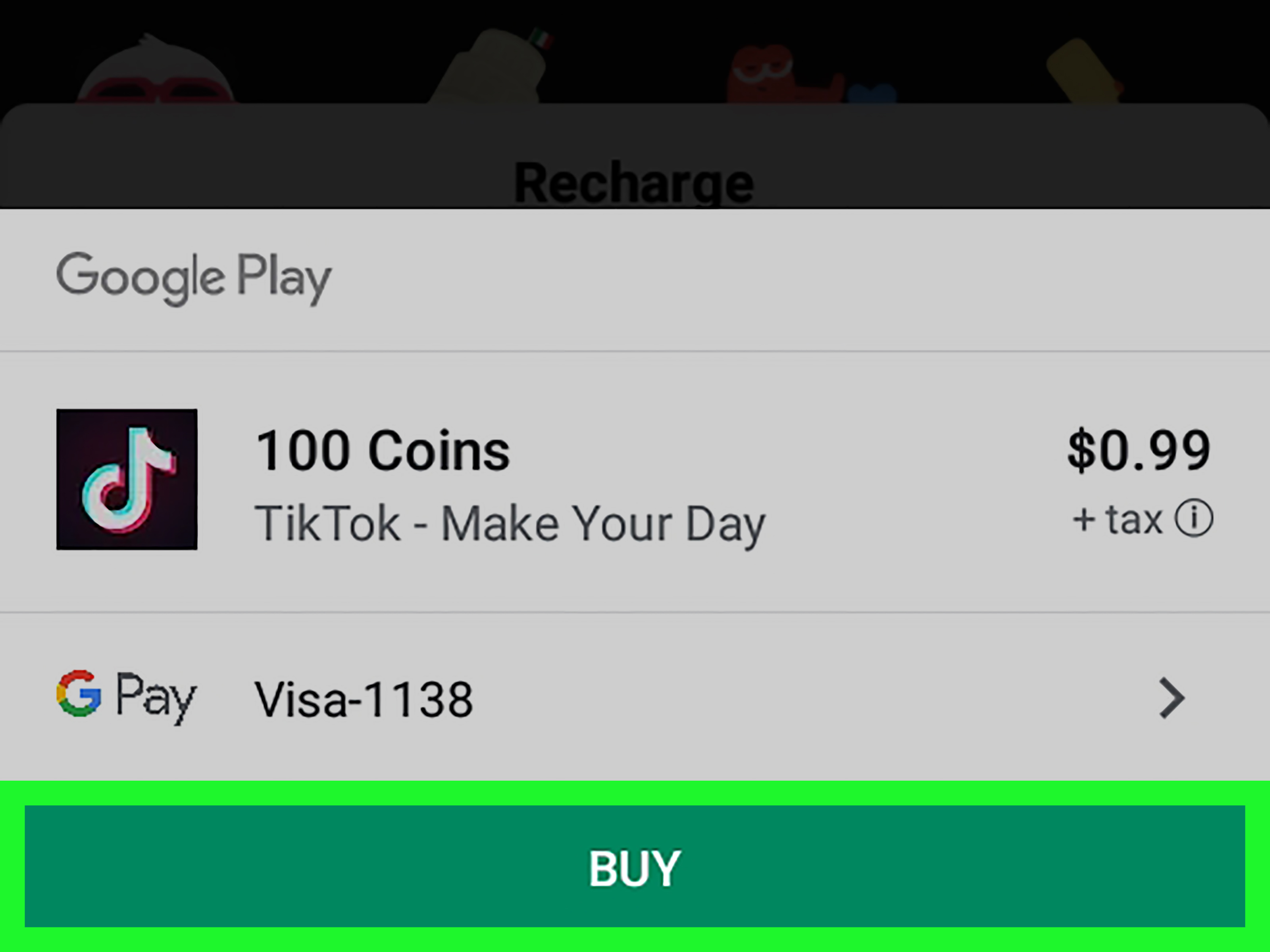
- Tap Recharge.
- Follow the payment instructions shown by TikTok or Google Play.
- After the purchase is complete, check your Balance to confirm the Coins were added.
That’s it. No wizard robe required. Your Coins should appear shortly after the payment is processed. If they do not show up immediately, give the app a moment, close and reopen TikTok, and check your Balance again.
Why This Is the Easiest Method
The in-app Android method is convenient because you do not need to leave TikTok. It also uses familiar Android payment tools, which may include credit cards, debit cards, Google Play balance, Google Play gift card balance, or other supported payment methods depending on your country and account settings.
This is also the method most casual users should choose because it reduces confusion. You see the Coin package, confirm the price, complete the payment, and continue watching TikTok. It is basically the “drive-thru lane” of TikTok Coin purchases: not always the cheapest meal in town, but fast and predictable.
Alternative Method: Recharge Coins During a TikTok LIVE
You can also buy Coins directly while watching a TikTok LIVE, which is handy if your favorite creator is live and you suddenly feel moved to send a Gift. Maybe they sang your favorite song. Maybe their cat walked across the keyboard. Maybe you just like sending tiny digital roses. We do not judge.
How to Recharge During a LIVE
- Open a TikTok LIVE where Gifts are available.
- Tap the Gift button at the bottom of the screen.
- If your Coin balance is too low, tap Recharge.
- Choose a Coin package.
- Complete the purchase through the payment flow shown on your Android device.
- Return to the LIVE and send your Gift if you still want to.
This method is fast, but it has one small danger: impulse spending. LIVE streams are designed to feel exciting. Gifts fly, comments move quickly, and it is easy to tap faster than your budget appreciates. Before recharging during a LIVE, pause for three seconds and ask yourself, “Would future me approve?” Future you is often very wise and slightly tired.
Can You Recharge TikTok Coins from the Website on Android?
Yes, TikTok also supports Coin recharge through its official website in some regions. On Android, you can open your browser and go to TikTok’s official Coin recharge page, sign in, choose a Coin package, and complete the purchase using the available payment methods.
This can be useful if you prefer not to buy through the app or want to compare the final price before purchasing. In some cases, users notice different pricing between the app and the web, but do not assume the website is always cheaper. Prices can vary by location, tax, currency, account, package size, promotion, and platform. The smart move is simple: check the final total before you pay.
App vs. Website: Which Is Better?
The Android app is usually best for convenience. The TikTok website may be better for comparing options or using a payment method that is not available inside the app. Both are legitimate when you use TikTok’s official channels. What you should avoid is any random website that asks for your TikTok login, promises “free unlimited Coins,” or looks like it was designed during a thunderstorm by someone who has never met a security certificate.
Can You Get TikTok Coins for Free?
Here is the honest answer: there is no reliable, legitimate “free TikTok Coins generator.” TikTok Coins are purchased virtual items. Any site, app, or account promising unlimited free Coins is almost certainly trying to get something from you, such as your TikTok login, personal data, payment details, or permission to install something sketchy on your phone.
Sometimes scammers use phrases like “human verification,” “coin hack,” “TikTok mod APK,” “free recharge,” or “limited Coin event.” Be careful. If a method asks you to enter your username and complete random offers, download unknown apps, share a code, or pay a “small activation fee,” close the page. Real discounts do not need your password. Real promotions do not require you to install mystery software. And real TikTok Coins do not appear because a website with twelve pop-ups says “processing magic server injection.”
How to Buy TikTok Coins Safely on Android
Buying TikTok Coins is simple, but safe buying matters. Here are the best practices every Android user should follow.
Use Only Official TikTok or Google Play Payment Flows
Buy through the TikTok app, TikTok’s official website, or supported Google Play payment options. Do not send money to strangers who claim they can recharge your account. Do not share your TikTok password. Do not hand over your phone number, email verification code, or two-factor authentication code. If someone says they need those details to “add Coins,” they are not helping you; they are auditioning to steal your account.
Check Your Google Play Payment Method
On Android, your purchase may use Google Play billing. Before buying, make sure your payment method is active and up to date. Open the Google Play Store, tap your profile icon, go to Payments & subscriptions, and review your payment methods. You may be able to use a card, Google Play balance, or other supported local options.
Turn On Purchase Verification
If you share your phone with family members, especially kids, purchase verification is your financial seatbelt. In Google Play, you can require verification before purchases. This helps prevent accidental Coin purchases, which is useful because “the toddler bought TikTok Coins” is not a sentence anyone wants to explain to customer support.
Set a Monthly Budget
Google Play allows users to set a budget and track spending. This does not necessarily block all purchases, but it can warn you when you are close to or over your monthly amount. If you enjoy TikTok LIVE gifting, a budget can keep the fun from turning into a surprise bill with jump-scare energy.
What Payment Methods Can Android Users Use?
Payment options depend on your country, account, and whether you are buying through the TikTok app or website. Common Android-related options may include:
- Credit card
- Debit card
- Google Play balance
- Google Play gift card balance
- Carrier billing where supported
- PayPal or digital wallet options where available
- Other regional payment methods shown at checkout
The checkout screen is the final authority. If a payment option does not appear, it may not be supported for your account, device, region, or purchase type.
How Much Do TikTok Coins Cost?
TikTok Coin prices vary. The app usually shows different Coin bundles, and larger bundles may offer a better per-Coin value. However, the exact price can change based on region, currency, taxes, app store fees, exchange rates, and TikTok’s current pricing.
Instead of memorizing a price chart that may become outdated faster than a TikTok trend, use this method: open TikTok, go to Balance, tap Get Coins, and compare the packages shown on your screen. Divide the total price by the number of Coins if you want to find the best value. For example, if one package costs $9.99 and another costs $19.99, check how many Coins each gives you before assuming bigger is better.
What Can You Use TikTok Coins For?
TikTok Coins are mainly used to send virtual Gifts. These Gifts can appear during LIVE streams or other gifting-enabled TikTok content. Gifts vary in Coin cost. Some are small, simple, and affordable; others are dramatic full-screen animations that make the chat explode like everyone just saw a celebrity at the mall.
When viewers send Gifts, creators may receive Diamonds or rewards through TikTok’s monetization system, depending on eligibility and TikTok’s policies. The exact value creators receive is not always a simple one-to-one conversion from the amount viewers spend, because TikTok’s system involves platform rules, revenue sharing, fees, and eligibility requirements.
Common Problems When Buying TikTok Coins on Android
Payment Declined
If your payment is declined, check whether your card is active, your billing address is correct, your Google Play payment profile is updated, and your bank is not blocking the transaction. You can also try another supported payment method.
Coins Not Showing After Purchase
If you paid but do not see your Coins, close and reopen TikTok. Check your TikTok Balance again. Also check your Google Play purchase history or payment receipt. If the transaction went through but Coins still do not appear, use TikTok’s in-app support or Google Play support depending on where the payment was processed.
Recharge Button Missing
If you do not see a recharge option, update TikTok, restart your phone, check your account age and region, and make sure you are logged into the correct account. Some features are not available everywhere or for every account.
Gift Button Missing During LIVE
Not every LIVE allows Gifts. If the Gift button is missing, gifting may not be available for that creator, stream, region, or account. It may also be restricted by TikTok’s eligibility rules.
Refunds: Can You Get Your Money Back?
Refunds for TikTok Coin purchases can be tricky. Digital purchases and in-app purchases are often treated as final unless a specific refund policy or legal requirement applies. If the purchase was processed through Google Play, you may need to request help through Google Play’s refund process. If the issue is with TikTok Balance or Coins not appearing, TikTok support may be the better first stop.
The safest strategy is to treat Coin purchases as final before you tap confirm. Buy smaller packages first if you are new. Do not test with a large purchase unless you are comfortable spending that amount.
Best Tips for Getting TikTok Coins Without Regret
Start Small
Buy a small Coin package first to understand how the process works. Once you know how Coins appear, how Gifts work, and how often you actually use them, you can decide whether a larger package makes sense.
Compare App and Web Prices
If TikTok’s web recharge is available in your region, compare the final price with the Android app price. Do not compare only the package label; compare the final checkout total.
Avoid Third-Party “Discount” Sellers
Unofficial sellers may promise cheaper Coins, but they often come with account risk, payment risk, or plain old scam risk. Saving a few dollars is not worth losing your TikTok account.
Use a Budget
TikTok Gifts are fun because they feel social and instant. That is also why spending can sneak up on you. Set a monthly entertainment limit before you start gifting.
Never Share Login Codes
No real TikTok Coin recharge requires you to share a password, SMS code, email code, or two-step verification code with another person. Keep those private.
Real-World Experience: What Buying TikTok Coins on Android Feels Like
The first time you buy TikTok Coins on Android, the process feels almost too easy. You open the app, tap through Profile and Balance, choose a package, confirm the payment, and suddenly your account has Coins. The whole thing can take less than a minute if your Google Play payment method is already set up. That convenience is great, but it also deserves a little respect. When buying feels effortless, spending can feel less real. It is the same reason people can order fries from a delivery app at midnight and act surprised when the receipt looks like a small utility bill.
From a user experience perspective, the Android method is smoothest when everything is prepared beforehand. The best setup is simple: update TikTok, confirm your Google Play payment method, turn on purchase verification, and decide your budget before you enter a LIVE. That way, when a creator you enjoy starts streaming, you are not fumbling through payment errors or making emotional spending decisions because the chat is yelling “send the galaxy!”
One practical example: imagine you regularly watch a musician who performs live on TikTok every Friday. You want to send small Gifts as appreciation, but you do not want to overspend. A smart approach is to set a monthly TikTok gifting budget, buy a modest Coin package at the beginning of the month, and treat that balance like your entertainment jar. When it is gone, it is gone. This keeps gifting fun instead of turning it into a financial mystery novel titled Where Did My Money Go?
Another useful habit is checking whether you are buying from the app or the official website. Some users prefer the Android app because it is faster and connected to Google Play. Others like checking TikTok’s web recharge page because it may show different package options or payment methods. The key is not to chase “cheap Coins” through random websites. The official app and official TikTok web flow are boring in the best possible way: boring means predictable, secure, and unlikely to ask for your password in neon letters.
The biggest lesson from real use is that TikTok Coins are best when treated as entertainment spending, not an investment. Sending Gifts can make a LIVE more interactive and help support creators, but Coins are still digital items used inside a platform. Buy them because you enjoy the experience, not because someone promised you status, profit, or secret rewards. If a creator pressures viewers aggressively, or if a stranger says they can multiply your Coins, take a step back. The best TikTok Coin experience is simple: buy safely, gift intentionally, and keep enough money left for actual life things, like coffee, rent, and snacks that do not disappear as animated stickers.
Final Thoughts
The best and easiest way to get TikTok Coins on Android is to recharge through the official TikTok app. Go to Profile, open the menu, select Balance, tap Get Coins, choose a package, and complete the purchase. If you are already watching a LIVE, you can also recharge from the Gift panel. If available, TikTok’s official website is another legitimate option worth comparing.
What should you avoid? Free Coin generators, modded APKs, unofficial sellers, strangers offering recharge services, and any page that asks for your TikTok login or verification code. TikTok Coins are simple when you stay inside official channels. The moment a website promises “unlimited free Coins,” it is time to leave faster than a creator ending a LIVE after saying, “I’ll be right back.”
Buy small, check the final price, use purchase verification, set a budget, and enjoy gifting responsibly. TikTok should be fun. Your payment history should not need a detective.