Adding music to a Facebook post or Story is one of the easiest ways to turn a regular update into something people actually pause to watch. A beach photo is nice. A beach photo with a sunny acoustic track? Suddenly, it looks like you have a lifestyle brand, a travel sponsor, and possibly a coconut water partnership. Music adds mood, movement, personality, and emotional contextwithout forcing you to write a caption that sounds like a greeting card had too much coffee.
The good news is that Facebook makes music fairly simple to add, especially in Stories, Reels, and certain text posts. The slightly annoying news is that Facebook’s music tools can vary by country, account type, device, app version, and music licensing availability. So, if your friend has a shiny “Music” button and you do not, it does not automatically mean your phone is haunted. It may simply mean the feature is not available to your account yet, or your app needs an update.
This guide explains how to add music to a Facebook Story, how to add music to a Facebook post when the option is available, how to use music in Reels, what to do when the Music sticker is missing, and how to avoid common copyright and audio problems. Whether you are posting a birthday moment, a product teaser, a vacation clip, or a dramatic photo of your iced coffee, here is how to give it a soundtrack.
Can You Add Music to a Facebook Post or Story?
Yes, you can add music to Facebook Stories, Reels, and some types of posts. Facebook’s built-in music library lets users search for songs, preview clips, choose a specific part of the track, and place a music sticker or audio layer on the content. In Stories, the feature usually appears as a Music option or Music sticker. In Reels, it often appears as an Audio or Music tool during recording or editing. For some text posts, Facebook may also show an option to add a song that plays when people view the post.
However, music availability is not identical for everyone. Some songs may appear in one country but not another. Some business accounts may have a more limited library than personal profiles because commercial use has different licensing rules. Some songs may be removed later if music rights change. In other words, Facebook music works wellbut it is not a magical unlimited jukebox. Think of it as a carefully licensed jukebox wearing a Meta hoodie.
How to Add Music to a Facebook Story
Facebook Stories are the easiest place to add music because the feature is built directly into the Story creation tools. Stories are designed for quick, casual sharing, so music can help set the tone fast.
Step 1: Open the Facebook App
Open the Facebook app on your iPhone or Android device. Music tools are mainly designed for the mobile app, so if you are trying to do this from a desktop browser, you may not see the same options. Make sure the app is updated to the latest version before you begin.
Step 2: Tap “Create Story”
At the top of your Feed, tap Create Story. You can usually choose from several story formats, such as photo, video, text, boomerang-style clips, or music. If you want music to appear over a photo or video, select the photo or video first.
Step 3: Choose a Photo, Video, or Music Story
You can upload media from your phone gallery or capture something directly using the camera. For example, if you are posting a birthday dinner photo, upload the picture first. If you want a music-first Story, select the Music option if it appears, then pick the song before adding visuals or text.
Step 4: Tap the Music Sticker or Music Option
After choosing your photo or video, tap the sticker icon or look for the Music option. In many versions of the Facebook app, you can find Music among the sticker tools. Tap it to open Facebook’s music library.
Step 5: Search for a Song
Use the search bar to type the song title, artist name, or a mood-related word. You may also see categories such as trending music, moods, genres, or popular tracks. Tap a song to preview it. If the song has lyrics available, Facebook may show a lyrics label or allow you to display lyric snippets in your Story.
Step 6: Choose the Best Part of the Song
Most people do not need the entire song. In fact, Stories are short, so the hook matters. Drag the slider to choose the part of the track you want people to hear. Pick a section that matches the visual moment. A calm piano intro may work for a sunset. A chorus may work better for a celebration. A dramatic beat drop may work for revealing your newly organized pantry, because yes, clean shelves deserve applause.
Step 7: Customize the Music Sticker
Facebook may let you change how the song appears on your Story. You can display the song title, artist name, album-style sticker, or lyrics if available. Drag the sticker to a clean part of the screen where it does not block faces, important text, or the main subject.
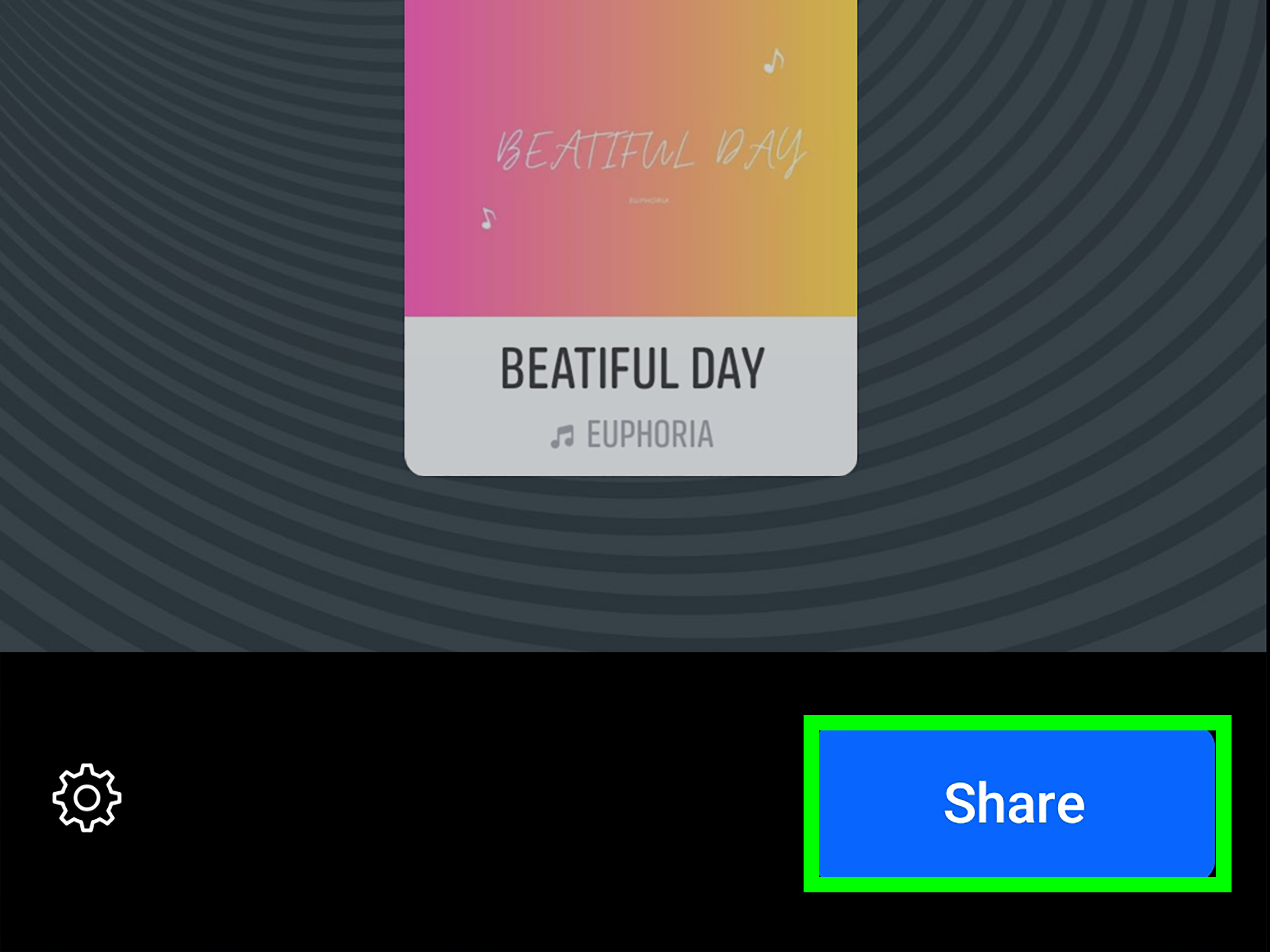
Step 8: Share Your Story
Once everything looks and sounds right, tap Share to Story. Your Story will appear to the audience you selected, and viewers can listen to the song clip while watching your content.
How to Add Music to a Facebook Text Post
Facebook has also offered music for certain text posts. When available, this feature lets you attach a song to a written update so the music can play when someone views the post. It is a fun option for status updates, quotes, announcements, or mood posts.
Step 1: Start a New Post
Open Facebook and tap the box that says something like What’s on your mind?. Write your text post first. For example: “Finally finished my room makeover,” “Weekend mood,” or “This song has been living rent-free in my head.”
Step 2: Look for the Music Option
Tap the add-to-post menu, which may appear as three dots, a smiley icon, or a list of options depending on your app version. If music is available for your account, you may see Music or an audio-related option.
Step 3: Select a Song
Search Facebook’s music library and choose a track that matches your post. If you are sharing a motivational thought, choose something upbeat. If you are posting a nostalgic memory, choose a softer or older track. The song should support the post, not wrestle it to the ground.
Step 4: Preview and Publish
Preview the post if possible, check your audience settings, and tap Post. If you do not see the music option, try updating the app, switching from desktop to mobile, or checking again later. The feature may not be available to every user, region, or post type.
How to Add Music to a Facebook Reel
If your content is video-based, Facebook Reels may be the best format. Reels are built for short-form video discovery, and music is a major part of the experience. You can add music before recording or after uploading a clip.
Adding Music Before Recording
Open Facebook and go to the Reels creation tool. Tap the music note, audio, or sound icon. Search for a song or browse available audio. After selecting a track, choose the section you want and record your video while the music plays. This is useful for lip-syncing, dancing, transitions, comedy timing, or any video where the action needs to match the beat.
Adding Music After Recording
If you already recorded or uploaded your video, tap the audio or music option on the editing screen. Choose a track, adjust the section, and balance the volume between the original video sound and the added music. This matters because nobody wants background music so loud that your voiceover sounds like it is calling from inside a washing machine.
Best Uses for Facebook Reel Music
Music works especially well in Reels for tutorials, before-and-after transformations, travel clips, food videos, outfit ideas, pet videos, fitness snippets, and product demos. A strong audio choice can make a simple clip feel more polished and increase watch time because viewers instantly understand the mood.
How to Add Music to a Facebook Page Story
If you manage a Facebook Page, such as a business, creator, community, or brand Page, you may also be able to add music to a Page Story. The steps are similar to personal Stories, but you need to make sure you are posting as the Page.
Open the Facebook app, go to your Page, and switch into the Page profile if needed. Tap Create Story, add your photo or video, then tap stickers and choose Music. Select a song, adjust the clip, customize the sticker, and share it. For businesses, remember that commercial use may be more limited than personal use. If the Story promotes a product, service, sale, or campaign, choose audio carefully and consider using royalty-free music or Meta’s approved sound tools where available.
Why You May Not See the Music Option on Facebook
One of the most common questions is: “Why can’t I add music to my Facebook Story or post?” There are several possible reasons, and most of them are fixable.
Your App Is Out of Date
Start with the simplest fix: update the Facebook app from the App Store or Google Play. New creative tools often require the latest app version. After updating, close and reopen the app.
The Feature Is Not Available in Your Region
Music licensing depends on country and region. A song, artist, or entire music feature may be available in one location and missing in another. This is not something you can fix manually inside Facebook.
Your Account Type Has Limited Music Access
Business accounts and Pages may have different access to popular music than personal profiles. This is because commercial content can trigger different copyright rules. If you are posting for a brand, use music that is cleared for business or promotional use.
The Song Is Not Licensed for Facebook
Not every song is available in Facebook’s music library. Even famous songs may be missing, restricted, or removed later. Try searching for another version, a similar artist, or a different track with the same mood.
You Are Using Desktop Instead of Mobile
Many Facebook music tools are easier to access from the mobile app. If you cannot find Music on desktop, try using the iOS or Android app instead.
Tips for Choosing the Right Music for Facebook Content
Adding music is easy. Choosing the right music is where the magic happens. The best song should match the message, pacing, and audience of your post or Story.
Match the Song to the Mood
A peaceful family photo needs a different sound than a gym progress Reel. A funny pet video may work better with playful audio than a dramatic movie-style track. Before selecting a song, ask: “What should people feel in the first two seconds?” That answer should guide your choice.
Use Recognizable Sections
If you choose a popular song, select the part people recognize quickly. The chorus, hook, or memorable beat usually performs better than a long instrumental intro. Social content moves fast, and your audio needs to arrive before the viewer’s thumb escapes.
Keep Captions and Music Working Together
Your caption and song should not feel like they belong to two different posts. If your caption is funny, the music can support the joke. If your caption is heartfelt, avoid audio that feels too chaotic. When text, visuals, and music agree with each other, the post feels intentional.
Check the Volume
For videos with speech, reduce the music volume so people can hear the voice. Background music should act like seasoning, not like someone dropped the whole salt shaker into the soup.
Copyright and Music Rules You Should Know
Facebook’s built-in music library is designed to help users add licensed music to posts, Stories, and Reels. Still, licensing can be complicated. A song available today may become unavailable later if rights change. When that happens, Facebook may mute, block, or limit the affected content.
For personal posts, using music from Facebook’s built-in library is generally the safest option. For business, advertising, sponsored posts, or brand promotion, be more careful. Popular music may not be cleared for commercial use, even if it appears in a social platform’s music tool. Brands should consider Meta’s sound resources, royalty-free libraries, original music, or properly licensed tracks.
Also avoid uploading copyrighted music manually into a video unless you have permission. Just because a song is “only playing in the background” does not mean it is automatically safe. Copyright systems can detect even short clips, and your video could lose audio or visibility.
Best Examples of Facebook Posts and Stories With Music
Birthday Story
Upload a photo or short video of the celebration, add a bright pop song, and use a lyric sticker if available. Keep the music sticker near the bottom or top corner so it does not cover faces.
Travel Post
For a beach, mountain, or city clip, choose music that matches the pace of the footage. A slow scenic video pairs well with calm audio, while a quick city montage works better with an energetic beat.
Small Business Story
If you are showing a new product, store display, or behind-the-scenes moment, use clean, upbeat music that does not distract from the product. For promotional content, make sure the audio is appropriate for business use.
Food Video
Cooking clips, coffee pours, and restaurant moments work well with warm, rhythmic tracks. If the video has natural soundsuch as sizzling, chopping, or pouringyou may want to keep some original audio and lower the music volume.
Troubleshooting: Music Not Working on Facebook
If your music does not play, disappears, or cannot be added, try these fixes:
- Update the Facebook app.
- Restart your phone.
- Clear the Facebook app cache on Android.
- Switch from Wi-Fi to mobile data or the other way around.
- Try a different song.
- Check whether the problem happens only on a Page or also on your personal profile.
- Use the mobile app instead of desktop.
- Delete and reinstall the app if nothing else works.
If none of these steps solve the issue, the feature may be temporarily unavailable or restricted for your account. In that case, patience may be the only button left to press, which is unfortunate because patience has terrible user interface design.
Experience Notes: What Actually Works Best When Adding Music to Facebook
After working with social content across personal profiles, creator pages, and small business posts, one thing becomes clear: music is not just decoration. It changes how people interpret the entire post. The same video can feel funny, sentimental, luxurious, chaotic, peaceful, or trendy depending on the track behind it. That is why adding music to a Facebook post or Story should not be treated as the final random step before publishing. It should be part of the message.
For Stories, the most successful approach is usually to keep everything simple. A clear photo, one strong music clip, and a short caption often perform better than a screen packed with stickers, GIFs, lyrics, emojis, location tags, and three different fonts trying to become famous. Viewers only have a few seconds to understand your Story. If the screen looks too busy, they may skip before the song even reaches the good part.
For personal updates, emotional matching matters more than trend-chasing. A trending song can help, but only if it fits. For example, using a high-energy dance track on a quiet memorial or serious life update feels awkward. On the other hand, pairing a nostalgic song with an old family photo can make the post feel instantly more meaningful. The best music choice feels like it belongs there, not like it was stapled on because the internet told you to.
For Reels, timing is everything. If the beat drops after the main action already happened, the video feels off. A good trick is to edit the visual moment around the strongest part of the audio. For example, if you are showing a room makeover, place the reveal right when the chorus begins. If you are filming a recipe, match quick cuts to the rhythm of the track. Even simple edits feel more professional when the sound and visuals move together.
Another practical lesson: always preview before posting. Music that sounds great in the search preview may feel too loud, too slow, or too distracting once it is attached to your actual video. This is especially true when your video includes people talking. If viewers cannot hear the speaker, they will not politely lean closer to their phones like detectives. They will leave. Lower the music volume and let the voice remain clear.
For businesses, the safest experience is to be conservative with music. Personal users can usually rely on Facebook’s built-in music tools for casual sharing, but brands need to think about usage rights. If a post is selling something, promoting a service, boosting a campaign, or representing a company, do not assume every popular song is safe. Use royalty-free tracks, original audio, or approved business-friendly sound libraries when possible. A great song is not worth a muted ad, a blocked video, or a copyright headache wearing tap shoes.
It is also smart to keep a backup version of important videos without platform-added music. If Facebook removes a song later because of rights changes, you may need to repost with different audio. Saving the original video gives you flexibility. This is especially useful for creators and small businesses that reuse content across Facebook, Instagram, TikTok, YouTube Shorts, websites, or email campaigns.
Finally, remember that music should make the content better, not hide weak content. A blurry video with confusing text will not become a masterpiece just because you added a popular song. Start with a clear visual, a simple idea, and a reason for people to care. Then add music that strengthens the emotion. When those pieces work together, your Facebook post or Story feels more aliveand your audience is much more likely to stop scrolling.
Conclusion
Learning how to add music to Facebook a post or Story is simple once you know where the tools live. For Stories, use the Music sticker or Music option in the Facebook mobile app. For text posts, look for the Music option in the post composer if it is available to your account. For videos, Reels usually offer the most flexible music and audio tools. The key is to choose music that matches the message, check the volume, respect copyright rules, and keep your content clean enough for viewers to enjoy without needing a map.
Music can turn an ordinary Facebook update into something memorable. Whether you are sharing a quiet moment, a big announcement, a product clip, or a “look at my dog being weird again” masterpiece, the right soundtrack helps your post say more in less time. And on social media, where attention spans move faster than a cat knocking a glass off a table, that matters.