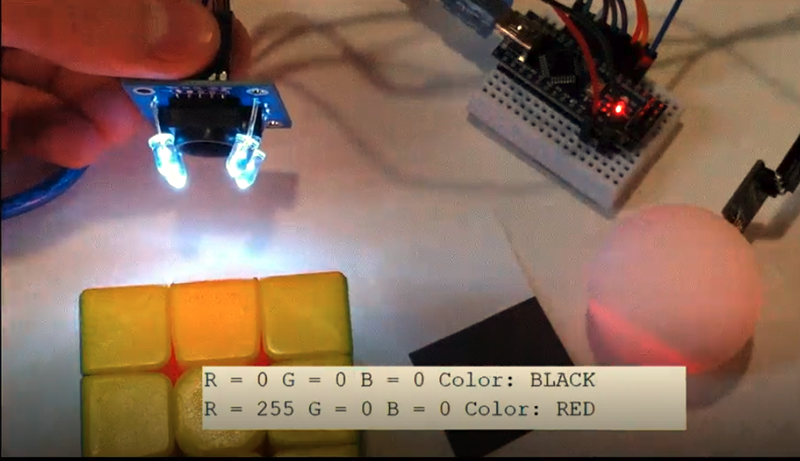
A color sensor sounds like something that belongs in a sci-fi robot with opinions about wallpaper. In reality, it is one of the most practical little devices in modern electronics. It helps machines “see” color by measuring light, turning that measurement into data, and giving a microcontroller, smartphone, printer, robot, or factory machine enough information to make a decision. Is this pill blue or white? Is the package label aligned? Is the phone display under warm indoor lighting? Is the robot following the red line or having an existential crisis on the carpet? A color sensor can help answer all of that.
In this guide, we will demystify the color sensor from the ground up. We will look at how color sensors work, what RGB and clear channels mean, why infrared light can confuse readings, how common sensors such as the TCS34725 and TCS3200 are used, and what matters when choosing a color sensor for Arduino, industrial automation, consumer electronics, or quality-control applications. No wizard hat required, although safety glasses still look professional.
What Is a Color Sensor?
A color sensor is an optical sensor that detects color by measuring light intensity across different parts of the visible spectrum. Most basic color sensors separate incoming light into red, green, and blue components, commonly called RGB. Many modern sensors also include a clear channel, infrared filtering, ambient light measurement, flicker detection, or even XYZ color matching for more accurate color science.
The main keyword here is simple: color sensor. But the related ideas matter too: RGB sensor, optical sensor, color detection, ambient light sensor, photodiode, color recognition, color measurement, and industrial color sensing. These terms all orbit the same concept: turning light into numbers that a machine can understand.
How Color Sensors Work
Human eyes see color because different surfaces reflect and absorb light in different ways. A red apple appears red because it reflects more red wavelengths and absorbs much of the rest. A white sheet reflects a broad range of visible light. A black surface reflects very little light, which is why black socks disappear into the laundry dimension.
A color sensor uses a similar idea, but instead of a retina and a brain, it uses tiny photodiodes and filters. A photodiode converts light into an electrical signal. Color filters allow only certain wavelengths to reach each photodiode. One filtered photodiode responds mostly to red light, another to green, another to blue, and sometimes another clear photodiode measures overall brightness without a strong color filter.
The Basic Process
Most color detection systems follow this sequence:
- A light source shines on an object, or the sensor reads ambient light directly.
- The object reflects some wavelengths and absorbs others.
- Filtered photodiodes measure the red, green, blue, and sometimes clear light levels.
- An internal analog-to-digital converter or external circuit converts the signal into usable data.
- A microcontroller or processor interprets the values and classifies the color.
That sounds straightforward, but color is a slippery little goblin. Distance, surface gloss, lighting angle, shadows, ambient light, sensor gain, integration time, and calibration can all affect the reading. This is why a color sensor is not simply a “point at object, receive truth” device. It is more like a tiny lab assistant: useful, fast, and accurate when you give it a controlled setup.
RGB, Clear, XYZ, and Spectral Sensors: What Is the Difference?
Not all color sensors are created equal. Some are simple modules for hobby projects. Others are advanced optical sensors built for smartphones, cameras, medical devices, printers, or factory automation. Understanding the common types helps you avoid buying a sensor that is either too weak for your job or so advanced that your breadboard starts judging you.
RGB Color Sensors
RGB color sensors measure red, green, and blue light components. These are common in Arduino projects, robotics, color sorting machines, and basic color recognition tasks. A sensor such as the TCS3200 uses filtered photodiodes and outputs a frequency related to the measured light intensity. A microcontroller counts that frequency and estimates color values.
RGBC Color Sensors
RGBC sensors add a clear channel. The clear channel measures overall light intensity, which helps improve brightness compensation and color calculations. Sensors such as the TCS34725 are popular because they provide digital red, green, blue, and clear readings through an I2C interface. They are compact, beginner-friendly, and useful for object color detection, LED feedback, ambient light sensing, and color-matching experiments.
XYZ Color Sensors
XYZ color sensors are designed to match standardized human color perception models more closely than basic RGB sensors. They are often used when more accurate color temperature, white balance, or display adjustment is required. In consumer electronics, this helps screens and cameras respond better to changing lighting conditions.
Multispectral Sensors
Multispectral sensors measure several narrow bands of light rather than only broad red, green, and blue channels. They are useful for applications where color alone is not enough, such as material analysis, agriculture, laboratory testing, and advanced inspection. Think of RGB as a three-piece band and multispectral sensing as a full orchestra with a conductor who owns a clipboard.
Why Infrared Light Matters
Many color sensors include an infrared blocking filter. This matters because humans cannot see infrared light, but silicon photodiodes often can. Without filtering, infrared energy from sunlight, incandescent bulbs, or other sources may sneak into the measurement and distort the color result.
For example, a surface may look like a normal shade of gray to your eyes, but if it reflects infrared strongly, a sensor without proper filtering may report misleading values. An IR filter helps the sensor behave more like human vision, making readings more reliable for color recognition and ambient light measurement.
Common Color Sensor Applications
Color sensors show up in more places than most people realize. They are quietly doing useful work while receiving none of the celebrity attention given to cameras, microphones, or dramatic robot arms.
1. Arduino and DIY Electronics
In maker projects, a color sensor is often used for object sorting, line-following robots, candy color detection, smart lamps, educational experiments, or interactive art. A small RGB sensor can detect whether a card is red, green, or blue, then trigger an LED, servo motor, display message, or sound effect. It is a fun way to teach light, electronics, coding, and calibration without needing a physics degree or a warehouse full of test equipment.
2. Industrial Automation
In factories, color sensors help identify products, inspect labels, detect registration marks, verify packaging, sort materials, and check whether parts are present or correctly oriented. Industrial color sensors are usually more rugged than hobby modules. They may include teach-in settings, IO-Link communication, anti-glare models, longer sensing distances, and housings designed for dust, vibration, washdown, or other harsh conditions.
3. Display and Camera Systems
Smartphones, tablets, laptops, and cameras use ambient light and color sensing to improve user experience. A device can adjust screen brightness, color temperature, camera white balance, and flicker compensation based on the surrounding light. This is why your phone display can look cooler outdoors and warmer indoors without you manually poking settings every five minutes like a tiny lighting technician.
4. Healthcare and Test Reading
Color sensors can assist in reading diagnostic strips, fluid color changes, or chemical reactions. In these applications, controlled lighting and calibration are essential because a small color difference may carry important meaning. A casual “looks kind of yellowish” is not enough when the system needs repeatable measurement.
5. Food, Agriculture, and Quality Control
Color is often linked to ripeness, freshness, roasting level, contamination, or processing consistency. Sensors may help inspect fruit, sort grains, evaluate baked goods, classify plastics, or monitor production lines. The goal is not to replace human judgment in every situation, but to make repetitive inspection faster, more consistent, and less vulnerable to tired eyes after hour seven of staring at beige things.
Popular Color Sensor Modules
TCS34725 Color Sensor
The TCS34725 is one of the most popular color sensors for microcontroller projects. It provides red, green, blue, and clear light readings through I2C, and many breakout boards include a white LED for controlled illumination. The built-in IR blocking filter helps improve visible color accuracy. Because it communicates digitally, it is convenient for Arduino, Raspberry Pi, ESP32, and other embedded systems.
This sensor is a good choice when you want more stable readings than older frequency-output modules and when you need compact wiring. It is commonly used for color matching, light measurement, interactive devices, and educational projects.
TCS3200 and TCS230 Color Sensors
The TCS3200 and TCS230 style modules are also common in beginner electronics. Instead of directly returning digital RGB values over I2C, these sensors output a frequency that changes based on light intensity. Pins are used to select which photodiode filter group is active: red, green, blue, or clear. The microcontroller measures the pulse frequency and calculates color information.
These modules are affordable and useful for learning, but they usually require more careful coding, timing, and calibration. They can work well for sorting a limited set of known colors, such as red, blue, green, and white objects under consistent lighting.
Industrial Color Sensors
Industrial color sensors from automation companies are designed for production environments. They may detect multiple learned colors, distinguish subtle color differences, ignore background variation, or operate reliably at higher speeds. Some are used for color mark detection on packaging lines, where the sensor must recognize registration marks so printing, cutting, sealing, or labeling happens in exactly the right place.
Color Sensor Accuracy: Why Calibration Is Everything
A color sensor can provide impressive data, but raw readings are not automatically meaningful. If you place the same red object under sunlight, fluorescent light, and a warm LED bulb, the sensor may produce different values. That does not mean the sensor is broken. It means lighting has changed, and color depends heavily on illumination.
Factors That Affect Readings
- Distance: The farther the object is from the sensor, the weaker and more variable the reflected light may become.
- Angle: Glossy surfaces can reflect light away from the sensor or create bright glare.
- Ambient light: Room lighting, sunlight, and shadows can alter readings.
- Surface texture: Matte, shiny, rough, and transparent surfaces behave differently.
- Sensor gain: Higher gain can improve sensitivity but may saturate under bright light.
- Integration time: Longer integration can improve low-light measurement but slows response.
Good calibration usually begins with known reference samples. For a simple project, you might record sensor values for red, green, blue, white, and black cards under fixed lighting. Then you compare future readings against those trained values. In a professional system, calibration may include white references, black references, color standards, mathematical correction, and environmental control.
How to Use a Color Sensor in a Project
A practical color sensor project does not need to be complicated. The secret is to control what you can and measure what you cannot. In other words, do not wave a sensor vaguely over a shiny table in a sunbeam and blame the electronics when the result says “mysterious lavender.”
Step 1: Choose the Right Sensor
For beginner projects, an I2C RGBC sensor such as a TCS34725 breakout is often easier than a frequency-output sensor. For industrial work, choose a sensor based on sensing distance, response speed, housing protection, communication interface, teach-in functions, and tolerance for surface variation.
Step 2: Control the Lighting
Consistent illumination is the backbone of reliable color detection. Many modules include a white LED because a built-in light source reduces dependence on the room. For better consistency, use a small enclosure or shroud to block stray light. A matte black interior can reduce reflections.
Step 3: Fix the Distance and Angle
Mount the sensor at a repeatable distance from the object. If the object is always 5 millimeters away during calibration, do not later use it at 50 millimeters and expect the same result. Color sensors like predictability. They are tiny, but emotionally they are accountants.
Step 4: Capture Training Data
Measure each known color several times and average the readings. Store reference values for each target color. For simple classification, compare the current reading with trained values and choose the closest match. For more advanced systems, use normalized RGB, HSV conversion, CIE Lab color space, or machine-learning classification.
Step 5: Test Under Real Conditions
Test with actual objects, actual lighting, actual speeds, and actual surfaces. A project that works perfectly with printer paper on a desk may behave differently with glossy packaging on a conveyor belt. Real-world testing is where optimistic code meets physics, and physics usually brings receipts.
RGB Values Are Not Always 0 to 255
Beginners often expect a color sensor to output familiar RGB values from 0 to 255, like HTML color codes. Some libraries may convert readings into that range, but raw sensor data is often much larger or formatted differently. A sensor may output 16-bit values, pulse frequencies, clear-channel brightness, or calibrated color temperature.
To turn raw readings into 0–255 RGB values, you usually need scaling or normalization. For example, you may divide each red, green, and blue reading by the clear value or by the maximum observed value, then map the result into the 0–255 range. This works for display-style output, but it may throw away precision. For classification, raw or normalized sensor values are often more useful than pretty RGB numbers.
Color Sensor vs Camera: Which One Should You Use?
A color sensor and a camera both detect light, but they are not interchangeable. A camera captures images with many pixels. It can identify shapes, patterns, positions, and multiple objects at once. A color sensor typically measures color over a small area. It is simpler, cheaper, faster in many cases, and easier to integrate into low-power embedded systems.
Use a color sensor when you need a compact, focused measurement: checking whether one object is the correct color, detecting a label mark, following a colored line, reading a test strip, or adjusting display brightness. Use a camera when you need spatial information, image recognition, object tracking, or inspection across a larger scene.
How to Choose the Best Color Sensor
The best color sensor is not always the most expensive one. It is the one that fits your application. Before choosing, ask practical questions:
- Am I measuring reflected object color or direct light color?
- Do I need RGB, RGBC, XYZ, or multispectral data?
- How close will the sensor be to the target?
- Will the lighting be controlled or unpredictable?
- Is the surface matte, glossy, transparent, curved, or textured?
- How fast does the measurement need to happen?
- Do I need analog output, frequency output, I2C, SPI, UART, IO-Link, or another interface?
- Will the sensor live on a desk, in a product, outdoors, or in a factory washdown zone?
For hobby electronics, prioritize ease of use, library support, and stable readings. For product design, consider power consumption, package size, spectral response, flicker detection, optical window design, and calibration flow. For industrial automation, prioritize ruggedness, repeatability, response time, mounting flexibility, and integration with control systems.
Common Mistakes When Using Color Sensors
Mistake 1: Ignoring Ambient Light
Ambient light is the villain in many color sensor mysteries. If your sensor works at night but fails during the day, the sun is probably not personally attacking your project. It is just adding extra light. Use shielding, controlled LEDs, or background subtraction.
Mistake 2: Skipping Calibration
A color sensor without calibration is like a kitchen scale that has never met a gram. It may still respond, but the numbers need context. Always collect reference readings under the same conditions used in operation.
Mistake 3: Expecting Human-Level Color Names
Humans use fuzzy labels such as teal, navy, beige, cream, and “that weird green from the 1970s refrigerator.” Sensors provide numbers. Your software must decide what those numbers mean.
Mistake 4: Testing Only Perfect Samples
Real objects vary. Printed colors fade. Plastic batches differ. Surfaces get dusty. Conveyor belts wobble. Test with the messy samples, not only the beautiful ones that look like they came from a catalog photoshoot.
Future Trends in Color Sensing
Color sensors are becoming smaller, smarter, and more integrated. Modern devices combine color measurement with ambient light sensing, flicker detection, proximity detection, and low-power operation. In mobile devices, accurate light sensing helps cameras and displays adapt to real environments. In industry, better color resolution and digital communication make sensors easier to configure and monitor. In healthcare and food inspection, improved optical sensing supports faster and more consistent analysis.
We are also seeing more systems combine color sensors with machine learning. Instead of manually setting thresholds for each color, developers can collect training data and let algorithms learn patterns. This can improve classification when surfaces vary or colors overlap. Still, machine learning is not magic dust. It works best when the optics, lighting, and calibration are already solid.
Color Sensor Demystified: Real-World Experience and Practical Lessons
The first time you use a color sensor, the results can feel suspiciously chaotic. You place a red object in front of it, and the reading says red. Excellent. You move it slightly, and suddenly green gets ambitious. You turn on a desk lamp, and blue joins the meeting uninvited. This is the moment every beginner learns the most important truth of color sensing: the sensor is not lying, but your setup may be telling too many stories at once.
In real projects, the biggest improvement usually comes from controlling the physical environment, not rewriting the code seventeen times while whispering threats at the USB cable. A small cardboard tunnel, a fixed mounting bracket, or a 3D-printed enclosure can transform unreliable readings into stable data. Keeping the target at the same distance is especially important. Even a few millimeters can change reflected light intensity enough to confuse simple threshold-based color recognition.
Another lesson is that “red” is not one thing. A glossy red candy wrapper, matte red paper, red plastic, and red fabric may all look red to your eyes, but they reflect light differently. Some surfaces create specular highlights. Some absorb more blue or green than expected. Some change appearance when tilted. If you are building a color sorting project, train the sensor using the actual materials you plan to sort, not just colored paper from a craft drawer. The craft drawer is charming, but it is not a calibration laboratory.
A useful workflow is to log raw red, green, blue, and clear readings before writing classification rules. Print the values to a serial monitor or save them to a spreadsheet. Take multiple readings for each color. Look for clusters. You may discover that normalization works better than raw values, or that the ratio between red and clear is more stable than red alone. This kind of data-first approach prevents the classic beginner mistake of guessing thresholds, testing once, and then wondering why the robot thinks orange is green’s loud cousin.
Lighting deserves special respect. Built-in white LEDs help, but they can also create glare on shiny surfaces. Diffusing the light, changing the angle, or using a shroud can make readings more repeatable. In some cases, turning off the onboard LED and using a controlled external light source gives better results. For direct light measurement, such as detecting the color of an LED, the setup should be different from reflected object sensing. The sensor should face the light source, and extra illumination may need to be disabled.
The best practical advice is to design the color sensor system as a complete optical setup. The sensor chip matters, but so do the LED, enclosure, distance, angle, software, calibration samples, and environmental conditions. When all of those pieces cooperate, a color sensor becomes surprisingly powerful. It can sort objects, guide robots, adjust displays, inspect products, and teach students that light is both beautiful and occasionally annoying. Once demystified, the color sensor stops being a mysterious electronic eyeball and becomes what it really is: a small, affordable, data-driven tool for making machines a little less color-blind.
Conclusion
A color sensor is a compact optical device that measures light and converts color into data. Whether it uses RGB photodiodes, an RGBC architecture with a clear channel, an XYZ color model, or multispectral filtering, the core idea remains the same: measure reflected or incoming light and interpret it intelligently. The magic is not magic at all. It is optics, electronics, calibration, and careful setup wearing a very tiny lab coat.
For beginners, modules like the TCS34725 and TCS3200 make color detection accessible and fun. For industrial and product applications, more advanced sensors bring better accuracy, ruggedness, communication options, and environmental compensation. The key to success is choosing the right sensor, controlling the lighting, calibrating with real samples, and remembering that raw RGB values need context.
Note: This article is an original educational synthesis based on real manufacturer documentation, electronics tutorials, sensor datasheets, and industrial automation references. It is written for web publication without copied source text or unnecessary citation placeholders.