Some business cards quietly whisper, “Let’s connect.” Others show up blinking, demand a coin-cell battery, and challenge the person across the table to a round of Connect Four. The Blinky Business Card Plays Snake And Connect Four project belongs firmly in the second categorythe category of pocket-sized engineering flexes that make paper cards look like they showed up to a laser fight carrying a pencil.
Created by hardware maker Dennis Kaandorp, this interactive PCB business card proves that a professional introduction can be more than a name, email address, and politely embossed logo. It can be a tiny embedded system. It can be a game console. It can be a conversation starter that says, “Yes, I understand PCB layout, firmware, low-power design, LED multiplexing, and also how to make networking events significantly less boring.”
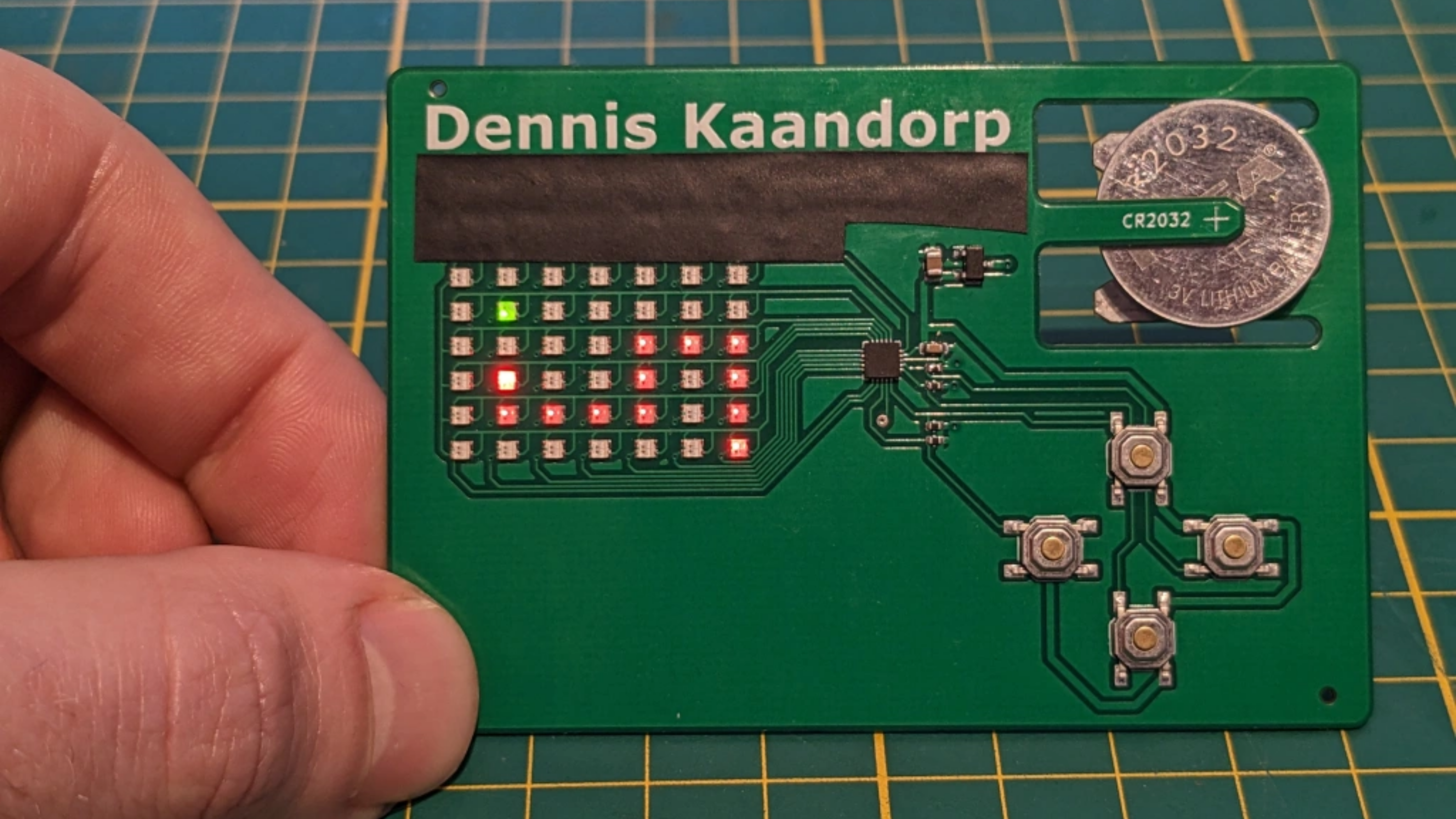
At first glance, the card is a minimalist printed circuit board shaped like a credit card. Look closer and the fun begins: 42 dual-color LEDs, four push buttons, an ATtiny1616 microcontroller, a CR2032 battery, and firmware capable of running both Snake and Connect Four. It is equal parts résumé, demo board, and “please do not throw this away with the conference tote bag inserts.”
What Is a Blinky Business Card?
A blinky business card is exactly what it sounds like: a business card that lights up. In maker culture, however, that simple description barely scratches the solder mask. These cards are usually fabricated as printed circuit boards, or PCBs, with copper traces, silkscreen text, exposed pads, LEDs, sensors, microcontrollers, NFC chips, USB connectors, or whatever other tiny wizardry the designer can fit into a wallet-friendly rectangle.
The appeal is obvious. A traditional card says what you do. A PCB business card shows what you can do. For engineers, embedded developers, robotics designers, hardware hackers, and electronics students, that difference matters. Instead of telling a recruiter, client, or fellow maker that you know circuit design, you hand them a working circuit. That is not a business card; that is a tiny job interview wearing a battery.
Over the years, makers have built PCB cards that blink LEDs, emulate keyboards, share contact details over NFC, display scrolling messages, run simple games, and in extreme cases even boot miniature Linux systems. The reason these projects keep attracting attention is not just novelty. They compress real engineering constraints into a brutally small format: cost, thickness, power, durability, manufacturability, and user interaction all collide on a board that still has to fit in someone’s pocket.
The Core Idea: A Business Card That Plays Games
Kaandorp’s card takes the blinky-card concept and gives it a delightfully playable twist. The project uses the LED array as a low-resolution display for two familiar games: Snake, the classic game where a growing line slithers around eating dots and avoiding itself, and Connect Four, the two-player strategy game played on a seven-column by six-row grid.
That Connect Four detail is important because it drives the entire display design. A standard Connect Four board has 7 columns and 6 rows, which equals 42 positions. Kaandorp’s card therefore uses 42 dual-color LEDsone for each possible token slot. With red and green available, the board can represent two players without needing a full-color display, a separate screen, or anything too fancy. Fancy is fun, but fancy also tends to eat batteries for breakfast.
Snake works on the same grid, using the available LEDs as a compact playfield. The four push buttons act as controls. The result is simple, instantly understandable, and surprisingly charming. Nobody expects a business card to ask for a rematch.
Why the Design Is Clever
The genius of this project is not that it includes LEDs. Anyone can sprinkle LEDs on a PCB like technological confetti. The cleverness lies in how the card balances constraints. It is thin, cheap enough to make in small batches, battery-powered, interactive, and still recognizable as a business card.
Credit-Card Size, But With Personality
The PCB has roughly the same footprint as a credit card, making it familiar in the hand and easy to carry. This matters because business cards live in wallets, pockets, laptop bags, and desk drawers. If a card is too bulky, it becomes a novelty object rather than something a person might actually keep.
The contact information appears on the silkscreen, while a QR code on the back can point to a professional profile. That combination gives the card two jobs: it functions as a normal contact card and as an interactive embedded demo. In other words, if the battery dies, the card does not become a useless green rectangle. It still does the business-card part of business carding.
A PCB That Holds Its Own Battery
One of the most elegant features is the battery holder. Low-profile CR2032 holders exist, but they add thickness and cost. Instead of using a bulky holder, the design uses flexible arms cut directly into the 0.8 mm PCB. The coin cell slides into the board itself, held mechanically by the springiness of the FR4 material.
That may sound like a tiny detail, but in hardware design tiny details are where the dragons live. A standard battery holder might be too tall. A soldered battery would be inconvenient to replace. A USB-powered card would be thinner in some ways but less portable, because nobody wants to say, “Nice to meet you, may I borrow your laptop port?” The PCB cutout solution keeps the card slim, replaceable, and inexpensive.
The project also includes reverse-polarity protection with a MOSFET, which is the sort of practical touch that separates a cute prototype from a design that understands real humans will insert batteries backward while pretending they absolutely did not.
The LED Matrix Challenge
Driving 42 dual-color LEDs is not as simple as connecting every LED directly to a microcontroller pin. Dual-color LEDs effectively double the number of controllable light elements, so the design must manage 84 LED channels. A straightforward one-pin-per-channel approach would be ridiculous on a small, low-cost card. The board would need too many pins, too much routing space, and probably a tiny apology note to the PCB manufacturer.
To solve this, the project uses a hybrid approach combining traditional matrix multiplexing and charlieplexing. Multiplexing lets the circuit control many LEDs by scanning rows and columns quickly enough that the human eye perceives the lights as steady. Charlieplexing takes advantage of microcontroller pins that can switch between high, low, and high-impedance states, allowing even more LEDs to be controlled with fewer pins.
Pure charlieplexing could reduce the number of required pins, but it comes with routing complexity and voltage limitations. Kaandorp’s hybrid design reduces the LED control requirement to 13 pins while keeping the board layout manageable. Add four push buttons, and the microcontroller still has enough I/O to handle the card’s interface.
This is the kind of design decision that looks obvious only after someone else has done the work. Before that, it is a puzzle made of copper traces, forward-voltage drops, firmware timing, and the quiet fear that one LED will refuse to behave.
The Microcontroller: Small Chip, Big Job
At the heart of the card is an ATtiny1616, a small 8-bit AVR microcontroller from Microchip’s tinyAVR 1-series. For this application, it is a sensible choice: affordable, compact, familiar to many embedded developers, and capable enough to refresh the display, read button inputs, and run simple game logic.
The ATtiny1616 family includes features such as flash memory, SRAM, timers, GPIO, and low-power operation. Those may not sound glamorous, but they are exactly what a project like this needs. The card does not require a heavyweight processor, wireless networking, or a display controller with a dramatic résumé. It needs a dependable little brain that can wake up, scan LEDs, read buttons, and keep a tiny snake from crashing into itself.
The screen refresh is handled through timer-driven firmware. Instead of manually updating the LED matrix in a sloppy loop, the card uses timed interrupts to refresh the display predictably. This allows the game code and the display scanning code to coexist without the LEDs flickering like a haunted vending machine.
Why Snake and Connect Four Are Perfect Choices
Not every game belongs on a 6×7 LED grid. Nobody is porting an open-world RPG to a business card unless the business is “unreasonable optimism.” Snake and Connect Four work because their rules are simple, their graphics are minimal, and their interaction models map naturally to buttons and grid positions.
Snake: The Classic Embedded Game
Snake is a favorite among embedded hobbyists because it turns limited display resolution into a feature instead of a flaw. The player controls direction, the snake grows, and the challenge increases over time. A few LEDs are enough to communicate position, movement, food, and failure. No textures. No sound engine. No downloadable content. Just pure “one more try” energy.
Connect Four: Strategy in 42 Pixels
Connect Four is equally well suited because the physical board already has 42 slots. A 7×6 LED grid is not a compromise; it is the exact game board. Dual-color LEDs allow each player’s pieces to appear in a different color, making the card more intuitive than a single-color display would be. With four buttons, the interface can let players move a selector, choose a column, reset, or switch modes.
The game also makes the card social. Snake is a solo distraction before a meeting. Connect Four turns the card into a two-person interaction. That is ideal for networking, where the hardest part is often breaking the ice without asking, “So, what do you do?” in the same tone used by exhausted dentists.
Power, Battery Life, and Real-World Use
A CR2032 coin cell typically provides enough capacity for low-power gadgets, but LED projects can drain batteries quickly if the design is careless. According to the project measurements, the card draws roughly 4 to 5 mA during operation. With a CR2032 capacity around 230 mAh, that suggests about 50 hours of use under practical conditions.
For a business card, that is more than enough. This is not meant to be a daily driver game console. It is meant to light up, impress someone, survive a few demonstrations, and maybe spend the rest of its life on a desk next to a novelty mug that says “I void warranties.”
The low current draw also reflects the value of multiplexing. Since the LEDs are scanned rather than all driven continuously at full power, the design can create the appearance of a working display without burning through the battery like a flashlight left on during a camping trip.
Cost: Expensive for Paper, Cheap for a Gadget
Compared with paper business cards, PCB cards are expensive. Compared with tiny custom electronic gadgets, they can be surprisingly affordable. Kaandorp’s prototype batch reportedly came out to a little over five dollars per assembled card, with larger quantities estimated around three dollars and fifty cents each.
That is far too expensive for handing out by the hundreds at a trade show. But for targeted networkingjob interviews, maker fairs, hardware meetups, client meetings, or engineering conferencesit makes sense. You do not give one to everyone. You give one to the person you want to remember you.
There is also marketing value in the object itself. A paper card might be forgotten. A playable LED card is more likely to be shown to coworkers, photographed, shared online, or kept as a desk toy. In that sense, the cost buys attention, and attention is the entire point of a business card.
Lessons for Makers and Hardware Designers
The Blinky Business Card Plays Snake And Connect Four project offers several practical lessons for anyone designing small electronics.
Start With the Form Factor
The card succeeds because the form factor drives the design. It remains thin, rectangular, and card-like. Every component choice must respect that boundary. This is a useful reminder: good hardware design is not just about adding features. It is about choosing the right features for the physical object.
Use Constraints Creatively
The 6×7 Connect Four grid could have been a limitation. Instead, it became the display architecture. The lack of room for a battery holder could have been a problem. Instead, the PCB itself became the holder. Limited GPIO could have killed the idea. Instead, multiplexing and charlieplexing made it possible.
Make the Demo Self-Explanatory
A business card has seconds to make an impression. Snake and Connect Four need almost no explanation. Four buttons are familiar. Blinking LEDs attract attention. The project communicates its purpose quickly, which is exactly what a physical portfolio piece should do.
Why This Project Stands Out in the PCB Business Card World
There are many impressive PCB business cards, from NFC-enabled contact cards to macro pads, badges, tiny computers, and LED art pieces. This one stands out because it balances ambition and restraint. It does not try to do everything. It does not need Wi-Fi, Bluetooth, audio, a touchscreen, or a tiny espresso machine. It focuses on one delightful idea: a card that can play games on its own LED grid.
That restraint makes it stronger. The project demonstrates PCB layout, low-power design, firmware, user input, display multiplexing, and mechanical creativity without becoming absurdly complicated. It is a portfolio piece with a sense of humor and a practical bill of materials.
It also captures something important about maker culture. The best projects often sit somewhere between useful and unnecessary. Nobody strictly needs a business card that plays Snake. But once you see one, you understand why it should exist. It makes technology playful. It turns a professional ritual into a tiny shared moment. It reminds us that engineering can be precise and silly at the same time, which is honestly the healthiest combination.
Experiences Related to Blinky Business Cards, Snake, and Connect Four
Anyone who has attended a hardware meetup or engineering conference knows the strange life cycle of a business card. The ordinary ones disappear into pockets, notebooks, tote bags, and eventually a drawer where old charging cables go to form a union. But an interactive PCB card changes the experience immediately. The moment LEDs turn on, the conversation changes from polite professional exchange to curiosity.
Imagine handing over the card and saying, “It plays Snake.” The other person will almost certainly press a button before reading your job title. That is not a failure of networking; that is networking working better than usual. The card gives people something to do with their hands and something specific to ask about. “How are you powering it?” “Is that charlieplexed?” “Did you assemble these yourself?” “Can I win at Connect Four before the keynote starts?” Suddenly the interaction has momentum.
From a maker’s perspective, building a card like this is also an excellent learning experience because it forces uncomfortable but valuable decisions. You quickly discover that every millimeter matters. A component that looked tiny on a product page becomes enormous on a credit-card-size PCB. A battery holder that seemed affordable becomes too thick. A beautiful LED choice turns out to have the wrong forward voltage. A routing plan that worked in your imagination becomes a copper spaghetti festival the moment you open the PCB editor.
Firmware adds another layer of humility. A game as simple as Snake sounds easy until you are refreshing a multiplexed LED matrix, debouncing buttons, tracking game state, managing timing, and trying not to create visible flicker. Connect Four sounds simple until you need to represent turns, legal moves, win detection, column selection, and two colors on a display that is also your entire visual interface. These are not impossible problems, but they are real embedded systems problems disguised as fun.
The best part is watching people react. A blinky card creates a different kind of memory. Someone may forget a résumé bullet, but they remember the person who handed them a playable circuit board. It is the same reason demo projects matter in job interviews and portfolios: proof beats claims. Saying “I design embedded systems” is fine. Handing someone a polished embedded system that fits in a wallet is better.
Of course, there are practical realities. You would not hand these out like candy unless your candy budget is suspiciously large. You would choose recipients carefully. You would keep a few in a protective sleeve. You would test every card before an event because nothing says “hire me” quite like frantically tapping a dead prototype while whispering, “It worked yesterday.” Still, those little risks are part of the charm. Hardware is physical. It has tolerances, scratches, batteries, fingerprints, and personality.
That is why the Blinky Business Card Plays Snake And Connect Four project is more than a novelty. It is a reminder that small objects can tell big stories. This one tells a story about practical engineering, playful design, and the timeless truth that adding LEDs makes almost everything at least 37 percent more interesting.
Conclusion
The Blinky Business Card Plays Snake And Connect Four project is a brilliant example of how engineering, creativity, and personal branding can fit inside a wallet-sized PCB. By combining a 42-position dual-color LED matrix, an ATtiny1616 microcontroller, four buttons, a CR2032 battery, and smart multiplexing techniques, Dennis Kaandorp created a business card that does far more than share contact details. It invites interaction.
For makers, it is a compact lesson in embedded design. For recruiters and clients, it is a memorable introduction. For everyone else, it is proof that even the humble business card can evolve from disposable paper rectangle to tiny blinking game console. And frankly, if your business card can play Snake, it has earned the right to be called networking hardware.