Somewhere between a concert hall, a soldering bench, and a science fair table that got really ambitious, an Arduino orchestra has managed to play The Planets Suite. Yes, Gustav Holst’s thunderous, mystical, brass-heavy masterpiecethe one that can make a full symphony orchestra sound like the universe is filing a dramatic complainthas been reimagined through microcontrollers, speakers, code, and a heroic amount of patience.
The idea sounds almost like a joke at first: take one of the most famous orchestral suites ever written and hand it to a group of tiny electronic boards better known for blinking LEDs, reading sensors, and making beginner robots bump into chair legs. But the result is more than a novelty. An Arduino orchestra playing The Planets Suite is a wonderful example of how maker culture, electronic music, classical composition, and engineering curiosity can meet in one surprisingly charming performance.
It may not replace the New York Philharmonic anytime soon. Nobody is confusing a piezo speaker with a French horn. But that is exactly the point. This project is not trying to be a flawless symphonic recording. It is a delightful, nerdy, technically impressive tribute to music, coding, and the joy of making machines do something they were never politely asked to do.
What Is an Arduino Orchestra?
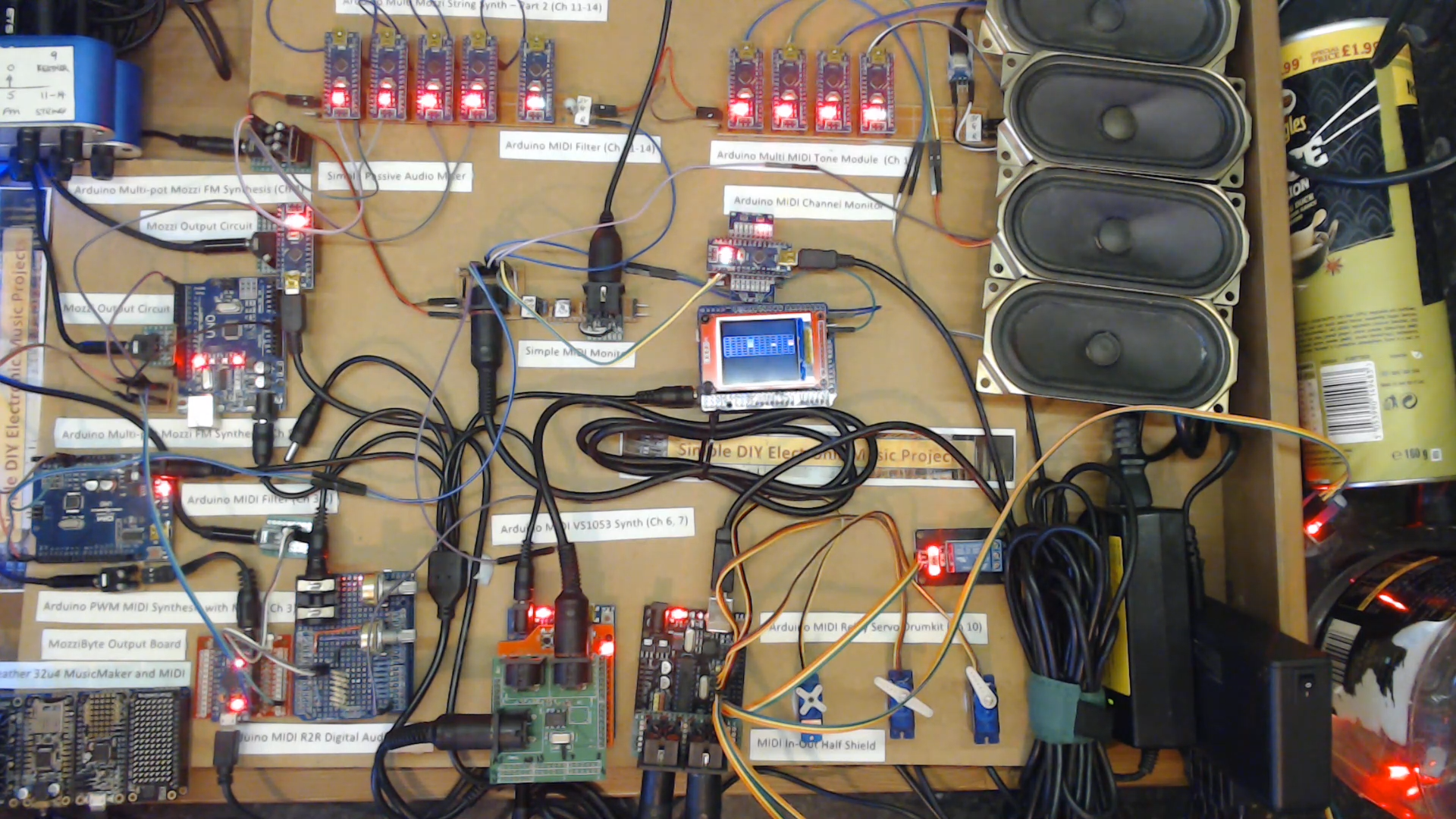
An Arduino orchestra is a collection of Arduino boards and related electronic sound-making modules that work together like a miniature ensemble. Instead of violins, trombones, flutes, timpani, and harps, the “players” might include piezo buzzers, small speakers, synthesizer circuits, MIDI modules, stepper motors, relays, or other electronic components capable of producing tones, rhythms, and textures.
Arduino boards are popular in the maker world because they are affordable, flexible, and friendly to beginners. They can control lights, motors, sensors, displays, and, yes, sound. With the right code, an Arduino can play a melody through a speaker using frequency and timing instructions. With several boards working together, the project becomes more interesting: one board can handle bass notes, another can play melody, another can manage harmony, and yet another can trigger percussion-like effects.
That is where the orchestra idea becomes genuinely clever. A single Arduino playing a tune is cute. Many Arduino-based devices performing different musical parts at the same time is a tiny electronic civilization wearing a conductor’s bow tie.
Why The Planets Suite Is a Wild Choice
Gustav Holst’s The Planets, officially known as The Planets, Op. 32, is a seven-movement orchestral suite composed in the early twentieth century. Each movement is named after a planet and its astrological character, not its scientific geology. This is not a musical documentary about craters, gas giants, and orbital mechanics. It is more like a cosmic personality test written for orchestra.
The seven movements are:
- Mars, the Bringer of War
- Venus, the Bringer of Peace
- Mercury, the Winged Messenger
- Jupiter, the Bringer of Jollity
- Saturn, the Bringer of Old Age
- Uranus, the Magician
- Neptune, the Mystic
This is not exactly beginner-level material. The Planets is famous for its enormous orchestration, shifting moods, complex rhythms, memorable melodies, and huge emotional range. “Mars” pounds forward in a menacing 5/4 rhythm. “Venus” floats with calm, shimmering beauty. “Jupiter” practically bursts through the door carrying confetti and a brass section. “Neptune” fades into mystery with a wordless chorus that seems to disappear into deep space.
So when a maker decides to program an Arduino orchestra to play the whole thing, that is not a weekend “hello world” project. That is the electronic music equivalent of telling a toaster to learn ballet.
The Maker Spirit Behind the Arduino Planets Project
The best thing about an Arduino orchestra playing The Planets Suite is not just that it works. It is that it represents the most lovable part of maker culture: asking, “Could this be done?” and then continuing long after a normal person would have gone outside for fresh air.
Projects like this often begin with small experiments. A maker might first build a simple circuit that plays a scale. Then they try a familiar melody. Then they add another voice. Then a second board. Then a MIDI interface. Then synchronization. Then, before anyone can stage an intervention, they are arranging Holst for a tabletop army of electronic noisemakers.
The Arduino approach makes music visible in a unique way. In a traditional orchestra, you watch human musicians breathe, bow, strike, pluck, and phrase. In an Arduino orchestra, you see wires, LEDs, speakers, boards, and components acting as the performers. The music becomes a system. Notes become data. Timing becomes code. Harmony becomes a coordination problem. It is half concert, half engineering demo, and half “please ignore the cable pile.” That is three halves, but maker math has always been optimistic.
How an Arduino Orchestra Can Play Music
1. Turning Notes Into Frequencies
At the most basic level, electronic music on Arduino starts with pitch. Musical notes can be represented as frequencies. For example, the note A4 is commonly tuned to 440 Hz. When an Arduino sends a signal to a speaker at a specific frequency, the speaker vibrates and produces a tone.
Arduino’s tone-based examples show how a board can generate simple melodies using arrays of notes and durations. This is perfect for beginner songs, alerts, and short musical experiments. But an orchestral work like The Planets requires far more than a single melody line. It needs layers, dynamics, timing, and instrumental character.
2. Splitting the Score Into Parts
A full orchestral score contains many simultaneous parts. Violins, violas, cellos, basses, woodwinds, brass, percussion, keyboard instruments, and sometimes voices all have their own lines. To recreate that with microcontrollers, the music has to be divided into playable sections.
One Arduino might play a melody. Another might hold long tones. Another might create rhythmic pulses. Some modules may handle more complex synthesized sounds. The goal is not necessarily to copy every orchestral detail perfectly, because that would be like asking a bicycle bell to imitate a pipe organ. Instead, the maker captures the core musical structure: rhythm, melody, harmony, and recognizable texture.
3. Synchronizing Multiple Devices
Synchronization is the secret sauce. If each Arduino plays independently without timing control, the performance quickly turns into what music teachers politely call “experimental.” To perform a piece as rhythmically demanding as “Mars,” each electronic player must know when to enter, when to stop, and how to stay aligned with the rest of the ensemble.
This can be handled through MIDI, a central controller, timing signals, or carefully programmed sequences. In more advanced setups, one device acts like the conductor, distributing timing information to the other devices. That way, the electronic orchestra does not drift apart like a marching band on roller skates.
4. Creating Different Electronic Voices
A simple square wave has a charming retro quality, but it cannot carry an entire suite by itself unless the listener has superhuman patience. To create variety, makers use different sound sources: small speakers, synthesizer boards, filters, sampled sounds, buzzers, and custom circuits. These different voices help represent the contrast between movements.
For example, “Mars” benefits from sharp, percussive, mechanical tones. “Venus” needs softer, smoother sounds. “Mercury” calls for quick, agile textures. “Jupiter” needs big, cheerful musical energy. “Neptune” asks for something distant, strange, and fading. Even in lo-fi form, those moods can be suggested through clever arrangement and sound design.
Movement by Movement: Why the Suite Works in Lo-Fi Form
Mars: The Bringer of War
“Mars” is probably the perfect test for an Arduino orchestra because its rhythmic identity is so strong. The repeated pattern, dark energy, and relentless forward motion are instantly recognizable. Electronic components are good at precision and repetition, so the mechanical pulse of “Mars” translates surprisingly well into the world of microcontrollers.
Of course, the original orchestral version is massive. It uses aggressive strings, brass, percussion, and a sense of unstoppable pressure. An Arduino version cannot reproduce that physical concert-hall impact, but it can capture the skeleton of the rhythm and the dramatic shape. It sounds less like an army approaching and more like a squad of determined calculators preparing for battle. Honestly, still intimidating.
Venus: The Bringer of Peace
“Venus” is a completely different challenge. It is gentle, lyrical, and atmospheric. A lo-fi electronic setup has to avoid sounding too harsh or robotic. This is where softer synthesis, careful note spacing, and controlled dynamics matter.
In an Arduino orchestra, “Venus” can become a study in restraint. Instead of overwhelming the listener, the arrangement lets tones breathe. The simplicity can even become beautiful in its own way. When tiny speakers attempt cosmic peace, the result feels like a music box that has been reading astronomy books.
Mercury: The Winged Messenger
“Mercury” is quick, nimble, and full of motion. This movement suits electronic instruments because microcontrollers are excellent at fast, precise patterns. The challenge is making the performance feel light rather than stiff.
Short notes, rapid alternations, and playful exchanges between electronic voices can bring out the messenger-like quality of the movement. It becomes less like a full orchestra chasing a mythological figure and more like a room full of enthusiastic robots passing notes during class.
Jupiter: The Bringer of Jollity
“Jupiter” is one of the most beloved movements in the suite, partly because of its broad, noble central melody. In orchestral form, it is warm, grand, and emotionally generous. In Arduino form, it becomes charmingly sincere.
This is where the limitations of the project become part of its personality. The melody is strong enough to survive almost any arrangement. Even when performed by electronic voices, the musical heart of “Jupiter” remains clear. It is like hearing a grand parade recreated with toy instruments, except the toys have been programmed by someone who really knows what they are doing.
Saturn: The Bringer of Old Age
“Saturn” is slow, solemn, and deeply atmospheric. It relies on gradual development and emotional weight. For an Arduino orchestra, this movement requires patience and careful pacing. Long tones must be handled without becoming dull, and the arrangement needs to preserve the feeling of time passing.
Lo-fi electronics can actually serve this movement well. The slightly fragile quality of simple tones can make “Saturn” feel eerie and delicate. It does not sound like a traditional orchestra aging gracefully. It sounds like an old computer remembering the stars.
Uranus: The Magician
“Uranus” is playful, bold, and theatrical. It has humor, swagger, and a bit of musical mischief. This is a natural playground for an Arduino orchestra because unusual electronic timbres can make the movement feel even more magical.
Buzzing tones, sudden accents, quirky rhythms, and unexpected textures can turn “Uranus” into a maker’s carnival. If any movement seems comfortable wearing a wizard hat made of jumper wires, this is the one.
Neptune: The Mystic
“Neptune” is perhaps the hardest movement to translate because so much of its power comes from atmosphere. In the original, the wordless chorus fades away into silence, creating one of classical music’s most haunting endings. Recreating that with electronics requires imagination.
An Arduino orchestra can suggest the mystery through soft sustained tones, delicate patterns, and gradual fading. It may not reproduce the human choir exactly, but it can create an otherworldly ending. The result feels less like voices disappearing into the universe and more like a spacecraft losing signal in a poetic way. That still counts as magic.
Why This Project Matters Beyond the Novelty
It would be easy to dismiss an Arduino orchestra as a clever internet oddity. But projects like this matter because they make both music and technology more approachable. A student who feels intimidated by classical music might become curious after seeing it performed by microcontrollers. A beginner programmer might suddenly understand timing, arrays, loops, and coordination because those concepts are connected to sound. A musician might see code not as a cold technical thing, but as another form of composition.
This is STEAM education in action: science, technology, engineering, art, and math tangled together in a productive knot. The project teaches rhythm, pitch, electronics, programming logic, music theory, signal control, and problem-solving. It also teaches persistence, because any project involving many wires and synchronized sound will eventually produce a moment where nothing works and the builder stares into the middle distance like a philosopher.
Arduino, Classical Music, and the Joy of Creative Constraints
One reason the Arduino orchestra is so engaging is that it embraces constraints. A full orchestra offers enormous expressive power. Arduino-based instruments offer limited tone quality, limited polyphony, and plenty of technical headaches. But constraints can inspire creativity.
When you cannot rely on lush strings or heroic brass, you must decide what really defines a piece of music. Is it the rhythm? The melody? The harmony? The contour? The emotional arc? By reducing The Planets Suite to electronic essentials, the Arduino orchestra reveals how strong Holst’s writing is. Even when stripped down and rebuilt with circuits, the music remains recognizable.
That is a compliment to both Holst and the maker. Great music survives translation. Great engineering makes the translation understandable.
What Beginners Can Learn From the Arduino Orchestra
You do not need to recreate The Planets on your first day with Arduino. In fact, please do not. Start smaller unless your hobby is emotional damage with a USB cable.
A beginner can learn from this project by starting with the basic building blocks:
- Use a piezo speaker to play one note.
- Program a short melody using note frequencies and durations.
- Experiment with tempo and rests.
- Add a second sound source for harmony.
- Use buttons, sensors, or MIDI input to control playback.
- Try arranging a simple song for multiple devices.
Once those steps make sense, larger projects become less mysterious. The Arduino orchestra is not magic. It is many simple ideas stacked carefully until they become impressive. That is basically engineering with better stage presence.
Specific Examples of Maker Techniques
Using Piezo Speakers for Simple Melodies
A piezo speaker is one of the easiest ways to make sound with Arduino. It can produce clear beeps at different frequencies, making it suitable for simple melodies. The sound is thin, but it has a charming retro quality. For a movement like “Mercury,” that sharpness can actually work well.
Using MIDI for Better Coordination
MIDI is a standard communication protocol widely used in electronic music. In an Arduino orchestra, MIDI can help coordinate multiple devices, trigger notes, and keep musical events organized. A central controller can send messages to different modules, much like a conductor cueing sections of an orchestra.
Using Additive Layers
Additive synthesis means building complex sounds by combining simpler tones. In a lo-fi orchestra, multiple basic voices can work together to create a richer texture. One square wave may sound plain. Several carefully tuned waves can suggest something fuller, brighter, or stranger.
Using Visual Feedback
Many maker music projects include LEDs or displays that flash with the music. This helps the audience see what is happening and helps the builder debug timing. In a project as complex as an Arduino performance of The Planets Suite, visual feedback is not just decoration. It is a survival tool with blinking lights.
The Experience of Hearing an Arduino Orchestra Play The Planets Suite
Listening to an Arduino orchestra play The Planets Suite is a different experience from hearing a symphony orchestra perform it in a concert hall. The sound is smaller, sharper, and more mechanical. The emotional scale changes. But the fascination increases because you are aware of the translation happening in real time.
You listen not only for the music but also for the engineering decisions. How did the maker handle that rhythm? Which electronic voice is carrying the melody? How are the parts synchronized? Why does that tiny speaker sound like it is trying so hard? There is a special charm in hearing machines reach for something grand.
The performance becomes a conversation between old and new. Holst wrote music inspired by ancient astrological symbolism, using the forces of a large orchestra. More than a century later, hobby electronics can reinterpret that same music with code and circuits. That is not a replacement for tradition. It is a tribute wearing safety glasses.
Extended Experience: What It Feels Like to Build, Watch, and Understand This Project
The most memorable part of a project like Arduino Orchestra Plays The Planets Suite is not just the final performance. It is the experience surrounding itthe sense that you are watching an idea slowly become possible. Anyone who has built even a small Arduino music project knows the emotional journey. First comes confidence. Then comes confusion. Then comes a weird buzzing sound. Then comes debugging. Then, finally, one correct note plays, and suddenly you feel like you have personally invented civilization.
Scaling that feeling up to an entire electronic orchestra is both exciting and ridiculous in the best way. Imagine arranging “Mars” and realizing that the famous rhythmic drive has to be divided among electronic voices that do not breathe, listen, or make eye contact. Human musicians adjust naturally. Microcontrollers do exactly what they are told, including the mistakes. If a note enters late, it will enter late with absolute confidence. If a duration is wrong, the board will repeat that wrongness like it is defending a doctoral thesis.
That is why the project teaches humility. Music is not only about notes. It is about timing, balance, tone color, phrasing, silence, and motion. When you program music, you discover how many tiny choices human performers make automatically. A violinist can shape a phrase with pressure and bow speed. A horn player can swell into a note. A choir can fade into the distance with breath and blend. An Arduino needs instructions for nearly everything. It is talented, but it is not psychic.
Watching the orchestra perform also changes how you hear Holst. In a traditional performance, the listener may be swept away by the massive sound. In the Arduino version, the structure becomes more visible. You notice patterns, repetitions, entrances, and rhythmic cells. “Jupiter” still feels joyful, but you hear how strongly the melody carries the movement. “Saturn” still feels solemn, but you become aware of its slow architecture. “Neptune” still feels mysterious, but the mystery is rebuilt through electronic fading and texture.
There is also something wonderfully democratic about it. Classical music can sometimes feel locked behind expensive tickets, formal halls, and a fear of clapping at the wrong time. Arduino projects break that wall down. They say, “Here is a masterpiece. Here are some wires. Let’s learn what makes it tick.” That attitude does not disrespect classical music. It keeps it alive by inviting new people into the room.
For students, hobbyists, and curious readers, this project is a reminder that creativity does not require perfect tools. You can explore orchestration with cheap speakers. You can study rhythm with blinking LEDs. You can learn programming through melody. You can discover Holst because a maker decided that microcontrollers deserved a chance at cosmic drama.
The final result is funny, impressive, and oddly touching. An Arduino orchestra playing The Planets Suite sounds like technology trying to dream bigger than its parts. It is not polished in the traditional sense, but it has personality. It has effort. It has the unmistakable spark of someone asking a strange question and then doing the work to answer it.
And that may be the real reason people love projects like this. They remind us that art and engineering are not opposites. They are two ways of paying attention. One listens for beauty. The other asks how to build the thing that makes it. When they meet, sometimes you get a robot arm, sometimes you get a blinking sculpture, and sometimes you get an Arduino orchestra bravely marching through “Mars” like a pocket-sized army of musical calculators.
Conclusion
Arduino Orchestra Plays The Planets Suite is more than a quirky headline. It is a celebration of musical imagination, technical persistence, and creative remixing. By turning Holst’s legendary orchestral suite into a lo-fi electronic performance, the project shows how classical music can inspire modern makers and how small devices can tackle enormous artistic ideas.
The performance may be electronic, imperfect, and charmingly mechanical, but it captures something real: curiosity. It proves that an Arduino board is not only a tool for sensors and robots. In the right hands, it can become part of an orchestra, a classroom, a laboratory, and a tiny doorway into the cosmos.
Note: This article is written for web publication and synthesizes real background information about Arduino music projects, Holst’s The Planets, maker culture, electronic sound, and lo-fi orchestra techniques without adding source-link clutter inside the content.