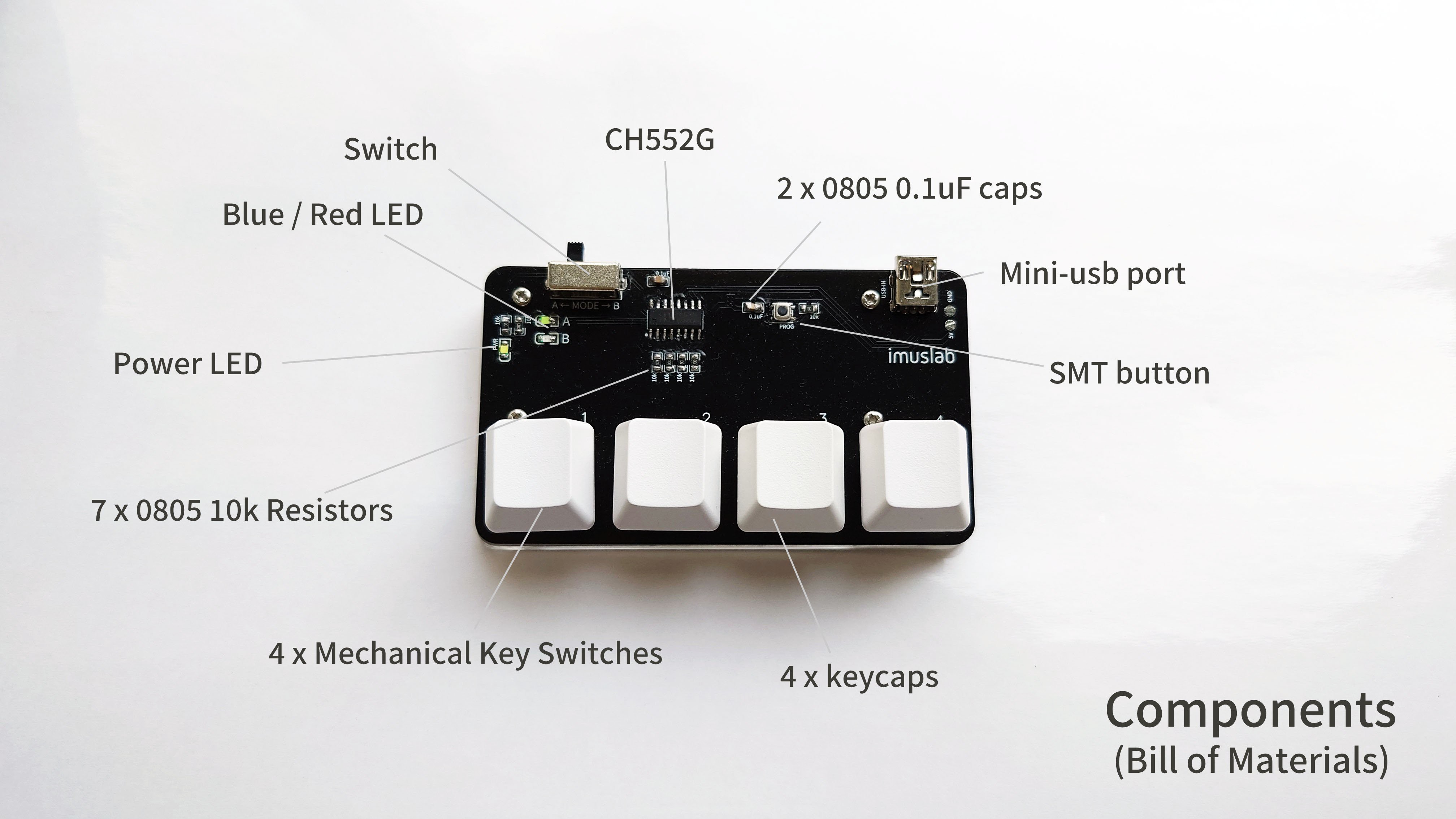
A macro pad cheap enough to give away sounds like the kind of thing a tech hobbyist says right before ordering too many tiny components at 1:00 a.m. But the idea is surprisingly practical. A macro pad is a small programmable keyboard, usually with a handful of keys, that can trigger shortcuts, media controls, app commands, text snippets, or custom workflows. Instead of remembering a dozen key combinations like a caffeinated octopus, you press one button and let the little gadget do the boring part.
The phrase “Macro Pad Cheap Enough To Give Away” became interesting because of a real maker-style concept: a business-card-sized, four-key mechanical macro pad designed around the inexpensive CH552G microcontroller. The project’s charm is not that it tries to be the most luxurious keyboard accessory on Earth. It does the opposite. It asks a better question: how useful can a tiny programmable keypad be if the cost drops so low that you can hand it to someone like a sticker, a business card, or a very nerdy party favor?
The answer is: more useful than expected. For students, coders, streamers, editors, office workers, designers, and anyone who repeats the same computer actions all day, a cheap macro pad can become a pocket-sized productivity remote. It is not glamorous in the way a $300 custom keyboard is glamorous. It is glamorous in the way duct tape is glamorous: humble, inexpensive, and weirdly capable of saving the day.
What Is a Macro Pad?
A macro pad is a compact keyboard made for shortcuts rather than full typing. It may have three keys, four keys, twelve keys, knobs, OLED screens, RGB lighting, or a case that looks like it was designed by someone who owns both a soldering iron and too many opinions about desk aesthetics. The simplest version is just a few buttons connected to a microcontroller. When you press a button, the computer sees a keyboard input, such as Ctrl+C, Command+Shift+5, mute microphone, open search, paste a saved phrase, or switch scenes in streaming software.
Most computers already support keyboard shortcuts. Windows uses combinations such as Ctrl+C for copy, Ctrl+V for paste, Windows+E for File Explorer, Alt+Tab for switching apps, and Windows+I for Settings. macOS uses combinations such as Command+C, Command+V, Command+Tab, and Command+Shift+5 for screenshots. A macro pad simply turns those multi-key finger gymnastics into a single press.
Why Not Just Use a Regular Keyboard?
You can. But a regular keyboard is built for general input. A macro pad is built for deliberate, repeated actions. Think of it as a mini control panel for your personal workflow. If your normal keyboard is a full kitchen, a macro pad is the hot sauce shelf: small, specific, and somehow used every day.
The best cheap macro pad does not need to replace anything. It sits beside your keyboard and performs the four to twelve actions you use constantly. That may be copy, paste, undo, and screenshot. It may be mute, camera toggle, push-to-talk, and “I am definitely paying attention in this meeting.” It may be brush size, zoom, save, and export for designers. The value comes from removing friction.
The Big Idea: A Macro Pad Cheap Enough To Give Away
The “cheap enough to give away” concept works because a macro pad can be useful with very few parts. A four-key macro pad does not need a large case, a complex keyboard matrix, a premium controller, or a luxury knob made from moon metal. It needs a small printed circuit board, a programmable microcontroller, switches, keycaps, a USB connector, a few supporting components, and firmware that turns button presses into keyboard commands.
The famous low-cost build uses the CH552G, an inexpensive 8-bit USB microcontroller compatible with Arduino-style development. Instead of using a costly controller board, the design places the microcontroller directly on the PCB. That single choice helps keep the build small, thin, and affordable. The project is about trimming every unnecessary feature until the macro pad becomes the electronics equivalent of a business card with superpowers.
Why the CH552G Matters
The CH552G is popular in ultra-budget USB projects because it includes USB device capability and can be programmed without requiring an expensive development board. In plain English, it can pretend to be a keyboard when plugged into a computer. That is exactly what a basic macro pad needs. It does not need to run a game server, train an AI model, or calculate your taxes. It needs to say, “Hello computer, I am a keyboard,” and then send key commands reliably.
That simplicity is the secret sauce. A Raspberry Pi Pico, RP2040 board, Pro Micro, or other popular microcontroller can absolutely power a macro pad. Many excellent DIY macro pads use RP2040 and firmware like QMK, KMK, CircuitPython, or Arduino code. But when the goal is “cheap enough to give away,” every extra dollar matters. The CH552G approach makes sense for a four-key giveaway device because it is small, USB-friendly, and inexpensive.
How a Cheap Macro Pad Is Built
A basic DIY macro pad follows a straightforward architecture. Pressing a physical switch closes a circuit. The microcontroller detects that change. Firmware translates it into a keypress or macro. The computer receives it over USB as if it came from a normal keyboard. No wizard robe required, although wearing one while soldering is a personal choice.
Core Parts in a Budget Macro Pad
- Custom PCB: The printed circuit board connects everything and can be shaped like a business card, badge, or tiny desk accessory.
- Microcontroller: A CH552G keeps costs low; RP2040 boards offer more power and broader firmware options.
- Mechanical switches: Four switches are enough for a minimalist macro pad. More switches mean more utility but also more cost.
- Keycaps: Cheap blank keycaps work fine, but labeled or novelty keycaps make the pad easier to use.
- USB connector: Mini USB, Micro USB, or USB-C connects the device to the computer.
- Resistors, capacitors, and LEDs: Small supporting components help with stability, indicators, and optional flair.
- Base or case: A 3D-printed base can angle the PCB and make it easier to press.
One reason the four-key design stays cheap is that it avoids a larger key matrix. Keyboards with many keys often use rows and columns to reduce the number of pins required. That usually means adding diodes for clean key detection and anti-ghosting. Diodes are inexpensive individually, but in a giveaway project they add parts, soldering time, and assembly complexity. For four keys, using one input per switch is beautifully simple.
What Can You Do With Four Keys?
Four keys may sound limited until you list the actions you repeat every day. Most people do not need a 60-key command center. They need a few dependable shortcuts that remove tiny annoyances. A cheap USB macro pad can handle those beautifully.
Everyday Office Shortcuts
For office work, a four-key macro pad might be programmed as copy, paste, undo, and screenshot. Another layout could be mute microphone, open calendar, paste email signature, and lock computer. In spreadsheet-heavy jobs, the keys could trigger paste values, format cells, insert row, and save. The value is not that the commands are impossible on a regular keyboard. The value is that you no longer have to think about them.
Creative Workflows
Designers and video editors can map keys to zoom, brush size, cut, export, timeline marker, play/pause, or tool switching. A four-key macro pad will not replace a professional editing console, but it can speed up repetitive actions in Photoshop, Premiere Pro, DaVinci Resolve, Figma, Canva, Illustrator, or audio software. If your left hand is always reaching for the same awkward shortcut, a macro pad can save it from filing a workplace complaint.
Streaming and Meetings
Streamers can use a macro pad for scene switching, microphone mute, sound effects, recording start/stop, or chat commands. Remote workers can set keys for mute, camera, raise hand, and paste meeting notes. A cheap macro pad becomes especially useful when you want physical buttons that are easy to hit without hunting through app windows.
Accessibility and Comfort
One underrated use for a small macro pad is accessibility. A person recovering from an injury, using a laptop in bed, or working with limited hand movement may benefit from four large, easy-to-reach buttons. Media playback, volume, browser navigation, and common text actions can be placed under one hand. In that context, a cheap macro pad is not just a toy; it is a practical assistive tool.
Firmware Options: Arduino, QMK, VIA, Vial, and CircuitPython
Hardware gets the macro pad onto your desk. Firmware gives it a personality. There are several common paths depending on the microcontroller and the user’s skill level.
Arduino-Style Firmware
For very low-cost CH552G projects, Arduino-compatible development is attractive because it lowers the learning curve. You can define which pins read the switches and what keyboard commands they send. This approach is lightweight, direct, and well suited to a four-key device.
QMK Firmware
QMK is a powerful open-source keyboard firmware used widely in custom mechanical keyboards. It supports custom keymaps, layers, macros, tap dances, combos, encoders, lighting, and many advanced behaviors. For a macro pad, QMK is appealing because it gives the device deep keyboard features without relying on software running on the computer.
VIA and Vial
VIA and Vial make configuration friendlier by letting users remap keys through a graphical interface when the device firmware supports it. This matters for giftable macro pads. If you hand someone a device that requires compiling firmware, you may also accidentally hand them a headache. If they can remap keys in a visual tool, the macro pad becomes less “mysterious electronics slab” and more “useful desktop gadget.”
CircuitPython and RP2040 Boards
RP2040-based macro pads, including hobbyist boards and commercial examples, often work well with CircuitPython or Arduino. CircuitPython is especially friendly for beginners because changing behavior can feel closer to editing a script than rebuilding embedded firmware. The tradeoff is cost. A full-featured RP2040 macro pad with OLED display, rotary encoder, speaker, RGB lighting, and twelve keys is delightful, but it is not usually the same kind of “giveaway” device as a bare-bones four-key CH552G pad.
Cheap Macro Pad vs. Premium Macro Pad
A premium macro pad may include a CNC aluminum case, hot-swappable switches, multiple rotary encoders, OLED displays, gasket mounting, RGB underglow, and firmware that can do everything except make coffee. It feels fantastic. It also costs enough that giving away twenty of them would make your wallet quietly leave the room.
A cheap macro pad focuses on the essentials: keys, USB, firmware, and usefulness. It may have exposed PCB styling, a simple printed base, and basic keycaps. That is not a flaw. For workshops, classrooms, maker fairs, developer meetups, hackathons, conference swag, and team onboarding gifts, a low-cost macro pad is more practical. People are more likely to actually use it, modify it, and learn from it.
When Cheap Is Better
Cheap is better when the goal is distribution, education, or experimentation. A beginner who receives a simple macro pad can learn about USB HID devices, keyboard shortcuts, microcontrollers, soldering, firmware, and PCB design without being terrified of breaking an expensive collector’s item. Low cost encourages curiosity. If something goes wrong, the tragedy level is “oops” rather than “cancel dinner.”
When Premium Is Better
Premium is better when you need durability, daily professional control, high-end feel, hot-swap sockets, extensive layers, or polished software support. A video editor working eight hours a day may prefer a larger, heavier macro pad with knobs and labeled profiles. A four-key giveaway pad is not meant to win that fight. It is meant to prove that a useful programmable keypad can be tiny, affordable, and fun.
Best Use Cases for a Giveaway Macro Pad
The giveaway angle is where this project becomes more than another keyboard accessory. A macro pad cheap enough to give away is a conversation starter, teaching tool, productivity booster, and tiny piece of functional branding.
Maker Faire and Hackathon Swag
At a maker event, a PCB macro pad is far more memorable than a paper business card. It shows design skill, electronics knowledge, and a sense of humor. It also gives recipients something they can plug in and use. That is powerful. A good giveaway should not immediately become drawer confetti.
Classroom Electronics Projects
A simple macro pad is excellent for teaching basic electronics. Students can learn about switches, pull-up resistors, USB communication, soldering order, firmware flashing, and enclosure design. Because the device is small, the project feels achievable. Because it becomes a real tool, it feels rewarding.
Developer and Design Team Gifts
Teams can preprogram macro pads for common workflow shortcuts: build project, open terminal, run tests, format code, push-to-talk, open documentation, or paste a support response template. The device becomes a small onboarding gift that says, “Welcome to the team; here is a button that saves you from typing the same thing forever.”
Design Tips for Making It Truly Giftable
Cheap is not the same as sloppy. A giveaway macro pad should still feel intentional. The difference between “cool handmade gadget” and “mysterious rectangle from someone’s basement” is often a few design choices.
Label the Keys
Blank keycaps look clean, but recipients may forget what each key does. Use icons, stickers, printed legends, or a tiny card explaining the default layout. A macro pad should not require a treasure map.
Use Safe Default Macros
Avoid programming sensitive data such as passwords, private API keys, or personal addresses. A macro pad can type stored text, but that does not mean it should become a tiny USB confession booth. Safer defaults include copy, paste, mute, screenshot, media controls, app shortcuts, or a harmless text snippet.
Make It Reprogrammable
The more easily users can change the layout, the more likely they are to keep using it. Provide simple instructions, firmware files, or a configuration guide. If the macro pad supports a visual remapping tool, even better.
Keep the Case Simple
An exposed PCB can look stylish and reduce cost, but a tilted base makes the pad easier to press. A 3D-printed stand, rubber feet, or acrylic plate can improve the experience without turning the bill of materials into a luxury invoice.
Common Mistakes to Avoid
The first mistake is adding too much. The moment a cheap four-key macro pad becomes a twelve-key RGB OLED rotary encoder sandwich, the cost and complexity climb. Extra features are fun, but the giveaway goal depends on restraint.
The second mistake is ignoring the recipient. A programmer, a teacher, a streamer, and an accountant may all want different shortcuts. If you cannot customize every unit, choose universal actions like copy, paste, undo, screenshot, mute, and media control.
The third mistake is weak documentation. A cheap macro pad becomes far more valuable when the recipient understands how to use and modify it. Include a short setup note, default key list, and reprogramming instructions. Documentation is not glamorous, but neither is searching your inbox for “how do I flash this thing” six months later.
Is a Cheap Macro Pad Worth Building?
Yes, especially if the goal is learning, gifting, or solving a focused workflow problem. A cheap macro pad is not about replacing commercial keyboards. It is about making automation tangible. Instead of hiding shortcuts inside menus, you put them under physical keys. That changes how people think about their tools.
For builders, the project teaches hardware and firmware fundamentals. For users, it removes repetitive friction. For event organizers, it becomes memorable swag. For teams, it can standardize common shortcuts. For hobbyists, it is simply fun. And fun matters, because not every gadget needs to justify itself with a quarterly productivity report.
Experiences With a Macro Pad Cheap Enough To Give Away
The most interesting experience with a cheap macro pad is how quickly it stops feeling like a gadget and starts feeling like part of the desk. At first, four keys seem almost comically small. You plug it in, press a button, and think, “That’s it?” Then you map one key to mute. Ten minutes later, during a video call, you hit that key without looking. Suddenly, the little board earns its rent.
The second surprise is how personal the layout becomes. One person maps the keys to copy, paste, screenshot, and undo. Another maps them to play/pause, next track, volume mute, and open notes. A designer might set them to zoom in, zoom out, brush tool, and export. A writer might use them for em dash, heading format, paste plain text, and word count. The hardware is the same, but the usefulness changes with the user. That is why the giveaway concept works so well. You are not giving someone a fixed-purpose toy. You are giving them a tiny control surface they can make their own.
There is also a funny social effect. A macro pad on a desk invites questions. Someone sees four mechanical switches sitting beside a laptop and asks, “What does that do?” That is the moment the device becomes a conversation starter. At a maker fair, workshop, or developer meetup, this is gold. It is better than a flyer because it demonstrates the idea physically. Press a key, watch it work, and the explanation becomes obvious.
In everyday use, the best macro pad layouts are boring in the best possible way. The shortcuts you use constantly are rarely dramatic. They are the tiny actions that steal seconds: switching windows, pasting a template, muting audio, saving a file, opening search, or taking a screenshot. A cheap macro pad makes these actions feel intentional. It gives your workflow a dashboard, even if that dashboard has only four buttons and the aesthetic of a tiny spaceship control panel.
The limitations are real. Four keys are not enough for every workflow. Cheap switches may feel inconsistent. A bare PCB can look cool but may not survive rough travel unless protected. Some users will want VIA, Vial, QMK, or a more polished reconfiguration process. Others will not want to touch firmware at all. That is why a giveaway macro pad should ship with sensible defaults. The first experience should be useful before it becomes customizable.
The biggest lesson is that cost changes behavior. If a macro pad is expensive, people treat it like a purchase decision. If it is cheap enough to give away, people treat it like an invitation. They experiment. They remap keys. They use it for weird personal workflows. They learn what macros are. They discover that computers are more flexible than they thought. And occasionally, they become the kind of person who says, “I could build a better one,” which is how many excellent DIY projects begin.
A macro pad cheap enough to give away proves that useful technology does not always need to be bigger, shinier, or more expensive. Sometimes it just needs four buttons, a clever microcontroller, and a reason to exist. In a world full of overbuilt gadgets, that kind of simplicity feels refreshingly rebellious.
Conclusion
A cheap macro pad is one of those small devices that makes a big point: productivity tools do not have to be complicated to be valuable. With a low-cost microcontroller such as the CH552G, a few mechanical switches, a compact PCB, and practical firmware, a macro pad can become affordable enough for workshops, events, classrooms, team gifts, and personal experiments. It may not have the premium feel of a high-end custom keypad, but it delivers the part that matters most: one press, one action, less friction.
For anyone curious about DIY electronics, keyboard shortcuts, or workflow automation, a macro pad cheap enough to give away is a near-perfect project. It is approachable, useful, customizable, and just nerdy enough to make people smile. That is a strong combination for something small enough to sit next to your coffee mug and quietly make your day easier.