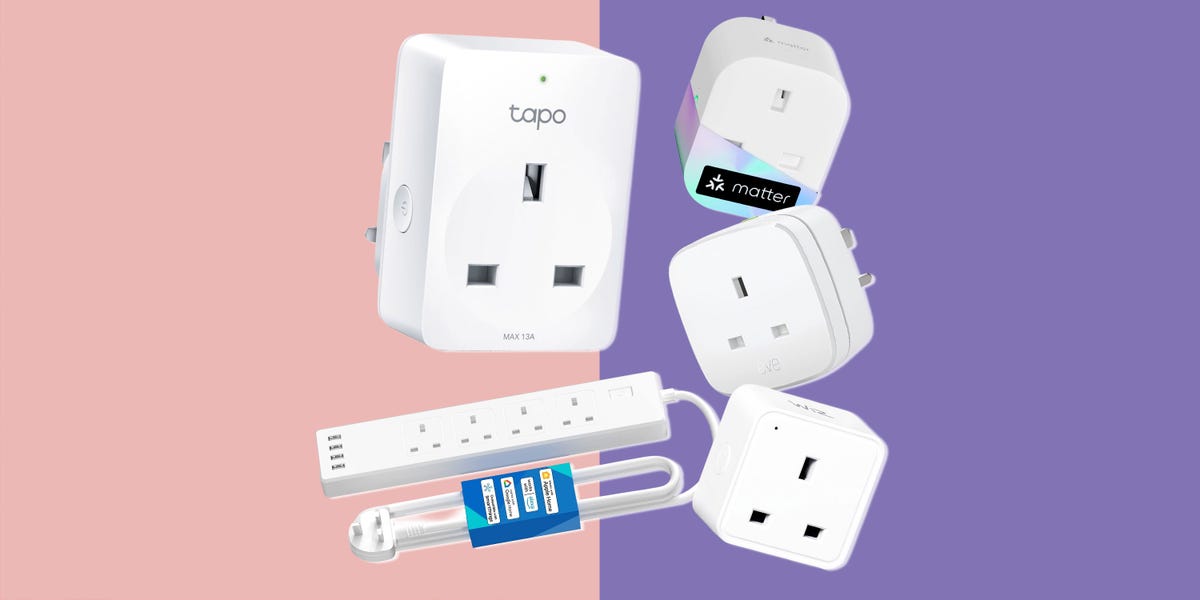
Note: This article is written for web publishing and is based on current U.S. smart-home standards, manufacturer specifications, and recent expert review trends for smart plugs in 2025.
Starting a smart home can sound like a weekend project that requires a wiring diagram, three cups of coffee, and a cousin who “knows networking.” Thankfully, the humble smart plug is here to rescue beginners from that chaos. It is small, affordable, easy to install, and surprisingly powerful. Plug it into a regular wall outlet, connect a lamp, coffee maker, fan, humidifier, or holiday light string, and suddenly that ordinary device can respond to an app, voice command, schedule, or automation.
The best smart plugs in 2025 are not just remote-control outlets. They are smarter, smaller, safer, and more compatible than the clunky early models that blocked both sockets and occasionally made setup feel like solving a riddle written by a router. Today’s top options support Alexa, Google Home, Apple Home, Samsung SmartThings, Matter, energy monitoring, away modes, outdoor weather resistance, and even individual outlet control on smart power strips.
For anyone building a connected home from scratch, smart plugs are the perfect first step. They are cheaper than smart thermostats, easier than smart switches, and less dramatic than installing a video doorbell while balancing on a ladder. Below, we break down the best smart plugs for beginners in 2025, what each one does well, and how to choose the right model for your home.
Why Smart Plugs Are the Best First Smart Home Upgrade
A smart plug gives “dumb” electronics a basic brain. It cannot make your old coffee maker grind beans, compliment your outfit, or file your taxes, but it can turn power on and off automatically. That simple function unlocks a lot: scheduled lamps, voice-controlled fans, automatic holiday lights, remote appliance checks, sunrise routines, bedtime scenes, and energy tracking.
Smart plugs are especially beginner-friendly because they do not require electrical work. A smart wall switch may need neutral wires and installation confidence. A smart plug only needs an outlet, Wi-Fi or Thread connectivity, and a phone app. Most indoor models are designed for 120V U.S. outlets and many support up to 15 amps, though you should always confirm the rating before plugging in anything power-hungry.
In 2025, Matter support is one of the biggest reasons smart plugs are easier to recommend. Matter is a smart-home standard designed to help devices work across major ecosystems such as Apple Home, Amazon Alexa, Google Home, and Samsung SmartThings. It does not magically fix every smart-home headache, but it makes buying new devices less risky because you are not locked into one brand’s app forever.
Quick Picks: Best Smart Plugs for 2025
Best Overall: TP-Link Tapo Matter Smart Plug Mini
The TP-Link Tapo Matter Smart Plug Mini is the easiest recommendation for most beginners. It is compact, affordable, and built around the exact features new smart-home users actually need: scheduling, remote control, voice control, and broad platform support. Its Matter compatibility makes it friendly to Alexa, Google Home, Apple Home, and SmartThings users, which is a major advantage if your household is divided between iPhones, Android phones, Echo speakers, and the occasional person yelling at Siri from the kitchen.
Its small size also matters more than people think. A bulky smart plug can block the second socket on a wall outlet, which is annoying in a bedroom and unforgivable behind a couch. The Tapo Mini design keeps things tidy, making it a strong starter plug for lamps, small fans, decorative lighting, and coffee stations.
Best for Energy Monitoring: TP-Link Kasa KP125M
The Kasa KP125M is a great choice if you want to know what your devices are actually costing you. It combines a slim design with Matter support and energy monitoring, allowing users to track consumption through the app. That makes it ideal for appliances that quietly sip electricity all day, such as dehumidifiers, air purifiers, office equipment, or entertainment-center devices.
Energy monitoring will not magically cut your electric bill by itself. It is more like putting a fitness tracker on your outlets: the information is only useful if you act on it. But once you see how much standby power certain devices use, it becomes much easier to create schedules that shut them off when they are not needed.
Best for Apple Home and Privacy: Eve Energy
Eve Energy is a premium smart plug that appeals to Apple Home users, privacy-focused buyers, and anyone who wants Matter over Thread instead of another Wi-Fi-only device. Thread can improve smart-home responsiveness when your home already has a Thread border router, such as a compatible Apple TV, HomePod mini, or other supported hub.
Eve Energy also offers energy monitoring and a polished app experience. It costs more than many Wi-Fi plugs, but the extra money can be worth it for users who care about local control, privacy, and long-term smart-home flexibility. It is not the cheapest first plug, but it is one of the cleanest choices for people building a serious Apple-centered smart home.
Best Budget Smart Plug: Wyze Plug
The Wyze Plug remains a favorite for budget shoppers who want useful automation without paying premium prices. It works well for basic Alexa and Google Assistant setups, supports scheduling, and includes a vacation mode that can turn lights on and off to make your home look occupied.
The trade-off is compatibility. Wyze Plug is not the best choice for Apple Home users, and it does not offer the same future-proofing as a Matter smart plug. But if you are building a low-cost smart home around Alexa or Google and want several plugs for lamps, fans, or seasonal lights, Wyze is still a practical option.
Best for Alexa Users: Amazon Smart Plug
The Amazon Smart Plug is not trying to be the most universal smart plug on the shelf. Its entire personality is basically, “Alexa, I’m home.” If your smart home is already built around Echo speakers and the Alexa app, this plug is extremely simple to set up and use.
It works exclusively with Alexa, which is both its biggest strength and biggest weakness. For Alexa-only households, that narrow focus makes setup painless. For everyone else, especially Apple Home or Google Home users, it is too limited. Buy it if you want easy Alexa routines. Skip it if you want platform flexibility.
Best Outdoor Smart Plug: TP-Link Tapo Matter Outdoor Smart Plug
Outdoor smart plugs are perfect for patio lights, fountains, inflatables, landscape lighting, and holiday displays that would otherwise require you to walk outside in slippers and regret your life choices. The TP-Link Tapo Matter Outdoor Smart Plug stands out because it combines outdoor weather resistance, dual outlets, strong range, and broad smart-home compatibility.
For outdoor use, never use a regular indoor smart plug. Look for weather-resistant housing, protective outlet covers, and a design intended for outdoor receptacles. Also make sure your outdoor outlet is properly protected by a weatherproof cover and GFCI protection. Smart is good; smart and safe is better.
Best Smart Plug for Lamps: Lutron Caseta Plug-In Lamp Dimmer
Most smart plugs can only turn a lamp on or off. The Lutron Caseta Plug-In Lamp Dimmer can dim compatible lamps, which makes it much more useful for living rooms, bedrooms, and cozy corners where “full interrogation-room brightness” is not the desired vibe.
Lutron’s system is more expensive than a basic Wi-Fi plug, especially if you add the Smart Hub, but it is known for strong reliability and excellent lighting control. The included Pico remote support is also a bonus because it gives you a physical control option without wiring a switch into the wall.
Best Smart Power Strip: Kasa Smart Wi-Fi Power Strip HS300
If one smart outlet is good, six individually controlled smart outlets are dangerously convenient. The Kasa HS300 Smart Wi-Fi Power Strip is ideal for home offices, entertainment centers, gaming setups, craft rooms, and anywhere multiple devices gather like cables at a family reunion.
It includes six independently controlled outlets, USB ports, surge protection, voice control, and energy monitoring. That means you can turn off a monitor, speaker system, printer, and desk lamp separately instead of shutting down the entire strip. It is overkill for one lamp, but excellent for busy areas where multiple devices need schedules or remote control.
Best Matter Value Alternative: Meross Matter Smart Plug Mini
Meross has been one of the more visible brands pushing affordable Matter-compatible smart plugs. The Meross Matter Smart Plug Mini is worth considering if you want Apple Home, Alexa, Google Home, and SmartThings compatibility without spending premium money.
It is compact, supports scheduling and voice control, and fits well into mixed-platform homes. Some Meross models include energy monitoring, so check the exact model number before buying if power tracking is important. As with many smart-home products, the tiny letters in the model name can matter more than the giant marketing headline.
Best for Energy Nerds: Emporia Smart Plug
The Emporia Smart Plug is a smart pick for people who care less about flashy voice commands and more about understanding home energy use. It works with Alexa and Google Home, includes scheduling, and fits nicely into Emporia’s broader home energy monitoring ecosystem.
If you already use or plan to use an Emporia Vue energy monitor, Emporia plugs make even more sense. They let you compare plug-level consumption with whole-home energy data, which can help identify wasteful devices and build more efficient routines.
How to Choose the Right Smart Plug in 2025
Start With Your Smart Home Platform
Before buying any smart plug, choose your main platform. If you use Alexa, almost everything works. If you use Google Home, most Wi-Fi smart plugs are compatible. If you use Apple Home, look for Matter, HomeKit, or Thread support. If you use Samsung SmartThings, Matter support is usually the safest path.
Matter is especially helpful for beginners because it reduces the chance of buying a plug that only works in one ecosystem. However, not every Matter feature appears in every app. For example, a plug may expose basic on/off control through Matter while energy monitoring remains available only in the manufacturer’s app. That is not a deal breaker, but it is something to know before you build an entire outlet empire.
Check the Plug Size
Smart plugs look small online and mysteriously larger when they arrive. Choose compact models that leave the second outlet usable. This is important in kitchens, bedrooms, bathrooms, and behind furniture. A good smart plug should not turn a two-outlet wall plate into a one-outlet wall plate with a plastic backpack.
Look for Energy Monitoring If You Care About Costs
Energy monitoring is useful for devices that run for long periods, such as fans, air purifiers, dehumidifiers, heaters, office equipment, and entertainment systems. It helps you understand real consumption instead of guessing. That said, do not buy energy monitoring just because it sounds fancy. For a lamp that uses an LED bulb, the savings may be tiny. For a power-hungry appliance, the insight can be valuable.
Know the Safety Limits
Always check amperage and wattage limits. Many U.S. smart plugs are rated up to 15 amps, but that does not mean every appliance is a good match. Avoid using smart plugs with high-heat appliances such as space heaters, irons, hot plates, and hair tools unless the plug manufacturer specifically says that use is supported. Even then, never use automation to run risky heating devices unattended.
Indoor vs. Outdoor Matters
Indoor smart plugs belong indoors. Outdoor smart plugs should have weather-resistant designs, protective covers, and ratings appropriate for rain, dust, and temperature changes. If you are controlling patio lights or holiday decorations, buy an outdoor model. Your backyard deserves better than a $9 indoor plug wrapped in hope.
Best Smart Plug Uses for Beginners
The best first smart plug project is a lamp. It is safe, simple, and instantly satisfying. Create a schedule so the lamp turns on at sunset and off at bedtime. Add voice control so you can say, “Turn on the living room lamp,” and feel like a wizard with a mortgage.
Next, try a coffee routine if your coffee maker has a physical on/off switch. Fill it the night before, leave the switch on, and schedule the smart plug to power it in the morning. Not every coffee maker works this way, but when it does, it feels like your house has finally started contributing to the relationship.
Fans are another excellent use. A smart plug can turn a bedroom fan off after you fall asleep or activate a desk fan during work hours. Humidifiers and air purifiers can also work well, but only if their controls resume operation when power is restored. Devices with digital touch buttons may not turn back on automatically after the smart plug restores power.
Holiday lights are where smart plugs become heroes. Instead of crawling behind a tree every night, schedule the lights once and enjoy the glow. Outdoor plugs can do the same for porch lights, pathway decorations, and inflatable snowmen that look cheerful by day and mildly haunted after midnight.
Common Smart Plug Mistakes to Avoid
The first mistake is buying the cheapest unknown plug available. Smart plugs connect to your electrical system and your network, so brand reputation, safety certification, and app support matter. Look for recognizable brands, UL or ETL certification, clear load ratings, and recent app updates.
The second mistake is ignoring Wi-Fi requirements. Many smart plugs still use 2.4 GHz Wi-Fi, not 5 GHz. This is normal because 2.4 GHz travels farther through walls, but setup can be annoying on some mesh routers. If pairing fails, check whether your router has a combined network name, a temporary 2.4 GHz mode, or an IoT device setting.
The third mistake is expecting a smart plug to make every appliance smart. If a device requires you to press a digital button after power is restored, a smart plug can only deliver power, not press the button. Old-school lamps and fans with physical switches usually work best.
Real-World Experience: What You Learn After Living With Smart Plugs
The first thing most people learn after installing smart plugs is that convenience is addictive. You start with one lamp in the living room. Two days later, you are naming outlets like pets: “Corner Lamp,” “Desk Fan,” “Coffee Plug,” and “Definitely Not the Router.” By the end of the week, you are creating routines with the seriousness of a NASA launch engineer.
The most useful smart plug in daily life is often not the fanciest one. It is the one attached to the device you use every day. A bedroom lamp that turns on gently before your alarm can make mornings feel less like being summoned to court. A fan that shuts off automatically at 3 a.m. can keep you comfortable without running all night. A coffee maker that starts before you reach the kitchen can make a Monday morning slightly less rude.
Energy monitoring becomes interesting once you stop treating it like a novelty. At first, you check the app just because numbers are fun. Then you notice that an old dehumidifier uses far more power than expected, or that a printer sitting idle still consumes energy. This is where smart plugs become practical instead of merely cool. You can schedule devices to shut off overnight, group office electronics into one routine, or identify which appliances deserve replacement.
Another real-world lesson: physical buttons still matter. A smart plug with a side button is easier to live with because guests, kids, or less tech-enthusiastic family members can use it without opening an app. A smart home should not require a training seminar. If someone wants to turn on a lamp, they should not have to remember whether it lives in Alexa, Apple Home, Google Home, or an app named after a vowel shortage.
Reliability also matters more than features. A plug that works every day is better than one with a beautiful app and a dramatic personality. For critical routines, such as lights that simulate occupancy while you travel, choose brands known for stable performance and good app support. For casual uses, like seasonal lights, budget models are often fine.
The best experience comes from starting small. Buy one or two smart plugs before filling your cart with a 12-pack. Test them with your router, phone, voice assistant, and favorite routines. Learn which app you prefer. See whether Matter setup works smoothly in your ecosystem. Once you know what fits your home, expand room by room.
Smart plugs are not glamorous. They do not have screens, cameras, or robot arms. But they quietly make everyday life smoother. They turn forgotten lamps into routines, reduce small energy waste, and help beginners understand how smart-home automation actually works. In 2025, that makes them one of the smartest places to start.
Final Verdict: Which Smart Plug Should You Buy First?
For most beginners, the best smart plug to buy first is a compact Matter-compatible model such as the TP-Link Tapo Matter Smart Plug Mini. It offers the right mix of price, compatibility, size, and ease of use. If energy monitoring is a priority, the Kasa KP125M or Emporia Smart Plug is the better fit. Apple Home users who want privacy and Thread should consider Eve Energy. Alexa-only homes can keep things simple with the Amazon Smart Plug, while outdoor lighting projects need a weather-resistant model such as the Tapo Matter Outdoor Smart Plug.
The best smart plug is not always the most expensive one. It is the one that works with your platform, fits your outlet, supports your device safely, and makes your daily routine easier. Start with one lamp, one schedule, and one voice command. That is how a smart home begins: not with a robot butler, sadly, but with a plug that finally remembers to turn off the lights.