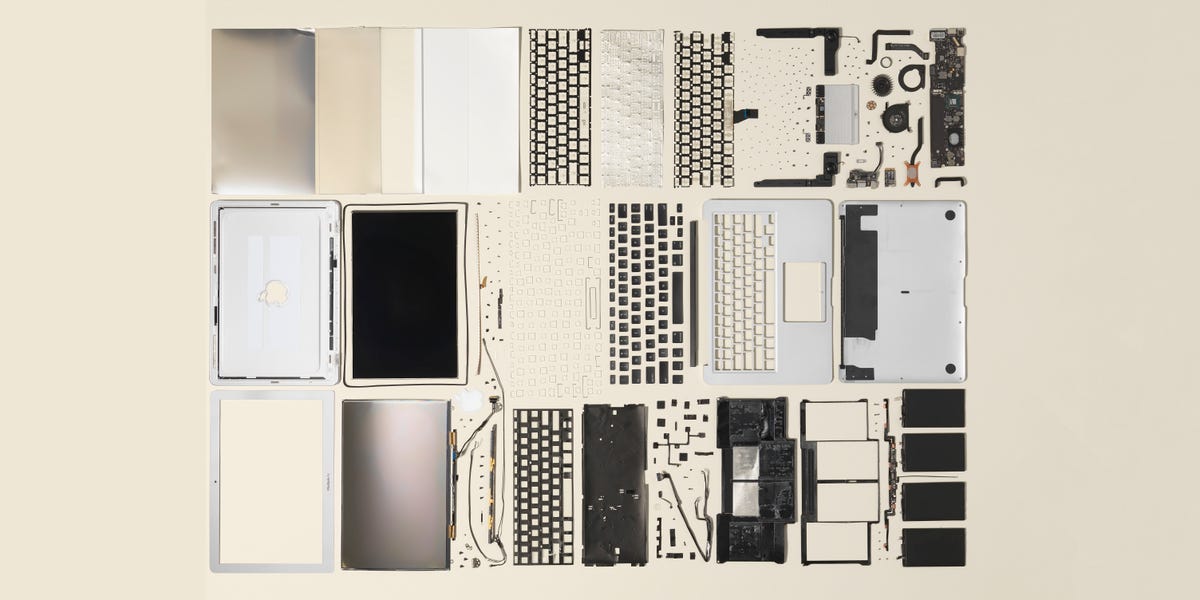
Note: This article is written for web publication and synthesizes real teardown, repair, and specification information from reputable technology and repair sources.
Introduction: A Thin Laptop With a Very Busy Interior
The MacBook Air Teardown 2019 is not just a story about screws, cables, batteries, and one very determined aluminum shell. It is a look inside one of Apple’s most recognizable laptops at a turning point in MacBook history. The 2019 MacBook Air looked familiar from the outside: slim wedge design, Retina display, Touch ID, large Force Touch trackpad, and two Thunderbolt 3 ports. But inside, it revealed Apple’s modern design philosophy in full: compact engineering, tightly integrated components, impressive build quality, and a repair experience that sometimes feels like solving a puzzle designed by someone who owns very tiny tweezers.
Released as a modest refresh of the redesigned 2018 MacBook Air, the 2019 model kept the same basic body and processor platform but added True Tone display technology and a slightly revised battery. On paper, that sounds like a light update. Under the hood, however, the 2019 MacBook Air is still worth examining because it shows the trade-offs Apple made between portability, durability, security, and repairability.
For users, students, repair technicians, and curious Mac fans, a teardown answers practical questions. Can the battery be replaced? Is the SSD removable? What happens if the logic board fails? Is the butterfly keyboard still a concern? And, most importantly, should you open one yourself or politely let a professional take the tiny screws of destiny?
MacBook Air 2019: Quick Hardware Overview
The 2019 MacBook Air, also known as the MacBook Air Retina 13-inch 2019, carries the model number A1932 and identifier MacBookAir8,2. It uses a 1.6GHz dual-core Intel Core i5 processor, Intel UHD Graphics 617, 8GB of 2133MHz LPDDR3 memory by default, and PCIe-based SSD storage. The display is a 13.3-inch Retina IPS panel with a 2560-by-1600 resolution at 227 pixels per inch.
The headline upgrade over the 2018 version was True Tone, a display feature that adjusts white balance based on ambient lighting. In plain English, the screen tries to look less like a flashlight in a refrigerator and more like paper under the light around you. This made the laptop more comfortable for reading, writing, browsing, and daily productivity.
The machine weighs about 2.75 pounds and uses a built-in 49.9-watt-hour lithium-polymer battery. Apple rated it for up to 12 hours of wireless web use and up to 13 hours of video playback. As with many Apple laptops of this era, memory and storage decisions had to be made at purchase because upgrades later were not realistically available.
Opening the MacBook Air 2019: First Impressions
Opening the 2019 MacBook Air begins with the bottom case. Apple uses pentalobe screws, which means your regular Phillips screwdriver will look at the laptop, shrug, and go make coffee. A P5 pentalobe driver is required to remove the lower case screws. Once those screws are out, the bottom cover can be separated from the chassis, revealing the battery, logic board, speakers, fan, trackpad area, and cable layout.
The first impression is classic Apple: everything is clean, compact, and deliberately arranged. There are no big empty spaces, no loose wires wandering around like they forgot their meeting, and no obvious upgrade slots waiting for a user to improve the machine later. The interior is efficient, but it is not especially friendly to casual tinkering.
The MacBook Air 2019 teardown shows a laptop built more like a sealed appliance than a traditional computer. That does not mean it is impossible to repair. It means repairs require patience, the correct tools, careful documentation, and a healthy respect for ribbon cables, which are basically the glass noodles of electronics repair.
Battery Design: Replaceable, But Not Effortless
The battery is one of the most important parts of any MacBook Air teardown because battery aging is one of the most common long-term problems. The 2019 MacBook Air uses a built-in lithium-polymer battery rated at 49.9 watt-hours. It is not a simple user-swap part, but it is serviceable with the right approach.
The battery is secured inside the case, and replacing it requires disconnecting the battery connector, managing adhesive, and working around delicate nearby components. Compared with older laptops where a battery could slide out after flipping a latch, this is a much more involved process. Apple’s obsession with thinness means the battery is shaped and fitted into the chassis with little wasted room.
For experienced repairers, battery replacement is one of the more realistic repairs on this model. For beginners, it can be stressful because lithium-polymer batteries should never be bent, punctured, crushed, or attacked with metal tools. A swollen battery is especially dangerous and should be handled by a professional. The teardown takeaway is simple: the battery can be replaced, but this is not a “five minutes before class” project.
Logic Board: Small, Dense, and Highly Integrated
The logic board in the 2019 MacBook Air is compact and densely populated. It contains the Intel processor, memory, storage chips, Apple T2 security chip, and other critical controllers. This is where the teardown becomes less about “Can I upgrade this?” and more about “Please do not sneeze near that connector.”
The RAM is soldered to the logic board, so memory upgrades are not possible after purchase. If you bought the 8GB version, it remains an 8GB MacBook Air forever. The SSD storage is also onboard, meaning it is not a removable stick-style drive. This design saves space and improves integration, but it also limits repair flexibility and makes data recovery harder if the logic board fails.
The Apple T2 chip is another major factor. It handles security functions, storage encryption, Touch ID integration, secure boot, and other system-level tasks. From a security perspective, the T2 chip is impressive. From a repair perspective, it can complicate component replacement because certain parts are paired or tied to the system at a deeper level.
Touch ID and the T2 Chip: Convenience With a Catch
Touch ID is one of the best everyday features of the 2019 MacBook Air. Press your finger, unlock your Mac, approve purchases, and feel briefly like you live in the future. But inside the teardown story, Touch ID is more complicated.
The Touch ID sensor is paired with the T2 chip on the logic board. That means replacing the logic board can affect Touch ID functionality unless the paired sensor and board relationship is preserved or properly calibrated through Apple’s service process. For independent repair, this is a serious limitation.
This pairing highlights a broader theme of the MacBook Air 2019 teardown: Apple prioritizes security and integration, but those choices can reduce repair freedom. For most users, the benefit is stronger device protection. For repair shops, it adds another layer of difficulty. For DIY repairers, it is a reminder that not every visible part behaves like a simple plug-and-play module.
Keyboard: The Butterfly in the Room
No discussion of the 2019 MacBook Air is complete without mentioning the butterfly keyboard. Apple’s butterfly keyboard design was thin, stable-feeling, and controversial enough to deserve its own dramatic soundtrack. The 2019 MacBook Air used an updated version with revised materials, but it still belonged to the butterfly family.
The issue with butterfly keyboards was not that everyone hated the feel. Some users liked the low-travel, crisp typing experience. The bigger concern was reliability. Dust, crumbs, and debris could cause keys to stick, repeat, or stop responding. In teardown terms, the keyboard was not a friendly standalone part. It was tied into the top case assembly, making keyboard repairs more complex and expensive than they would be on a more modular laptop.
For buyers considering a used 2019 MacBook Air, keyboard condition matters. Test every key. Type a few paragraphs. Try the space bar, return key, and commonly used letters. If a key feels inconsistent, that tiny annoyance may become a daily comedy routine you did not audition for.
Display and True Tone: A Practical Upgrade
The 13.3-inch Retina display remains one of the strongest parts of the 2019 MacBook Air experience. Its 2560-by-1600 resolution gives text sharp edges and photos a clean, detailed look. The addition of True Tone was the key visible upgrade for 2019.
True Tone adjusts the display’s color temperature to match the environment. In warm indoor lighting, the display becomes warmer. In cooler lighting, it shifts accordingly. This is excellent for reading and general use, though users doing color-critical photo or video work may prefer to turn it off for more consistent color judgment.
From a teardown point of view, the display is replaceable but not casually repairable. It is a complete assembly involving cables, hinges, and careful routing. A cracked display is usually one of the more expensive repairs on this model, especially compared with external parts like the bottom case or USB-C board.
Ports and Connectivity: Minimal, Modern, and Sometimes Annoying
The 2019 MacBook Air includes two Thunderbolt 3 USB-C ports on the left side and a 3.5mm headphone jack on the right. That is elegant, symmetrical enough to look intentional, and just limited enough to make dongle companies smile.
The USB-C ports handle charging, data transfer, external displays, and accessories. The laptop can support one external 5K display at up to 60Hz or up to two 4K external displays at up to 60Hz. For a thin ultraportable machine, that is solid capability. The trade-off is that users with older USB-A devices, HDMI monitors, SD cards, or Ethernet cables need adapters.
Internally, the USB-C board is more serviceable than fully soldered port designs. That is good news because ports experience daily stress from charging cables, docks, and travel use. A modular port board is one of the more repair-friendly choices in this otherwise tightly integrated laptop.
Fan, Speakers, and Trackpad
The MacBook Air 2019 includes a small fan for cooling. Because the laptop uses a low-power Intel chip, it is not built for heavy sustained workloads like 4K video editing, large software builds, or gaming marathons. The cooling system is compact and designed for light-to-moderate work: web browsing, writing, email, video streaming, spreadsheets, schoolwork, and general office tasks.
The speakers are surprisingly good for a laptop this thin. Apple used the internal space efficiently, and reviewers often praised the sound quality for the size. During teardown, the speaker modules appear as dedicated replaceable components, which is a positive point for repair.
The Force Touch trackpad is large, smooth, and accurate. It does not physically click in the traditional way; instead, it uses haptic feedback to simulate a click. Internally, the trackpad is serviceable, but it requires careful cable handling and alignment. In daily use, it remains one of the most pleasant parts of the machine.
Repairability Analysis: What Is Easy, What Is Hard?
The MacBook Air 2019 is not impossible to repair, but it is not a repair paradise either. Some parts, such as the fan, speakers, trackpad, USB-C board, and battery, can be serviced with the correct tools and skill. Other parts, including RAM and SSD storage, are soldered and cannot be upgraded. The keyboard is deeply integrated into the top case. The logic board and Touch ID relationship adds another layer of complexity.
The biggest repairability problem is not simply that Apple used small screws or compact parts. The issue is the combination of adhesive, soldered components, security pairing, and limited upgrade paths. This makes the MacBook Air 2019 feel premium and sturdy, but it also means long-term ownership depends heavily on the original configuration and the condition of major components.
If you are buying one used, prioritize battery health, keyboard condition, screen quality, and storage capacity. A 128GB model can feel cramped quickly in modern use, especially if you store photos, videos, music libraries, or large apps. Since storage cannot be upgraded internally, external drives and cloud storage become part of the ownership plan.
Performance After the Teardown: Who Was This Mac For?
The 2019 MacBook Air was designed for portability and everyday computing, not raw power. The dual-core Intel Core i5 handles writing, browsing, email, video calls, streaming, and light productivity well. It can manage basic photo editing and casual creative tasks, but it is not ideal for heavy multitasking or demanding professional workloads.
The teardown confirms what the spec sheet suggests: this is a highly compact computer optimized for mobility. The slim battery, small cooling system, soldered memory, and onboard SSD all point toward a machine meant to be bought in the right configuration and used as-is. It is less like a desktop computer you evolve over time and more like a sealed notebook appliance that rewards careful buying decisions upfront.
Used MacBook Air 2019 Buying Advice
A used 2019 MacBook Air can still be useful for students, writers, web users, and anyone who wants a lightweight macOS laptop for basic tasks. However, buyers should be realistic. This is an Intel Mac from the pre-Apple Silicon era. Newer MacBook Air models with Apple Silicon offer much better performance, battery life, and efficiency.
Still, the 2019 model may make sense at the right price. Before buying, check the cycle count and battery condition in macOS, inspect the screen for bright spots or lines, test all keys, confirm both USB-C ports work, check the speakers, test Wi-Fi and Bluetooth, and verify that Touch ID functions properly. Also make sure the device is not activation locked and that it has been fully erased by the previous owner.
For web publishing, school assignments, travel writing, email, and light productivity, the MacBook Air 2019 can remain pleasant. But for video editing, software development, large creative projects, or long-term future-proofing, an Apple Silicon MacBook Air is usually the wiser investment.
DIY Teardown Tips: Before You Open It
If you plan to open a MacBook Air 2019, prepare properly. Use the correct drivers: P5 pentalobe, T3 Torx, T4 Torx, and T5 Torx are commonly involved in repair guides. Keep screws organized because Apple uses different lengths, and putting a long screw into the wrong place can damage the device. Work on a clean, static-safe surface with good lighting.
Always power off and unplug the MacBook before opening it. Disconnect the battery early in the process to reduce electrical risk. Avoid metal tools near the battery. Use a spudger for connectors. Take photos as you go, especially if this is your first MacBook repair. A teardown is much easier when reassembly does not depend entirely on memory and optimism.
Most importantly, know when to stop. If a connector does not release easily, do not force it. If adhesive feels too strong, slow down. If the battery is swollen, do not continue casually. Repair confidence is good. Repair overconfidence is how tiny parts become expensive confetti.
500-Word Experience Section: What It Feels Like to Work Around a MacBook Air 2019 Teardown
Working through a MacBook Air Teardown 2019 feels like stepping into Apple’s design brain for an afternoon. At first, the laptop looks almost too simple. A thin aluminum wedge, a clean keyboard deck, a calm Retina display, and that familiar Apple logo. Then you remove the bottom case and realize the simplicity is mostly on the outside. Inside, everything has been folded, flattened, routed, taped, and packed with the discipline of someone preparing a suitcase for a two-week trip using only a carry-on.
The first memorable experience is the silence of the design. Many laptops look messy inside, with obvious cables and large empty pockets. The 2019 MacBook Air looks intentional. The battery cells fill the lower space. The logic board sits compactly. The fan, speaker modules, and trackpad hardware all have assigned seats. Nothing feels accidental. That is impressive, but it also makes you cautious. You quickly understand that this is not the kind of machine where you poke around casually while eating chips. In fact, keep chips away from the butterfly keyboard. It has suffered enough.
The second experience is realizing how much Apple values integration. The SSD is not a little removable module waiting for an upgrade. The RAM is not sitting under a friendly access panel. The Touch ID sensor is not just a button; it is part of a security relationship with the T2 chip. This makes the laptop feel advanced, but it also changes your relationship with ownership. You do not really “build up” this Mac over time. You maintain it, protect it, and hope the configuration you bought still fits your life later.
The battery area creates the most practical tension. On one hand, it is good that battery replacement is possible. Batteries age, and a laptop with a tired battery becomes a desktop with commitment issues. On the other hand, adhesive and delicate parts mean the repair requires focus. You need patience, proper tools, and a calm mood. This is not a repair to start at midnight while saying, “How hard can it be?” Those words have haunted many electronics.
The keyboard experience is more emotional. The butterfly keyboard defines this generation of MacBooks. Some people liked its crisp, shallow feel. Others developed trust issues after a single dust speck caused a key to misbehave. In a teardown context, the keyboard reminds you that thinness has consequences. A thinner keyboard can help create a thinner laptop, but repairability pays the bill.
After examining the machine, the 2019 MacBook Air leaves a mixed but fascinating impression. It is beautifully engineered, portable, and still enjoyable for light work. It is also limited, tightly integrated, and not especially forgiving. The best way to appreciate it is to see it for what it is: a polished ultraportable from the final chapter of Intel MacBook Air design. It is not the easiest MacBook to repair, but it is an excellent case study in how modern laptops balance elegance, security, battery life, and serviceability. The teardown does not ruin the magic. It simply shows how many tiny screws are holding the magic together.
Conclusion: What the MacBook Air 2019 Teardown Really Reveals
The MacBook Air Teardown 2019 reveals a laptop built with precision, restraint, and compromise. Apple delivered a thin, lightweight machine with a sharp Retina display, True Tone, Touch ID, strong speakers, and excellent portability. But the teardown also exposes the limits of that design: soldered RAM, onboard SSD storage, a complex keyboard assembly, adhesive-secured battery work, and T2-related repair complications.
For everyday users, the 2019 MacBook Air remains a capable light-duty laptop if the battery, keyboard, and ports are in good condition. For repair enthusiasts, it is a reminder that beauty and repairability do not always travel together. For used buyers, it is a checklist machine: inspect carefully, buy only at the right price, and understand that upgrades are not part of the plan.
In the end, the 2019 MacBook Air is a polished ultraportable with a fascinating interior. It is not a repair disaster, but it is not a DIY playground either. Think of it as a finely packed lunchbox of technology: efficient, elegant, and slightly terrifying if you have to take the whole thing apart before lunch.