Roblox is a giant digital playground where players can race cars, build worlds, role-play as pizza chefs, survive disasters, and accidentally spend three hours customizing a hat. Most of the time, it is creative, chaotic, and fun. But like any busy online space, Roblox can also attract players who spam, bully, scam, harass, share inappropriate content, or make others feel unsafe.
That is where reporting comes in. Learning how to report someone on Roblox is not about being dramatic or “telling on people” because someone beat you in a sword fight. It is about helping Roblox moderators review behavior that may break the platform’s rules. A good report gives the safety team the right context, the correct username, and a clear explanation of what happened.
This guide walks you through 13 practical steps to report a Roblox player, report abuse inside an experience, block someone, protect a child’s account, and handle more serious situations. Think of it as your safety backpack: no snacks inside, sadly, but very useful when a player turns a fun game into a digital raccoon fight.
Why Reporting Someone on Roblox Matters
Roblox uses moderation tools, safety systems, filtering, community rules, parental controls, and user reports to help keep the platform safer. Reports are especially useful because they point moderators toward specific behavior that automated systems may miss. A report can involve bullying, threats, harassment, inappropriate language, scams, impersonation, cheating, sexual content, attempts to move a child to another app, or anything else that feels unsafe or violates Roblox rules.
Not every annoying action deserves a report. Someone beating you in a round, refusing to trade, or saying your avatar looks like “a confused refrigerator” may be rude, but it is not always report-worthy. Report behavior that appears abusive, harmful, exploitative, threatening, discriminatory, sexual, scam-related, or seriously disruptive.
How to Report Someone on Roblox: 13 Steps
Step 1: Stay calm and do not argue back
Before you report someone on Roblox, take a breath. It is tempting to fire back with the perfect comeback, especially when someone is acting like the final boss of bad manners. Do not escalate. Arguing can make the situation messier and may create a chat history that is harder for moderators to review.
If a player is harassing you, threatening you, pressuring you, or making you uncomfortable, stop engaging. Move away in the experience, mute them if the option is available, or leave the server. Reporting works best when you focus on the behavior instead of turning the chat into a roast battle.
Step 2: Decide whether the behavior should be reported
Use the report feature for behavior that breaks Roblox rules or creates a safety concern. Common reasons to report a Roblox player include bullying, hate speech, sexual comments, threats, scams, asking for passwords, trying to steal Robux, impersonating staff, exploiting game bugs, sharing personal information, or encouraging someone to move to another app for private conversation.
A simple rule: if the behavior makes the game unsafe, inappropriate, manipulative, or harmful, report it. If the player is merely annoying, blocking or muting may be enough. Roblox is full of loud avatars, dramatic role-players, and people who jump on your head for no reason. Annoying is not always abusive, even when it deserves a tiny imaginary traffic ticket.
Step 3: Save the important details
Before submitting a report, note the player’s exact username, what happened, when it happened, and where it happened. If the issue occurred in a specific Roblox experience, remember the name of that game or experience. If the player said something concerning in chat, keep the wording in mind so you can describe it clearly.
You do not need to write a courtroom novel. Moderators need accurate details, not a 900-page fantasy trilogy titled The Bully of Block Town. A useful description might say: “This player repeatedly called me slurs in chat and told others to target me,” or “This user asked me to share my password and promised free Robux.”
Step 4: Use in-experience reporting when the incident happens during gameplay
If the problem happens inside a Roblox experience, report it from within that experience when possible. In-experience reporting is helpful because it can send relevant context about what was happening at the time. This is often better than leaving the game and trying to explain everything later from memory.
For example, if a player is harassing others in live chat, using offensive language, or behaving inappropriately during gameplay, open the Roblox menu while you are still in the experience and use the report option. This helps connect your report to the exact environment where the behavior occurred.
Step 5: Open the Roblox menu
While you are in the experience, look for the menu button in the upper-left area of the Roblox player screen. Depending on your device and the current Roblox interface, the menu may appear as the Roblox icon or as a button with stacked lines. Roblox updates its interface from time to time, so the icon may look slightly different, but the menu is usually easy to spot.
Click or tap the menu. This is your gateway to several options, including reporting. No secret code, no wizard password, no need to defeat a dragon first.
Step 6: Choose the Report option
Inside the menu, select the report option. On some versions of Roblox, you may see a shield or flag icon labeled “Report.” On others, there may be a “Report” tab or a report button next to a player’s name. Select the option that starts the Report Abuse process.
Roblox has been improving its reporting flow to make it easier for players to choose the right type of report. If your screen looks slightly different from an older tutorial, do not panic. Follow the prompts on the current screen and choose the answers that best match what happened.
Step 7: Choose whether you are reporting a person or an experience
Roblox may ask whether you want to report a person or an experience. If a specific player behaved badly, choose the person or player option. If the entire experience contains inappropriate content, misleading design, sexual material, extreme violence, scams, or something else that violates rules, choose the experience option.
This distinction matters. Reporting a person tells moderators to review that user’s behavior. Reporting an experience tells Roblox to review the game or environment itself. If both are a problem, you may need to submit separate reports.
Step 8: Select the correct username
When reporting a person, choose the correct username from the list. Take your time here. Roblox usernames can look similar, and some players use confusing display names. Reporting the wrong person is like sending a pizza complaint to the dentist: technically communication, but not useful.
If the player has a display name and a username, focus on identifying the correct account. If you are unsure, check the player list carefully. The more accurate your report is, the easier it is for Roblox to review the right behavior.
Step 9: Select the best reason for the report
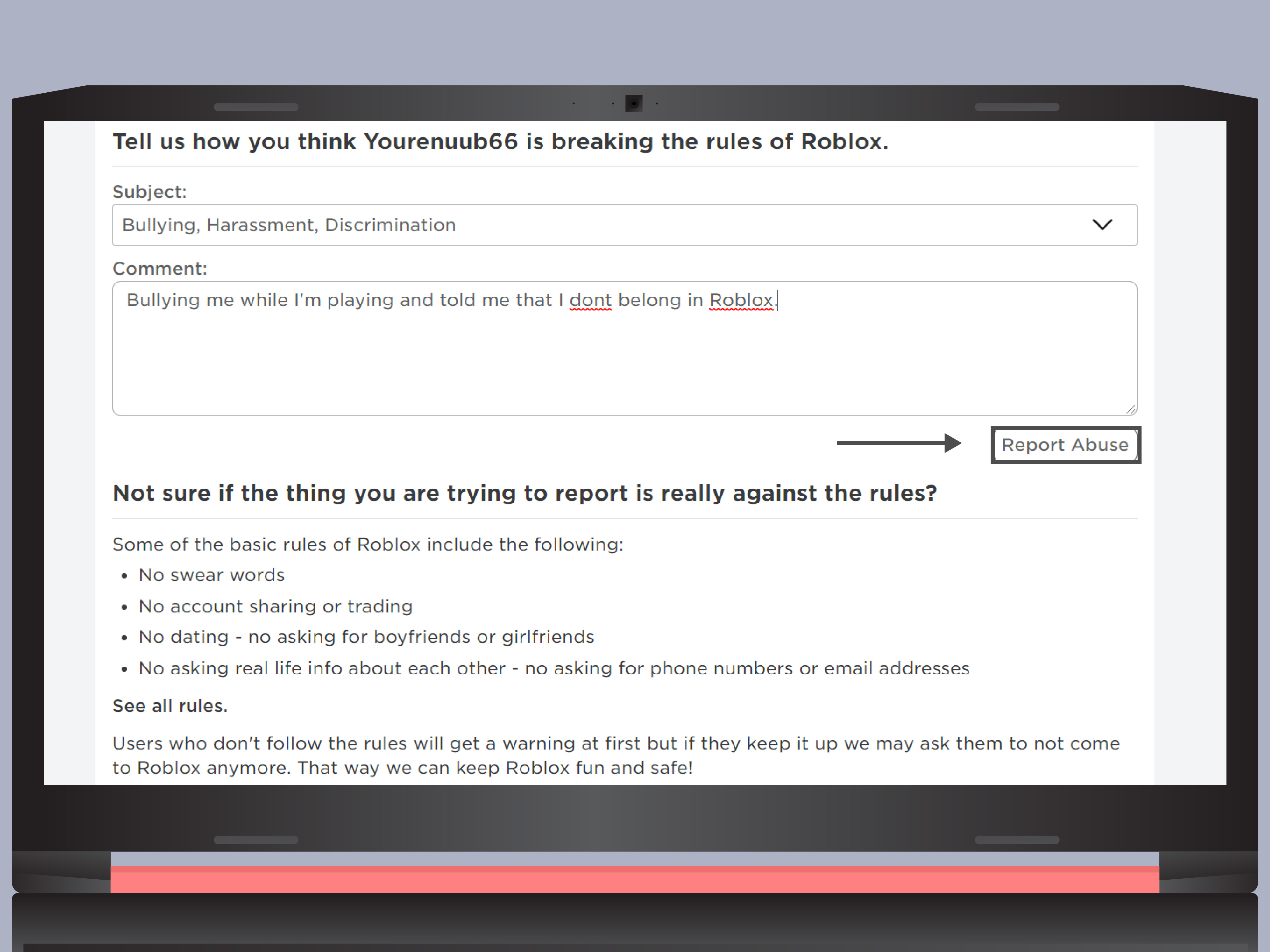
Roblox will ask you to choose a reason for abuse or a category that describes the violation. Choose the option that most closely matches the behavior. Possible categories may involve bullying, harassment, inappropriate language, dating or sexual content, scams, cheating, exploiting, threats, or sharing personal information.
Do not choose the most dramatic category just because you are upset. Accurate reports are stronger reports. If someone is spamming, choose a spam-related reason. If someone is threatening real-world harm, choose the most relevant threat or safety category. If someone is asking for passwords or promising free Robux, choose a scam or account-theft-related reason.
Step 10: Write a clear short description
The short description box is where your report can become much more useful. Keep it specific, factual, and brief. Include what the player did, what they said, and why it was concerning. Avoid insults, exaggeration, or jokes inside the report. Save the comedy for your group chat, not the moderation form.
Good examples include:
- “This player repeatedly used racist insults in chat and targeted two users.”
- “They asked me for my password and said they would give me free Robux.”
- “This user kept telling my child to add them on another app and not tell parents.”
- “The player made threats of real-world violence during the game.”
Bad examples include: “Ban them now,” “They are the worst,” or “They ruined my vibe.” Your vibe matters emotionally, but moderators need facts.
Step 11: Submit the report
After choosing the person, category, and description, submit the report. Once submitted, the report goes to Roblox for review. A report does not always mean the account will be banned immediately. Moderators may review chat logs, behavior, account history, experience context, and other signals before deciding what action is appropriate.
Roblox may also provide follow-up information or notifications depending on the type of report and the current reporting system. After submitting, you do not need to keep reporting the same incident repeatedly. One clear, accurate report is usually better than ten angry duplicates.
Step 12: Block or mute the player
Reporting tells Roblox about the issue, but blocking or muting helps protect your own experience right away. If the player continues bothering you, use the block option on their profile or in the available Roblox menu. Blocking can prevent unwanted contact and reduce the chance that the person keeps following, messaging, or interacting with you.
If you are a parent managing a child’s Roblox account, you may be able to view, block, or report connections through parental controls. This is especially useful if a child is too nervous to report someone alone or does not fully understand why a conversation felt wrong.
Step 13: Get extra help for serious safety concerns
Some situations need more than a Roblox report. If someone threatens real-world violence, shares private information, attempts sexual exploitation, asks a child for images, pressures a player to move to another platform, or appears to be grooming a minor, involve a trusted adult immediately. Parents should document what happened and use Roblox’s support and safety tools.
If there is immediate danger, contact local emergency services. If the situation involves suspected child sexual exploitation, report it to the appropriate child-safety authorities in your country. In the United States, the National Center for Missing & Exploited Children operates the CyberTipline for reports of suspected child sexual exploitation. Roblox reporting is important, but serious real-world safety concerns should not stay trapped inside a game menu.
How to Report a Roblox Profile Outside an Experience
Sometimes the problem happens outside a live game. A player may send inappropriate messages, post something concerning, impersonate someone, or use their profile in a way that violates Roblox rules. In that case, go to the player’s profile, look for the three-dot menu or report option, and choose “Report” if available.
Profile reports are useful when the issue is tied to the account itself rather than a specific in-game moment. For example, if a user’s profile contains inappropriate text, scam links, impersonation, or attempts to lure players away from Roblox, reporting the profile may be the right move.
How Parents Can Help a Child Report Someone on Roblox
Parents do not need to become Roblox experts overnight. You do not have to know the difference between an obby, a tycoon, and a simulator to support your child. Start by asking calm questions: What happened? Who said it? Where did it happen? Did they ask you to keep a secret? Did they ask you to move to another app?
Then help your child report the user, block the account, and adjust privacy settings. Roblox parental controls can help parents manage communication settings, review connections, and reduce unwanted interactions. For younger players, consider limiting chat features, reviewing friend lists, and talking regularly about online boundaries.
The most important parenting move is not the perfect setting. It is making sure your child knows they can come to you without getting blamed. If a child thinks they will lose Roblox forever the moment they report something scary, they may stay silent. Keep the door open. Safety conversations work better when they feel like teamwork, not a surprise courtroom hearing.
What Should You Report on Roblox?
Here are common examples of reportable Roblox behavior:
- Bullying, harassment, repeated insults, or targeted humiliation
- Racist, sexist, homophobic, or hateful language
- Threats of real-world harm or self-harm encouragement
- Sexual comments, sexual role-play, or requests for intimate images
- Attempts to move a child to another app for private conversation
- Requests for passwords, account access, or personal information
- Free Robux scams, fake giveaways, phishing links, or impersonation
- Cheating, exploiting, or intentionally disrupting the experience
- Inappropriate content inside a game or experience
When in doubt, ask: “Could this harm someone, manipulate someone, expose private information, or make Roblox unsafe?” If yes, reporting is reasonable.
What Not to Do When Reporting Someone
Do not make false reports. Reporting someone just because they beat you, declined a trade, or would not join your group is not helpful. False or low-quality reports waste moderation resources and may make it harder for real problems to get attention.
Do not try to run your own “sting.” Do not pretend to be someone else, lure a suspicious user into more conversations, or move the interaction to another app to gather evidence. That can put people at greater risk and may violate platform rules. Use the official reporting tools, preserve relevant information, and involve trusted adults or authorities when needed.
Do not share screenshots publicly with names attached in an attempt to shame the user. Public pile-ons can create more harassment and confusion. Report through the correct channels and let Roblox review the issue.
How to Make Your Roblox Report Stronger
A strong Roblox report is clear, specific, and honest. Include the behavior, the context, and the reason it worried you. If the issue happened in chat, mention the words or topic without adding extra drama. If the player tried to scam you, describe the promise or trick. If the user made you feel unsafe, explain what they asked you to do.
For example, “User asked me to click a link for free Robux” is stronger than “They are sus.” “User kept asking my child to add them on another app and keep it secret” is stronger than “Bad person.” Specific details help moderators understand the situation quickly.
Experience-Based Tips: What Reporting Someone on Roblox Teaches You
Anyone who spends enough time in Roblox learns that online communities are a mix of creativity, friendship, weird jokes, and the occasional person who behaves like they were raised by a malfunctioning vending machine. Reporting someone can feel awkward at first, especially for younger players who worry they are overreacting. But the experience often teaches an important lesson: you do not have to tolerate behavior that makes you feel unsafe just because it happens in a game.
One common experience is dealing with spam or scam attempts. A player may pop into chat promising free Robux, rare items, or account upgrades. The message might look exciting, especially to kids who want new accessories or game passes. But legitimate platforms do not need your password, and strangers offering magical piles of Robux are usually selling trouble wrapped in glitter. Reporting these accounts helps protect not only you but also players who may be younger or less experienced.
Another common situation is bullying. Sometimes it starts as teasing and turns into repeated targeting. A player may follow someone around the map, insult their avatar, mock their voice, or encourage others to join in. The best response is not to “win” the argument. The best response is to step away, report the behavior, and block the person. That may not feel as satisfying as delivering a movie-worthy comeback, but it is safer and cleaner.
Parents often discover Roblox reporting after a child says, “Someone was being weird.” That word matters. “Weird” can mean silly, annoying, creepy, sexual, threatening, or confusing. Instead of dismissing it, ask the child to show you what happened if they can. Many kids do not have adult vocabulary for grooming, manipulation, or harassment. They may only know that someone made them uncomfortable. Treat that feeling as useful information.
Reporting also teaches digital boundaries. A player who says, “Don’t tell your parents,” “Add me on another app,” or “Send me a picture” is crossing a line. Children should know that safe friends do not demand secrecy. If a Roblox interaction moves from fun to pressure, secrecy, threats, or personal questions, it is time to stop, report, block, and talk to an adult.
The most reassuring part is that reporting is not complicated. You do not need to be a cybersecurity expert wearing sunglasses in a dark room full of monitors. You just need to use the report button, choose the right category, explain what happened, and protect yourself with blocking or privacy settings. Good reporting is a simple habit that makes online play safer.
In the long run, the best Roblox safety strategy combines platform tools with real conversations. Reporting handles the immediate incident. Blocking reduces contact. Parental controls add guardrails. Regular conversations build judgment. Together, they create a safer experience without turning Roblox into a joyless spreadsheet with avatars.
Conclusion
Knowing how to report someone on Roblox is a basic safety skill for every player and parent. The process is simple: stay calm, identify the behavior, use the in-experience report tool when possible, choose the correct person or experience, add clear details, submit the report, and block the user if needed. For serious concerns involving threats, exploitation, grooming, or real-world danger, involve a trusted adult and the appropriate safety authorities.
Roblox is at its best when players can create, explore, and socialize without being harassed, scammed, or pressured. Reporting is not about ruining someone’s fun. It is about protecting the fun for everyone else. And honestly, a safer Roblox is much better than a server full of chaos gremlins with Wi-Fi.