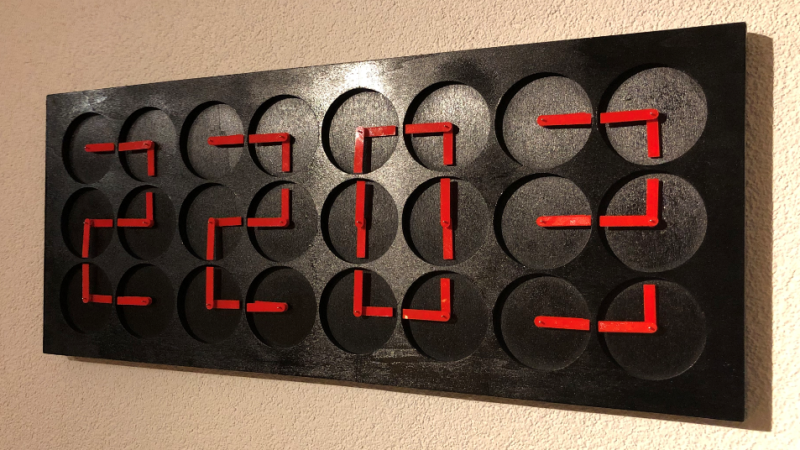
A giant meta-clock made of smaller clocks sounds like something a time-traveling engineer would build after drinking one too many coffees. Yet it is a real and fascinating idea: dozens of small analog clock faces work together to form one larger digital display. Each small clock has two hands. Individually, those hands may look like ordinary hour and minute hands. Together, they become pixels, strokes, letters, numbers, animations, and a little bit of mechanical magic.
The concept sits at the sweet intersection of kinetic art, embedded electronics, mechanical design, and visual storytelling. It is not just a clock. It is a clock made of clocks, which is exactly the kind of sentence that makes your brain stop, reboot, and ask for a wiring diagram.
In this guide, we will explore how a giant meta-clock works, what makes the design so mesmerizing, what components are commonly used, and what builders can learn from famous “clock of clocks” projects. We will also look at practical design decisions, from stepper motors and microcontrollers to enclosures, calibration, animations, and the very human experience of building something that literally refuses to be rushed.
What Is a Giant Meta-Clock?
A giant meta-clock is a large display built from many smaller analog clock faces. Instead of each clock telling its own time, all the smaller clocks cooperate to show a larger message, usually a digital-style time such as 12:45. The hands become line segments. With careful positioning, six small clocks can form one digit. Four digits require twenty-four clocks, which is why many well-known versions use a 4-by-6 or similar arrangement.
The idea is delightfully backwards. A normal digital clock uses LEDs, LCD segments, or pixels to show time. A meta-clock uses rotating mechanical hands to imitate a digital display. It turns time into choreography. Every minute, the hands move, spin, align, and settle into a new arrangement. The viewer sees both the result and the process, which is the secret sauce. The clock does not simply tell time; it performs time.
Why Smaller Clocks Make Such a Big Impression
The appeal of a clock made of clocks comes from contrast. Analog clocks feel traditional, familiar, and almost old-fashioned. Digital numerals feel precise, modern, and efficient. A meta-clock combines both. It uses analog parts to create digital meaning.
This makes the object feel alive. Before the minute changes, the hands may swirl in a wave, scatter into visual chaos, or rotate in synchronized patterns. Then, suddenly, they snap into order. The giant display appears. The little clocks stop being individuals and become a team. It is like watching a marching band, except everyone is a clock hand and nobody forgot their hat.
For web readers, makers, designers, and engineering hobbyists, this topic has broad appeal because it touches several popular interests: DIY electronics, kinetic sculpture, smart home decor, microcontroller programming, CNC fabrication, laser cutting, 3D printing, and creative display design.
Real-World Inspiration: From Art Installations to DIY Builds
The most famous commercial and artistic examples come from Humans since 1982, a Stockholm-based studio known for ClockClock 24 and the larger A million Times installations. ClockClock 24 uses twenty-four analog clock faces to create a collective digital time display. Larger A million Times works scale the idea dramatically, using many more clock faces to produce animations, typography, and public art experiences.
Maker and embedded-systems educator Erich Styger has also documented impressive versions of a meta-clock concept. One widely discussed build used twenty-four small analog clocks, stepper motors, microcontrollers, a laser-cut enclosure, 3D-printed hands, magnetic position detection, and a low-voltage power setup. A newer version expanded the idea into a 5-by-12 matrix with sixty clocks and 120 motorized hands, adding LED rings, an oak enclosure, RS-485 communication, and more display flexibility.
These projects show that a giant meta-clock is not a weekend “glue some clocks to a board and hope” project. It is a system. The beauty on the wall depends on a hidden orchestra of firmware, wiring, power distribution, calibration, mechanical tolerance, and patience.
How the Display Actually Works
Each Clock Becomes a Visual Module
In a meta-clock, each small clock face is no longer treated as a timekeeper. It becomes a visual module. The two hands can point in many directions, and certain positions create strokes. For example, both hands can form a vertical line, a horizontal line, a corner, or a diagonal. When several small clocks are arranged in a grid, these strokes can form a digit.
A digit like “2” might require top, upper-right, middle, lower-left, and bottom strokes. Instead of lighting those strokes like a seven-segment LED display, the clock rotates hands into the right positions. The result is mechanical typography.
The Hands Must Move Independently
The magic depends on independent hand control. In an ordinary wall clock, the hour and minute hands are mechanically linked. In a meta-clock, each hand usually needs its own motor or a dual-shaft motor arrangement so the system can place both hands exactly where needed. That independence allows the clock to create shapes beyond normal timekeeping.
Software Controls the Choreography
The firmware decides where each hand should point for every number, letter, animation, or transition. This requires mapping visual patterns into motor positions. A simple version might only show time. A more advanced version may display room temperature, short text, loading animations, waves, spirals, or decorative patterns between minute changes.
Main Components of a Giant Meta-Clock
1. Stepper Motors
Stepper motors are popular for this kind of project because they move in small, controlled increments. They are useful when precise positioning matters. For a meta-clock, the motor must rotate a hand to a known angle, stop cleanly, and repeat that motion reliably thousands of times.
Some builds use compact clock-style stepper motors because they are thin, affordable, and suitable for lightweight hands. Larger builds may use dual-shaft stepper motors so each clock face can control two hands independently. The goal is not brute strength; it is repeatable, graceful movement. A meta-clock hand should not lurch around like it just heard bad news.
2. Microcontrollers
A large meta-clock may require many motor outputs. Rather than force one controller to handle everything directly, builders often divide the work. One board might control several clocks, while a central controller coordinates the overall display. This modular design makes wiring cleaner and troubleshooting less dramatic.
Microcontrollers such as ARM Cortex-M-based boards are common in embedded projects because they offer enough performance for motor control, communication, and timing while remaining compact and affordable. The exact board matters less than the architecture: reliable timing, enough I/O, stable firmware, and a communication method that does not collapse when you add the twenty-third clock.
3. Motor Drivers
Microcontrollers cannot usually drive motors directly. Motor drivers handle the electrical load and convert control signals into motor movement. A driver may accept step and direction commands, which simplifies firmware. The controller says, in effect, “move this way for this many steps,” and the driver handles the muscle.
Good motor driving also affects sound. A quiet clock feels elegant; a noisy one feels like a drawer full of electric toothbrushes trying to escape. Smooth motion and low noise are especially important if the clock will hang in a living room, office, gallery, or lobby.
4. Position Sensors
Because the system needs to know where every hand is, calibration is essential. Many designs use magnets and Hall effect sensors to detect reference positions. A small magnet embedded in a hand or rotating element passes near a sensor, letting the firmware establish a known “home” point.
Without calibration, tiny errors can accumulate. After enough movement, a hand that should point straight up may point slightly sideways. One misaligned hand is charming. Thirty misaligned hands make the clock look like it is whispering secrets in cursive.
5. Communication Bus
As the project scales, communication becomes a serious design choice. A few clocks can be handled with simple wiring. Dozens of clocks benefit from a robust communication bus. RS-485 is often used in industrial and multi-node systems because it supports differential signaling and can work well across longer wired networks.
For a giant meta-clock, a bus architecture lets the main controller send commands to distributed boards. Each board knows which clocks it controls. This keeps the design scalable and reduces the chaos of running every signal back to one central point.
6. Power Supply
Power planning is not glamorous, but it is where many ambitious projects go to trip over a shoelace. A small twenty-four-clock version may run from a low-voltage 5V supply if the motors and electronics are chosen carefully. A larger sixty-clock build with LED rings can require significantly more current, especially when many LEDs are on at once.
Good practice includes estimating peak current, using proper wire gauges, separating logic and motor power when needed, adding fuses or protection, and avoiding mystery power bricks from the “probably fine” drawer. Low-voltage projects are safer than mains-powered builds, but they still deserve respect.
7. Enclosure and Mechanical Frame
The enclosure is both structure and stage. It must hold every clock face at a consistent distance, keep motors aligned, hide wiring, and look good enough that visitors do not ask whether the project is “still in beta.” Common fabrication methods include laser-cut panels, CNC-cut wood, 3D-printed brackets, acrylic hands, and carefully designed rear covers.
Wood gives warmth. Acrylic gives crisp precision. 3D printing gives customization. The best enclosure balances beauty, serviceability, and stiffness. If one motor fails, you want access without dismantling half the wall.
Planning the Layout
Before buying parts, decide what the clock should display. A classic twenty-four-clock design can show four digital digits. A larger matrix can show time, text, icons, or abstract animations. The layout determines how many motors, drivers, boards, wires, screws, and “why did I start this?” moments you will need.
For a beginner-friendly concept, a 4-by-6 arrangement is a reasonable starting point. It is still challenging, but the visual logic is clear. Each digit can be built from six clocks. Four digits show hours and minutes. Add a colon with LEDs or two small decorative dots if desired.
For a more advanced build, a 5-by-12 or larger grid opens the door to scrolling text, expressive animations, and custom fonts. However, it also multiplies the complexity. More clocks mean more calibration, more current, more wiring, more firmware states, and more chances for one tiny hand to rebel.
Designing the Motion
Minimal Mode
Minimal motion is quiet and practical. The hands move only as much as needed to update the time. This is ideal for offices, bedrooms, classrooms, and anyone who loves kinetic art but also enjoys concentrating.
Medium Mode
Medium motion adds short transitions. The hands may rotate briefly, create a wave, or sweep into position. This gives the clock personality without turning every minute into a Broadway number.
Elaborate Mode
Elaborate motion is where the meta-clock becomes a showpiece. The hands can spin, scatter, align, ripple, and reform. Done well, the animation makes people stop mid-sentence. Done poorly, it looks like a mechanical argument. The key is choreography: motion should feel intentional, not random.
Firmware: The Invisible Clockmaker
The firmware has several jobs. It must keep accurate time, translate digits into hand positions, command motor drivers, monitor calibration sensors, manage animations, and recover gracefully if something goes wrong. A robust design may include startup homing, error detection, manual calibration, brightness control for LEDs, and a command interface for testing.
The most important firmware concept is abstraction. Do not write code that treats every motor as a unique snowflake with a dramatic backstory. Define modules. Define hand positions. Define digits. Define animations. Once the software understands a clock face as an object with two controllable hands, the rest becomes much easier to expand.
Building the Hands
Clock hands must be light, balanced, visible, and consistent. Laser-cut acrylic is a popular option because it can be precise and attractive. 3D-printed hands are flexible and easy to iterate, but they may need careful finishing to avoid wobble. Thin plywood can look beautiful, though weight and warping must be considered.
Visibility matters. A giant meta-clock is usually viewed from several feet away, so the hands need contrast against the face. If the hands are too thin, the display becomes hard to read. If they are too heavy, the motors struggle. If they are too flashy, the clock may look like it wandered out of a carnival. Balance is everything.
Calibration: Where Precision Meets Patience
Calibration is the difference between “wow” and “hmm.” Every hand needs a known reference. During startup, the system can rotate each hand until it detects its home position. From there, the firmware counts steps to reach target angles.
Mechanical tolerances matter. A small offset in a single clock may be barely visible. Across twenty-four or sixty clocks, offsets become obvious. The best builds allow per-hand correction values in software. That way, you can fine-tune alignment without sanding plastic at midnight while questioning your life choices.
Common Challenges and Practical Fixes
Wiring Gets Messy Fast
Use modular harnesses, labeled connectors, and consistent color coding. Future-you will appreciate present-you. Future-you is already holding a multimeter and looking tired.
Power Drops Cause Strange Behavior
If motors twitch, LEDs flicker, or boards reset during animations, check voltage drop and current capacity. Larger builds may need multiple power injection points.
Hands Drift Over Time
Improve homing routines, reduce missed steps, check motor torque, and use calibration offsets. Mechanical friction can also cause drift, especially if hands rub against the face or each other.
The Display Is Hard to Read
Increase contrast, adjust hand length, refine digit patterns, or slow the final settling motion. A meta-clock should be artistic, but it should still tell time without requiring an advanced degree in interpretive geometry.
Where a Giant Meta-Clock Fits Best
A giant meta-clock is ideal for spaces where people have a moment to look and wonder: maker labs, engineering offices, hotel lobbies, galleries, schools, design studios, coffee shops, and modern homes. It becomes a conversation starter because it rewards attention. At first glance, people see a digital clock. Then they notice the smaller clocks. Then they lean closer. Then they say, “Wait, how does that work?” Congratulations. The clock has successfully captured another human.
Is This a Beginner Project?
Not exactly. A simple single-clock motor project can be beginner-friendly. A giant meta-clock is better for intermediate or advanced makers, especially those comfortable with microcontrollers, soldering, CAD, motor control, and basic fabrication. That said, a beginner can still approach it in stages.
Start with one clock face and two independently controlled hands. Then build a row of four. Then build one digit from six clocks. Once one digit works reliably, scaling becomes a matter of repetition, patience, and having enough desk space to look slightly unreasonable.
Estimated Build Strategy
Phase 1: Prototype One Clock
Test the motor, driver, hand design, sensor, and firmware. Confirm that the hand can home, move to known angles, and repeat accurately.
Phase 2: Build One Digit
Arrange six clocks and program patterns for numbers 0 through 9. This reveals whether the display is readable and whether your mechanical spacing works.
Phase 3: Expand to Four Digits
Add boards, wiring, and a main controller. Implement timekeeping and coordinated updates. This is where modular design pays off.
Phase 4: Add Animation
Once the clock tells time reliably, add transitions. Keep them optional. A mode button or configuration setting lets users choose between quiet and theatrical.
Phase 5: Finish the Enclosure
Do not rush the enclosure. It is the difference between a prototype and a finished object. Sand edges, hide wires, plan wall mounting, and make maintenance possible.
Experience Notes: What Building One Teaches You
Building a giant meta-clock teaches a maker that time is not the only thing that moves slowly. So does debugging. The first surprise is scale. One clock face feels simple. Two hands, one motor assembly, one sensor, one little board. Easy enough. Then you multiply it by twenty-four, forty-eight, or sixty, and the project becomes a small mechanical city. Every resident has an address, a job, and a tendency to misbehave when visitors arrive.
The second lesson is that mechanical accuracy is deeply emotional. A line that is off by two degrees will bother you more than you expect. You will stare at it. You will adjust it. You will tell yourself nobody will notice. Then someone will walk into the room and say, “That one looks crooked.” At that moment, you will understand why calibration menus exist.
The third lesson is that good cable management is not decoration. It is survival. In a giant meta-clock, wires multiply like rabbits with engineering degrees. Motor leads, sensor lines, power cables, LED data lines, programming headers, and communication buses all need routes. If you do not label them early, troubleshooting becomes an archaeological dig. You will find a connector and wonder whether it belongs to the upper-left digit, the lower-right board, or a completely different project from 2021.
The fourth lesson is that animation changes everything. A static display is satisfying, but coordinated motion creates personality. When the hands sweep into place, the clock feels intentional. When they spin in harmony before forming the next minute, the object becomes more than a tool. It becomes a performance. The trick is restraint. Too much motion can become visual noise. The best animations give the viewer a little surprise, then politely return to being useful.
The fifth lesson is that people love visible mechanisms. We live surrounded by black rectangles that hide how they work. A meta-clock does the opposite. It reveals the act of displaying information. You can see every hand travel from confusion to clarity. That makes the clock feel honest, almost playful. It says, “Yes, I could have used LEDs, but where is the drama in that?”
The sixth lesson is that projects like this benefit from modular thinking. Build one working unit. Duplicate it. Create test routines. Make every board identifiable. Store calibration values. Design the enclosure so parts can be removed. The more artistic the final object looks, the more disciplined the hidden engineering must be.
Finally, building a giant meta-clock teaches patience in a very literal way. You are making a machine that measures minutes, and you will spend many minutes teaching it how to behave. That is part of the charm. The finished piece is not just a display of time; it is a record of careful decisions, tiny corrections, failed tests, successful fixes, and the quiet joy of watching dozens of small clocks agree on one big idea.
Conclusion
Building a giant meta-clock made of smaller clocks is one of those projects that proves engineering can be poetic. It combines the precision of stepper motors, the logic of embedded software, the craft of physical fabrication, and the visual delight of kinetic art. The result is functional, decorative, and wonderfully unnecessary in the best possible way.
For makers, it is a masterclass in systems thinking. For designers, it is a study in motion and meaning. For viewers, it is simply mesmerizing. A meta-clock reminds us that time does not have to be shown in the fastest or simplest way. Sometimes, the most memorable clock is the one that takes twenty-four, sixty, or even hundreds of smaller clocks and persuades them to dance together.