Imagine changing the volume, steering a small robot, switching lights, or navigating a media menu with a simple flick of your wrist. No clicky buttons. No sticky remote buried between couch cushions. No dramatic living-room archaeology. That is the charm of an ARM-based gesture remote control: it turns natural hand movements into digital commands using an ARM microcontroller, motion sensors, signal processing, and wireless communication.
At its heart, this technology blends embedded systems with human-computer interaction. A small device recognizes gestures such as tilt left, tilt right, swipe up, rotate, shake, or point forward, then sends the matching instruction to another system. The receiver may be a robot, smart appliance, TV interface, drone prototype, industrial machine, or home automation controller. It is a compact idea with a surprisingly large personality.
ARM-based microcontrollers are popular for this job because they offer a strong balance of performance, low power consumption, real-time response, and affordable development boards. In other words, they can think fast without eating batteries like a raccoon in a snack cabinet.
What Is an ARM-Based Gesture Remote Control?
An ARM-based gesture remote control is a handheld or wearable device that uses an ARM processor to detect motion and translate it into control signals. The word “ARM” usually refers to a family of processor architectures widely used in microcontrollers, smartphones, wearables, sensors, and Internet of Things devices. In many prototypes, the core controller may be an ARM Cortex-M chip, such as those found in STM32, NXP, Nordic, Microchip, or Arduino Nano 33 BLE-style boards.
The gesture part comes from sensors. A basic system may use an accelerometer to measure movement and orientation. A more advanced design adds a gyroscope to track rotation, a magnetometer for heading, or an optical gesture sensor such as APDS-9960 for touchless hand swipes. Higher-end designs can even use time-of-flight sensors, infrared arrays, radar, or tiny machine learning models running directly on the microcontroller.
The remote-control part is the action layer. Once the microcontroller recognizes a gesture, it sends a command through Bluetooth Low Energy, radio frequency modules, infrared, Wi-Fi, Zigbee, or another wireless protocol. For example, tilting the remote forward may move a robot ahead. A right swipe may skip a song. A clockwise wrist rotation may increase volume. A shake may act as an emergency stop, because every good project needs a panic button that does not require a tiny screwdriver.
Why ARM Microcontrollers Are a Strong Fit
Gesture control requires quick sensor reading, filtering, decision-making, and wireless communication. ARM-based microcontrollers are well suited because they are designed for embedded applications where timing, energy efficiency, and reliability matter.
Low Power for Portable Devices
A gesture remote is usually battery powered. Nobody wants a remote that needs charging after three enthusiastic hand waves. ARM Cortex-M microcontrollers are commonly used in low-power sensor devices, making them practical for handheld remotes, wearables, and smart-home controllers.
Real-Time Sensor Processing
Gesture recognition works best when the system responds immediately. If you swipe left and the device reacts two seconds later, it feels less like smart control and more like arguing with a sleepy toaster. ARM microcontrollers can sample sensors, process data, and trigger outputs with low latency, especially when code is optimized and interrupts are used properly.
Flexible Development Ecosystem
Developers can build ARM gesture projects with tools such as STM32CubeIDE, Keil, Arduino IDE, PlatformIO, Zephyr, FreeRTOS, TensorFlow Lite for Microcontrollers, and vendor-specific software libraries. This ecosystem makes it easier to move from a breadboard prototype to a polished product.
Core Components of an ARM-Based Gesture Remote Control
A practical gesture remote control is made of several hardware and software blocks. Each block has one job, but together they behave like a tiny orchestra. Sometimes the violin section is an accelerometer, and sometimes the trumpet section is a Bluetooth module refusing to pair until you reboot it twice.
1. ARM Microcontroller
The microcontroller is the brain. It reads sensor data, applies filtering, recognizes gestures, manages power, and sends commands. Common choices include STM32 Cortex-M boards, Arduino Nano 33 BLE, NXP LPC or i.MX RT boards, Nordic nRF52 modules, and other ARM Cortex-M platforms.
2. Motion Sensor
The motion sensor captures movement. A 3-axis accelerometer measures acceleration along X, Y, and Z axes. A gyroscope measures angular velocity. Many gesture remotes use an IMU, or inertial measurement unit, which combines accelerometer and gyroscope data. Popular IMU modules include MPU-6050, ICM-20948, LSM6DS series sensors, and similar devices.
3. Gesture Sensor or Proximity Sensor
For touchless gestures, optical sensors like APDS-9960 can detect directional swipes such as up, down, left, and right. These sensors often use infrared light to sense movement near the module. They are especially helpful when the remote is fixed on a desk, wall, appliance, or dashboard.
4. Wireless Communication Module
The system needs a way to send commands. Bluetooth Low Energy is popular for smartphones, laptops, smart devices, and wearable remotes. RF modules are common in robotics. Infrared can control traditional TVs and appliances. Wi-Fi works well for smart-home systems, though it may consume more power than BLE or low-power RF.
5. Power Supply
A lithium-ion battery, coin cell, AA battery pack, or rechargeable LiPo cell can power the remote. Good designs include voltage regulation, charging protection, sleep modes, and a clear battery-status indicator. A battery LED is not fancy, but it prevents the classic engineering mystery called “the code is broken,” which is often solved by charging the battery.
6. Receiver Unit
The receiver interprets incoming commands and controls the target device. In a robot project, the receiver may drive motors. In a smart-home project, it may trigger relays or send MQTT messages. In a media controller, it may emulate keyboard shortcuts or Bluetooth HID commands.
How the System Works
The workflow of an ARM-based gesture remote control can be explained in five stages: sensing, filtering, feature extraction, gesture classification, and command transmission.
Sensing
The sensor continuously measures movement. For an IMU-based remote, the accelerometer and gyroscope generate streams of numeric values. These values describe tilt, shake, rotation, direction, speed, and orientation.
Filtering
Raw sensor data is noisy. Small vibrations, hand tremors, sensor drift, and electrical interference can create false readings. Filtering smooths the data. Common techniques include moving averages, complementary filters, Kalman filters, thresholding, and debounce logic. A good filter is like a polite bouncer at the club: it lets real gestures in and keeps random nonsense outside.
Feature Extraction
The microcontroller then looks for meaningful patterns. Features may include peak acceleration, tilt angle, angular velocity, duration, direction changes, or gesture timing. For example, a “shake” gesture may show alternating acceleration peaks. A “tilt right” command may show a stable change in the X-axis value.
Gesture Classification
Classification means deciding which gesture happened. Simple systems use rules. For instance, if the X-axis crosses a positive threshold for more than 200 milliseconds, call it “right.” If the Z-axis suddenly spikes, call it “tap” or “shake.” More advanced systems use machine learning models trained on sample motion data. TinyML can classify complex gestures on microcontrollers, but it requires careful data collection, model compression, and testing.
Command Transmission
After recognizing the gesture, the ARM controller sends a command packet. A robot might receive “FORWARD,” “LEFT,” or “STOP.” A smart TV interface may receive “NEXT,” “BACK,” or “SELECT.” A home automation hub may receive “LIGHT_ON” or “FAN_SPEED_UP.” The receiver confirms or acts on the command.
Common Gesture Commands
Gesture commands should be simple, distinct, and easy to remember. The best gestures feel natural, not like a secret handshake invented by a committee of caffeinated engineers.
- Tilt forward: Move forward, scroll down, or increase speed.
- Tilt backward: Move backward, scroll up, or reduce speed.
- Tilt left: Turn left or previous item.
- Tilt right: Turn right or next item.
- Quick shake: Stop, reset, cancel, or wake the device.
- Clockwise rotation: Increase volume, brightness, or motor speed.
- Counterclockwise rotation: Decrease volume, brightness, or motor speed.
- Swipe over optical sensor: Navigate menus without touching the device.
Design Example: Gesture-Controlled Robot Remote
A classic ARM-based gesture remote project is a small robot controlled by hand motion. The transmitter uses an ARM Cortex-M microcontroller with an accelerometer and gyroscope. The receiver uses another microcontroller connected to motor drivers. Communication may happen over Bluetooth, RF, or BLE.
When the user tilts the remote forward, the transmitter detects a forward angle and sends a forward command. When the user tilts left, the robot turns left. A shake gesture stops the robot immediately. This is more intuitive than pressing four small buttons, especially for educational robotics, assistive technology demos, and human-machine interface experiments.
The main challenge is avoiding accidental commands. Human hands are wonderfully expressive, which is another way of saying they are unstable sensor platforms. To solve this, the system should use dead zones, minimum gesture duration, calibration, and confirmation logic. For example, a tilt must stay above a threshold for 150 to 300 milliseconds before the command is accepted.
Rule-Based Recognition vs. Machine Learning
There are two common ways to recognize gestures: rule-based logic and machine learning.
Rule-Based Gesture Recognition
Rule-based recognition uses thresholds and conditions. It is easier to understand, faster to implement, and efficient on low-cost microcontrollers. A rule might say: “If acceleration on the X-axis is greater than a set value, and the Y-axis is stable, classify the gesture as right tilt.”
This method is excellent for simple gestures such as tilt, shake, tap, and directional movement. It is also easier to debug. You can print sensor values, adjust thresholds, and see results quickly.
Machine Learning Gesture Recognition
Machine learning is useful when gestures are complex, overlapping, or performed differently by different users. A model can learn patterns from training data and classify gestures based on features. TinyML allows small neural networks to run directly on ARM microcontrollers without sending data to the cloud.
The tradeoff is complexity. You need training samples, labeling, validation, memory optimization, and careful deployment. For a commercial product, machine learning may improve accuracy. For a weekend prototype, rules may be enough. The best choice depends on the project goal, budget, power limit, and how many gestures the system must recognize.
Applications of ARM-Based Gesture Remote Control
Gesture remote controls are not just cool lab toys. They can solve real interaction problems in multiple industries.
Smart Home Control
A gesture remote can control lights, fans, blinds, speakers, or thermostats. A simple wrist motion can dim lights or change music. This is useful when hands are wet, dirty, gloved, or full of groceries.
Robotics
Gesture control is widely used in robot car prototypes, robotic arms, drones, and assistive robots. It creates a more natural connection between human intention and machine movement.
Healthcare and Accessibility
Gesture remotes can help people with limited mobility operate devices without pressing small buttons. A wearable remote can translate easier hand motions into commands for wheelchairs, hospital beds, call systems, or communication aids.
Industrial Interfaces
In factories, operators may wear gloves or work in environments where touchscreens are inconvenient. Gesture systems can provide quick command input while reducing physical contact with control panels.
Gaming and Entertainment
Gesture remotes can create immersive game controllers, presentation tools, VR accessories, or media remotes. They make digital interaction feel more physical and playful.
Advantages of ARM-Based Gesture Remote Control
The biggest advantage is natural interaction. People already understand gestures. We point, wave, tilt, shake, and rotate objects without needing a manual. A good gesture remote uses that natural behavior.
Another advantage is hygiene. Touchless or low-touch controls are useful in kitchens, hospitals, workshops, laboratories, and shared public devices. Gesture control can also reduce mechanical wear because there are fewer buttons to break.
ARM platforms also support scalable design. A student can build a simple version with an accelerometer and Bluetooth module. A professional team can add sensor fusion, secure wireless communication, machine learning, enclosure design, and over-the-air firmware updates.
Challenges and Limitations
Gesture control is not magic, although it occasionally looks like it. Designers must handle real-world problems such as sensor noise, inconsistent user movement, battery life, wireless interference, false positives, and environmental limitations.
Optical gesture sensors may struggle in strong sunlight or when hands are too far from the sensor. IMU-based remotes may misread casual movement as intentional commands. Machine learning systems may perform poorly if trained on too little data. Wireless control must also be secure and reliable, especially if the remote controls motors, doors, medical devices, or industrial equipment.
The solution is thoughtful design. Use clear gestures, add calibration, include feedback through LEDs or vibration, provide a manual override, and test with different users. Never assume that one person’s perfect wrist flick is universal. Some people gesture like orchestra conductors; others gesture like they are trying to swat an invisible mosquito.
Best Practices for Building a Reliable Gesture Remote
Start With Fewer Gestures
Begin with four or five gestures. Make them distinct. Forward, backward, left, right, and stop are easier to recognize than twelve gestures that differ by tiny wrist angles.
Use Calibration
Let the remote learn its neutral position when powered on. This helps the system adapt to different users and holding styles.
Add Feedback
Use an LED, buzzer, small display, or vibration motor to confirm recognized commands. Feedback builds trust. Without it, users may wave harder, which usually makes recognition worse and makes the project look haunted.
Design for Safety
Always include a stop command. For robots, drones, motors, or appliances, the stop gesture should be easy and reliable. A physical emergency stop button is even better.
Optimize Power
Use sleep modes, wake-on-motion interrupts, low-power wireless settings, and efficient sensor sampling. A remote should feel ready when needed but quiet when idle.
Future of ARM-Based Gesture Remote Control
The future of gesture remote control is moving toward smarter, smaller, and more private systems. Instead of sending raw sensor data to a phone or cloud server, more devices can process gestures directly on the microcontroller. This reduces latency, saves bandwidth, and improves privacy.
Sensor fusion will also become more common. Combining accelerometers, gyroscopes, proximity sensors, time-of-flight sensors, and infrared data can improve accuracy. Edge AI will make it possible to support personalized gestures, adaptive sensitivity, and context-aware commands.
In smart homes, gesture remotes may become compact universal controllers. In healthcare, they may support assistive interfaces. In robotics, they may make machines easier to guide. In consumer electronics, they may finally help us stop pressing the wrong tiny button in the dark. That alone deserves applause.
Conclusion
An ARM-based gesture remote control is a practical and exciting example of embedded technology meeting natural human movement. By combining an ARM microcontroller, motion sensors, wireless communication, and gesture-recognition logic, a small device can control robots, appliances, smart-home systems, media players, and industrial interfaces.
The best designs are not necessarily the most complicated. A reliable remote with five clean gestures is often better than a fancy one that recognizes twenty gestures only when Mercury is in retrograde. Start simple, filter sensor data carefully, provide feedback, test with real users, and keep safety at the center of the design.
As ARM microcontrollers become faster and more energy efficient, and as TinyML tools become easier to use, gesture remote controls will continue to improve. The result is a future where controlling technology feels less like operating a machine and more like having a conversation with itpreferably a conversation where the machine listens the first time.
Practical Experience: Building and Testing an ARM-Based Gesture Remote Control
Working on an ARM-based gesture remote control is one of those projects that looks simple on paper and then immediately teaches humility. The block diagram is clean: sensor, microcontroller, wireless link, receiver, output. Then real hands enter the story, and suddenly your “tilt right” command becomes “maybe right, maybe forward, maybe the user sneezed.” That is where the project becomes interesting.
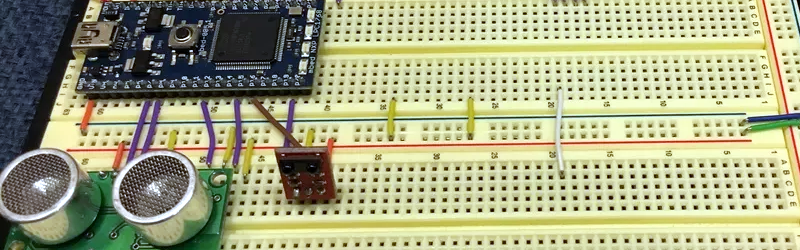
In a typical prototype, the first successful moment comes quickly. Connect an IMU to an ARM Cortex-M development board, read the X, Y, and Z values over I2C, print the numbers to a serial monitor, and tilt the board. The values change, and you feel like you have discovered electricity personally. The next step is creating thresholds. For example, when the X-axis value rises above a selected point, the program marks the gesture as right. When it drops below another point, it marks left. At this stage, the system works well on the desk and slightly less well in the human hand, because humans are not precision laboratory fixtures.
The biggest lesson is that filtering matters. Raw accelerometer data jumps around. A moving average helps smooth readings, but too much smoothing makes the remote feel slow. A complementary filter can improve orientation estimates when accelerometer and gyroscope data are combined. After testing, a small delay between recognition events is also helpful. Without a cooldown period, one enthusiastic gesture may fire five commands, and your robot may zip across the room like it just remembered an appointment.
Wireless testing brings its own comedy. Bluetooth is convenient, but pairing behavior, range, and reconnection logic must be handled carefully. RF modules may be simpler for robot projects, but command packets need structure. A good packet might include a start byte, command code, checksum, and stop byte. This prevents random noise from becoming an unexpected “drive forward” command. For safety, the receiver should stop the controlled device if no valid command is received after a short timeout.
Physical design also matters more than beginners expect. A loose sensor board causes inconsistent readings. A remote enclosure should hold the sensor in a stable orientation and make the neutral hand position comfortable. Button placement, battery access, charging port location, and LED visibility all affect usability. Even a simple wrist strap can improve handling during robot or drone testing.
Testing with multiple people is eye-opening. One person tilts gently. Another rotates dramatically. A third holds the remote sideways and insists that this is “more natural.” These differences are not problems; they are design data. Calibration at startup helps, and adjustable sensitivity can make the remote more user-friendly.
The most satisfying version is usually the one that feels boringly reliable. Tilt forward, the robot moves forward. Shake, it stops. Swipe, the menu changes. No drama. No mystery. No emergency unplugging. When an ARM-based gesture remote reaches that point, it stops feeling like a science project and starts feeling like a real interface. That is the magic: not the gesture itself, but the moment when technology quietly understands what the hand meant.
Note: This article is intended for educational and prototyping purposes. When designing gesture control for motors, appliances, vehicles, industrial systems, or assistive devices, always include fail-safe behavior, manual override, secure communication, and careful real-world testing.