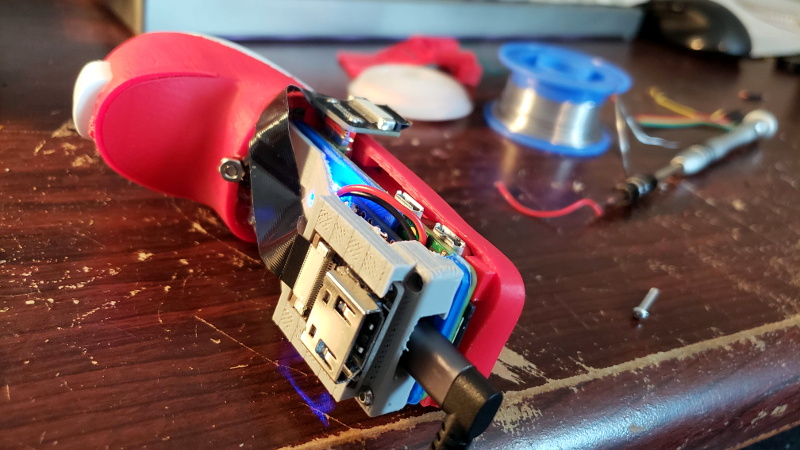
Somewhere in a drawer near the “mystery chargers” and the one Allen wrench you’ll need someday (but never today), there’s a Nintendo Wii Nunchuk quietly waiting for a second career. It already has the ergonomics, the joystick, the buttons, and even motion sensing baked in. What it didn’t haveuntil makers started getting delightfully unreasonablewas a whole Linux computer living inside it.
That’s the magic behind the “Wii Nunchuk gets a built-in Raspberry Pi Zero” idea: turning a beloved, inexpensive controller accessory into a self-contained microcomputer input device (and sometimes the computer itself). The result is part wearable computing experiment, part retro-hardware glow-up, and part “because I can” energythe best kind.
Why the Wii Nunchuk is a Maker Favorite
The Wii Nunchuk is one of those rare consumer gadgets that feels like it was accidentally designed for hackers. It’s comfortable in your hand, easy to find used, and packed with useful sensors: an analog joystick, two buttons (C and Z), and an accelerometer. Better yet, it communicates over I2C, a simple serial protocol that’s friendly to microcontrollers and single-board computers.
Small controller, big potential
Makers have used Nunchuks to drive robots, DIY mice, interactive art, and game projects for years. The “built-in Pi” twist flips the usual script: instead of the Nunchuk being a peripheral for a computer, the Nunchuk becomes the computer’s bodyor at least its portable cockpit.
The Core Concept: A Pi Zero Hidden in Plain Sight
A Raspberry Pi Zero (or Pi Zero W/Zero 2 W) is tiny, but not “disappear into a factory Nunchuk shell” tiny. The clever workaround in popular builds is to keep the Nunchuk’s original top shell and controls, then replace or extend the bottom half with a custom 3D-printed enclosure. That extra volume is where the Pi, battery, and power circuitry move in and start paying rent.
What typically goes inside
- Raspberry Pi Zero / Zero W / Zero 2 W (the brain)
- LiPo battery (commonly around 750 mAh for a compact build)
- Boost/charge board (often an Adafruit PowerBoost-style board to supply stable 5V)
- Wiring to the Nunchuk’s I2C lines so the Pi can read joystick/buttons
- Video breakout or adapter if the build is meant to drive a tiny wearable display
In other words: it’s not just “a controller with a computer inside.” It’s a pocketable, battery-powered computing module disguised as a controller griplike a spy gadget from a movie where the props department also owns a 3D printer.
How It Works (Without Turning This Into a 40-Page Build Log)
The Nunchuk talks over I2C, and the Pi can speak I2C too. In many builds, the original Nunchuk PCB remains largely intact; the Pi simply taps into the right lines so it can read joystick position and button states. Once the Pi can “hear” the Nunchuk, software can translate those movements into whatever you want: mouse movement, keyboard shortcuts, media control, a custom interface, or a full-on game controller mapping.
Input: joystick, buttons, and motion
The joystick gives you smooth analog control. The buttons can act like mouse clicks, hotkeys, or mode switches. The accelerometer opens the door to motion gesturestilt to scroll, flick to change tabs, or rotate to adjust volume (if you’re brave enough to trust your wrist that much).
Output: why some builds break out HDMI
A standout variation of this idea uses the Pi inside the Nunchuk to drive a small wearable displaythink “heads-up” browsing, quick notes, or lightweight interfaces on the go. That’s why you’ll sometimes see a clean HDMI breakout integrated into the Nunchuk’s extended base: it turns the grip into the computer, and the display into your portable window.
Real-World Use Cases (Beyond “Look What I Stuffed In Here”)
The fun part about this mod isn’t just the hardware flexit’s what it enables. Here are a few practical (and semi-practical) ways makers have put “Pi-in-a-Nunchuk” builds to work.
1) A wearable browsing companion
Pair the Pi with a compact wearable display and you get a surprisingly usable setup for quick information: checking headlines, glancing at reminders, or pulling up notes while walking. The Nunchuk form factor shines here because it’s designed for one-handed control. The joystick feels natural for pointer movement, and the buttons can handle clicking and back/forward navigation.
2) A wireless “mouse” that doesn’t look like a mouse
Another popular direction is using the Nunchuk + Pi combo as a portable mouse. The software translates joystick movement into cursor movement, and the buttons become left/right click. It’s a quirky accessibility-friendly option too: some people find a joystick grip less strain-inducing than gripping a traditional mouse for long periods.
3) A custom controller for games and emulation
For retro gaming fans, the Pi-in-a-Nunchuk concept is basically an invitation. A Pi Zero can handle lightweight emulation and simple games, and the Nunchuk’s inputs map cleanly to classic control schemes. Add a display, and you’re dangerously close to building a tiny handheld that’s 30% nostalgia and 70% “this should not be this cool.”
4) Robotics and physical computing
The Nunchuk has long been used to steer robots and servos because its I2C data is easy to parse. With a Pi living inside, you can bring the compute closer to the actionuse it as a controller brain for a rover, a camera rig, or a kinetic art piece, sending commands over Wi-Fi or Bluetooth.
Design Challenges You Only Appreciate After You Try It
This project looks straightforward in photos: “Pi goes in controller, happiness ensues.” In practice, it’s a tidy collection of small engineering headaches. Not impossible headachesjust the kind that teach you new vocabulary words you can’t say around your family.
Space is the first boss fight
A stock Nunchuk is slim. Once you add a Pi, a battery, and a power board, you’re negotiating millimeters. That’s why the 3D-printed extension is such a smart move: you preserve the familiar grip shape while creating a cavity where the electronics can exist without being crushed into modern art.
Power management matters more than you think
A Pi wants stable power. Batteries don’t always feel like being stable. A boost/charge board can smooth things out, but you still have to consider charging access, heat, runtime, and what happens when the battery hits low voltage. If the device is meant to be truly portable, power design becomes as important as the “cool factor.”
Cable strain, connectors, and reality
If you’re driving an external display, you’ll likely run an HDMI adapter or ribbon cable. That introduces physical stress pointsespecially if the device is used while walking. Smart builds route and anchor cables carefully, because “portable” means “eventually bumped into something.”
Ergonomics: the invisible feature
A Nunchuk feels good because it was designed to feel good. Any extension or custom bottom has to respect that, or you end up with a gadget that’s impressive on a desk and annoying in a hand. The best versions keep the grip smooth, keep the weight balanced, and avoid sharp edgesbecause your palm will file a complaint.
What This Project Says About Modern DIY Culture
The “Pi inside a Nunchuk” trend hits a sweet spot in maker culture: upcycling (reusing old hardware), modular computing (tiny boards with big capability), and personalized interfaces (building the controls you wish existed).
It also highlights a broader truth: a lot of great DIY isn’t about inventing new partsit’s about recombining good parts in unexpected ways. The Nunchuk is a great part. The Pi Zero is a great part. Put them together and you get a gadget that feels oddly inevitable, like peanut butter meeting chocolate and immediately forming a brand deal.
Experiences From the Real World: What It’s Like to Use a Pi-in-a-Nunchuk
If you’ve never used a joystick-driven “mouse,” the first few minutes can feel like learning to write with your non-dominant handawkward, a little wobbly, and occasionally hilarious. But once you tweak cursor speed and get used to the Nunchuk’s physical cues, it starts to click. The thumb naturally finds the stick, the index finger learns where the trigger-like button sits, and suddenly you’re scrolling through content with something that feels more like a game controller than office equipment.
Makers who build this kind of device often describe the “portable browsing” experience as surprisingly usable for short bursts. It’s not meant to replace a phone for texting or a laptop for serious work. Instead, it shines in quick interactions: checking a headline, glancing at a calendar entry, pulling up a note, or navigating a simple menu in a custom app. In that context, the Nunchuk shape is a genuine advantage. It’s designed for one-handed operation, and that design was refined by a company that cared deeply about hand comfort (and, presumably, about not being sued by sore wrists).
The most common “aha” moment tends to be ergonomics: adding computing power is easy compared with keeping the device comfortable. A slightly too-square corner on a 3D print, a battery that shifts weight toward your pinky, or a cable that rubs your knuckle can turn “cool” into “why did I do this?” Builders who iterate usually end up sanding edges, re-routing wiring, and redistributing internal parts to keep the grip feeling neutral. That’s not wasted effortit’s the difference between a demo piece and something you’ll actually carry.
Another experience builders run into is the reality of “pocketable.” A Pi Zero in a Nunchuk is compact, but not invisible. If you pair it with a tiny keyboard, a display, and a phone tether, you’ve created a small ecosystem of objects that all want pocket space. Many makers start with ambitious plansfull interfaces, lots of typing, complex appsand then discover that fewer interactions win. A joystick-driven UI with big text, simple menus, and shortcut buttons tends to get used more than anything that requires frequent typing.
On the software side, the experience can be unexpectedly satisfying because the Nunchuk’s inputs lend themselves to clean mappings. One button becomes “click,” another becomes “back,” the joystick becomes cursor movement, and a quick tilt gesture can become “scroll.” When it works, it feels like you’ve created a custom remote control for the digital worldone tuned to your habits rather than a manufacturer’s assumptions. And that’s a big part of the appeal: the device isn’t just hacked hardware, it’s a hacked workflow.
Finally, there’s the social experience: a Pi-in-a-Nunchuk is the kind of gadget that starts conversations. People recognize the controller and assume it’s just a Wii accessoryuntil you mention it’s a tiny computer. That reveal tends to earn a smile, a confused squint, and then the inevitable question: “But… why?” The best answer is also the most honest: because building strange, useful things is funand sometimes the best projects are the ones that make you laugh and learn at the same time.
Conclusion
“Wii Nunchuk gets a built-in Raspberry Pi Zero” isn’t just a quirky headlineit’s a snapshot of what makes the maker world so addictive. It’s practical enough to be useful, weird enough to be memorable, and challenging enough to teach you something every step of the way. Whether you’re into wearable computing, retro controllers, or just love the idea of hiding a Linux computer inside a piece of gaming history, this project proves one thing: the best gadgets aren’t always the ones you buy. Sometimes they’re the ones you boldly cram into a Nunchuk and then proudly show your friends.
Sources referenced (no links)
- Hackaday coverage of the PiChuk concept and enclosure approach
- Hackster.io write-up on real-world use and power/display choices
- Tom’s Hardware overview of the Pi Zero 2 W “wireless mouse” variation
- HotHardware summary and parts list discussion
- Adafruit documentation on Wii Nunchuk I2C behavior and adapter design
- Make: project history showing Nunchuk-as-mouse patterns
- Community discussion threads documenting day-to-day usage and ergonomics
- Open-source code references for reading Nunchuk data on Raspberry Pi