Haptic hacks are the tiny, buzzing, tapping, pulsing experiments that make digital things feel less like flat glass and more like the real world. A good haptic effect can make a phone button feel satisfyingly “clicked,” help a gamer sense danger before seeing it, guide a person through a space without staring at a screen, or turn a boring notification into a polite shoulder tap. A bad one? Well, that feels like your device swallowed a trapped bee.
The exciting part is that haptics is no longer only for high-end phones, luxury cars, surgical simulators, or futuristic VR labs. Makers, app designers, game developers, accessibility innovators, and hardware tinkerers can now experiment with affordable vibration motors, linear resonant actuators, haptic drivers, microcontrollers, wearables, audio-to-touch effects, and even mid-air tactile feedback. In other words, the age of “just add a buzz” is over. The new challenge is designing touch that has meaning.
This guide explores what we need to try in haptic hacks: practical experiments, smarter design rules, real-world examples, and the hands-on experiences that make tactile technology so addictive. Grab your curiosity, a tiny motor, and maybe a bit of double-sided tape. Things are about to get delightfully buzzy.
What Are Haptic Hacks?
Haptic hacks are creative experiments that use touch feedback to communicate information. The feedback might come from a vibration motor in a phone, a wearable bracelet, a haptic glove, a gaming controller, a touchscreen, a steering wheel, or a DIY device powered by Arduino, Raspberry Pi, ESP32, or another microcontroller.
The word “haptic” simply refers to the sense of touch. In technology, it usually means a system that creates a physical sensation: vibration, pressure, resistance, texture, temperature, or motion. A haptic hack takes that idea and applies it in a useful, playful, or experimental way.
Common Types of Haptic Feedback
Most beginner haptic projects use vibration because it is affordable and easy to prototype. Eccentric rotating mass motors, often called ERM motors, create vibration by spinning an off-center weight. Linear resonant actuators, or LRAs, create sharper and more controlled vibration by moving a small mass back and forth. More advanced systems may use force feedback, pneumatic actuators, ultrasonic waves, skin stretch, electrotactile stimulation, or wearable pressure pads.
That sounds technical, but the core idea is simple: the device needs to “speak” through touch. The better the vocabulary, the better the experience.
Why Haptic Hacks Matter More Than Ever
Modern interfaces are becoming smoother, flatter, and more screen-heavy. We tap glass to type, swipe glass to pay, pinch glass to zoom, and occasionally yell at glass when a password field refuses to cooperate. Haptics brings some of the missing physicality back.
Touch feedback matters because it can confirm actions, reduce uncertainty, improve accessibility, increase immersion, and support faster interactions. A subtle pulse can tell users that a button worked. A warning buzz can signal danger. A directional vibration can guide movement. A realistic force response can help someone train for a complex manual task.
Haptics is especially useful when visual attention is limited. Drivers should not stare at screens. Surgeons in training need realistic manual feedback. VR users need more than floating hands and wishful thinking. People with visual or hearing impairments may benefit from touch-based alerts and navigation cues. In all of these cases, haptic hacks can move from “cool trick” to “seriously useful tool.”
What We Need To Try First In Haptic Hacks
The best haptic hacks are not the loudest. They are the clearest. Before building a glove that lets someone feel a dragon sneeze in virtual reality, start with simple feedback patterns that communicate one idea at a time.
1. Try Meaningful Micro-Interactions
Micro-interactions are small moments inside an app or device: pressing a button, dragging a slider, switching a toggle, reaching the end of a list, completing a task, or triggering an error. These are perfect places to test haptic feedback because users already expect confirmation.
A “success” pattern might be a soft double tap. A “warning” pattern might be a firmer pulse. A “selection changed” pattern could be a quick tick. The key is consistency. If the same vibration means “success” in one screen and “danger” in another, users will not feel delighted. They will feel like their phone is sending mixed emotional signals.
2. Try Haptic Navigation Cues
Directional vibration is one of the most practical haptic hack ideas. A wearable band, belt, shoe insert, or handheld device can guide users left, right, forward, or backward using different vibration locations. This can support walking directions, indoor navigation, cycling alerts, warehouse guidance, or accessibility tools.
For example, a wristband could vibrate on the left side when the user needs to turn left. A belt with multiple vibration motors could create a “compass around the waist.” A cane attachment could use distance sensors and haptic patterns to warn about nearby obstacles. The goal is to move guidance away from constant screen-checking and toward intuitive body-based cues.
3. Try Audio-To-Haptic Experiments
Audio-to-haptic feedback turns sound into touch. This is useful for music, gaming, accessibility, meditation, and immersive storytelling. A bass note might become a deep pulse. A drumbeat might become a crisp tap. A notification sound might become a short vibration phrase.
DIY builders can experiment with vibration motors or haptic drivers that respond to audio signals. App designers can synchronize haptics with sound effects so that a visual animation, a sound, and a physical tap all arrive together. When timing is right, the result feels polished. When timing is wrong, the result feels like the device is clapping after everyone else has left the room.
4. Try Texture Illusions On Flat Surfaces
One fascinating haptic direction is making flat surfaces feel textured. This can be done through vibration, electrostatic friction, ultrasonic modulation, or carefully timed feedback. The user touches a smooth screen, but the system creates the impression of ridges, bumps, resistance, or surface changes.
This is still a challenging area, but it is worth exploring. Imagine digital buttons that feel different from sliders, maps that help users feel boundaries, drawing apps that simulate paper grain, or educational tools that let students explore shapes through touch.
5. Try Haptic Wearables For Focus And Wellness
Haptics can also be gentle. Not every vibration needs to shout “ALIEN ATTACK!” A wearable device can use soft pulses for breathing exercises, posture reminders, hydration nudges, meditation pacing, or focus timers.
The trick is designing feedback that feels supportive rather than annoying. A calming pulse should not feel like a tiny jackhammer. A focus reminder should not interrupt like a fire alarm wearing a smartwatch. For wellness-related haptic hacks, subtlety is the superpower.
Haptic Hacks For Apps And Mobile UX
Mobile haptics are the easiest place for many designers to begin because phones already include vibration hardware. The challenge is not whether you can trigger feedback; it is whether you should.
Good mobile haptics should reinforce an action or state change. They should not decorate every tap like digital confetti. A checkout success, a drag-and-drop snap, a refresh completion, a game collision, or a long-press confirmation can benefit from feedback. Regular scrolling, ordinary reading, and every single menu tap usually do not need a vibration soundtrack.
Best Mobile Haptic Experiments
Try building a small test app with five interactions: a button press, a toggle switch, a warning message, a success message, and a slider. Give each interaction a distinct haptic pattern. Then test whether users can identify the meaning without looking. If they can, the design is becoming a tactile language. If they cannot, simplify.
Also test intensity levels. A haptic effect that feels elegant on one phone may feel weak or harsh on another. Platform guidelines matter because different devices support different haptic capabilities. A smart haptic hack respects hardware limits and provides fallback behavior instead of assuming every device can perform the same tactile magic trick.
Haptic Hacks For Gaming And Virtual Reality
Gaming has always been one of the most natural homes for haptics. Controller rumble made explosions feel bigger decades ago, but modern haptic design can be much more precise. Instead of one generic shake, designers can create sensations for footsteps, recoil, rainfall, heartbeat, engine vibration, shield impact, or a lock clicking open.
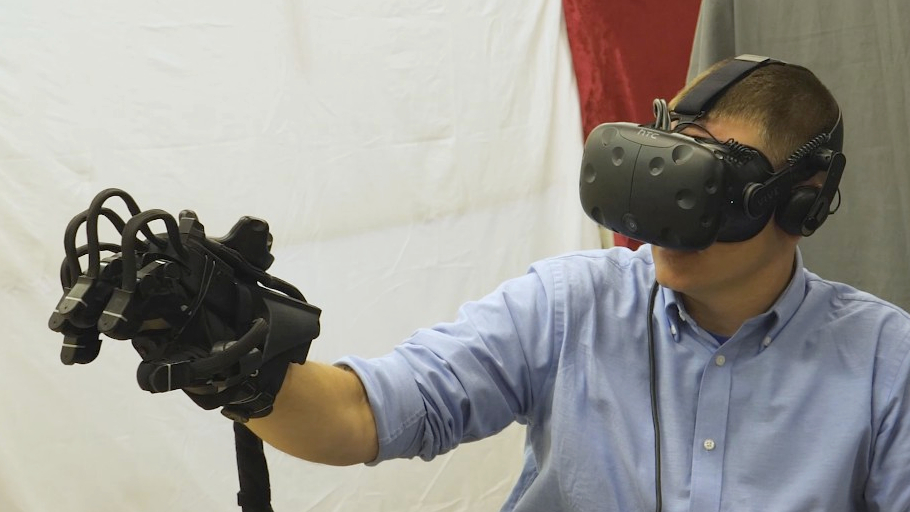
Virtual reality raises the stakes even higher. In VR, users can see a digital object and reach toward it, but without touch feedback, the illusion breaks quickly. Haptic gloves, vests, wrist devices, and handheld controllers try to solve that problem by simulating contact, pressure, resistance, or vibration.
What To Try In VR Haptic Hacks
Start with object contact. When a user touches a virtual wall, the controller or glove should respond instantly. Next, test material differences. A metal surface might feel sharp and short. A rubber ball might feel softer and bouncier. A wood block might have a lower, duller pulse.
Then try resistance cues. Even simple vibration can suggest weight if it is timed well. For example, lifting a heavy virtual box could trigger a low-frequency pulse while the object moves. Pulling a bowstring could increase intensity as tension builds. These cues do not need to perfectly imitate reality. They need to convince the brain just enough to stay immersed.
Haptic Hacks For Accessibility
Some of the most important haptic hacks are not flashy. They are practical tools that help people access information through touch. For users who are blind or have low vision, vibration patterns can support navigation, object detection, screen interaction, and alerts. For users who are deaf or hard of hearing, haptics can translate sound events into tactile cues.
Accessibility-focused haptic hacks should be designed with users, not just for users. A vibration pattern that seems obvious to a developer may feel confusing, tiring, or intrusive in real life. Testing with actual users is essential.
Accessible Haptic Ideas Worth Trying
One promising idea is a wearable obstacle alert. Sensors detect nearby objects, and different vibration patterns communicate distance or direction. Another idea is sound awareness: a device could translate a doorbell, alarm, baby cry, or approaching vehicle into distinct tactile signals. A third idea is private notification feedback, where users can identify calls or alerts without relying on audio announcements in public.
The design rule is simple: make the feedback recognizable, reliable, and respectful. Accessibility haptics should reduce cognitive load, not create a new puzzle game called “Guess What This Buzz Means.”
Haptic Hacks For Education And Training
Training is another powerful haptic playground. In fields such as surgery, robotics, manufacturing, maintenance, and emergency response, people need to learn physical skills. Screens can show what to do, but touch can help teach how it feels.
Haptic simulations can let trainees practice procedures before working on real people, expensive equipment, or hazardous environments. A surgical simulator with force feedback can help learners understand pressure and resistance. A robotics training system can let operators feel remote contact. A maintenance simulator can teach the sensation of alignment, friction, or mechanical limits.
A Practical Training Hack
Create a simple “pressure coach.” Use a force sensor, a microcontroller, and a haptic output. When the user presses too lightly, the device gives one pulse. When the pressure is correct, it gives a smooth confirmation. When the user presses too hard, it gives a sharper warning. This small experiment can demonstrate a big principle: haptics can guide better physical behavior in real time.
Haptic Hardware To Experiment With
Beginner haptic projects do not need a futuristic laboratory. Many can start with a microcontroller, a vibration motor, a motor driver, jumper wires, and a battery. For more refined effects, haptic driver chips can control ERM and LRA actuators with built-in waveforms, calibration features, and stronger timing control.
Useful Components For Haptic Hacks
Try ERM motors for simple vibration projects. They are inexpensive and easy to understand. Try LRAs for sharper taps and more precise feedback. Try a haptic motor driver when you want more than basic on/off buzzing. Try multiple motors when you need direction, location, or patterns across the body.
For wearables, pay attention to comfort, battery life, heat, wiring, and placement. A motor that feels clear on a table may feel weak through fabric. A vibration that feels fine for ten seconds may become irritating after ten minutes. A wearable prototype should be tested while moving, not only while sitting heroically at a desk surrounded by wires.
Design Rules For Better Haptic Hacks
The biggest mistake in haptic design is treating vibration like seasoning and dumping it everywhere. Haptics should have purpose. Each effect should answer one question: what does this touch signal tell the user?
Keep Feedback Short
Short haptic effects usually feel cleaner. Long buzzing can feel cheap, alarming, or physically tiring. A crisp tap often communicates better than a dramatic rumble that seems to be auditioning for an earthquake movie.
Match The Feeling To The Meaning
A success cue should feel confident but not aggressive. An error cue should be noticeable but not punishing. A navigation cue should be directional and repeatable. A game explosion can be intense, but a calendar reminder should probably not feel like a monster truck rally.
Test Without Looking
A great haptic pattern should communicate even when the user is not staring at the screen. During testing, ask users to close their eyes and identify the feedback. If they cannot tell the difference between confirmation, warning, and selection, the patterns need more contrast.
Respect User Control
Users should be able to reduce, customize, or disable haptics. Some people love tactile feedback. Others find it distracting, uncomfortable, or inaccessible for their needs. Good design gives control instead of assuming everyone wants a pocket-sized percussion section.
Haptic Hacks We Should Stop Doing
Not every haptic idea deserves applause. Some should be gently escorted out of the prototype room.
First, stop using the same buzz for everything. If every action feels identical, the feedback becomes noise. Second, avoid unnecessary haptics in reading-heavy experiences. A news article does not need to vibrate every time someone scrolls unless the goal is to make readers question their life choices. Third, do not hide critical information only in haptics. Touch feedback should support visual and audio cues, not replace them entirely unless the product is specifically designed and tested for tactile-first use.
Finally, avoid haptics that are too strong, too frequent, or poorly timed. Latency matters. A haptic effect that arrives after the visual event feels broken. The best haptic hacks feel immediate, intentional, and connected to the action.
The Future Of Haptic Hacks
The next wave of haptic innovation will likely combine touch with AI, spatial computing, robotics, automotive interfaces, health technology, and accessibility tools. Devices may learn which haptic patterns users understand best. Cars may use tactile controls to reduce visual distraction. VR systems may simulate more believable contact. Remote robots may let operators feel pressure, texture, and resistance from miles away.
Mid-air haptics is especially intriguing because it can create touch sensations without wearables or physical buttons. Ultrasonic arrays can focus pressure points onto the skin, allowing people to feel virtual controls in open space. This could matter for kiosks, cars, medical environments, public displays, museums, and augmented reality systems.
Still, the future will not be won by the strongest vibration. It will be won by the clearest tactile experience. The best haptic hacks will feel natural enough that users stop noticing the technology and simply understand the message.
Hands-On Experience: What It Feels Like To Build Haptic Hacks
A realistic haptic hacking experience usually begins with confidence and ends with a desk full of wires, tape, and one tiny motor trying to escape across the table. That is part of the fun. The first time a vibration motor responds to code, the effect feels almost silly: a little buzz, a little jump, a small “hey, it works!” moment. But after that first success, the project quickly becomes more interesting. You stop asking, “Can I make it vibrate?” and start asking, “Can I make this vibration mean something?”
One of the most useful experiments is creating three feedback patterns: a single tap, a double tap, and a long pulse. On paper, they seem obvious. In practice, they can blur together depending on the motor, the surface, the battery level, and where the device touches the body. A motor taped to cardboard feels different from the same motor mounted in a 3D-printed case. A wristband feels different from a handheld controller. A pulse that seems strong in your palm may feel weak through a jacket sleeve.
This is where haptic hacks become less like pure electronics and more like product design. Placement matters. Timing matters. Silence between pulses matters. Even the emotional tone matters. A short tick can feel clean and professional. A rough buzz can feel cheap. A rising pulse can feel like building pressure. A quick double tap can feel friendly, almost like the device is saying, “Done!” without making a big dramatic speech.
Testing with other people is humbling in the best way. A pattern that feels obvious to the builder may confuse everyone else. Someone may interpret a warning pulse as a success cue. Someone else may say the “gentle reminder” feels like an angry mosquito. That feedback is gold. Haptics lives on the body, and bodies are wonderfully inconsistent.
The most satisfying experience comes when the haptic cue finally becomes useful. A navigation prototype vibrates left, and the user turns left without looking. A game controller taps at the exact moment a virtual object lands. A wearable breathing guide creates a calm rhythm. A training device warns when too much pressure is applied. Suddenly, the buzz is not a gimmick anymore. It is communication.
The biggest lesson from hands-on haptic experimentation is restraint. Beginners often want to use every waveform, every motor, every effect, and every dramatic rumble available. The better approach is to build a small tactile vocabulary and make it reliable. One clear tap is better than ten confusing buzzes. Haptic hacks succeed when touch becomes understandable, not when the device feels like it is trying to win a vibration talent show.
Conclusion
Haptic hacks are one of the most exciting frontiers in human-computer interaction because they bring technology back to the body. They can make apps clearer, games deeper, training safer, navigation easier, and accessibility tools more powerful. But successful haptics requires more than adding a motor and hoping for magic. It requires intention, timing, comfort, testing, and respect for the user.
What we need to try in haptic hacks is not just stronger vibration. We need smarter tactile languages. We need accessible designs, better wearables, meaningful mobile feedback, immersive VR sensations, practical training tools, and subtle wellness experiences. Most of all, we need to test haptics in the real world, with real hands, real movement, real distractions, and real users.
The future of haptics will not simply be felt. It will be understood.