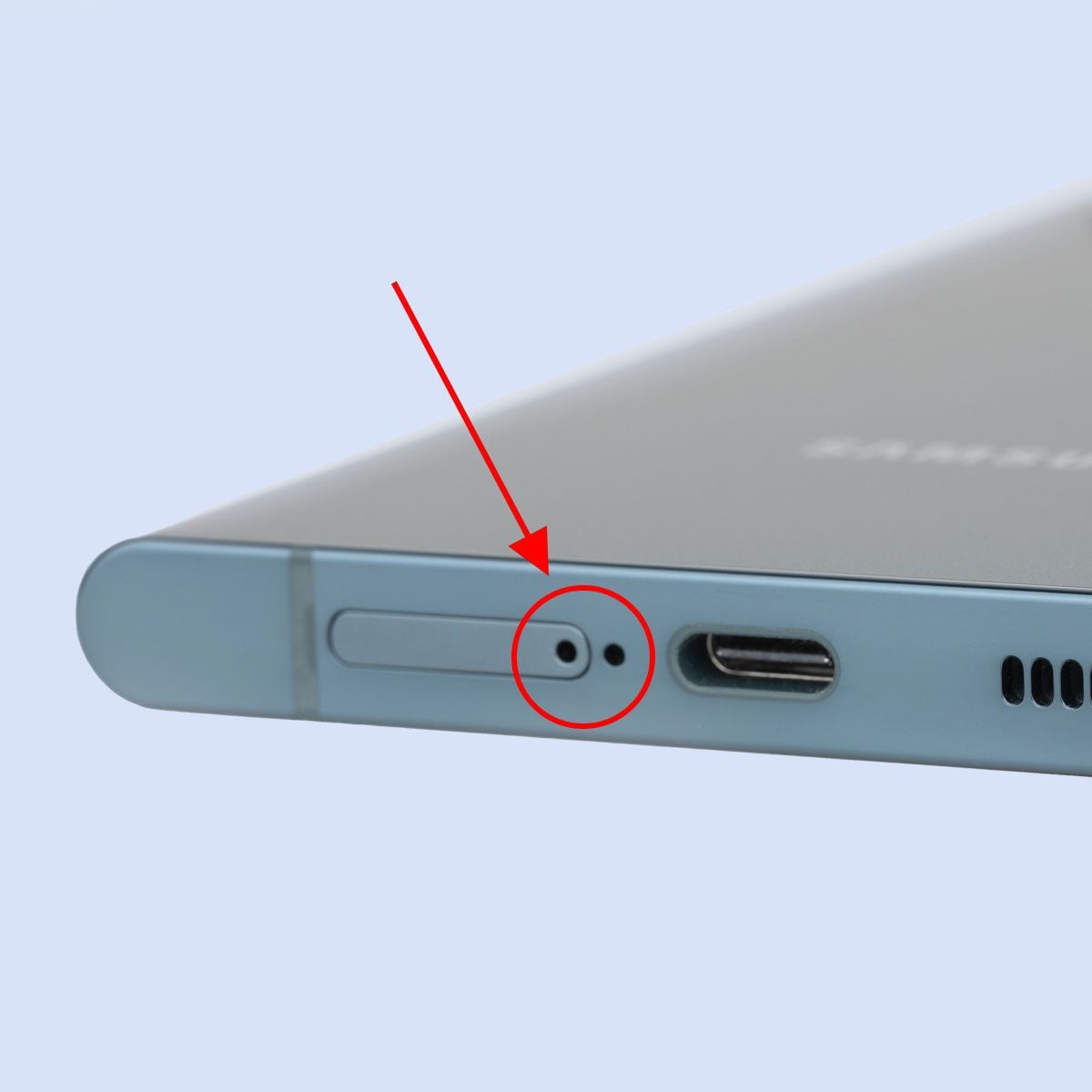
At some point, every phone owner has stared at a tiny hole on the side, top, or bottom of their device and thought, “Well, that looks important. Also mildly suspicious.” It is one of modern tech’s smallest mysteries. Your phone is sleek, expensive, and full of components you definitely do not want to stab with a paper clip, yet here it is covered with mysterious little openings that all seem to be daring you to guess wrong.
The good news is that those tiny holes are not random decoration. They usually serve very practical purposes. Most are there for microphones, speakers, SIM tray ejection, or ventilation and pressure balancing on certain models. In other words, they are less “secret spy hardware” and more “small but essential workers keeping your phone functional.”
If you have ever worried that you poked the wrong hole while trying to remove a SIM card, you are not alone. In fact, this is so common that many manufacturers design phones with that exact mistake in mind. Let’s break down what those tiny holes usually do, how to tell them apart, and what you should absolutely not jam into them unless you enjoy unnecessary stress.
Why Phones Have So Many Tiny Holes
Modern smartphones pack a surprising amount of hardware into a very small frame. To keep calls clear, videos sounding decent, cellular service working, and internal components behaving normally, manufacturers use strategically placed openings around the edges of the phone.
Depending on the model, those holes may connect to a microphone, a speaker chamber, a SIM tray, or a vent. Some phones also place additional microphones near the rear camera module or on the top edge for noise reduction, video recording, or voice isolation. That means the tiny hole on your phone’s edge may not have just one purpose in the broad sense of “audio.” It may be part of a larger microphone system working behind the scenes.
So yes, your phone may look like it has random pinholes for no reason. It does not. Engineers rarely add holes to expensive electronics just for the vibes.
The Most Common Answer: They’re Microphone Openings
The most common purpose of tiny holes on a phone is to let sound reach one or more microphones. Nearly every smartphone has multiple microphones, not just one lonely mic doing its best.
Main Microphone
This is usually located near the bottom edge of the phone, often close to the USB-C or Lightning port. It is the microphone that primarily picks up your voice during regular calls, voice notes, and some recordings. If you see a tiny opening on the bottom edge, there is a very good chance it belongs to the main microphone system.
Secondary or Noise-Canceling Microphone
Many phones also include a second microphone on the top edge or near the rear camera. Its job is to capture background sound so the phone can reduce ambient noise and make your voice clearer. That is why calls often sound better on newer phones than they did a decade ago. Back then, your phone basically hoped for the best. Now it actually works to separate your voice from wind, traffic, air conditioners, and your neighbor’s dog with main-character energy.
Video and Camera Audio Microphones
Some phones add extra microphones to improve stereo recording when shooting video. So if you notice a pinhole near the camera bump or upper frame, that may be part of the phone’s recording array rather than something related to the SIM card or speakers.
This is why the tiny holes matter so much. Without them, your phone would have trouble hearing you, your calls would sound worse, and your videos might capture audio like they were filmed inside a cereal box.
Another Common One: The SIM Tray Eject Hole
If there is one tiny hole that causes the most confusion, it is the SIM tray eject hole. This is the small opening beside the SIM tray that lets you insert a SIM eject tool or straightened paper clip to pop the tray out.
It is usually located next to a visible tray outline. That outline is your biggest clue. If you see a tiny hole but no tray-shaped border around it, stop right there. That hole is probably not for SIM removal.
The SIM tray opening is intentionally small and simple, which is great for minimalist phone design and less great for people who are trying to swap SIM cards at 7 a.m. before coffee. Because microphone holes and SIM eject holes can look similar, many people accidentally poke the wrong one first.
Here is the easy rule: find the tray outline before you insert the tool. If the hole is floating on its own without a tray border, do not treat it like the SIM tray.
Can You Damage Your Phone by Poking the Wrong Hole?
Sometimes yes, but usually not as easily as people fear.
Many modern phones are designed so the microphone is not sitting directly behind the visible outer hole. Engineers often offset the delicate component and protect it with channels, meshes, or internal barriers. That means a quick, shallow mistake with a SIM tool does not always destroy the microphone.
Still, “probably okay” is not the same as “great idea.” If you push hard into a microphone opening, use the wrong tool, or go deeper than necessary, you can potentially damage the protective mesh, puncture a barrier, affect water resistance, or in some cases harm the mic assembly.
So the internet’s favorite phrase applies here: don’t test it.
What About the Speaker Holes?
Not every tiny opening is a single round pinhole. Some are grouped in a row or disguised as a grille. Those are often speaker openings. On many phones, the bottom edge contains a mix of microphone holes, speaker holes, and the charging port all in the same general neighborhood.
This is part of what makes edge layouts confusing. You might look at the bottom of your phone and see what appears to be matching hole patterns on both sides of the charging port, then assume both are speakers. In reality, one side may be the speaker grille and the other may house a microphone, a tray, or a combination of design elements. Phones are sneaky like that.
Speaker openings are larger or repeated in a row, while microphone openings are often smaller and fewer. But there is no universal law saying every brand must make this obvious. Some phones absolutely enjoy chaos.
Some Tiny Holes Are Actually Vents
Here is where things get more interesting. On certain devices, especially some newer models, one of those tiny holes may function as an air vent or pressure-balancing opening. This can help with audio performance, internal airflow behavior, or acoustic tuning.
That does not mean your phone is trying to breathe like a tiny robot fish. It just means sealed electronics still need careful engineering to manage sound and pressure in a compact body. If you cover or clog one of these vent openings with a bulky case, audio quality or call clarity may suffer.
So if you ever spot a small hole that does not seem to match the microphone, speaker, or SIM tray pattern, it may be part of the phone’s venting or acoustic system rather than a mystery port from another dimension.
How to Tell Which Tiny Hole Does What
1. Look for the tray outline
If the hole sits beside a thin rectangular or oval outline, it is probably the SIM tray eject hole.
2. Check the location
Bottom edge holes are often microphones, speakers, or SIM tray openings. Top edge holes are frequently secondary microphones. Side holes may belong to SIM trays or, on some designs, vent systems.
3. Notice the pattern
A single tiny pinhole is often a mic or SIM eject opening. A row of multiple holes usually suggests a speaker grille.
4. Look up your specific model
This is the smartest move. iPhones, Galaxy phones, Pixels, and Motorola devices often place the same features in different spots depending on the generation. A layout that is correct for one model may be wrong for the next one.
Should You Clean These Holes?
Yes, but gently. Dust, lint, pocket fuzz, and microscopic crumbs from whatever happened in your bag can build up in speaker and microphone openings over time. That can lead to muffled audio, reduced call quality, or distorted sound.
The key word is gently. Do not go digging around with sharp metal tools, needles, safety pins, or anything else that sounds like it belongs in a questionable DIY video. A soft brush, dry microfiber cloth, or manufacturer-approved cleaning method is the safer route.
If your phone has been exposed to water and the speaker or microphone sounds muffled, let it dry fully before panicking. Water can temporarily affect audio performance until it evaporates. In that case, patience is cheaper than repair.
Do All Phones Have the Same Tiny Holes?
Not at all. Phone layouts vary by brand, model, region, and year. Some iPhones sold in the United States no longer include a physical SIM tray, while international versions may still have one. Some Android phones put the SIM tray on the bottom edge, while others keep it on the side or top. Certain models include extra microphones by the camera, and some add vent openings that look suspiciously like microphone holes.
In short, two phones can look almost identical and still have tiny holes doing completely different jobs. That is why guessing based on memory can backfire.
The Simple Answer Most People Need
If you came here because you spotted a tiny hole on the side of your phone and wanted the plain-English answer, here it is: it is probably for one of four things.
- A microphone opening
- A SIM tray eject hole
- A speaker opening or part of a speaker grille
- A vent or pressure-balancing opening on certain models
That is the entire mystery, minus the stress and the accidental paper-clip stabbings.
Final Thoughts
The tiny holes on the sides of your phone may look insignificant, but they are doing real work. They help your phone hear your voice, reduce background noise, play sound, connect to cellular networks, and in some cases manage airflow or acoustic pressure. They are small, but they are not optional.
The next time you see one of those little openings and wonder whether it is important, the answer is almost certainly yes. Just remember the golden rule: if you are about to poke something with a SIM tool, check for the tray outline first. Your phone will appreciate the effort, and your blood pressure probably will too.
Real-Life Experiences With the Tiny Holes on a Phone
I have to admit this topic feels weirdly personal for a lot of people because almost everyone has a tiny-hole story. Usually it starts with confidence and ends with a search query typed in total panic. Mine was classic: new phone, shiny frame, tiny hole on the bottom edge, SIM tool in hand, and a split-second decision made with far too much optimism. I pressed. Nothing happened. My soul briefly left my body. Then I realized I had targeted the microphone hole instead of the SIM tray.
That moment taught me two things. First, phone manufacturers really do make these openings look confusingly similar. Second, the average person becomes a phone repair philosopher the second they think they damaged a brand-new device. Suddenly you are holding your phone at eye level like an archaeologist studying a sacred artifact, wondering whether a tiny dot has ruined audio forever.
I have also seen the opposite problem: people ignoring the holes until something stops working. A friend once complained that calls on speakerphone sounded fuzzy and distant. The cause was not a software bug or a failing microphone. It was lint. Just lint. Months of pocket debris had packed itself into the bottom openings so neatly it could have applied for residency. After careful cleaning, the phone sounded normal again. The lesson was humbling. Sometimes modern technology is defeated not by complexity, but by hoodie fibers.
Another common experience is assuming symmetry where none exists. If one side of the charging port has a row of holes, people often expect the other side to match function for function. But phones are not always designed for visual honesty. One side might be a speaker grille, while the other side hides a microphone, a tray hole, or a decorative matching pattern. That mismatch catches people off guard because our brains love neat, balanced designs. Engineers, meanwhile, love fitting working parts wherever they can.
Then there is the travel scenario. You are at an airport, switching SIM cards, slightly rushed, carrying too many things, and suddenly that tiny hole becomes the most important feature on the phone. In those moments, nobody wants to decode industrial design. They just want the tray to pop out without collateral damage. That is why learning what these holes do actually matters in everyday life. It saves time, prevents mistakes, and lowers the odds of turning a simple task into an emotional event.
So while the question sounds small, it connects to real experiences people have all the time: confusion, relief, mild embarrassment, and the discovery that the tiniest parts of a phone can cause the biggest moments of uncertainty. Tiny holes, big feelings. That may be the most accurate smartphone slogan nobody asked for.