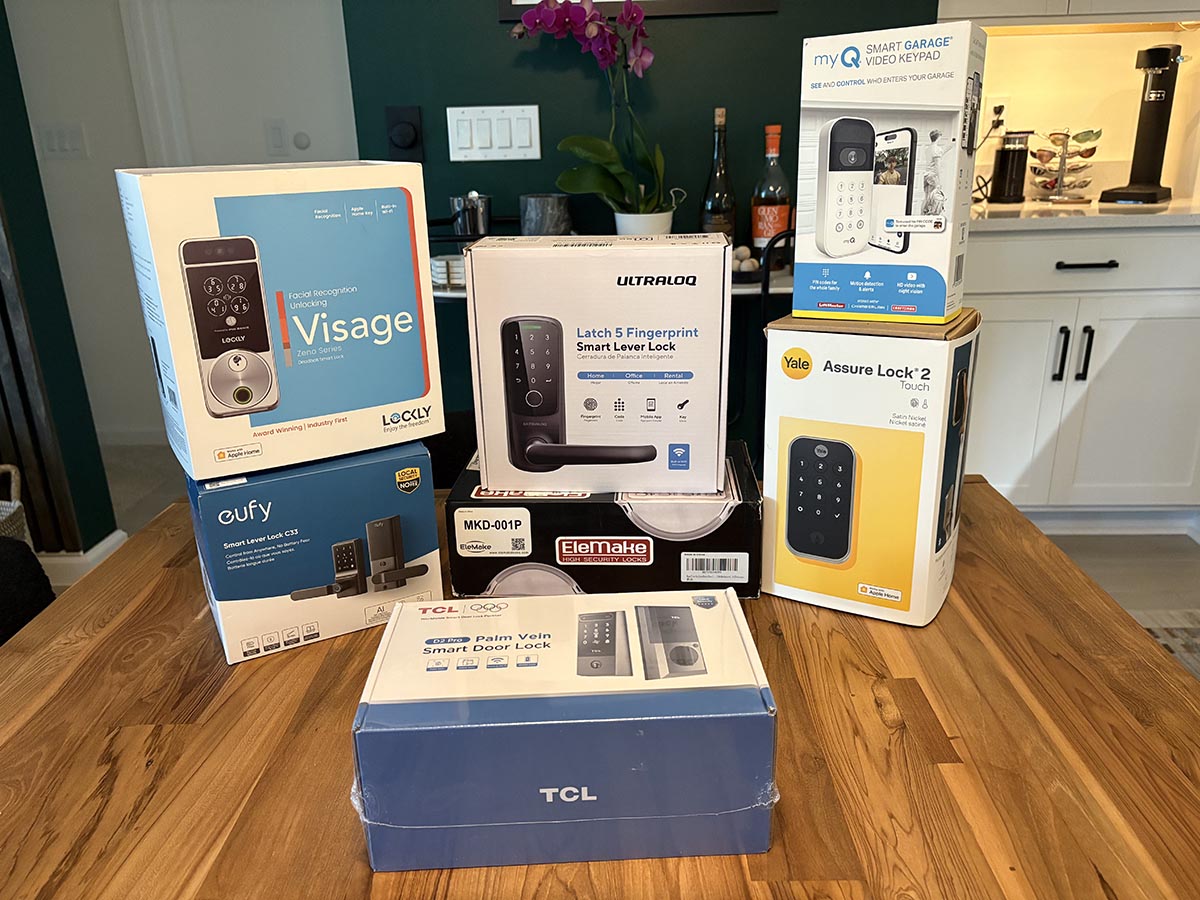
Keys are excellent at disappearing. They hide beneath couch cushions, remain heroically locked inside cars, and occasionally travel through an entire washing-machine cycle. A dependable keyless door lock eliminates much of that daily nonsense by letting you enter with a code, fingerprint, phone, smartwatch, or even your face.
The best keyless door locks of 2025, however, offered more than flashy ways to open a door. A good model also needed a reliable motor, understandable controls, sensible backup access, useful guest permissions, manageable battery demands, and an app that did not require a computer-science degree.
This guide focuses on seven prominent models available during 2025. Each lock was evaluated using the same editorial criteria, including installation, access speed, smart-home compatibility, security certification, remote management, battery design, backup entry, and everyday usability. Product documentation was cross-checked with hands-on findings from established American technology and home-improvement publications.
Testing transparency: The rankings below synthesize standardized product analysis, manufacturer specifications, and published hands-on testing. They should not be interpreted as a claim that every unit was personally installed by this article’s author.
Our Top Keyless Door Lock Picks
| Model | Best For | Main Access Methods |
|---|---|---|
| Schlage Encode Plus | Best overall | Keypad, app, Apple Home Key, physical key |
| Yale Assure Lock 2 Touch | Best for families | Fingerprint, keypad, app, physical key |
| Aqara Smart Lock U100 | Best value for Apple users | Fingerprint, keypad, Apple Home Key, NFC, key |
| Ultraloq U-Bolt Pro WiFi | Best variety of access options | Fingerprint, keypad, app, auto-unlock, key |
| Kwikset Halo Touch | Best rekeyable fingerprint lock | Fingerprint, app, physical key |
| Lockly Visage Zeno Series | Best facial-recognition lock | Face, fingerprint, keypad, Apple Home Key, key |
| Eufy Video Smart Lock E330 | Best lock-and-camera combination | Fingerprint, keypad, app, voice, physical key |
How We Evaluated the Best Keyless Door Locks
A keyless lock must first succeed at being a lock. We therefore placed mechanical construction, deadbolt operation, weather resistance, and recognized security ratings ahead of app tricks. A lock that sends beautifully designed notifications while struggling to extend its bolt is merely a very expensive door ornament.
Installation and Door Compatibility
Most full-replacement smart deadbolts fit standard American residential doors, but “standard” is doing considerable work in that sentence. Door thickness, bore-hole size, backset, strike alignment, and existing hardware can all affect installation. A misaligned door may make even a powerful motor sound as though it is chewing gravel.
Daily Entry Reliability
We considered how quickly and consistently each model recognizes codes, fingerprints, phones, watches, or faces. We also favored locks with more than one practical access method. Fingerprint recognition is convenient until you are wearing gloves; phone entry is elegant until your phone battery takes an unscheduled vacation.
Guest Access and Remote Management
Temporary codes are useful for houseguests, cleaners, dog walkers, contractors, and relatives who arrive early despite receiving extremely specific instructions. The strongest apps make it easy to create, schedule, review, and revoke access without standing next to the door.
Backup Access and Battery Management
A physical key, emergency power connection, replaceable battery pack, or another backup method can prevent a low-battery alert from turning into an outdoor camping experience. We also looked for clear battery warnings and easy access to the interior battery compartment.
The 7 Best Keyless Door Locks for 2025
1. Schlage Encode Plus Best Overall
The Schlage Encode Plus earns the top position because it balances dependable hardware with approachable smart features. It offers an illuminated touchscreen, built-in Wi-Fi, remotely managed access codes, a physical backup key, and Apple Home Key support. Apple users can tap a compatible iPhone or Apple Watch against the lock instead of opening an app or entering a PIN.
Schlage allows up to 100 access codes, which is far more than most households will ever need unless the front door has unexpectedly become a small hotel. Built-in Wi-Fi also means remote access does not require a separate bridge.
The hardware carries strong ANSI/BHMA ratings, including Grade AAA ratings for security, durability, and finish on listed Encode Plus configurations. That certification does not make the entire doorway invinciblethe frame, strike plate, screws, and door material still matterbut it is reassuring for a primary entrance.
Potential drawbacks: The exterior housing is larger than a traditional deadbolt, and direct Wi-Fi connectivity can consume batteries more quickly than low-power hub-based systems. It is also usually priced above basic keypad locks.
Bottom line: Choose the Schlage Encode Plus when you want a polished, security-focused smart deadbolt that works especially well in an Apple household without becoming useless to everyone who owns an Android phone.
2. Yale Assure Lock 2 Touch Best for Families
The Yale Assure Lock 2 Touch is one of the friendliest fingerprint locks for a busy household. Children can use a fingerprint or code, parents can manage access from the Yale app, and scheduled credentials can be created for babysitters, relatives, or service providers.
Yale’s DoorSense system can determine whether the door is actually closed rather than merely reporting that the deadbolt is extended. That distinction matters. A lock can proudly announce “secured” while the door is still resting two inches open, which is technically impressive but not particularly helpful. Auto-lock settings can then secure the deadbolt after a selected delay.
The Assure Lock 2 family is available in several configurations, so buyers should check the exact package carefully. Bluetooth, Wi-Fi, fingerprint, key-free, and Apple-oriented versions may have different capabilities. Independent testing has consistently highlighted the line’s compact appearance, straightforward controls, and useful family-oriented features.
Potential drawbacks: The product lineup can be confusing, and adding Wi-Fi may increase both cost and battery use. Some versions eliminate the key cylinder, creating a cleaner exterior but making electronic emergency-power procedures more important.
Bottom line: The Yale Assure Lock 2 Touch is a strong choice for households that value easy fingerprint entry, door-position awareness, and flexible user management.
3. Aqara Smart Lock U100 Best Value for Apple Users
The Aqara U100 delivers an unusually long feature list for its category. It includes a fingerprint reader, touchscreen keypad, Apple Home Key support, NFC access, app management, temporary passwords, and a concealed mechanical keyway.
The fingerprint reader can store up to 50 fingerprints. The lock also uses an internal gyroscope to detect its position and support automatic locking after the door closes. Apple Home Key lets compatible iPhone and Apple Watch owners tap to enter, including through Apple’s power-reserve functionality on supported devices.
Aqara users receive the most functionality when the lock is paired with a compatible Aqara hub. Certain automations, remote features, and broader smart-home integrations depend on the selected hub and network configuration. Buyers should verify compatibility instead of assuming that every logo on the package will immediately become best friends.
Potential drawbacks: Setup can feel less streamlined than Schlage or Yale, especially when adding hubs and multiple ecosystems. The hardware also has a more technological appearance than a conventional deadbolt.
Bottom line: The Aqara U100 is a feature-rich value pick for Apple Home users who want fingerprints and Home Key without stepping into the most expensive price tier.
4. Ultraloq U-Bolt Pro WiFi Best Variety of Access Options
The Ultraloq U-Bolt Pro WiFi is designed for people who want every reasonable way to open a door. Depending on configuration, users can enter with a fingerprint, PIN, smartphone, automatic proximity unlocking, app command, or physical key. Built-in Wi-Fi allows remote operation without the external bridge required by earlier versions.
Its circular keypad has a distinctive appearance, while the fingerprint reader is positioned for quick access. Guest codes and electronic keys can be issued for limited periods, and the companion app provides activity history and notifications.
The biggest appeal is flexibility. A family member can use a fingerprint, a guest can receive a temporary code, and a homeowner can retain a conventional key for emergencies. That is a sensible approach because no single authentication method is perfect in every situation.
Potential drawbacks: Published owner and reviewer experiences with fingerprint consistency have been mixed, particularly when fingers are wet, dirty, very dry, or difficult to scan. Careful fingerprint enrollmentusing several anglescan improve results.
Bottom line: The U-Bolt Pro WiFi suits households that prioritize access flexibility and feature value over minimalist styling.
5. Kwikset Halo Touch Best Rekeyable Fingerprint Lock
The Kwikset Halo Touch is an excellent match for homeowners who prefer fingerprint entry but still want a familiar physical-key backup. Its standout advantage is Kwikset SmartKey technology, which allows the cylinder to be rekeyed using an existing compatible key without replacing the entire lock.
The Halo Touch can enroll up to 100 fingerprints for as many as 50 users. Built-in Wi-Fi supports remote locking, unlocking, activity monitoring, notifications, and user management through the Kwikset app. Select configurations carry an ANSI Grade AAA rating.
Unlike locks that squeeze a fingerprint sensor into an already crowded keypad, the Halo Touch keeps the interaction simple: place an enrolled finger on the sensor to unlock. The traditional key remains available beneath the exterior face.
Potential drawbacks: There is no numeric keypad, so a visitor who has not enrolled a fingerprint will need app-based access, an electronic invitation, or a physical key. Wi-Fi can also make battery replacement more frequent.
Bottom line: Pick the Halo Touch when fingerprint access, remote control, and easy rekeying matter more than PIN-code entry.
6. Lockly Visage Zeno Series Best Facial-Recognition Lock
The Lockly Visage Zeno Series brings facial recognition to the front door without abandoning more conventional options. It also supports fingerprints, PINs, Apple Home Key, app control, and a mechanical backup key.
Facial entry is particularly useful when both hands are occupied. Instead of balancing grocery bags while attempting fingerprint gymnastics, an authorized user can approach the lock and allow the camera-free recognition sensors to identify the face. Independent testing has found modern facial-recognition locks more practical than earlier versions, although positioning, lighting, hats, and accessories can still affect performance.
The Visage uses a rechargeable 10,000-mAh battery, and Lockly estimates up to eight months of regular use. The lock fits a broad door-thickness range and includes a second battery, helping reduce downtime while one pack is charging.
Potential drawbacks: It is expensive, physically larger than a basic deadbolt, and offers more technology than many households need. Facial recognition may also raise privacy questions for buyers who prefer local codes and mechanical keys.
Bottom line: The Visage is the premium choice for hands-free entry and households that genuinely benefit from multiple biometric options.
7. Eufy Video Smart Lock E330 Best Lock-and-Camera Combination
The Eufy Video Smart Lock E330 combines three devices that would otherwise compete for space on the front door: a fingerprint lock, a 2K video doorbell, and a security camera. Entry methods include fingerprint, keypad, app, supported voice assistants, and a physical key.
The rechargeable 10,000-mAh battery powers both the lock and camera system. Eufy includes built-in local video storage, which can reduce dependence on a monthly cloud subscription. The camera section carries an IP65 weather-resistance rating, and an emergency power port provides temporary power if the battery is depleted.
The E330 is attractive for homeowners who have not already installed a video doorbell. One device, one app, and one exterior assembly can be more convenient than managing separate systems. It also prevents the front door from resembling a technology store display.
Potential drawbacks: Camera activity places greater demands on the battery than a conventional keypad lock. The exterior unit is bulky, and buyers already invested in another doorbell platform may find the video features redundant.
Bottom line: Choose the E330 when you want keyless entry and front-door video coverage in one package without mandatory cloud storage.
What to Look for in a Keyless Door Lock
Choose the Entry Method You Will Actually Use
A fingerprint reader sounds futuristic, but a keypad may be easier for frequent guests. Apple Home Key is delightful for Apple households but less compelling when half the family uses Android. Facial recognition is convenient, although it carries a premium price. Start with household routines rather than the longest feature list.
Check the Security Certification
Look for ANSI/BHMA ratings and read exactly what the certification covers. Grade 1 or AAA-rated hardware generally indicates stronger performance in relevant security and durability tests, but no deadbolt can compensate for a weak frame, loose strike plate, hollow door, or nearby window.
Do Not Ignore the Backup Plan
Every electronic lock eventually encounters a dead battery, network problem, forgotten phone, or confused houseguest. A physical key, emergency battery terminal, removable rechargeable pack, or local keypad prevents a minor inconvenience from becoming a locksmith invoice.
Understand Connectivity
Built-in Wi-Fi offers convenient remote access but generally uses more power. Bluetooth is efficient but usually limits direct control to nearby users. Thread, Zigbee, and Z-Wave can offer efficient smart-home integration but may require a compatible hub or border router.
Real-World Experience: What Living With a Keyless Lock Feels Like
The biggest improvement is not dramatic. There are no lasers, smoke effects, or congratulatory trumpets when the door opens. Instead, small annoyances quietly disappear.
Imagine returning from the grocery store with a bag in each hand. With a traditional deadbolt, this is the moment when the keys migrate to the deepest known region of a pocket. With a fingerprint lock, one touch can open the door. With Apple Home Key, a watch can be tapped against the lock. With facial recognition, the door may unlock without putting anything down. Convenience becomes most noticeable when your hands are full, the weather is unpleasant, or someone inside is shouting, “I’m coming!” while making no detectable progress toward the door.
Keyless access also changes how households manage other people. Instead of hiding a spare key under a decorative rock that is fooling absolutely nobody, a homeowner can create a temporary code for a contractor. The code can begin at 9 a.m., expire at noon, and leave an activity record. A dog walker can receive a recurring weekday code, while a visiting relative gets access for the weekend.
Families often settle into different entry habits. One person uses a fingerprint. Another prefers the keypad. A teenager uses a phone but forgets to charge it, proving why multiple access methods remain valuable. After a few days, the physical key moves to emergency status rather than disappearing entirely.
Auto-locking is another feature that feels more useful over time. The familiar halfway-to-work question“Did I lock the door?”can be answered by checking the app. Better systems also report whether the door is open or closed, preventing the lock from extending its bolt into empty air and proudly declaring victory.
There are irritations. Fingerprint readers may hesitate when hands are wet, dusty, cold, or covered in sunscreen. Touchscreens can be less pleasant in freezing weather. Auto-unlock may occasionally trigger too early, too late, or not at all. Direct Wi-Fi models tend to demand batteries more often, especially when users constantly check status or run automations.
Installation quality influences nearly everything. A deadbolt that slides smoothly by hand will usually remain quieter and consume less power. If the door must be pushed, lifted, or negotiated with before the bolt aligns, the motor works harder. That can cause slow locking, warnings, rapid battery drain, and the mechanical groaning of a device reconsidering its career choices.
Battery anxiety usually fades once alerts prove reliable. Many owners keep a spare set of alkaline batteries nearby or charge a second battery pack before replacing the first. The essential lesson is to respond to low-power notifications instead of treating them as optional newsletters.
Privacy and account security require attention as well. Strong, unique passwords and multifactor authentication should be enabled when available. Access permissions should be reviewed periodically, especially after a houseguest leaves, a contractor finishes work, or a former dog walker is no longer expected to enter the home.
After the novelty wears off, the best keyless door lock becomes almost invisible. It opens reliably, locks automatically, allows guests in without drama, and provides reassurance when nobody remembers who left the house last. That quiet dependabilitynot the number of icons on the product boxis what separates a genuinely useful smart lock from an expensive front-door gadget.
Final Verdict
The Schlage Encode Plus is the best all-around keyless door lock for 2025 because it combines strong hardware, built-in Wi-Fi, flexible code management, a physical backup key, and excellent Apple Home Key support.
The Yale Assure Lock 2 Touch is especially well suited to families, while the Aqara U100 offers excellent value for Apple-centered smart homes. The Ultraloq U-Bolt Pro WiFi provides the broadest collection of practical entry methods, and the Kwikset Halo Touch is ideal for buyers who want fingerprint access with rekeyable backup hardware.
For more specialized needs, the Lockly Visage delivers genuinely convenient facial recognition, while the Eufy E330 combines a keyless lock, video doorbell, and security camera in one substantial package.
Whichever model you choose, check the door measurements, smart-home requirements, backup-entry system, and security certification before purchasing. The right keyless door lock should make entering your home easiernot introduce a new electronic hobby you never asked for.
Note: Product availability, prices, firmware features, app support, and smart-home compatibility can change. Confirm the current specifications of the exact model and configuration before purchasing or publishing buying information.