Taking a selfie without holding the phone used to feel like a tiny magic trick reserved for influencers, family photographers, and that one friend who somehow always looks relaxed in group photos. Good news: you do not need a photography degree, a ring light the size of a spaceship, or an assistant named Chad. With the right camera settings, a stable surface, and a few clever tricks, you can take hands-free selfies that look natural, sharp, and flattering.
Whether you want a full-body outfit photo, a travel shot, a professional headshot, a workout progress picture, or a group selfie where nobody’s arm looks like it grew three extra feet, hands-free photography is your friend. This guide walks you through 11 simple steps to take a selfie without holding the phone, using built-in features on iPhone, Android, Samsung Galaxy, Google Pixel, and common accessories like tripods, Bluetooth remotes, smartwatches, and selfie sticks.
The best part? Once you learn these methods, you will stop sprinting back and forth after tapping the shutter button like you are auditioning for an action movie. Let’s make your phone do the hard work.
Why Take a Selfie Without Holding the Phone?
Hands-free selfies solve several common photo problems. First, they create better composition. When your phone is not in your hand, you can move farther from the camera, include more background, and capture full-body shots without awkward cropping. Second, they reduce camera shake, which means clearer images. Third, they make your pose look more relaxed because you are not twisting your wrist into a pretzel.
Hands-free selfies are also useful for group photos. Instead of one person being stuck as the “long-arm photographer,” everyone can be in the frame. They are especially helpful for travel photos, outfit pictures, family portraits, product shots, fitness content, cooking videos, and professional profile photos.
11 Steps to Take a Selfie Without Holding the Phone
1. Use the Built-In Camera Timer
The easiest way to take a selfie without holding your phone is to use the camera timer. Most modern smartphones include a timer option in the native camera app. On iPhone, you can usually select a delay such as 3, 5, or 10 seconds, depending on your iOS version and device settings. On many Android phones, you can also choose a short countdown before the photo is taken.
Set your phone on a stable surface, open the camera, choose the timer, tap the shutter, and move into position. The 10-second option is usually best because it gives you enough time to stop looking like you just escaped a revolving door.
Best for: simple selfies, outfit photos, family shots, and quick portraits.
2. Prop Your Phone on a Stable Surface
You do not always need a tripod. A bookshelf, coffee mug, water bottle, windowsill, stack of books, or kitchen counter can work beautifully. The trick is to make sure the phone is secure before you walk away. A falling phone is not a photography technique; it is a tiny tragedy with a screen protector.
Place something soft behind or under the phone if the surface is slippery. A folded towel, rubber coaster, or phone case with grip can help keep it steady. Before taking the photo, check that the lens is not blocked and the phone is not tilted too far upward or downward.
Best for: casual indoor selfies, desk photos, cooking shots, and quick social media pictures.
3. Use a Small Tripod for Better Framing
A smartphone tripod is one of the best tools for hands-free selfies. It keeps your phone steady, allows you to adjust height and angle, and makes your photos look more intentional. Even a small tabletop tripod can dramatically improve your results.
For full-body photos, choose a taller tripod or place a small tripod on a table. For close-up portraits, position the camera slightly above eye level for a flattering angle. Many tripods include a phone clamp that rotates between vertical and horizontal orientation, which is perfect for Instagram, TikTok, YouTube Shorts, blogs, and profile photos.
Best for: headshots, full-body selfies, content creation, travel photos, and group pictures.
4. Try a Bluetooth Remote Shutter
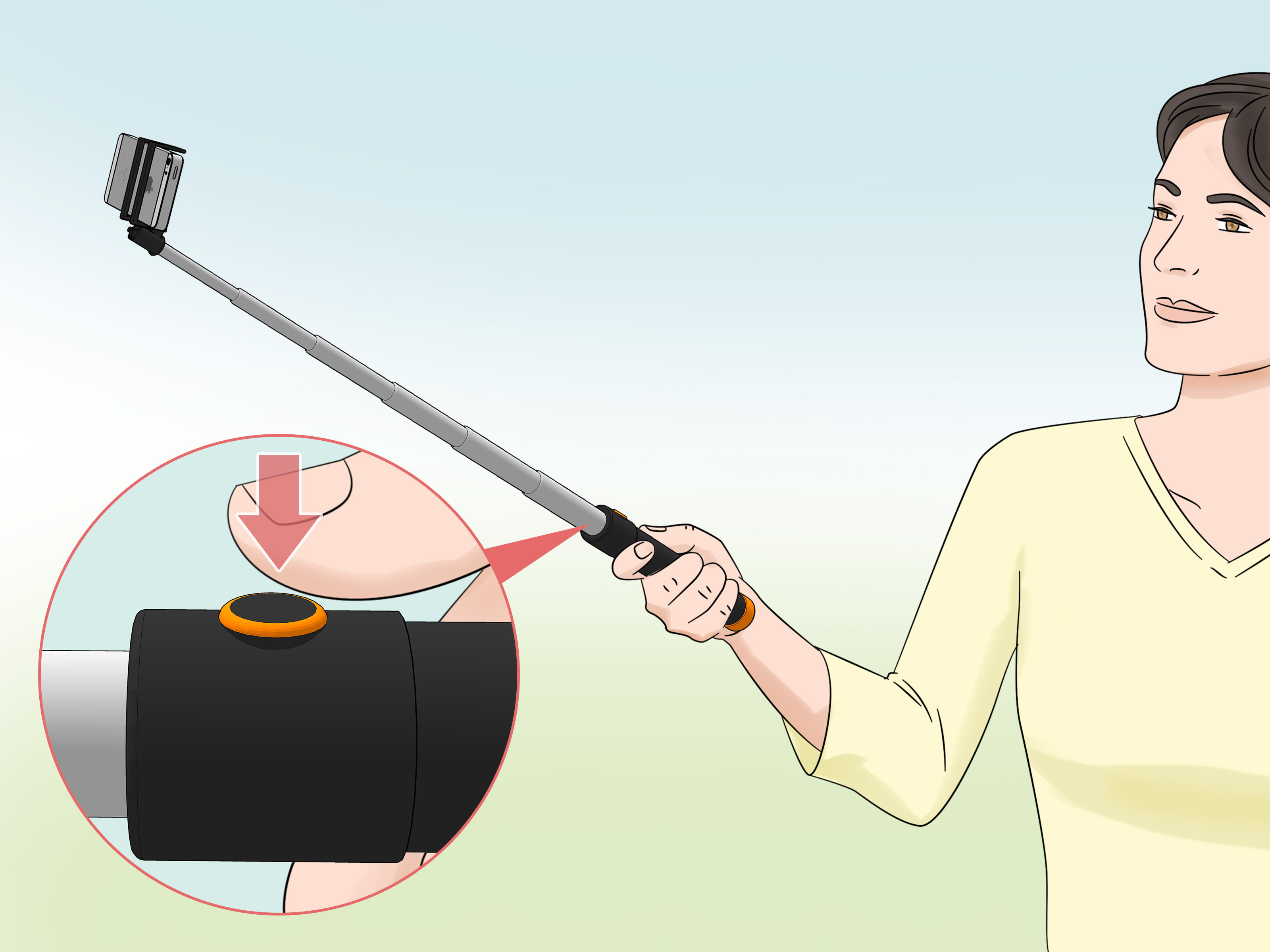
A Bluetooth remote shutter lets you take photos from a distance without touching your phone. Pair the remote with your phone, open the camera app, pose, and press the remote button. Many selfie sticks and tripods include a removable Bluetooth remote, which is convenient because you can hide it in your hand or pocket.
This method is especially useful when you want to take several photos quickly. Instead of resetting the timer every time, you can capture multiple poses while staying in place. It is also great for pets, kids, and group shots where everyone’s expression changes every half-second.
Best for: repeated shots, group photos, fashion photos, and travel content.
5. Use Voice Commands on Supported Phones
Some smartphones let you take photos using voice commands. Samsung Galaxy phones, for example, often include shooting methods that allow you to say words like “Smile,” “Cheese,” “Capture,” or “Shoot” to trigger the camera. This is one of the most convenient ways to take a selfie without holding the phone because you do not need a timer or remote.
To use this feature, open your camera settings and look for shooting methods, voice control, or voice commands. Turn the option on, place your phone where you want it, frame the shot, and say the trigger word clearly. Try not to shout “CHEESE” like you are warning a village. Normal volume usually works fine.
Best for: Samsung users, hands-free portraits, group shots, and moments when your hands are busy.
6. Use Palm Gesture or Palm Timer
Many phones now support gesture-based selfie capture. Samsung Galaxy devices commonly offer a “show palm” feature. When you raise your palm toward the front camera, the phone starts a short countdown and takes the photo. Google Pixel phones also include Palm Timer, which can trigger the camera when the phone recognizes your hand.
This method feels futuristic in the best way. Set your phone down, step into the frame, raise your palm, wait for the countdown, then lower your hand and pose. It is perfect when you do not want to run back and forth or keep a remote hidden in your fingers.
Best for: Android users, casual selfies, group photos, and quick hands-free shots.
7. Use Your Smartwatch as a Camera Remote
If you use an Apple Watch, you can control your iPhone camera from your wrist. The watch can act as a remote viewfinder, allowing you to preview the frame, set a timer, and take the photo. This is incredibly helpful because you can see whether your head is in the shot before taking the picture. Revolutionary, truly.
Some Android watches and companion camera apps offer similar remote features, depending on the phone and watch model. The main advantage is control. You can adjust your position while checking the preview, which helps avoid photos where you are accidentally half a person.
Best for: iPhone users with Apple Watch, solo travel photos, headshots, and carefully framed portraits.
8. Use a Selfie Stick That Converts Into a Tripod
A selfie stick is not just for tourist attractions and dramatic mountaintop poses. Many modern selfie sticks convert into tripods and include Bluetooth remotes. This combination is ideal for hands-free selfies because you get height, distance, stability, and remote control in one compact tool.
Use the extended stick as a tripod when you want more background in the shot. Keep it lower for casual seated photos or raise it for full-body images. For travel, choose a lightweight model that folds down small enough to fit in a backpack.
Best for: travel selfies, outdoor photos, group shots, and wide-angle compositions.
9. Use Burst Mode or Live Photos to Catch the Best Moment
One challenge with hands-free selfies is timing. You may blink, laugh too early, move your hand, or make a face that says, “I just remembered my email inbox.” Burst mode helps by taking several photos in quick succession, giving you more options to choose from.
On iPhone, Live Photos can also help because you may be able to select a better frame from the captured moment. On Android, look for burst, motion photo, or top shot features. These tools are especially useful when photographing kids, pets, windy hair, jumping poses, or any situation where life refuses to stand still politely.
Best for: action selfies, candid portraits, pets, kids, and group photos.
10. Improve Lighting Before You Take the Shot
Hands-free selfies look much better when the lighting is kind to your face. Natural light is usually the easiest option. Stand near a window, face the light, and avoid harsh shadows from overhead bulbs. Outdoor photos often look best in soft morning or late afternoon light.
Avoid placing the brightest light directly behind you unless you want to become a mysterious silhouette. If you are indoors at night, use a lamp, ring light, or soft light source in front of you. The goal is even lighting, not interrogation-room drama.
Best for: portraits, headshots, beauty photos, and social media content.
11. Check the Background, Angle, and Lens Before Shooting
Before taking a hands-free selfie, do a quick background check. Remove distracting clutter, check for awkward objects behind your head, and make sure the camera lens is clean. A fingerprint-smudged lens can make your photo look like it was taken through a foggy sandwich bag.
For flattering portraits, place the camera around eye level or slightly above. For full-body shots, move the phone farther away and keep it level to avoid distortion. If you want a more polished look, use the rear camera instead of the front camera when possible because it often delivers higher image quality. Just use a timer, smartwatch preview, or remote shutter so you can frame the shot properly.
Best for: professional selfies, profile pictures, blog images, and polished social media posts.
Best Hands-Free Selfie Methods by Phone Type
For iPhone Users
The most reliable iPhone methods are the built-in camera timer, Apple Watch Camera Remote, Bluetooth remote shutters, and tripod setups. If you have an Apple Watch, use it as a viewfinder so you can frame the photo before tapping the shutter. For simple photos, the iPhone timer is fast and dependable.
For Samsung Galaxy Users
Samsung Galaxy users should explore camera shooting methods. Depending on your model, you may find options such as voice commands, floating shutter button, and show palm. Palm gesture is especially useful for selfies because you can trigger the countdown without touching the screen.
For Google Pixel Users
Google Pixel users can try Palm Timer, which lets the camera start a timer when it detects your raised hand. This is a smart option for group photos, rear-camera selfies, and tripod shots. Pair it with good lighting and a stable phone position for the best result.
Common Mistakes to Avoid
Using an Unstable Setup
If your phone is leaning against a slippery cup on a tilted table, the photo may end with a dramatic crash. Use a stable surface, tripod, or clamp. Safety first, selfies second.
Standing Too Close to the Camera
When the phone is too close, faces and objects can look distorted. Move the phone back and use the timer or remote. Distance gives your image a more natural perspective.
Ignoring the Background
A great pose can be ruined by laundry, dishes, or a random lamp sprouting from your head. Check the whole frame before shooting.
Forgetting to Clean the Lens
Phone lenses collect fingerprints easily. Wipe the lens with a clean microfiber cloth before taking photos. This one tiny habit can make your selfies look much sharper.
Extra Tips for Better Hands-Free Selfies
Use grid lines to improve composition. Place your face slightly off-center for a more natural image, or center yourself for a clean profile-style portrait. Try both vertical and horizontal framing depending on where the photo will be used. Vertical photos work well for social media stories and reels, while horizontal photos are better for blog headers, YouTube thumbnails, and wide group shots.
Take more photos than you think you need. Professional-looking selfies often come from testing small changes: chin slightly down, shoulders relaxed, one foot forward, hands in pockets, or a small turn toward the light. The first photo is usually the warm-up pancake. The second, third, or tenth might be the winner.
Personal Experiences and Practical Lessons from Taking Selfies Without Holding the Phone
After experimenting with hands-free selfies in everyday situations, one lesson becomes obvious very quickly: the setup matters more than the pose. A relaxed pose in bad lighting with a crooked phone still looks awkward, while a simple pose with clean lighting and a stable frame can look surprisingly polished. The phone does not need to be fancy, but the setup needs to be thoughtful.
One of the easiest real-life methods is the “bookshelf tripod.” Stack a few books, place the phone against a mug, turn on the timer, and step back. It sounds almost too simple, but it works well for indoor portraits and casual outfit photos. The key is to test the frame before taking the final shot. A quick test photo can reveal whether the camera is too low, too high, or accidentally focused on a houseplant that clearly did not sign a modeling contract.
For outdoor photos, a small tripod is much better than balancing the phone on rocks, benches, or suspiciously wobbly fence posts. Wind is the enemy of dramatic solo photography. A tripod with secure legs gives you more confidence, especially when using the rear camera. If the phone is far away, a Bluetooth remote or smartwatch preview saves time. Instead of jogging back to check every picture, you can take several shots in a row and review them afterward.
Lighting is another major lesson. Window light is often more flattering than bathroom lighting, overhead lighting, or direct midday sun. Standing near a window with your face turned toward the light can make a normal phone selfie look cleaner and more professional. Outdoors, soft shade is often easier than bright sunlight. Direct sun can create harsh shadows and squinting, which is not ideal unless your desired aesthetic is “confused detective at noon.”
Gesture controls are great when they work, but they require a little patience. Palm gestures and palm timers usually need a clear view of your hand, so make sure your palm is visible and not blending into a busy background. After the countdown starts, lower your hand naturally and settle into your pose. The first few attempts may include a raised-hand blur, but once you get used to the timing, the process becomes quick and smooth.
Voice commands are excellent for group photos because nobody has to press a button. However, background noise can interfere. If you are outside near traffic, music, or people talking, a Bluetooth remote may be more reliable. Indoors, voice commands can feel almost too easy. Set the frame, say the trigger word, and let the phone do the work.
The biggest confidence tip is to stop expecting one perfect shot. Hands-free selfies work best when you take several variations. Change your angle, shift your weight, adjust your hands, move closer to the light, then try again. Small changes make a big difference. You are not being “extra”; you are simply giving yourself options. Even professional photographers take many frames to get one final image.
Finally, hands-free selfies are not just about looking better in photos. They make the process less stressful. You can slow down, frame the image, step into the scene, and create a photo that feels less rushed. Whether you are taking a LinkedIn headshot, a travel memory, a family picture, or a fun photo for friends, learning to take selfies without holding the phone gives you more control and better results.
Conclusion
Taking a selfie without holding the phone is simple once you know the right tools. Start with the camera timer, then try a tripod, Bluetooth remote, smartwatch, palm gesture, or voice command depending on your device. Improve your lighting, clean your lens, check your background, and take several shots so you have options.
Hands-free selfies are not only easier; they often look better. You can include more of the scene, avoid awkward arm angles, and create sharper, more natural photos. With a little practice, your phone becomes less of a thing you hold and more of a tiny personal photographerminus the hourly rate and dramatic scarf.