Note: This article is written for web publishing and synthesizes practical guidance from established database documentation, relational database design principles, and real-world engineering patterns.
Introduction: The Tiny Database Decision That Can Become a Giant Headache
Choosing a primary key in a database sounds like one of those small technical chores you can finish between sips of coffee. Add an id column, call it a day, and go back to building the exciting parts of your app, right? Well, sometimes yes. But sometimes that innocent little key becomes the database equivalent of a wobbly table leg: everything seems fine until the whole system starts leaning.
A primary key is the column, or group of columns, that uniquely identifies each row in a table. In plain English, it answers the question: “Which exact record are we talking about?” If your database has a customers table, the primary key makes sure one customer record does not accidentally impersonate another. If your database has an orders table, the primary key helps every order stand up, wave politely, and say, “Yes, I am order number 18472, not my cousin from last Tuesday.”
Good primary key design improves data integrity, query performance, relationships between tables, application logic, reporting, and long-term maintainability. Bad primary key design creates duplicate records, broken foreign keys, messy migrations, confusing joins, and the kind of debugging session where everyone in the room suddenly remembers they have an urgent dentist appointment.
The good news is that choosing a primary key does not need to feel mysterious. Whether you are designing a small SQLite database, a MySQL application, a PostgreSQL schema, a SQL Server system, or a cloud-based data warehouse, the same core ideas apply. A reliable primary key should be unique, stable, non-null, simple to reference, and practical for the way your application actually uses data.
In this guide, we will walk through four simple steps to choose a primary key in a database, with examples, warnings, and a few friendly jokes to keep the schema design gremlins away.
What Is a Primary Key?
A primary key is a database constraint that uniquely identifies each row in a table. It prevents two rows from having the same key value and does not allow null values. That means every row must have a real, unique identifier. No blanks. No duplicates. No “we’ll figure it out later.” Databases are famously bad at appreciating vague promises.
For example, in a table named products, you might choose product_id as the primary key:
Here, product_id uniquely identifies every product. Even if two products have the same name, the database can still tell them apart. This matters because names change, descriptions change, prices change, and sometimes marketing decides that “Basic Mug” should become “Artisan Morning Hydration Vessel.” Your primary key should survive that kind of chaos.
Primary Key vs. Unique Key vs. Foreign Key
Before choosing a primary key, it helps to understand how it differs from related database concepts.
Primary Key
A primary key uniquely identifies each row and cannot be null. A table normally has one primary key, although that key may contain multiple columns. When the primary key uses multiple columns, it is called a composite primary key.
Unique Key
A unique key also prevents duplicate values, but depending on the database system and configuration, it may allow nulls. A table can have multiple unique constraints. For example, a users table may use user_id as the primary key while also requiring email to be unique.
Foreign Key
A foreign key connects one table to another. For example, an orders table may contain a customer_id column that points to the primary key in the customers table. This keeps relationships consistent and prevents lonely orphaned records wandering around the database like lost socks.
Simple Ways to Choose a Primary Key in a Database: 4 Steps
Step 1: Identify What Makes Each Row Unique
The first step is to understand the real-world thing your table represents. Every table should have a clear “grain,” which means each row should represent one specific type of thing. In a customers table, one row should represent one customer. In an orders table, one row should represent one order. In an order_items table, one row might represent one product line inside one order.
Once you know the grain, ask: “What makes this row different from every other row?” That answer gives you your candidate keys. A candidate key is any column or combination of columns that could uniquely identify a row.
For example, in a students table, possible candidate keys might include:
student_idschool_email- A combination of
school_idandstudent_number
Not every candidate key should become the primary key. Some values are unique today but may not stay unique tomorrow. A student email might change. A product SKU might be reused after a product line is retired. A username might be editable because users enjoy reinventing themselves every spring. Before you pick a primary key, make sure the value is reliably unique over time.
Example: Choosing a Key for a Customers Table
Suppose you are building an e-commerce database. Your customers table includes these columns:
The email column may seem like a good primary key because every customer account needs a unique email address. But email addresses can change. A customer may update their email after changing jobs, switching providers, or finally retiring the address they created in middle school. If the email is the primary key, that change may ripple through related tables.
A better choice is often customer_id, a stable internal identifier. You can still enforce uniqueness on email, but you do not have to use it as the row’s main identity.
Step 2: Decide Between a Natural Key and a Surrogate Key
After identifying possible unique values, decide whether the primary key should be natural or surrogate.
Natural Key
A natural key comes from the real-world data itself. Examples include an ISBN for a book, a country code, a product SKU, or a vehicle identification number. Natural keys are meaningful because humans can look at them and understand what they represent.
Natural keys can be useful when the value is truly stable, short, unique, and already central to the business. For example, a table of countries may use an ISO country code as the primary key. A table of currencies may use a currency code like USD or EUR. These values are already standardized, compact, and easy to understand.
Surrogate Key
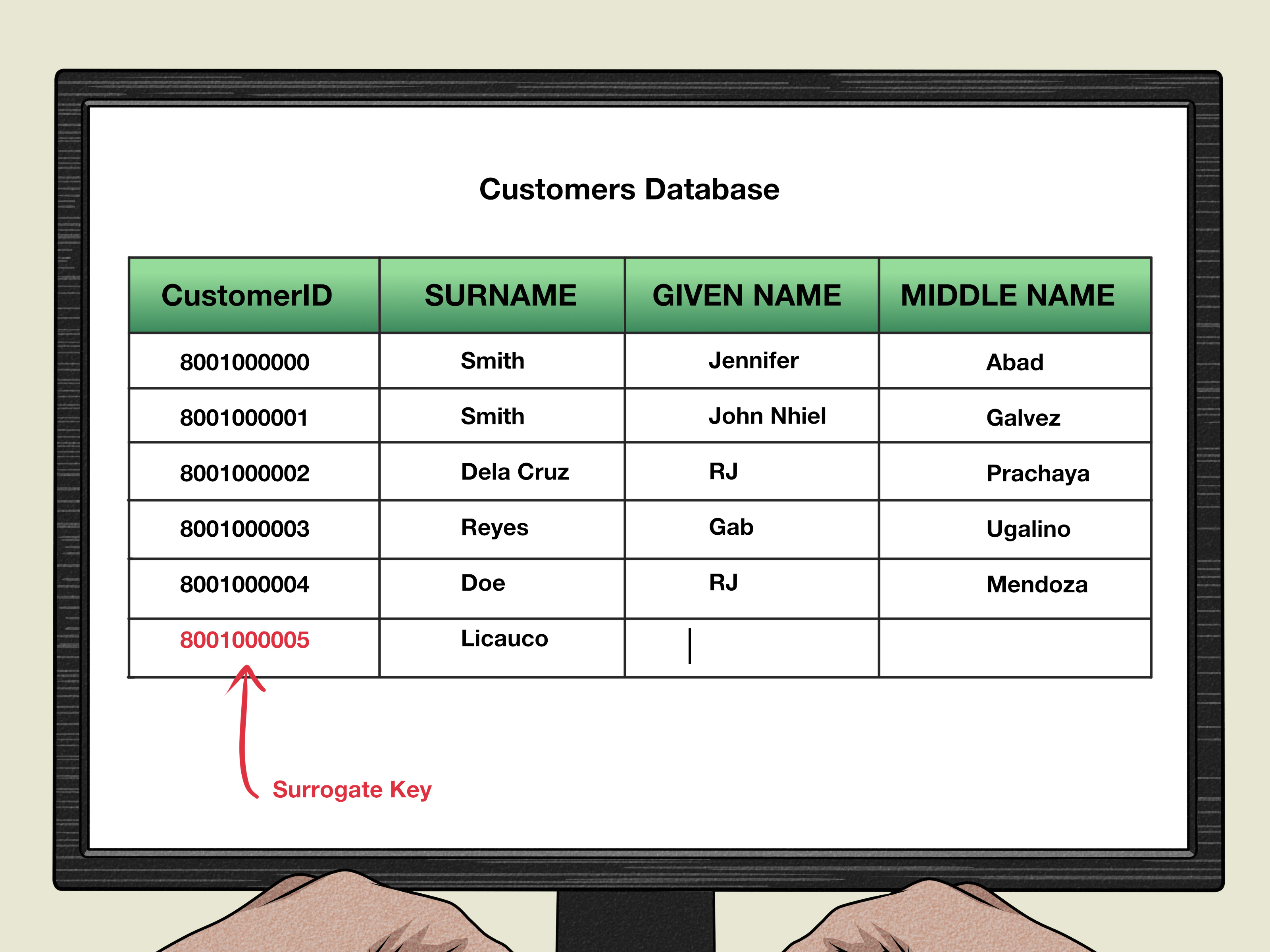
A surrogate key is an artificial identifier created by the database or application. It has no business meaning. Common examples include auto-incrementing integers, identity columns, sequences, and UUIDs.
For many application tables, a surrogate key is the safer default. It is stable, compact, and independent of business rules. If a customer changes their email, a product changes its SKU, or a company updates its naming system, the surrogate primary key stays the same. It quietly does its job without asking for applause.
Natural Key vs. Surrogate Key: Which One Should You Choose?
Use a natural key when the natural value is guaranteed to be unique, stable, required, and reasonably small. Use a surrogate key when the natural value may change, may be sensitive, may be long, may involve multiple columns, or may create awkward relationships with other tables.
In practice, many well-designed databases use both: a surrogate primary key for internal relationships and unique constraints on natural business fields. For example:
In this design, user_id is the primary key. Meanwhile, email and username are still protected from duplicates. It is a neat compromise: the database gets a stable technical key, and the business still gets clean rules.
Step 3: Keep the Primary Key Stable, Simple, and Small
A great primary key should be boring in the best possible way. It should not change. It should not carry emotional baggage. It should not contain five columns, three abbreviations, a customer’s birth date, and a tiny prayer.
When choosing a primary key, look for these qualities:
Uniqueness
Every row must have a different primary key value. This is non-negotiable. If the database cannot tell two rows apart, neither can your application, reports, APIs, or future self at 1:17 a.m.
Non-Null Values
A primary key must always have a value. Null means “unknown” or “missing,” and an unknown identifier is not an identifier. It is a shrug wearing a database costume.
Stability
A primary key should not change after it is created. Changing primary keys can break foreign key relationships, audit trails, cache references, external integrations, and application logic.
Simplicity
Short, simple keys are easier to index, join, store, and debug. Integer keys are common because they are compact and efficient. UUIDs are useful in distributed systems, but they are longer and may affect index size and insert behavior depending on the database and generation strategy.
Privacy
A primary key should avoid exposing sensitive personal information. Social Security numbers, national ID numbers, personal phone numbers, and email addresses are risky primary keys because they may be private, changeable, regulated, or all three. Use a technical identifier instead and protect sensitive values with proper security controls.
Step 4: Test the Key Against Real Relationships and Future Changes
The final step is to test your primary key choice against how the table will connect to the rest of the database. A primary key rarely lives alone. It is often referenced by foreign keys in other tables, used in joins, included in APIs, exported to analytics systems, and stored in logs.
Ask these questions before finalizing your design:
- Will other tables reference this key often?
- Could the value ever change because of business rules?
- Is the key short enough for efficient indexing and joining?
- Would exposing this key create privacy or security problems?
- Can the key be generated reliably during imports, migrations, and integrations?
- Does the key still make sense if the application grows?
For example, imagine using email as the primary key in a users table. At first, it works. Then users ask to change email addresses. Then the marketing system stores old emails. Then the billing system references emails. Then customer support exports data to a spreadsheet named final_final_REAL_final.xlsx. Suddenly, your “simple” primary key is hosting a drama series.
Now imagine using user_id as the primary key and enforcing email with a unique constraint. Users can change their email without breaking every related table. The database remains calm. The developers remain slightly less caffeinated. Everyone wins.
Common Types of Primary Keys
Auto-Increment Integer Keys
Auto-incrementing integers are one of the most common primary key choices. They are simple, compact, and easy to read. They work well for many traditional web applications and internal systems.
The main drawback is that sequential IDs can reveal record counts or ordering if exposed publicly. For public-facing URLs or APIs, some teams use separate public identifiers while keeping integer primary keys internally.
UUID Primary Keys
A UUID is a globally unique identifier. UUIDs are useful in distributed systems where multiple servers, services, or offline clients need to create records without asking one central database for the next number.
UUIDs are powerful, but they are longer than integers. Depending on how they are generated and indexed, they may increase storage and affect performance. They are not bad; they are just not magic confetti. Use them when they solve a real problem.
Composite Primary Keys
A composite primary key uses two or more columns together. This is common in junction tables that represent many-to-many relationships.
This design says a student can enroll in a course only once. Composite keys are clear and useful, but they can become cumbersome if they are referenced by many other tables. When a composite key gets too wide or too awkward, consider adding a surrogate key and keeping a unique constraint on the natural combination.
Primary Key Mistakes to Avoid
Using Editable Business Data as the Primary Key
Email addresses, usernames, product names, department names, and phone numbers can change. If the value can change, think carefully before making it the primary key.
Using Sensitive Data
Do not use highly sensitive personal information as a primary key. It increases privacy risk and can make compliance harder. A primary key tends to travel across tables, logs, backups, exports, and integrations. Sensitive data should not get a free world tour.
Skipping Primary Keys Entirely
Some teams create tables without primary keys, especially for quick imports or temporary reporting. That can be acceptable for staging data, but production tables generally need a clear primary key. Without one, updates, deletes, deduplication, and relationships become harder.
Choosing a Key Before Understanding the Data
Do not pick a primary key just because a column “looks unique.” Check the data, understand the business rules, and ask what may change later. A column that is unique in a sample file may not be unique in real production data.
Making the Key Too Wide
A primary key used in foreign keys appears in related tables. If your primary key has five large text columns, every referencing table may inherit that complexity. Wide keys can make indexes larger and queries more awkward.
Practical Examples of Good Primary Key Choices
Users Table
Recommended primary key: user_id.
Reason: Usernames and emails may change. A stable internal ID keeps relationships clean.
Orders Table
Recommended primary key: order_id.
Reason: Orders need a stable identifier for payments, shipping, refunds, customer service, and reporting.
Countries Table
Possible primary key: country_code.
Reason: Standard country codes are compact and meaningful. However, some teams still prefer a surrogate key for consistency across systems.
Order Items Table
Possible primary key: order_item_id or a composite key such as (order_id, product_id).
Reason: If the same product can appear more than once in the same order with different options, discounts, or shipments, a separate order_item_id may be clearer.
Enrollment Table
Possible primary key: (student_id, course_id).
Reason: The table represents the relationship between students and courses. If each student can enroll in a course only once, the composite key matches the business rule.
How Primary Keys Affect SEO, Applications, and User Experience
Primary keys may sound like a back-end detail, but they influence user experience more than many people realize. A messy key strategy can create duplicate accounts, broken dashboards, missing order histories, incorrect profile updates, and reports that make managers stare into the distance.
For web applications, primary keys often shape URL patterns, API routes, caching, and admin tools. For example, an admin panel may load /users/1245 to edit a user. An API may fetch /orders/90081. If identifiers are stable, the application feels reliable. If identifiers change or collide, users may see errors, wrong records, or data that seems to vanish into a small digital swamp.
That does not mean every primary key should be exposed publicly. In many systems, the internal primary key stays private while the public interface uses a separate slug, token, or public ID. For example, a blog post may have an internal post_id and a public URL slug such as /database-primary-key-guide. The primary key keeps the database organized, while the slug keeps the URL readable for users and search engines.
A Simple Checklist for Choosing a Primary Key
Before you finalize your database schema, run your primary key through this quick checklist:
- Does every row always have a value for this key?
- Is the value guaranteed to be unique?
- Will the value remain stable over time?
- Is the key reasonably short and efficient?
- Will it work well in joins and indexes?
- Does it avoid sensitive personal information?
- Can related tables reference it easily?
- Does it still make sense if the application grows?
If your answer is “yes” to all of these, your primary key is probably in good shape. If your answer is “well, technically…” then your future database may already be clearing its throat.
Conclusion: Choose the Key That Keeps Your Data Calm
Choosing a primary key in a database is not about finding the fanciest identifier. It is about choosing the clearest, most stable way to identify each row for the life of the system. A good primary key is unique, non-null, stable, simple, and easy to reference. It supports relationships, protects data integrity, and helps applications behave predictably.
For many tables, a surrogate key like user_id, order_id, or product_id is a practical default. For certain lookup tables or standardized data, a natural key may work beautifully. Composite keys are useful when a relationship itself defines uniqueness. The trick is not to follow a database religion. The trick is to understand your data, your business rules, and how the system may change over time.
Think of your primary key as the name tag every row wears forever. Choose one that will not fall off, change every week, expose private information, or require three developers and a whiteboard to understand. Your database will thank you. Quietly, of course. Databases are not known for emotional speeches.
Additional Experience-Based Notes: What Real Projects Teach About Primary Keys
After working with database-backed websites, admin panels, e-commerce systems, content platforms, reporting dashboards, and import tools, one lesson becomes very clear: primary key decisions feel small only at the beginning. Later, they become part of almost everything. They appear in URLs, logs, exports, customer support screens, API payloads, payment records, analytics pipelines, backups, and migration scripts. That is why experienced developers tend to be careful with them.
One common experience is discovering that “unique” business data is not as unique as expected. A team may assume every customer has one email address. Then a family shares one email. A company uses a group inbox. A user deletes an account and signs up again. A marketplace imports guest checkout records. Suddenly, the email column is still important, but it is no longer the perfect identity of a human being. Using an internal customer_id gives the system breathing room.
Another lesson comes from product catalogs. At first, a SKU looks like a perfect primary key. It is unique, meaningful, and already used by the business. Then the business changes suppliers, merges product lines, supports bundles, or allows regional SKUs. Sometimes old SKUs must be preserved for order history while new SKUs replace them for inventory. If the SKU is the primary key, every change becomes delicate. If the table has a stable product_id and a unique SKU constraint, the system can adapt more easily.
Importing data from outside systems also teaches humility. External IDs are useful, but they may not be under your control. A partner system may recycle IDs, change formats, send duplicates, or use different IDs across regions. In these cases, it is often better to create your own primary key and store the external ID in a separate column with the right uniqueness rule. For example, (source_system, external_customer_id) may be unique, while external_customer_id alone is not.
Many teams also learn the value of public and private identifiers. Internal integer IDs are fast and convenient, but exposing them publicly can reveal record counts or make scraping easier. A common pattern is to use an internal primary key for database relationships and a separate public UUID, slug, or token for external access. This gives developers efficient joins while giving users safer, cleaner URLs.
Composite keys are another area where experience matters. They are elegant when they match a true business rule, such as one enrollment per student per course. But if the relationship grows extra details, the design may need to change. For example, if a student can enroll in the same course more than once across different semesters, then (student_id, course_id) is no longer enough. You may need (student_id, course_id, term_id) or a separate enrollment_id. The best key depends on the real rule, not the rule you wish the business had because it would make the schema prettier.
In reporting systems and data warehouses, surrogate keys are often used to create consistent row identifiers across transformed data. However, analytics models still need tests to confirm that the chosen key is unique and not null. A surrogate key generated from messy source columns can still produce bad results if the source data is inconsistent. A key is not a magic broom; it cannot sweep away unclear business logic by itself.
The most practical advice is to document why you chose each primary key. A short note in a schema file, migration comment, or internal documentation page can save hours later. Write down whether the key is natural or surrogate, what uniqueness rule it represents, and what related unique constraints exist. Future developers will appreciate it, especially the one debugging a production issue on a Friday afternoon while pretending not to panic.
In real projects, the best primary key is rarely the cleverest one. It is the one that keeps the data trustworthy when users change their minds, businesses update rules, imports get messy, and applications grow beyond the first version. Choose stability over cleverness. Choose clarity over convenience. And when in doubt, remember this humble database proverb: today’s shortcut is tomorrow’s migration script.