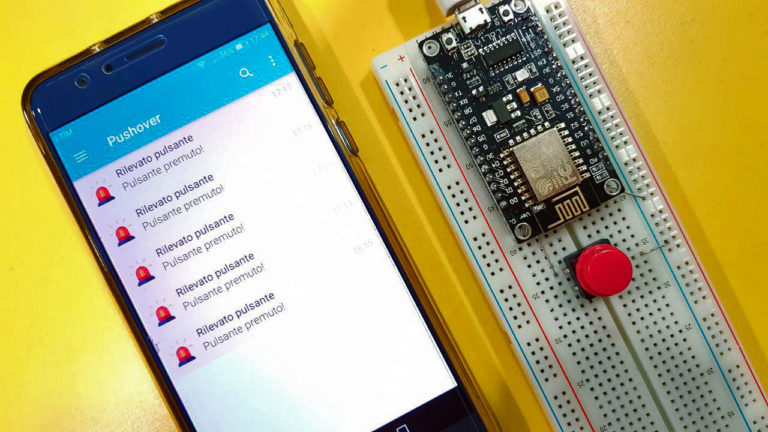
From a tiny tap to a timely alert, push notifications have changed how websites, apps, brands, and users stay connected. Used wisely, they feel like a helpful assistant. Used badly, they become the digital equivalent of someone shaking a tambourine outside your bedroom window.
What “Pushbutton → Push Notification” Really Means
The phrase “Pushbutton → Push Notification” captures a simple but powerful shift in digital communication. In the old world, a user pressed a button and something happened immediately: a doorbell rang, a machine started, a form submitted, a light turned on, or a message was sent. The action was direct. The user pushed; the system responded.
Today, the relationship is more dynamic. A user may press a button oncesubscribe, allow alerts, follow a product, save a search, track an orderand after that, the system can communicate with them later through push notifications. The original “pushbutton” becomes the gateway to an ongoing conversation.
A push notification is a short message delivered to a user’s device or browser even when the app or website is not actively open. It might announce a breaking news update, an order status change, a calendar reminder, a flash sale, a security alert, a new chat message, or a weather warning. In plain English, it is the internet tapping you on the shoulder and saying, “Hey, this may matter.”
That little tap can be incredibly useful. It can also be spectacularly annoying. The difference is strategy, timing, relevance, and respect.
How Push Notifications Work Behind the Curtain
Push notifications may look simple on the screen, but behind the scenes they rely on a carefully organized chain of technology. On the web, push notifications commonly involve the Push API, the Notifications API, a service worker, user permission, a push subscription, and a server that knows when to send the message. Mobile apps use platform systems such as Apple Push Notification service for iOS and Firebase Cloud Messaging for Android and cross-platform messaging.
The Basic Flow
First, the user gives permission. This is not optional, and it should never be treated like a sneaky trapdoor. A website or app must ask whether the user wants notifications. If permission is granted, the browser or operating system creates a subscription or device token. That token helps identify where future messages should be delivered.
Next, the app’s server stores that subscription information securely. When something important happens, the server sends a message through a push service. The push service delivers the message to the browser or device. On the web, a service worker can wake up in the background and display the notification. On mobile, the operating system handles delivery and presentation based on app settings, user preferences, and platform rules.
In other words, the user does not need to keep your website open like a loyal guard dog. The system can still deliver timely information when it is genuinely useful.
Push Notification vs. In-App Message
A push notification appears outside the app or website experience. It can show on the lock screen, notification center, browser, or desktop. An in-app message appears only while the user is actively inside the app. Think of push as a polite knock on the door, while in-app messaging is a note placed on the kitchen counter after the person has already walked in.
Both are valuable, but they serve different jobs. Push is best for time-sensitive, useful, or behavior-triggered updates. In-app messages are better for onboarding tips, feature announcements, upgrade prompts, and contextual guidance inside the product.
Why Push Notifications Matter for Businesses
Push notifications are popular because they solve a hard problem: how to bring users back without relying entirely on email, paid ads, or wishful thinking. A well-timed notification can recover an abandoned cart, remind a patient about an appointment, alert a traveler about a gate change, notify a shopper about a price drop, or help a reader follow a developing story.
For marketers, product managers, publishers, retailers, SaaS teams, and mobile app owners, push notifications support retention. Retention is the grown-up sibling of acquisition. Acquisition says, “We got a new user!” Retention says, “Great, now can we keep them from disappearing into the digital fog?”
Push notifications can increase engagement because they reach users in real time. They can also reduce friction. A customer does not need to refresh a tracking page every ten minutes to see whether a package moved from “label created” to “actually exists.” A notification can deliver that update instantly.
However, push is not magic glitter. It does not fix a weak product, poor content, bad customer experience, or irrelevant offers. It amplifies what already exists. If the message is helpful, push makes it more visible. If the message is spammy, push makes the spam harder to ignoreand much easier to block.
The Permission Moment: Where Trust Is Won or Lost
The most important moment in a push notification strategy is not the send. It is the ask. When a website immediately shows “Allow notifications?” before the user has even seen the page, it feels like a stranger asking for your house key while you are still reading their name tag.
Modern best practice is to request notification permission only after a meaningful user action. That action might be clicking “Track my order,” choosing “Get price alerts,” following a topic, saving a search, joining a waitlist, or turning on reminders. The user should understand what they will receive and why it benefits them.
Use a Soft Prompt First
A soft prompt is a custom in-app or on-page message that explains the value before triggering the official browser or operating system permission dialog. Instead of jumping straight to “Allow notifications?” a better prompt says, “Want a heads-up when your order ships?” or “Get notified when this item is back in stock.”
This approach gives users context. It also protects your one big chance on platforms where users may not easily reconsider after denying permission. A clear explanation feels respectful. A surprise system prompt feels like someone launching confetti during a tax audit.
Be Honest About Frequency
Users are more likely to opt in when they know what they are signing up for. “Get important account alerts” sounds useful. “We will buzz you whenever our marketing team has feelings” does not. Tell users whether notifications are for security, shipping, reminders, breaking news, deals, messages, or personalized updates.
What Makes a Push Notification Effective?
A strong push notification is short, specific, timely, and useful. It does not try to squeeze an entire sales page into two lines. It respects the tiny canvas it has been given.
1. Relevance
Relevance is the difference between “Your prescription is ready for pickup” and “We thought you might enjoy a random announcement about socks.” The best push notifications are connected to user behavior, preferences, location, lifecycle stage, or real-time events.
For example, a finance app can send a fraud alert immediately. A travel app can notify someone of a flight delay. A retailer can send a back-in-stock alert for the exact product a shopper saved. A media app can alert readers about topics they follow instead of sending every headline to every subscriber.
2. Timing
Timing is not decoration; it is strategy. A lunch coupon at 11:30 a.m. may be useful. The same coupon at 2:17 a.m. feels like the app has joined a raccoon support group. Timing should consider the user’s time zone, habits, urgency, and context.
3. Clarity
Push copy should be clear at a glance. Users should understand the message without opening a detective agency. “Your order has shipped” is stronger than “An exciting update awaits!” Specific beats mysterious almost every time.
4. A Clear Action
A notification should suggest a next step. Tap to view, approve, confirm, read, track, reply, save, or learn more. If there is no meaningful action, ask whether the notification needs to exist at all. Silence is also a user experience.
5. Restraint
Frequency matters. Too many notifications train users to ignore, mute, or uninstall. Smart brands use frequency caps, quiet hours, preference centers, and segmentation. The goal is not to send the most messages. The goal is to send the most useful messages.
Examples of Good and Bad Push Notifications
Good: Transactional and Timely
“Your order is out for delivery. Track it live.”
This works because it is expected, relevant, and tied to a real customer need. The user wants this information. No one has ever said, “Please stop telling me where my tacos are.”
Good: Personalized and Useful
“The running shoes you saved are back in stock in size 9.”
This notification is specific. It uses behavior-based personalization without feeling creepy. It helps the user complete an action they already showed interest in.
Bad: Vague and Pushy
“You won’t believe what’s waiting inside!”
This sounds like a haunted email subject line. It creates curiosity but not trust. Users are busy. If the value is real, say it plainly.
Bad: Too Frequent
“Sale today!” “Still on sale!” “Sale ending!” “Sale really ending!” “Okay, now we mean it!”
This is not a lifecycle campaign. This is a digital woodpecker. Overuse leads to opt-outs, lower engagement, and brand fatigue.
Push Notifications for Web, Mobile, and Apps
Web Push Notifications
Web push notifications allow websites and progressive web apps to send updates through supported browsers. They are especially useful for publishers, SaaS dashboards, ecommerce stores, community platforms, and tools where users may not install a native app.
Web push typically requires HTTPS, a service worker, a push subscription, and user permission. It is powerful because it gives websites app-like re-engagement capability. But it also comes with responsibility. Browsers have introduced stricter permission experiences and quieter prompts to reduce spammy behavior.
Mobile Push Notifications
Mobile push notifications are delivered through iOS and Android notification systems. They can include text, images, buttons, badges, sounds, and deep links. Mobile apps often use push to support onboarding, retention, account alerts, reminders, loyalty programs, and real-time updates.
Mobile notifications can be extremely effective because phones are personal devices. That is also why they must be handled carefully. A phone is not a billboard. It is closer to someone’s pocket-sized command center, alarm clock, wallet, camera, map, and emotional support rectangle.
Desktop Push Notifications
Desktop notifications are useful for productivity tools, messaging apps, collaboration platforms, calendars, project management systems, trading platforms, and customer support dashboards. The key is urgency. A desktop notification should help users act sooner, not merely interrupt their flow.
SEO and Push Notifications: A Smart Relationship
Push notifications do not directly improve search rankings the way quality content, technical SEO, backlinks, internal linking, and page experience can. However, they can support SEO indirectly by encouraging return visits, content discovery, brand loyalty, and repeat engagement.
For publishers and blogs, push notifications can bring readers back to fresh articles. For ecommerce sites, they can revive product interest. For SaaS businesses, they can encourage users to complete onboarding or return to important workflows. More returning visitors can strengthen brand signals and audience loyalty over time.
The SEO-friendly way to use push is not to blast every post to every subscriber. Instead, segment by interest. A reader who subscribed to “home improvement tips” may not want daily updates about cryptocurrency, unless their bathroom remodel has somehow become a blockchain project. Keep topics aligned with user expectations.
Privacy, Security, and User Control
Push notifications touch sensitive territory because they appear outside the original app or website context. They can reveal personal information on a lock screen or shared computer. That is why privacy-first design matters.
Businesses should avoid placing sensitive data directly in notification text unless the user clearly expects it and the risk is low. A banking app might say, “New security alert. Open the app to review.” That is safer than exposing account details in a public-facing notification.
Users should also have control. Preference centers allow people to choose which notifications they want: order updates, weekly summaries, promotions, reminders, price drops, or security alerts. A clear unsubscribe or settings option reduces frustration and builds trust.
Security also matters on the technical side. Subscription data and device tokens should be protected. Payloads should be handled carefully. Teams should review who can send campaigns, how messages are approved, and whether automation rules can accidentally create notification storms.
A Practical Push Notification Strategy
Step 1: Define the Purpose
Do not start with “We need push notifications.” Start with “What user problem are we solving?” Good purposes include delivery updates, reminders, alerts, onboarding nudges, saved search updates, personalized content, loyalty rewards, and reactivation campaigns.
Step 2: Segment the Audience
Segmentation prevents one-size-fits-all messaging. Group users by behavior, interest, lifecycle stage, location, purchase history, engagement level, or preferences. A new user may need onboarding help. A loyal customer may appreciate early access. An inactive user may need one carefully chosen reason to return.
Step 3: Write Human Copy
Push notifications should sound like they were written by a person who has met another person before. Avoid robotic hype, all caps, vague urgency, and fake scarcity. Use active language, specific details, and a tone that matches the brand.
Step 4: Test and Measure
Track opt-in rate, delivery rate, open rate, click-through rate, conversion rate, opt-out rate, uninstall rate, revenue impact, and long-term retention. A notification that gets clicks but increases unsubscribes may not be a win. A notification that quietly prevents churn may be more valuable than one flashy spike.
Step 5: Respect the Off Switch
The best push strategy assumes users are in charge. Make it easy to adjust preferences. When users feel trapped, they leave. When they feel respected, they stay.
Common Mistakes to Avoid
Asking too early: Do not request permission before the user understands your value.
Sending generic blasts: Mass messaging may be easy, but relevance wins.
Ignoring time zones: Nobody wants a casual promo at 4 a.m.
Overusing urgency: If everything is urgent, nothing is urgent.
Forgetting analytics: Without measurement, you are just throwing tiny rectangles into the wind.
Hiding controls: Users should be able to manage what they receive.
Exposing private information: Keep sensitive details out of lock-screen text when possible.
The Future of Push Notifications
Push notifications are becoming more intelligent, more personalized, and more tightly connected to real-time customer journeys. Artificial intelligence may help predict the best send time, choose better wording, personalize content, and prevent message fatigue. Automation can trigger notifications based on behavior, inventory, location, weather, risk signals, or lifecycle events.
At the same time, platforms are becoming stricter about abuse. Browsers and operating systems continue to give users more control. That is good news for brands that treat push as a trust-based channel. It is less good news for brands that treat every permission grant like an invitation to shout through a megaphone.
The future belongs to notifications that feel less like advertising and more like assistance. The best push message will not always be the loudest. It will be the one that arrives at the right moment, says the right thing, and helps the user do something they already care about.
Real-World Experiences with Pushbutton → Push Notification
The most useful way to understand “Pushbutton → Push Notification” is to look at the everyday experience. Most of us have trained ourselves to press buttons and expect results. We press “Buy Now” and expect a receipt. We press “Track Package” and expect movement updates. We press “Follow” and expect to hear when something new happens. The button is no longer the end of the interaction. It is the beginning of a notification relationship.
One common experience is ecommerce. A shopper finds a jacket, but the right size is sold out. Instead of checking the page every day like a very fashionable detective, the shopper taps “Notify me when available.” That single pushbutton action creates a future push notification. When the product returns, the message arrives: “Your size is back in stock.” This feels helpful because the user asked for it. The notification saves time, solves a problem, and connects directly to intent.
Another experience is food delivery. After placing an order, users expect updates without opening the app every two minutes. “Your order is being prepared,” “Your driver is nearby,” and “Delivered” are not glamorous messages, but they are useful. They reduce uncertainty. They also prevent unnecessary customer support requests. Nobody wants to call a restaurant to ask whether their burrito has entered the next phase of its heroic journey.
Banking and security alerts show the serious side of push notifications. A message about a suspicious login or unusual card transaction can help users act quickly. In this case, speed matters more than clever copy. The best alert is calm, direct, and secure: “We noticed a new sign-in. Open the app to review.” It gives enough information to prompt action without exposing sensitive details.
Content platforms offer a different lesson. A news app that sends every headline will quickly become background noise. But a news app that lets users follow specific topicslocal weather, elections, technology, sports, health, financecan make push notifications feel personalized. The experience improves when users control the categories and frequency. A reader interested in severe weather alerts may welcome immediate notifications, while a reader following movie reviews may prefer a weekly digest.
Workplace apps also show how push can help or hurt. A project management tool that notifies users about every comment, emoji reaction, status change, and file upload can turn a normal Tuesday into a notification carnival. But a thoughtful setup that alerts users only when they are mentioned, assigned a task, or approaching a deadline can improve productivity. In professional settings, notification design is not just marketing. It is workflow architecture.
From these experiences, one rule becomes clear: the best push notifications are expected. They come from a button, preference, behavior, or relationship the user understands. The worst push notifications feel random. They arrive without context, too often, or with too much drama. The path from pushbutton to push notification should be paved with consent, usefulness, and restraint.
In practice, teams should review their notification experience from the user’s point of view. What did the user tap? What did they expect? What did they receive? How often did it happen? Could they control it? Did the message help them act, or did it merely interrupt them? These questions reveal whether push notifications are creating value or just making noise in a world already full of pings, buzzes, banners, badges, and tiny red circles demanding emotional labor.
The beauty of “Pushbutton → Push Notification” is that it connects human intent with automated service. The button says, “I care about this.” The notification should reply, “Great, I’ll let you know when it matters.” When that relationship works, push becomes more than a marketing channel. It becomes a promise kept.
Conclusion
Push notifications have evolved from simple alerts into a major part of digital customer experience. They connect user intent, real-time events, automation, and personalized communication. But their power depends on trust. A helpful notification can bring users back, reduce friction, and improve loyalty. A careless one can send them straight to the settings menu with the speed of a caffeinated squirrel.
The best strategy is simple: ask permission at the right moment, explain the value clearly, send relevant messages, respect timing, protect privacy, and measure what matters. When a pushbutton becomes a push notification, it should feel like servicenot noise.
Note: This article is written for web publication and synthesizes current platform documentation, browser standards, mobile notification practices, and customer engagement best practices without inserting source links into the content.