Note: This guide is meant for saving WeChat videos you own, videos sent to you directly, or videos you have permission to keep. Respect privacy, copyright, and the original creator’s wishes before reposting or sharing anything outside WeChat.
WeChat is one of those apps that can do almost everything except fold your laundry. It handles chats, video calls, Moments, group messages, payments in supported regions, file sharing, Channels, and enough tiny features to make your Android phone feel like it has a second apartment inside it. Naturally, people often want to save videos from WeChat to their Android Gallery for offline viewing, backup, editing, or simply because that one family clip is too good to disappear into the chat-history swamp.
The good news: downloading WeChat videos on Android is usually simple when the video was sent in a chat or saved in Favorites. The slightly less glamorous news: some videos from Moments, Channels, Official Accounts, or restricted posts may not show a direct “Save Video” button. In those cases, your best options are using WeChat’s built-in tools, Android’s file manager, or screen recording for personal reference when allowed. No wizard hat requiredjust a few taps and maybe a little patience.
This in-depth guide explains how to download WeChat videos on Android in 5 steps, where saved WeChat videos usually go, what to do when videos do not appear in Gallery, and how to avoid unsafe third-party downloader apps that ask for suspicious permissions. Let’s rescue your videos from digital hide-and-seek.
Before You Download: Know What Kind of WeChat Video You Have
Not all WeChat videos behave the same way. A video sent directly in a private chat or group chat is usually the easiest to save. A video in WeChat Favorites may also offer a save option. A video posted in Moments can sometimes be saved if WeChat allows it, but the option may vary depending on app version, account region, privacy settings, or the way the creator posted it. WeChat Channels and Official Account videos can be more restricted because they are often designed for in-app viewing.
That matters because the best method depends on the source. Trying to save a chat video like a Channel video is like trying to open a soda can with a house key: possible in theory, annoying in real life, and not recommended unless you enjoy tiny disasters.
Common WeChat Video Types on Android
- Chat videos: Videos sent directly in one-on-one chats or group chats. These are usually the easiest to save.
- Favorites videos: Videos you saved inside WeChat’s Favorites section. These may be saved later to your phone.
- Moments videos: Videos posted by friends in the social feed. Saving options can vary.
- Channels videos: Public or semi-public short-form videos inside WeChat. Direct downloading is often limited.
- Official Account videos: Videos embedded in articles or posts. These may not always include a native save button.
How to Download WeChat Videos on Android: 5 Steps
The following method starts with the safest and most reliable option: using WeChat’s built-in save feature. This works best for videos received in chats or videos you can open directly inside the app.
Step 1: Open WeChat and Find the Video
Open the WeChat app on your Android phone. Go to the conversation, group chat, Favorites section, Moment, or post where the video appears. If the video is in a chat, tap the conversation and scroll until you find it. If the chat is long, use WeChat’s search feature to look for media, files, or keywords related to the conversation.
For videos saved to Favorites, tap Me, then open Favorites. From there, look for the video under your saved items. WeChat Favorites is handy because it works like a little storage shelf inside the app. It is not exactly your phone Gallery, but it helps you avoid losing important clips in a sea of stickers, voice notes, and “OK” messages.
Before moving on, make sure the video fully loads. If the video still shows a loading icon, connect to Wi-Fi or a stable mobile data connection. A half-loaded video is not ready to be saved, just like a half-baked cookie is not ready to be judged. Let it finish.
Step 2: Tap the Video to Play It Full-Screen
Once you find the video, tap it so it opens in full-screen playback mode. This is important because WeChat often shows more options when the video is opened, not when it is just sitting in the chat preview. On some Android phones, the save menu appears only while the video is playing or paused in the full-screen player.
If the video was sent as a file rather than an embedded chat video, you may need to tap the file first to download it inside WeChat. After it downloads, open it. Look for a menu icon, three dots, share icon, or long-press option depending on your WeChat version and Android skin.
Android phone brands can make the interface look slightly different. Samsung, Google Pixel, OnePlus, Xiaomi, Oppo, and Motorola may all display storage and sharing options in their own style. The WeChat app is the same basic idea, but the buttons sometimes move around like they are avoiding rent.
Step 3: Long-Press the Video and Choose “Save Video”
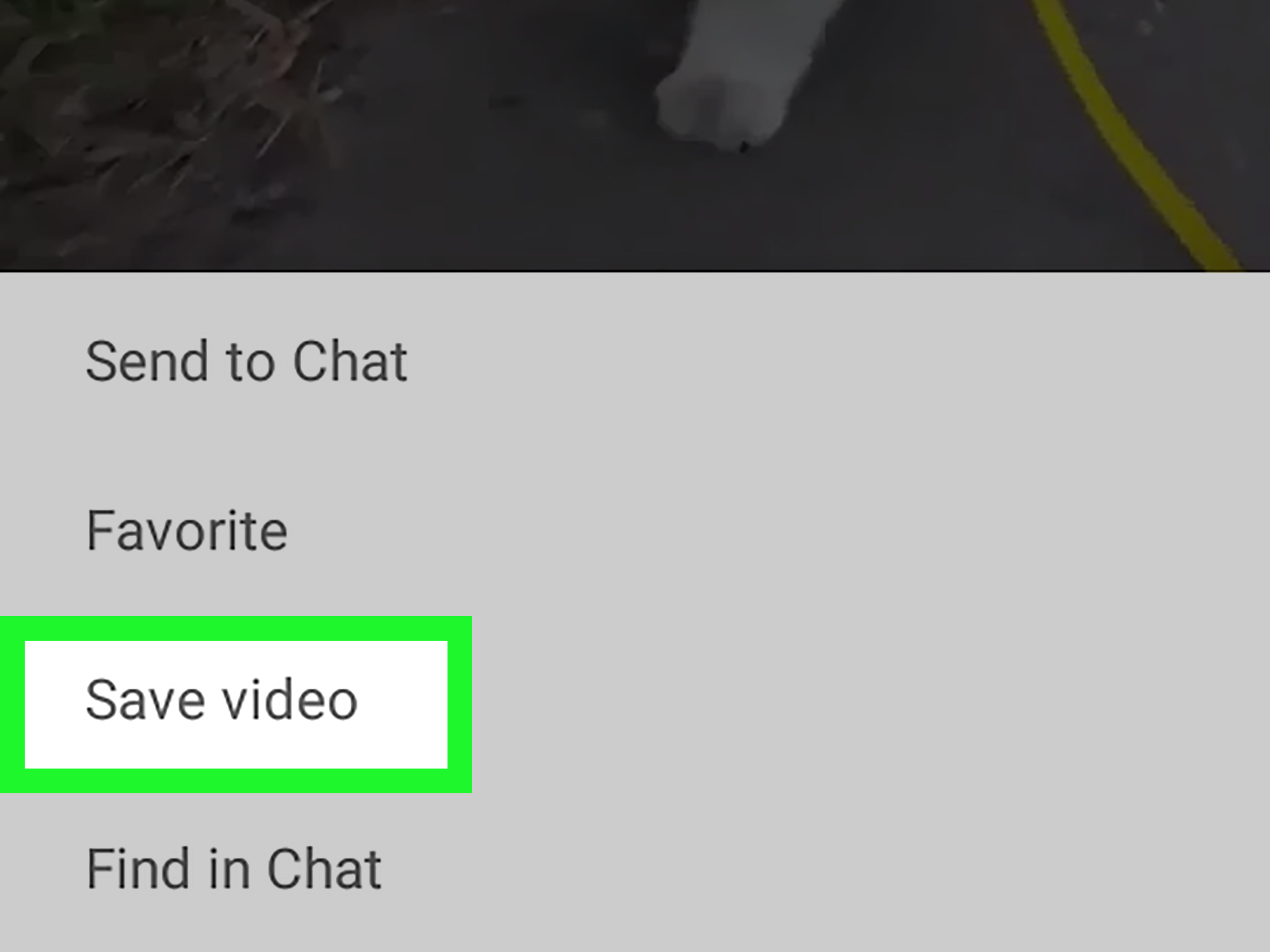
While the video is open, tap and hold on the screen for a second or two. If WeChat allows saving that video, a menu should appear. Choose Save Video, Save to Phone, or a similar option. The wording can vary slightly depending on the app version, phone language, and Android interface.
After you tap the save option, WeChat should download the video to local storage. You may see a small confirmation message such as “Saved” or “Saved to album.” If your phone asks for permission to access photos and videos, allow the permission if you trust the app and want the save feature to work. Modern Android versions use more specific media permissions, so video-saving features may require access to photos and videos rather than a broad old-school storage permission.
If you do not see “Save Video,” do not panic. The video may be from a section where WeChat does not offer direct downloads. It may also be protected by the creator’s settings, unavailable because of network issues, or stored in a format WeChat does not expose to the Gallery. In that case, continue to the troubleshooting sections below.
Step 4: Check Your Android Gallery, Photos, or File Manager
After saving the video, open your Android Gallery app, Google Photos, or your phone’s file manager. Look in recent media first. Many saved WeChat videos appear in an album or folder named WeChat, WeiXin, Pictures, Movies, or a similar media folder. On some phones, the clip may appear under “Albums” instead of the main Photos timeline.
If the video does not appear immediately, give your phone a moment to scan new media. Android’s media index sometimes needs a little time to notice newly saved files. It is not lazy; it is just thinking very deeply about thumbnails.
You can also use a file manager app such as Files by Google or your phone’s built-in file manager. Search for “WeChat,” “WeiXin,” “Tencent,” or the video file type, such as “.mp4.” Some older or brand-specific Android setups store WeChat media inside folders related to Tencent or MicroMsg, while newer Android versions may limit direct access to app-specific folders. If you cannot access certain directories, that is usually Android protecting app data, not your phone personally betraying you.
Step 5: Back Up, Rename, or Move the Video
Once you find the downloaded WeChat video on your Android phone, decide what to do with it. If the video is important, rename it with something useful, such as “family-dinner-wechat-video.mp4” instead of leaving it as a mysterious string of numbers. Future you will appreciate this. Future you is already dealing with enough chaos.
You can move the video to a folder such as Movies, Downloads, or a custom folder named Saved WeChat Videos. You can also back it up to Google Photos, Google Drive, OneDrive, Dropbox, or your computer. If you want the video to appear consistently in your Gallery, keep it in a public media folder rather than a hidden app cache folder.
For valuable videos, make at least one backup outside WeChat. Chat apps are convenient, but they are not a permanent archive. Messages can be deleted, phones can be replaced, accounts can have login issues, and storage cleanup tools can remove cached media. A saved video is good. A saved and backed-up video is better. A saved, backed-up, clearly named video is the adult version of finding money in an old jacket.
What If the “Save Video” Button Does Not Appear?
Sometimes WeChat does not show a save option, especially for Moments, Channels, Official Account videos, or videos with restrictions. Here are practical fixes and alternatives.
Try Saving the Video to Favorites First
If the video appears in a chat but will not save directly, long-press it and choose Favorite if that option is available. Then go to Me > Favorites, open the saved video, long-press it again, and look for Save Video. This extra step sometimes works because Favorites opens the media in a slightly different context.
Update WeChat from Google Play
If your WeChat version is old, update it from Google Play. App updates often include bug fixes, storage behavior changes, and compatibility improvements for newer Android versions. This matters because Android media permissions have changed over time, especially on Android 13 and newer, where apps handle photos and videos more specifically.
After updating, restart WeChat and try saving the video again. If your phone has pending system updates, install those too when convenient. App and operating system updates are not glamorous, but neither is fighting a broken save button for 30 minutes.
Check Android App Permissions
Open your Android settings and review WeChat’s permissions. The path is usually close to Settings > Apps > WeChat > Permissions. Look for permissions related to photos, videos, music, files, or storage. If WeChat is denied access to photos and videos, it may not be able to save media to your Gallery.
On Android 13 and newer, the permission may appear as Photos and videos. Some phones also let you choose full access, selected access, or no access. For saving videos smoothly, WeChat needs permission to write or access the relevant media location. Use the least permission that still allows the function you need.
Use Android Screen Recording for Personal Reference
If a WeChat video cannot be downloaded directly but you are allowed to keep a personal copy, Android’s built-in screen recorder can help. Swipe down from the top of the screen to open Quick Settings, look for Screen Record, start recording, play the video, and stop recording when finished. The screen recording usually saves to your phone’s Movies or Screen Recordings folder.
This method is not ideal for quality because it records your screen rather than downloading the original file. It may also capture notifications, buttons, or background sounds if you are not careful. Turn on Do Not Disturb, check audio settings, and record in a quiet place if sound matters. Also, do not use screen recording to copy or redistribute content you do not have permission to use.
Avoid Shady WeChat Video Downloader Apps
Be careful with third-party apps or websites claiming they can download every WeChat video instantly. Some may work for public links, but many ask for unnecessary permissions, push ads, collect data, or require you to paste private links. If an app wants full access to your files, contacts, messages, or login information just to save one video, that is not a toolit is a red flag wearing sunglasses.
For most Android users, the safest order is simple: use WeChat’s built-in save option first, try Favorites second, check your file manager third, and use screen recording only when appropriate. Avoid entering your WeChat credentials into unknown services.
Where Are WeChat Videos Saved on Android?
Saved WeChat videos usually appear in your Gallery, Google Photos, or a local media folder. The exact folder name can vary by phone model, Android version, and WeChat version. Common places include albums labeled WeChat, WeiXin, Videos, Movies, or Pictures. Some devices may show saved media under internal storage folders connected to Tencent or MicroMsg, especially on older Android versions.
If you use Files by Google or a built-in file manager, try searching for the newest video files. Sort by date modified and look for files created at the time you saved the WeChat video. Most saved videos use common formats such as MP4, which Android media apps can usually play without extra work.
If the file plays in the file manager but not in Gallery, move it to a public folder like Movies or Download. Then reopen Gallery or Google Photos. In some cases, restarting the phone forces Android to refresh the media index.
Why Your WeChat Video Is Not Showing in Gallery
When a saved WeChat video does not appear in Gallery, the cause is usually one of these issues:
- The video did not fully download: Open WeChat and replay the video on a stable connection.
- Gallery has not refreshed yet: Wait a minute, reopen the Gallery app, or restart your phone.
- The video is in an app folder: Use a file manager to search for the file manually.
- WeChat lacks permission: Check Android app permissions for photos and videos.
- The source blocks saving: Some Moments, Channels, or article videos may not offer direct downloading.
- Storage is full: Free up space and try saving again.
Storage is a sneaky culprit. If your phone is almost full, WeChat may fail to save videos or save only a broken partial file. Delete unnecessary downloads, clear unused app caches, or move old videos to cloud storage. Do not delete random folders if you are unsure what they do. Android phones contain many folders that look suspicious but are actually important. Deleting first and asking questions later is how people accidentally create their own tech-support horror movie.
Best Practices for Downloading WeChat Videos Safely
Respect Privacy and Permission
A video sent to you privately is not automatically yours to repost. Ask before sharing someone’s personal clip outside WeChat, especially if it includes faces, children, private events, workplace content, school activities, or sensitive locations. Saving for personal reference is different from publishing. The internet has a long memory and terrible manners.
Keep Your App Updated
Using the latest version of WeChat helps reduce bugs and improves compatibility with Android’s storage rules. If the save feature suddenly stops working, check for updates in Google Play and restart your phone after installing them.
Use Trusted File Managers
Stick with your phone’s built-in file manager or Files by Google. Avoid unknown “super downloader” apps that request excessive access. If an app’s permission list looks longer than a restaurant menu, think twice.
Back Up Important Videos
After downloading a WeChat video, back it up somewhere outside the app. Google Photos, Google Drive, external storage, or your computer are all reasonable options. A single phone is not a backup plan; it is a tiny rectangle living dangerously.
Quick Troubleshooting Checklist
- Open the video full-screen before long-pressing.
- Look for “Save Video,” “Save to Phone,” or a share icon.
- Try saving the video to Favorites, then saving it from Favorites.
- Check WeChat permissions in Android settings.
- Search your phone with Files by Google or a built-in file manager.
- Sort videos by newest first in Gallery or file manager.
- Free up storage if the save fails.
- Use screen recording only for permitted personal use when direct saving is unavailable.
Personal Experience: What Saving WeChat Videos on Android Is Really Like
In real-world use, downloading WeChat videos on Android is usually easybut not always obvious. The first surprise is that WeChat does not treat every video equally. A short clip sent by a friend in a chat may save instantly with a long press. A video from Moments may or may not show the same option. A Channels video might behave like it belongs to a tiny locked museum inside the app. You can look at it, admire it, maybe laugh at it, but saving it directly is not always part of the deal.
The most reliable habit is to open the video fully before trying to save it. Many people long-press the thumbnail in the chat and wonder why nothing useful happens. The full-screen player usually gives better options. It also helps to let the entire video load first. If your connection is weak, WeChat may show the video preview while the actual media file is still downloading in the background. Trying to save too early can feel like asking a pizza delivery driver for the pizza while they are still three blocks away.
Another useful lesson is to check more than one Gallery view. On many Android phones, the saved video does not appear at the very top of the main photo timeline right away. It may be tucked into an album called WeChat, WeiXin, Videos, or Downloads. Google Photos can also behave differently depending on whether backup is enabled and whether device folders are visible. When in doubt, a file manager is the grown-up tool for the job. Search for recent MP4 files, sort by date, and you can often find the video faster than scrolling through months of screenshots and accidental pocket photos.
Permissions are another common speed bump. Android has become more careful about media access, which is good for privacy but occasionally confusing. If WeChat cannot save a video, checking permissions is worth doing before blaming the app, the phone, the Wi-Fi, or Mercury retrograde. Open Android settings, find WeChat, and make sure it has the media access it needs. You do not need to grant every permission under the sun, but photos and videos access may be necessary for saving media properly.
For important clips, the best workflow is simple: save, find, rename, back up. Do not leave meaningful videos buried under random filenames. A video named “VID_20260528_104922.mp4” is technically accurate but emotionally useless. Rename it to something searchable, like “wechat-grandma-birthday-video.mp4” or “project-demo-from-li.mp4.” Then back it up. Phones get lost, apps glitch, accounts lock, and storage cleaners sometimes become a little too enthusiastic. A backup turns panic into a minor inconvenience.
The final experience-based tip is to be careful with downloader tools. It is tempting to search for a magic WeChat video downloader when the save button is missing, but many tools are unreliable or invasive. If a service asks you to log in with your WeChat account, hand over private links, or install an APK from a random website, step away gracefully. The safest method is almost always the built-in WeChat save feature, followed by Favorites, Android file search, or screen recording for content you have permission to keep. Simple, boring, and safe usually wins. In tech, boring is underratedboring means your data is still yours.
Conclusion
Downloading WeChat videos on Android is straightforward when you start with the official in-app method: open the video, long-press it, and tap “Save Video.” If that option does not appear, try saving the video to Favorites, checking Android permissions, searching with a file manager, or using screen recording for personal permitted use. The key is knowing that WeChat videos can come from different placeschats, Favorites, Moments, Channels, and Official Accountsand each one may offer different save options.
For the cleanest result, keep WeChat updated, use a stable connection, save videos only when you have the right to do so, and back up important clips outside the app. That way, your favorite WeChat videos do not vanish into the mysterious fog of chat history, where old memes and forgotten voice notes go to retire.