There are birthday parties, and then there are birthday parties where the guests of honor are beige towers, clicky keyboards, CRT monitors, and an operating system that taught millions of people where the Start button lived. Celebrating 30 years of Windows 95 at VCF is not just a nostalgic salute to old software; it is a hands-on reminder of the moment personal computing stopped feeling like a secret club and started feeling like something every household could understand.
At Vintage Computer Festival East 2025, held at the InfoAge Science and History Museums in Wall, New Jersey, the Windows 95 anniversary exhibit captured the spirit of a very specific computer era: the mid-1990s, when CD-ROM drives felt futuristic, boxed software looked like cereal packaging for nerds, and a family PC could become a homework station, game console, encyclopedia, email machine, and occasional blue-screen generator all before dinner.
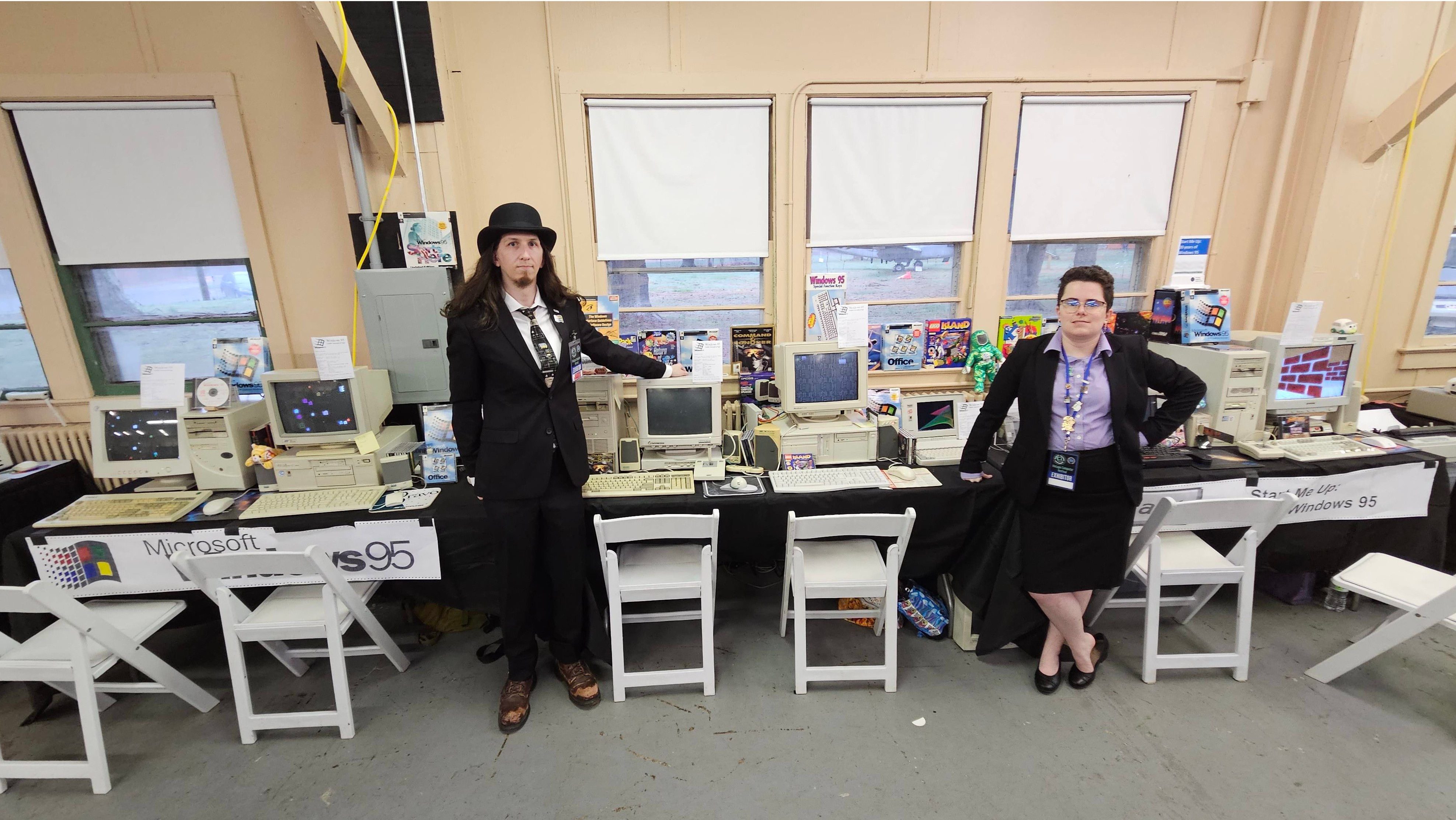
The exhibit, titled Start Me Up: 30 years of Windows 95, honored Microsoft’s landmark operating system with period-appropriate computers, multiple versions of Windows 95, classic applications, and games that many visitors remembered from childhood. It was more than a display. It was a working time machine with a mouse ball.
Why Windows 95 Still Matters After Three Decades
Windows 95 officially launched on August 24, 1995, and it was not a quiet software release. Microsoft treated it like a blockbuster movie premiere. Stores opened at midnight. Customers lined up. The Rolling Stones’ “Start Me Up” became forever linked with the Start button. Jay Leno appeared at the launch event. The marketing was loud, confident, and extremely 1995, which means it had just enough corporate swagger to wear sunglasses indoors.
But the reason Windows 95 still matters is not only the hype. The operating system changed the way everyday people interacted with PCs. Before Windows 95, many home users still navigated a world of Program Manager, File Manager, MS-DOS commands, cryptic configuration files, and the occasional ritual sacrifice to AUTOEXEC.BAT. Windows 95 gathered much of that complexity into a cleaner, more visual desktop built around the Start menu, taskbar, desktop shortcuts, Recycle Bin, and Windows Explorer.
That interface became a blueprint. Even people who have never used Windows 95 directly still recognize its influence. The Start menu became a landmark in software design. The taskbar made multitasking visible. Long file names made documents sound like human thoughts instead of license plates. Plug and Play promised that hardware installation could be easier, even if the phrase sometimes inspired skeptical laughter from anyone who wrestled with sound cards and IRQ conflicts.
VCF East 2025: The Perfect Place For A Windows 95 Birthday
The Vintage Computer Festival is exactly the kind of place where Windows 95 belongs. VCF is not a velvet-rope museum where machines sit silently behind glass while visitors whisper. Its culture is proudly hands-on. People come to type, click, boot, troubleshoot, repair, compare, and occasionally ask, “Wait, does this still work?” The answer is often yes, though sometimes after reseating a card and saying encouraging words to a power supply.
VCF East 2025 ran from April 4 to April 6 at the InfoAge Science and History Museums. The event included exhibits, talks, classes, workshops, consignment areas, museum tours, and community gatherings. Its broader theme, “The Sound of Vintage,” fit beautifully with a Windows 95 celebration. After all, few sounds in computing history are as instantly recognizable as a Windows startup chime drifting out of tiny beige speakers.
The Windows 95 anniversary exhibit was presented by Alexander Pierson and Katherine Ahlskog, known online through retrocomputing circles including Ms-Dos5 and Commodore Z. The exhibit displayed major Windows 95 versions, from a Chicago beta release to later updates from 1997, across a range of period-correct machines. That detail matters. Running Windows 95 on modern virtualization is interesting; running it on the kind of hardware it was designed for is a different experience entirely. It brings back the texture of computing: the hum, the scanlines, the disk access chatter, the slow patience of boot time.
Inside The Exhibit: More Than A Start Menu Shrine
A good vintage computing exhibit does not simply say, “Here is an old thing.” It asks visitors to feel why that old thing mattered. The Windows 95 display at VCF did exactly that by combining hardware, software, packaging, games, productivity tools, and real interaction.
Period-Correct Hardware
The exhibit featured a collection of mid-1990s desktops and laptops running Windows 95. Machines from the 486 era through Pentium and Pentium II systems helped show how quickly PC hardware evolved during the operating system’s lifespan. Windows 95 arrived during a fascinating transition: CD-ROM drives were becoming common, multimedia PCs were the new family-room dream, and manufacturers were competing to make computers less intimidating to normal buyers.
Seeing Windows 95 on authentic hardware also reveals the operating system’s personality. Modern machines hide friction with speed. Vintage machines make every process visible. You notice the boot sequence. You hear the hard drive. You wait for the desktop. You understand why a clean install felt like a weekend project and why successfully installing a driver could make a person feel like a small-town wizard.
Multiple Windows 95 Versions
One of the smartest parts of the VCF exhibit was its focus on Windows 95 as a living product, not a single frozen release. The public often remembers “Windows 95” as one thing, but the operating system changed through service releases and OEM versions. The exhibit included early Chicago beta material and later releases such as Windows 95 C, also known as OSR2.5.
This progression helps visitors understand how software history really works. Operating systems are not born perfect. They are negotiated into shape through hardware partnerships, bug fixes, user feedback, market pressure, and new technologies. Windows 95 had to bridge the old DOS world and the emerging 32-bit consumer computing world. It was both a revolution and a compromise, which is why it is so historically interesting.
Games, Creativity, And The Joy Of Clicking Around
The VCF exhibit also leaned into the fun side of Windows 95. Visitors could encounter classic software and games such as Space Cadet Pinball, Doom 95, LEGO Island, Solitaire, MS Paint, Kid Pix, Word 97, Microsoft Flight Simulator 95, Full Throttle, Minesweeper, SkiFree, Duke Nukem 3D, and Command & Conquer: Red Alert. That lineup is less a software list and more a portal into the after-school schedule of an entire generation.
Windows 95 mattered because it made the PC feel versatile. It was where homework met games, where Paint met early photo editing, where Word documents met dial-up internet, and where the family computer became a shared household appliance. One person might use it for spreadsheets, another for Encarta, another for gaming, and another for printing a banner that consumed half an ink cartridge and three sheets of perforated paper.
The Design Legacy: Start Menu, Taskbar, And Everyday Computing
The greatest achievement of Windows 95 was not that it made computers powerful. PCs were already powerful for their time. Its achievement was making power easier to reach. The Start menu gave users one obvious place to begin. The taskbar showed what was open. Desktop shortcuts gave files and programs a sense of place. The Recycle Bin made deleting files feel reversible, which reduced panic for everyone who had ever accidentally banished a school report into the void.
These features sound ordinary today because they won. That is the strange fate of successful design: it disappears into expectation. Nobody marvels at a taskbar in 2026 because taskbars, docks, launchers, and app switchers have become basic vocabulary. But in 1995, these ideas helped turn a PC from a machine you operated into a workspace you navigated.
The Start button was especially important because it gave computing a friendly verb. Start. Not execute. Not run command. Not initialize program group. Just Start. That one word lowered the emotional temperature of the PC. It invited users in, even if the computer still occasionally responded with a mysterious error message and a stern little beep.
The Technical Balancing Act Behind Windows 95
Windows 95 was a technological bridge. It merged MS-DOS and Windows into a more unified consumer product while moving the platform toward 32-bit computing. It supported long file names, improved memory handling, preemptive multitasking for 32-bit applications, and better hardware detection. It also maintained compatibility with a huge ecosystem of older DOS and Windows programs, because no one wanted to explain to millions of customers that their favorite software had been left behind.
This balancing act is one reason Windows 95 is so beloved by retrocomputing enthusiasts. It is full of transitional energy. It is modern enough to feel recognizable, but old enough to expose the machinery underneath. You can see the layers: DOS, Windows, drivers, INI files, Control Panel, Device Manager, and the early internet creeping into the desktop. It was a machine room with wallpaper.
Plug and Play is a perfect example. The idea was excellent: make hardware installation automatic. The reality was improving but imperfect. Many users still had to manage drivers, resource conflicts, and installation disks. Yet the direction was correct. Windows 95 helped establish the expectation that a consumer PC should detect devices and help configure them. Today, when a USB mouse simply works, it is easy to forget how magical that promise once sounded.
Why VCF Makes Old Software Feel Alive
Reading about Windows 95 is useful, but using it on a real vintage computer teaches different lessons. VCF events are valuable because they preserve the physical experience of computing history. A screenshot cannot show the weight of a CRT monitor. A video cannot fully capture the feel of a mechanical keyboard attached to a yellowing tower. An emulator cannot reproduce the suspense of wondering whether a CD-ROM tray will open gracefully or with the drama of a haunted drawer.
Hands-on exhibits also make technology history less abstract. Visitors can compare systems, notice performance differences, play the games, open the programs, and ask exhibitors why one machine behaves differently from another. For younger attendees, Windows 95 may feel ancient. For older attendees, it may feel alarmingly recent, which is one of the more brutal tricks time plays on anyone who remembers installing software from a stack of disks.
The community aspect is equally important. Retrocomputing survives because people share knowledge. Someone knows how to repair a failing capacitor. Someone else has the correct driver disk. Another person remembers which BIOS setting makes an old network card behave. VCF turns those scattered memories into a living archive.
The Cultural Moment: When Software Became Pop Culture
Windows 95 was one of the first operating systems to feel like a mainstream cultural event in the United States. It was not marketed only to IT managers or hobbyists. It was sold to families, students, small businesses, gamers, and curious first-time PC buyers. The launch made software feel exciting, almost glamorous. For a product whose installation could still involve driver anxiety and reboot marathons, that was quite an achievement.
Part of the magic was timing. The internet was beginning to move from universities and offices into homes. Multimedia CD-ROMs were booming. PC gaming was exploding. Computer magazines were thick enough to qualify as light exercise equipment. Buying a computer in the Windows 95 era felt like buying a ticket to the future, even if that future loaded one progress bar at a time.
VCF’s Windows 95 celebration captures that moment without pretending it was perfect. The operating system crashed. Hardware support could be fussy. The web was slow. Security was not prepared for the world that came next. But the imperfections are part of the story. Windows 95 was not a flawless product; it was a defining product. It helped millions of people understand what a personal computer could be.
What Modern Users Can Learn From Windows 95
Thirty years later, the lessons of Windows 95 remain surprisingly relevant. Good interface design matters. Compatibility matters. Hardware and software ecosystems matter. Marketing can create excitement, but usability creates staying power. Most of all, technology becomes historic when it changes behavior.
Windows 95 changed behavior. People learned to click Start. They learned to manage files visually. They learned to switch between applications. They learned to install games, browse the early web, customize the desktop, and treat the family PC as a normal part of daily life. The operating system helped move computers from the corner desk into mainstream culture.
For today’s designers, developers, and product teams, the Windows 95 story is a reminder that innovation is not always about inventing something completely new. Sometimes it is about arranging existing ideas in a way that finally makes sense to ordinary people. The Start menu did not make the computer powerful by itself. It made power approachable.
Experiences Related To Celebrating 30 Years Of Windows 95 At VCF
Walking through a Windows 95 exhibit at VCF is the kind of experience that begins with nostalgia and ends with analysis. At first, the reaction is emotional. There is the desktop color, that unmistakable gray, those chunky icons, and the little thrill of seeing the Start button exactly where memory left it. Then the deeper realization arrives: this was the interface that taught a huge number of people how to live with computers.
One of the best experiences is watching different generations react to the same machine. A visitor who used Windows 95 in the 1990s may immediately reach for the Start menu, open Paint, and joke about how everything feels slower than they remember. A younger visitor may be fascinated by the physicality of it all: the CRT glow, the floppy drive, the CD-ROM tray, the fact that software came in boxes large enough to store sandwiches. The same computer becomes two exhibits at once: memory for one person, discovery for another.
The games create the fastest connection. Space Cadet Pinball needs almost no explanation. Minesweeper still turns casual confidence into mathematical embarrassment. Doom 95 reminds people that the mid-1990s PC was not only a productivity tool but also a playground. LEGO Island, Full Throttle, and Command & Conquer: Red Alert show how much personality software had when developers designed around the limits of the hardware. The constraints made the art sharper.
Another memorable part is the sound. Vintage computers are not quiet in the modern sense. Fans spin. Drives click. Speakers chirp. A startup sound becomes an event. At VCF, those sounds are not background noise; they are part of the historical record. They remind visitors that computing used to announce itself physically. Today’s devices often feel sealed, silent, and invisible. Windows 95-era machines feel like little factories of possibility.
The exhibit also gives visitors a renewed respect for maintenance. Keeping these systems alive requires patience, technical knowledge, spare parts, and community cooperation. An old PC running Windows 95 is not just “old tech.” It is a preserved ecosystem of motherboard, storage, drivers, display, peripherals, software, and human memory. When everything works, it feels almost theatrical. The curtain rises, the desktop appears, and suddenly 1995 is not gone; it is waiting for someone to double-click.
For writers, collectors, educators, and technology fans, celebrating Windows 95 at VCF is a reminder that digital history must be experienced, not merely archived. Screenshots preserve appearance. Manuals preserve instructions. But hands-on events preserve behavior. They show how people actually used computers, what confused them, what delighted them, and why a simple button labeled Start became one of the most famous interface elements in computing history.
Conclusion: Windows 95 Deserves Its Cake, Candles, And Clean Boot
Celebrating 30 years of Windows 95 at VCF is more than a retro party for a beloved operating system. It is a celebration of accessibility, design, community preservation, and the messy, exciting moment when personal computers became truly personal for millions of users. Windows 95 brought the Start menu, taskbar, Plug and Play, long file names, desktop shortcuts, and a friendlier computing experience into mainstream homes and offices. VCF East 2025 gave people a chance to touch that history again.
The anniversary matters because Windows 95 sits at a crossroads. It connects DOS-era computing to the modern desktop. It connects boxed software to the internet age. It connects hobbyist machines to family PCs. And at VCF, it connects generations of users who may not share the same memories but can still understand the same simple invitation: click Start.
Note: This is an original, web-ready article based on real Windows 95 history and Vintage Computer Festival information. It contains no embedded source links or unnecessary citation placeholders.