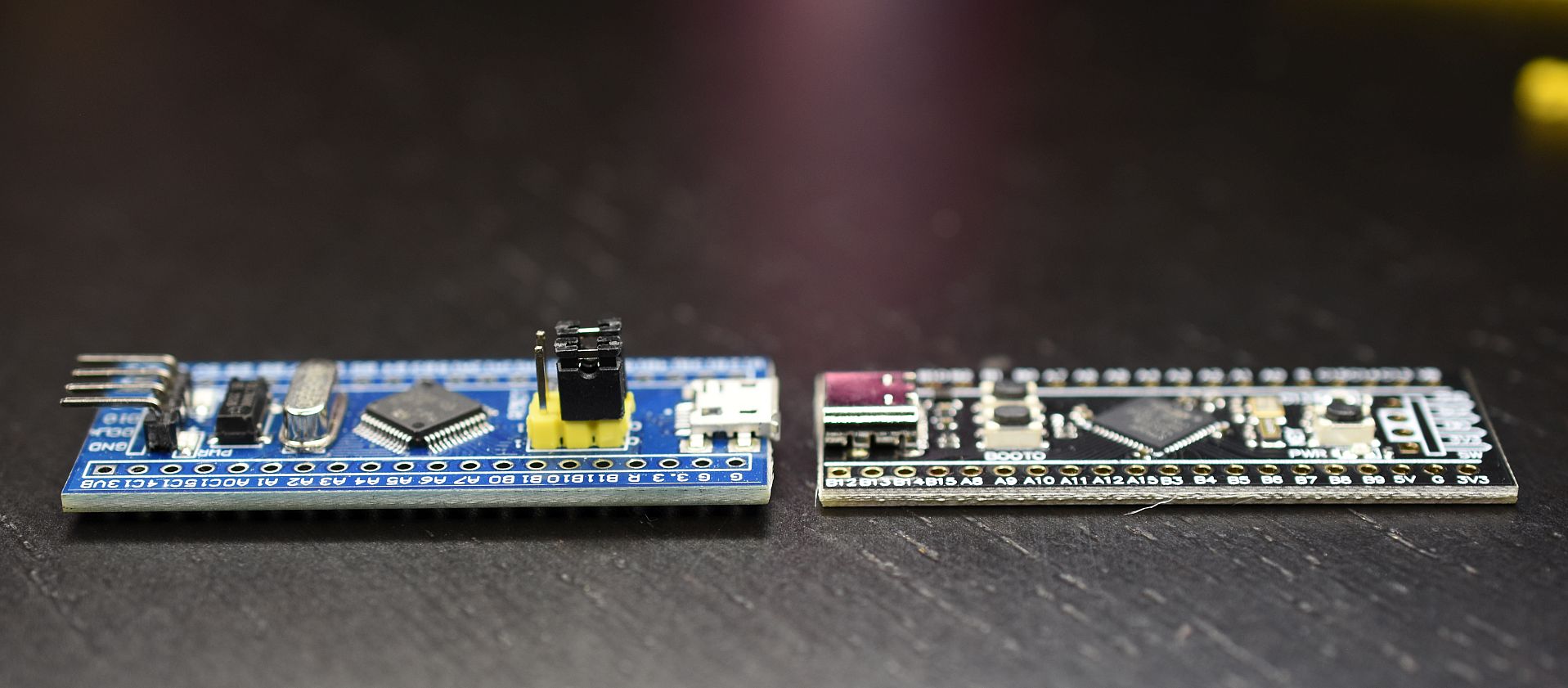
The STM32 “Blue Pill” has been the tiny blue gateway drug of embedded development for years. Cheap, powerful enough, breadboard-friendly, and slightly mysterious, it made 8-bit Arduino boards look like they had been doing push-ups with pool noodles. But then the “Black Pill” boards arrived, especially the STM32F411-based versions, and suddenly hobbyists, students, and product prototypers had a very tempting question: should I move from the STM32F103C8T6 Blue Pill to the STM32F411CEU6 Black Pill?
The short answer is yes, if your project needs more speed, memory, math performance, USB flexibility, or headroom for modern firmware. The longer answer is more interesting. The STM32F411 is not just a faster STM32F103 wearing a darker outfit. It belongs to a newer STM32F4 family, uses an Arm Cortex-M4 core with floating-point support, has different clock configuration rules, different alternate-function mapping, different startup expectations, and enough small migration traps to make your first port feel like debugging a toaster in a thunderstorm.
This guide explains the practical differences between the Blue Pill and Black Pill, how to transition code from STM32F103 to STM32F411, what can break, what gets better, and how to avoid the most common “why is my LED not blinking?” existential crisis.
What Is the STM32 Blue Pill?
The Blue Pill usually refers to a low-cost development board built around the STM32F103C8T6 microcontroller. Its main appeal is simple: it gives you a 32-bit Arm Cortex-M3 MCU at a bargain price. The STM32F103C8 typically runs at up to 72 MHz, includes 64 KB of flash memory, 20 KB of SRAM, timers, ADCs, SPI, I2C, USART, USB full-speed device support, CAN, and plenty of GPIO for small embedded projects.
For many makers, the Blue Pill was the first board that felt like an upgrade from classic Arduino Uno-style development without jumping into expensive evaluation kits. It is compact, widely documented, and supported by Arduino-style cores, STM32Cube tools, libopencm3, PlatformIO, and bare-metal workflows.
However, Blue Pill boards are also famous for quirks. Some boards use clone or questionable-quality chips. Some USB pull-up resistor arrangements are wrong. Some bootloader setups are inconsistent. Some boards are sold with 128 KB flash claims even when the official STM32F103C8 part is marketed as 64 KB. In other words, the Blue Pill is brilliant, but it occasionally behaves like it was assembled during a coffee shortage.
What Is the STM32 Black Pill?
The Black Pill name is used for several compact STM32 development boards, most commonly based on STM32F401 or STM32F411 chips. In this article, “Black Pill” means the STM32F411CEU6 version, often associated with WeAct Studio-style boards.
The STM32F411CEU6 is a much more capable microcontroller than the STM32F103C8T6. It uses an Arm Cortex-M4 core running up to 100 MHz, includes a single-precision floating-point unit, supports DSP instructions, and commonly offers 512 KB of flash and 128 KB of SRAM. That is a major upgrade over the typical Blue Pill configuration.
The Black Pill also often includes a USB-C connector, cleaner board layouts, onboard crystals, BOOT0 and reset buttons, and better support for modern firmware ecosystems such as MicroPython, CircuitPython, Arduino STM32, PlatformIO, STM32CubeIDE, and Zephyr-style environments. It is still cheap enough to buy in multiples, which is important because embedded developers always need one board for the project and one board for “experimental smoke testing.”
Blue Pill Vs Black Pill: Core Hardware Comparison
CPU and Performance
The STM32F103C8T6 uses an Arm Cortex-M3 core running up to 72 MHz. The STM32F411CEU6 uses an Arm Cortex-M4 core running up to 100 MHz. That speed increase alone is useful, but the real upgrade is the Cortex-M4’s floating-point unit and DSP instruction support.
If your Blue Pill project mostly toggles GPIO, reads buttons, drives relays, or talks to slow sensors, the speed difference may not feel dramatic. But if you process audio, filter sensor data, calculate PID loops, run graphics, generate waveforms, or use floating-point math, the STM32F411 feels much more comfortable. Floating-point calculations that are awkward or slow on the F103 become far more natural on the F411.
Memory
Memory is one of the biggest reasons to move from Blue Pill to Black Pill. The STM32F103C8 typically provides 64 KB of flash and 20 KB of SRAM. The STM32F411CEU6 commonly provides 512 KB of flash and 128 KB of SRAM.
That difference changes how you write firmware. On the Blue Pill, large libraries, USB stacks, graphics buffers, and communication protocols can make the linker complain like an unpaid intern. On the Black Pill, you have room for better abstractions, larger buffers, MicroPython experiments, file systems, audio tables, and more ambitious applications.
USB
Both chips support USB full-speed device functionality, but the user experience is often better on the Black Pill. Many STM32F411 Black Pill boards are designed with USB-C and are commonly used with DFU bootloading, MicroPython, CircuitPython, and USB serial workflows. The F411’s system bootloader support and board-level button layout can make firmware loading smoother once you understand the BOOT0 and reset sequence.
That said, USB is still USB. It will work beautifully for three hours, then refuse to enumerate because you changed a clock setting, used the wrong cable, or angered the tiny invisible goblin living inside your hub.
Power and Voltage
Both boards are 3.3 V microcontroller boards. Do not treat either one like a 5 V Arduino Uno. Some STM32 pins are 5 V tolerant, but not all pins are, and analog pins deserve special caution. The STM32F411 Black Pill should be approached as a 3.3 V board first. Use level shifting when connecting to 5 V peripherals unless you have verified pin tolerance in the datasheet and board schematic.
Why Transition From STM32F103 To STM32F411?
The most obvious reason is headroom. Blue Pill projects often begin small and then grow. First you blink an LED. Then you add a display. Then a sensor. Then USB serial. Then a menu system. Then logging. Then a “small” signal-processing feature. Suddenly your firmware is wearing three sweaters in a phone booth.
The STM32F411 gives you more space to breathe. The extra flash lets you use larger frameworks and keep debug features. The extra SRAM supports bigger buffers and more complex runtime behavior. The faster core and FPU make math-heavy code practical. For many projects, migrating to the Black Pill is less about raw luxury and more about not fighting the hardware at every turn.
Another reason is long-term learning. The STM32F4 family exposes you to more modern STM32 patterns. If you plan to use higher-end STM32 parts later, learning the F411 is a better stepping stone than staying forever on the F103. The clock tree, GPIO alternate functions, DMA behavior, and peripheral configuration style are closer to what you will see across many newer STM32 families.
What Changes When Moving From STM32F103 To STM32F411?
Clock Configuration Is Different
Clock setup is one of the first migration pain points. The STM32F103 and STM32F411 both use PLLs and multiple clock sources, but their register layouts and configuration details are not identical. Code that directly manipulates RCC registers on the F103 will not simply compile and behave correctly on the F411.
If you use STM32Cube HAL, the clock configuration is usually generated for you. If you use libopencm3 or bare-metal code, review the F411 reference manual carefully. Many mysterious failures, especially USB failures, come from incorrect clock setup. USB full-speed needs an accurate 48 MHz clock. A blinking LED may forgive a sloppy PLL. USB will not. USB is a drama queen with standards.
GPIO Configuration Uses a Different Model
The STM32F1 series uses a different GPIO configuration style than the STM32F4 series. On the F103, GPIO configuration involves CRL and CRH registers, plus AFIO remapping for alternate functions. On the F411, GPIO uses MODER, OTYPER, OSPEEDR, PUPDR, IDR, ODR, BSRR, and AFR registers. Alternate functions are selected per pin using alternate-function fields rather than the older F1 remap approach.
This is a major reason why low-level Blue Pill code does not port cleanly to the Black Pill. If your original code used Arduino-style calls such as pinMode() and digitalWrite(), migration may be fairly easy. If your code wrote directly to registers, prepare to rewrite the GPIO layer.
Peripheral Names May Look Familiar, But Details Matter
USART, SPI, I2C, timers, ADC, DMA, and USB exist on both families, but you should not assume every peripheral behaves identically. Instance availability, pin mapping, interrupt vectors, DMA streams, and clock-enable bits can differ.
For example, a UART pin pair used on the Blue Pill may not be the best choice on the Black Pill. A timer channel may move to a different alternate function. DMA routing on STM32F4 is more structured around streams and channels, which can surprise developers coming from F1. Treat migration as a port, not a copy-and-paste ceremony.
Boot and Upload Methods Can Change
Blue Pill boards are often programmed with ST-LINK, USB-to-serial adapters, or Maple-style bootloaders. Black Pill boards are commonly programmed with ST-LINK, DFU over USB, serial bootloader methods, or framework-specific upload tools.
For reliable development, an ST-LINK or compatible SWD programmer is still the embedded developer’s best friend. USB DFU is convenient, but SWD gives you programming, debugging, breakpoints, memory inspection, and rescue options when your firmware disables USB by accident. Think of ST-LINK as the tow truck for your firmware experiments.
Software Ecosystem: Arduino, PlatformIO, STM32Cube, and MicroPython
Arduino STM32
The STM32duino Arduino core supports many STM32 boards and lets developers use familiar Arduino-style APIs. For simple projects, moving from a Blue Pill target to a Black Pill target may involve selecting the correct board, checking pin names, and recompiling. However, library compatibility should still be tested. Some Arduino libraries assume AVR behavior, fixed pin mappings, or timing loops that do not translate perfectly to STM32.
PlatformIO
PlatformIO is one of the cleanest ways to manage the transition. For the WeAct STM32F411CE Black Pill, PlatformIO provides a board definition commonly identified as blackpill_f411ce. A basic configuration may look like this:
If you are moving from a Blue Pill PlatformIO project, change the board target, confirm the framework, check upload protocol, and review pin assignments. The build system can do a lot, but it cannot magically know that your old LED pin, UART pins, or SPI chip-select line moved to a different header position.
STM32CubeIDE
STM32CubeIDE is the safest path for developers who want official peripheral initialization, clock configuration, and HAL support. Create a new STM32F411CEU6 project, configure the clock tree, assign pins, generate code, and then move your application logic into the new project. This is usually better than trying to mutate an old STM32F103 project until it becomes an F411 project. That approach works about as well as teaching a goldfish to file taxes.
MicroPython and CircuitPython
The Black Pill is also attractive because STM32F411 boards have enough memory to run higher-level firmware environments more comfortably. MicroPython and CircuitPython support makes the board useful for quick experiments, education, and hardware testing. The Blue Pill can run lightweight experiments, but the F411’s flash and RAM make scripting far more practical.
Migration Checklist: From Blue Pill To Black Pill
1. Identify Your Exact Boards
Do not migrate based on board color alone. “Blue Pill” and “Black Pill” are informal names, not strict engineering specifications. Confirm the exact chip marking, board revision, crystal frequency, USB connector type, and pinout. There are clones, variants, and lookalikes everywhere. The embedded world has more “almost the same” boards than a drawer full of mystery charging cables.
2. Create a Fresh F411 Project
Start with a known-good STM32F411 project in your chosen environment. Blink an LED. Print over UART or USB serial. Confirm upload and reset behavior. Only then begin moving your Blue Pill application code.
3. Replace Pin Definitions
Map every signal from the F103 board to the F411 board. Do not assume physical header positions match. Check GPIO port names, alternate functions, ADC-capable pins, timer channels, and communication peripheral pins.
4. Rebuild Clock Setup
Use CubeMX/CubeIDE or verified board definitions when possible. If writing low-level code, configure HSE/HSI, PLL, bus prescalers, flash latency, and USB clocks according to the STM32F411 reference manual.
5. Rewrite Register-Level Drivers
If your Blue Pill code uses direct register access, rewrite the hardware layer. GPIO, RCC, DMA, and alternate-function setup are common areas requiring changes. Keep your application logic separate from hardware-specific code so future migrations are less painful.
6. Test Peripherals One at a Time
Bring up UART first, then SPI, then I2C, then ADC, then timers, then USB. Do not enable everything at once unless you enjoy debugging twelve suspects in a locked-room mystery.
Common Problems During Migration
The LED Does Not Blink
Check the actual LED pin. Black Pill boards may use a different onboard LED pin than your Blue Pill. Also confirm whether the LED is active-high or active-low.
USB Does Not Enumerate
Check the USB clock, cable quality, connector, boot mode, and firmware USB configuration. Make sure your code enables the correct USB peripheral and uses the correct pins. A charge-only USB cable is the villain in many debugging stories.
Serial Output Appears on the Wrong Pins
Review UART instance selection and alternate-function mapping. On STM32F4, alternate functions are selected per pin. A pin can physically exist but still not be connected to the peripheral function you expected.
I2C Gets Stuck Busy
Check pull-up resistors, bus voltage, pin mapping, peripheral clock enable, and whether a device is holding SDA low. I2C is simple in theory and surprisingly theatrical in practice.
Code Is Bigger Than Expected
The Black Pill has more flash, but frameworks such as HAL, USB stacks, MicroPython, and debugging features still consume memory. Use compiler optimization, remove unused libraries, and inspect the map file if firmware size matters.
When Should You Stay With the Blue Pill?
The Blue Pill still makes sense for simple projects, educational labs, ultra-low-cost batches, basic sensor reading, relay control, serial bridges, and projects that already work well on STM32F103. If you have a stable design and do not need more memory or speed, changing boards may create unnecessary work.
The STM32F103 also remains a great learning platform for low-level embedded basics. Its limitations can teach discipline. You learn to respect memory, write lean code, and understand peripherals instead of hiding everything behind enormous libraries.
When Is the Black Pill the Better Choice?
The STM32F411 Black Pill is better when you need more processing power, more RAM, more flash, floating-point math, larger firmware, USB experimentation, scripting environments, or a more future-friendly STM32 learning path. It is especially useful for audio projects, sensor fusion, displays, compact data loggers, robotics controllers, USB devices, and projects where the Blue Pill feels cramped.
For new projects, the Black Pill is often the smarter default. The price difference is usually small, while the performance difference is substantial. Unless your design specifically depends on STM32F103 behavior, the F411 gives you more room to grow.
Practical Example: Porting a Sensor Logger
Imagine a Blue Pill project that reads an I2C temperature sensor, logs values over UART, and flashes an LED when readings exceed a threshold. Moving this to the Black Pill sounds easy, and mostly it is, but the details matter.
First, create a new STM32F411 project. Select the correct board or MCU. Configure I2C pins supported by the Black Pill header. Configure UART or USB serial output. Set the system clock correctly. Then move the sensor driver and logging logic into the new project. Replace old pin names with F411 pin names. Test the LED, then UART, then I2C. Finally, increase buffer sizes or add features that were too large for the Blue Pill, such as timestamped logging, USB serial command input, or a small display menu.
The result is not only a faster project but a cleaner one. Migration is a perfect excuse to separate application logic from board-specific definitions. Future-you will appreciate this. Future-you is already tired.
Extra Field Notes: Real-World Experience Transitioning From Blue Pill to Black Pill
The first real lesson in moving from the STM32F103 Blue Pill to the STM32F411 Black Pill is that the upgrade feels easy until you touch the parts of the code that were secretly board-specific. A clean Arduino-style sketch may move in minutes. A bare-metal project full of RCC, GPIO, AFIO, timer, and DMA register writes may need a proper rewrite. That is not a failure. That is the board politely informing you that “STM32” is a family name, not a promise that every cousin has the same personality.
One practical experience is that the Black Pill rewards starting from a known-good template. Many developers try to take a working Blue Pill project and simply change the target chip. Sometimes that works for basic code, but it often creates confusing failures. A better method is to create a fresh STM32F411 project, confirm the clock, LED, serial output, and upload process, then bring old modules over one by one. This feels slower for the first hour but saves several hours of staring at a silent serial monitor like it owes you money.
Another experience is that pin labels deserve respect. On Blue Pill boards, many tutorials use familiar labels such as PA0, PA1, PB12, or PC13. On Black Pill boards, the same port names exist, but the physical header layout, onboard LED pin, button wiring, and available alternate functions can differ. It is easy to move code and forget that SPI, I2C, UART, PWM, or ADC functions must be available on the exact pins you selected. The safest habit is to keep a pinout diagram open and create a board-specific header file. Put all pin definitions in one place. Do not scatter magic pin names throughout the code unless you enjoy future archaeology.
The clock system is another common “welcome to the F4 club” moment. On the Blue Pill, many examples assume a 72 MHz clock and move on. On the Black Pill, board variants may use different external crystal values, and USB reliability depends on correct clock configuration. If USB serial or DFU behaves oddly, do not immediately blame the cable, although yes, also blame the cable. Check PLL settings, flash latency, system clock, and the 48 MHz USB clock path.
The extra RAM on the STM32F411 changes the way projects feel. On the Blue Pill, you may constantly trim buffers, avoid large lookup tables, and worry about stack usage. On the Black Pill, you can breathe. You can add a display buffer, a command parser, a larger sensor history array, or a proper USB stack without instantly fighting the linker. This does not mean memory is infinite. It means you can design like a reasonable person instead of packing bytes like you are moving apartments with one backpack.
The FPU is also more useful than it sounds at first. Many embedded tutorials advise avoiding floating-point math, and that is good advice on tiny chips without hardware support. But on the STM32F411, floating-point operations are much more practical. For filters, calibration curves, sensor fusion, audio effects, and control algorithms, the F411 lets you write clearer code without immediately paying a massive performance penalty.
The final experience is psychological: after using the Black Pill, the Blue Pill starts to feel like a clever old pocketknife. Still useful, still charming, but not the tool you pick for every job. The STM32F411 Black Pill is not perfect, and it still requires careful documentation, correct voltage handling, and disciplined debugging. But for most modern STM32 hobby and prototype projects, it offers a better balance of cost, performance, memory, and ecosystem support.
Conclusion
Transitioning from the STM32F103 Blue Pill to the STM32F411 Black Pill is one of the most worthwhile upgrades in the low-cost STM32 world. The Black Pill brings a faster Cortex-M4 core, floating-point hardware, more flash, more RAM, stronger support for modern firmware environments, and enough performance headroom to make ambitious projects feel realistic.
The migration is not automatic, especially for low-level code. GPIO setup, clock configuration, alternate functions, DMA, boot methods, and pin mapping all deserve careful review. But once you understand those differences, the STM32F411 becomes a powerful and flexible replacement for many STM32F103 projects.
The Blue Pill is still a classic. It earned its reputation by making 32-bit microcontroller development affordable and approachable. But the Black Pill is the better choice when your project needs room to grow. Think of it as moving from a reliable compact car to a sportier hatchback: still small, still affordable, but much happier when you ask it to climb a hill with a trunk full of peripherals.