Google loves doing this little trick where it sells you a phone, then keeps sneaking extra goodies into it later like a software Santa with a calendar problem. That is exactly the vibe of this Pixel Feature Drop. Instead of asking people to buy a brand-new device just to get a few meaningful upgrades, Google used its December rollout to make existing Pixel phones and the Pixel Watch feel smarter, safer, and much more polished.
The headline features are easy to understand and even easier to appreciate in daily life. Security settings are now easier to find. Phone calls sound clearer in noisy situations. Recorder gets better at figuring out who said what. Pixel Watch owners pick up a few fresh tools. And Pixel 7 users get a built-in VPN perk that adds an extra layer of protection when they are bouncing between coffee shop Wi-Fi, airport networks, and whatever mystery internet portal the hotel swears is “secure.”
In other words, this is not one of those updates that sounds impressive only in a keynote. This one actually touches the stuff people use every day: calls, privacy, recordings, sleep, and quick-glance convenience. That makes it one of the more practical Pixel Feature Drops, and honestly, practical is underrated. Flashy is fun, but fewer garbled calls and cleaner privacy controls are what keep a phone from turning into a tiny glass stress machine.
Why This Pixel Feature Drop Matters
Pixel Feature Drops have always been part software update, part brand identity. They remind users that buying a Pixel is not just about the hardware you unwrap on day one. It is also about the promise that your device can improve over time. This particular release leaned hard into that idea by focusing on quality-of-life upgrades instead of gimmicks.
That matters because smartphones have matured. Most premium phones are already fast, bright, and camera-happy. The real competition now is about experience. Which phone helps you hear a call in traffic? Which one makes privacy settings less annoying to manage? Which one turns a messy interview recording into something you can actually read? That is where this Pixel update tries to win.
Google also did something clever by spreading the benefits across multiple devices. Pixel 4a and newer phones got broad privacy improvements, newer Tensor-powered models gained more advanced features, and the Pixel Watch joined the party with wellness and convenience upgrades. It made the ecosystem feel more coherent. Instead of a scattered pile of gadgets, the Pixel lineup started acting more like a connected family. A slightly quirky family, sure, but still a family.
The Big Security Upgrade: One Home for Privacy and Protection
If you have ever bounced around your phone’s settings trying to figure out whether your Google account is secure, your app permissions are reasonable, and your passwords are doing anything besides disappointing you, this update speaks your language. One of the biggest additions is a more unified Security & Privacy area that pulls important information into one place.
That may not sound glamorous, but it is the kind of feature that quietly improves how people use their phones. Instead of digging through multiple menus like you are on a scavenger hunt designed by a stressed software engineer, you get a clearer view of risk levels, recommendations, and action cards that point out issues worth fixing.
The beauty of this feature is that it lowers the friction around good digital hygiene. Most people do not ignore privacy because they love danger. They ignore it because settings are buried, confusing, or easy to postpone until “later,” which in tech terms means never. A unified hub makes security feel less like homework and more like maintenance you can actually finish during a coffee break.
For web users, students, remote workers, and anyone living life through a dozen apps at once, this kind of simplification matters. It supports better habits without demanding an advanced degree in menu navigation. The result is a Pixel experience that feels more mature and more aligned with how people actually behave in the real world.
Why this feature is more important than it looks
Privacy dashboards are often treated like background scenery, but they shape everyday trust. When a phone makes it easier to spot risks, update settings, and review account protection, it encourages action. That is especially useful now that phones hold everything from school files and work messages to banking apps and health data.
Google’s approach here is not revolutionary because the concept of a safety center already exists in modern tech. What stands out is the attempt to make those controls feel immediate and readable, rather than hidden behind layers of digital fog. Sometimes the best feature is the one that helps people stop ignoring the boring but important stuff.
Clear Calling: Because Wind, Traffic, and Cafés Are Not Great Conversationalists
Another headline addition is Clear Calling, a feature aimed at improving voice clarity during calls by reducing background noise and enhancing the caller’s voice. In plain English, it tries to make the person you are talking to sound more like a person and less like they are calling from inside a blender.
This is a smart area for Google to invest in. For all the futuristic talk around smartphones, people still use them for phone calls. Wild, I know. And calls often happen in imperfect situations: on sidewalks, in stations, near traffic, in busy homes, or around enthusiastic air conditioners that sound like they are preparing for liftoff.
What makes Clear Calling interesting is that it is not just about boosting volume. It is about separating signal from noise. That is exactly the sort of machine-learning task Google loves to talk about, but in this case it has a refreshingly practical purpose. Better call clarity is not a “look what AI can do” demo. It is a “finally, I can hear my aunt in the supermarket” feature.
There is also a branding win here. Google has spent years building Pixel’s identity around helpful phone features, from Call Screen to Direct My Call. Clear Calling fits neatly into that lineup. It extends the idea that Pixel is not just an Android phone with a good camera. It is a phone that tries to make phone things better. That should be obvious, but in a market obsessed with megapixels and buzzwords, it feels oddly refreshing.
Who benefits most from Clear Calling?
People who make a lot of calls on the go will probably notice the biggest difference. Think commuters, delivery workers, parents juggling chaos in the background, or anyone whose family believes speakerphone in a crowded room is a personality trait. If your life includes noisy environments, this is one of those features that can feel small until you use it, and then you suddenly do not want to give it back.
Recorder Gets Smarter With Speaker Labels
Google’s Recorder app has been one of Pixel’s quiet superpowers for years. It already made voice transcription ridiculously useful, especially for students, journalists, interviewers, and anyone who has ever said, “I will totally remember that later,” and then absolutely did not remember it later.
With this Feature Drop, Recorder gets speaker labels, which means it can better distinguish between different people in a conversation and organize the transcript more clearly. That is a big deal because raw transcription is helpful, but structured transcription is where the productivity magic really kicks in.
Imagine recording a meeting, an interview, or a group brainstorm. Without speaker identification, the transcript can turn into a wall of text that reads like a speed-run of human confusion. With labels and cleaner breaks between speakers, the conversation becomes easier to follow, search, edit, and use afterward.
This upgrade also reinforces one of Google’s strongest Pixel themes: on-device intelligence that solves everyday problems. Not every AI feature needs to be dramatic. Sometimes it just needs to save you from rereading thirty lines of transcript trying to figure out who suggested the good idea and who just kept saying, “Let’s circle back.”
Practical examples of why it matters
A student can record a lecture and better follow classroom discussion. A freelancer can review a client call without guessing at who said what. A small business owner can capture brainstorming sessions with less cleanup later. Even families planning an event could benefit, especially if everyone insists on talking over one another in the warm spirit of togetherness.
VPN by Google One Adds a Useful Security Bonus
For Pixel 7 and Pixel 7 Pro users, one of the more appealing perks in this update is access to VPN by Google One at no extra cost. This turns a previously subscription-linked service into a built-in Pixel advantage, which is the kind of move that makes owners feel like they got a little extra value after checkout.
A VPN is not magic, and it does not turn you into an invisible internet ninja. But it can add a layer of protection by helping shield online activity, especially on public or unfamiliar networks. That makes it particularly useful for people who work remotely, travel often, or just end up connected to random Wi-Fi names that look like they were created by a mischievous raccoon.
Google’s inclusion of a VPN also fits the broader theme of the Feature Drop: reducing friction around security. It is one thing to tell users they should be safer online. It is another to hand them a built-in tool that makes that safer behavior easier.
From an SEO and consumer perspective, this is one of the most searchable and commercially appealing parts of the update. Terms like “Pixel security features,” “Pixel VPN,” and “Google One VPN on Pixel 7” naturally connect to real user questions. People want to know what it does, whether it is free, and whether it is actually useful. The answer is yes, with the healthy caveat that usefulness depends on the kind of browsing and networking habits you have.
Pixel Watch Picks Up Helpful Wellness and Convenience Features
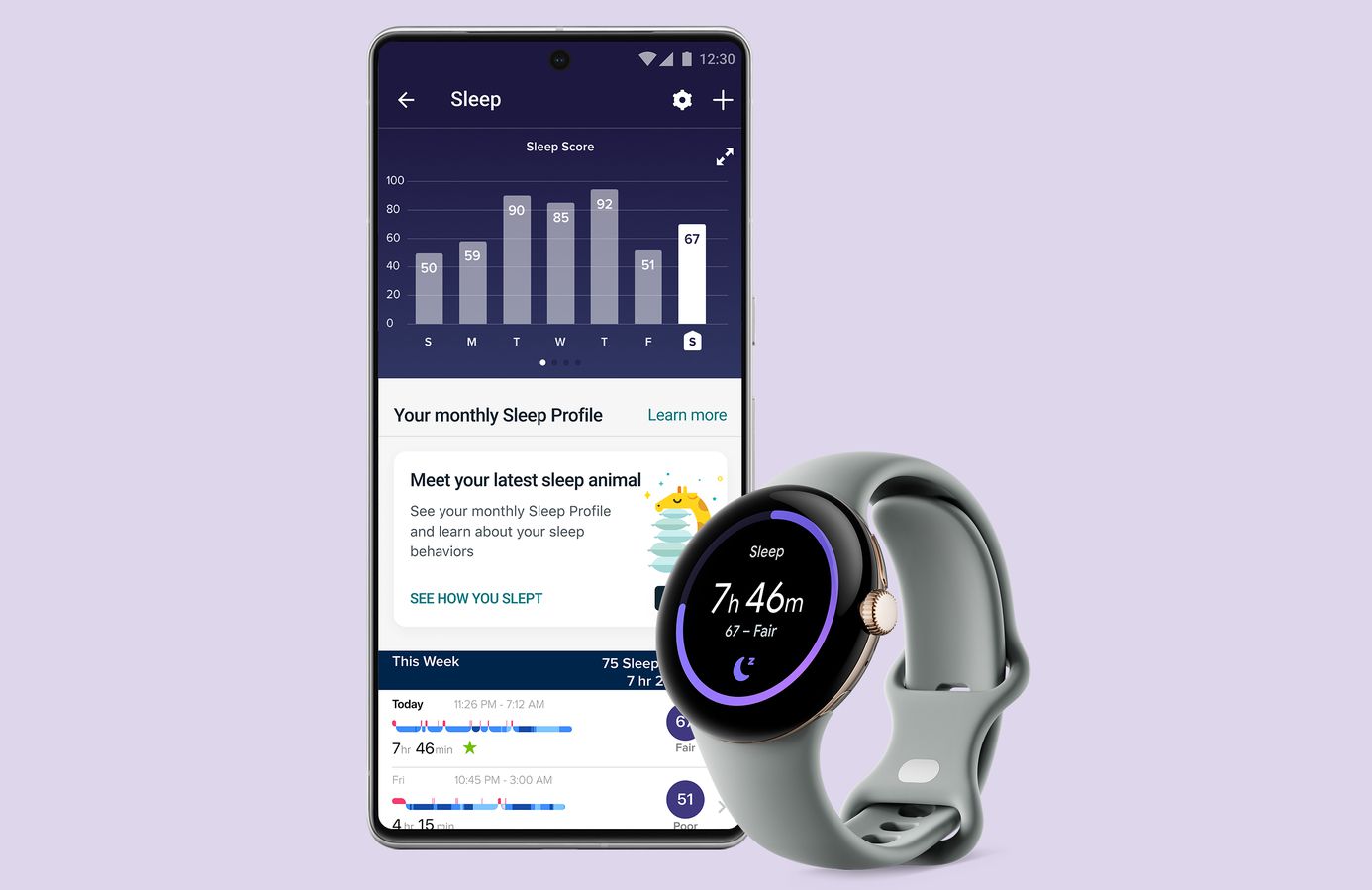
The update was not just about phones. Pixel Watch also gained features that make the wearable side of Google’s ecosystem feel more developed. Sleep tracking got more personality with Fitbit’s Sleep Profile, while new tiles for Weather and Contacts made the watch more glanceable and practical.
Sleep Profile is the sort of feature that mixes health data with just enough charm to keep it from feeling sterile. Rather than dumping raw metrics on your wrist and wishing you luck, it tries to summarize sleep behavior in a more approachable way. That makes wellness tech feel a little less like a spreadsheet and a little more like a coach that wants you to stop doom-scrolling at midnight.
The new tiles are easier to appreciate because they are so straightforward. Weather helps you glance at what the day is doing before you step outside dressed for the wrong season. Contacts helps you reach favorite people faster. Neither feature will change civilization, but both make the watch more immediately useful. And that is the point. Smartwatches succeed when they save tiny bits of time again and again.
Call Clarity, Security, and the Pixel Strategy
Step back from the individual features and a bigger pattern appears. Google is steadily shaping Pixel into a brand defined by software helpfulness rather than raw specification wars. Yes, hardware still matters. But this update shows Google knows it cannot win by chasing every flashy hardware headline alone.
Instead, it is betting on meaningful experiences: better calls, easier privacy control, better transcripts, safer browsing, and more useful wearables. That is smart strategy. Consumers remember whether a phone solves annoying problems more than they remember whether it won a spec-sheet arm wrestle online.
There is also a nice layering effect here. Security options make the device feel safer. Clear Calling makes communication easier. Recorder improves productivity. Pixel Watch additions make the ecosystem stickier. Put together, those changes strengthen the everyday case for staying in the Pixel world.
It is not a dramatic reinvention. It is something better: a quiet refinement of what already makes Pixel attractive. Google did not try to turn your phone into a flying car. It just tried to make your calls cleaner, your settings saner, and your recordings more useful. That is not a bad trade.
Final Thoughts
The phrase “feature drop” can sometimes sound like marketing confetti, but this one earns its headline. The security improvements are practical. Clear Calling targets a real annoyance. Recorder speaker labels add real value for productivity. The VPN perk gives Pixel 7 owners something genuinely useful. And Pixel Watch becomes more rounded, which matters for a young wearable platform still finding its rhythm.
Most importantly, the update highlights what Google wants Pixel to be: a line of devices that gets better in noticeable ways after purchase. That is a strong message in a market where many phones peak on launch day and then spend the rest of their lives collecting patches like dust.
So yes, the new Pixel Feature Drop adds security options, call clarity, and more. But the bigger story is that it adds confidence. Confidence that your phone can hear better, organize better, protect better, and grow into itself a little more with time. In smartphone land, that is a pretty solid trick.
Extended Experience: What It Feels Like to Live With These Pixel Features
Using features like these over time changes the feel of a phone more than you might expect. At first, a Feature Drop often looks like a checklist. Security hub, nice. Clear Calling, cool. Recorder labels, useful. But after a few weeks, the experience starts to feel less like separate tools and more like a smoother relationship with the device.
The easiest feature to appreciate day to day is probably Clear Calling. It is one of those upgrades that disappears into the background, which is exactly what a good communication feature should do. You stop thinking about the tech and simply notice that conversations feel less exhausting. If the other person is in a loud place, you are not constantly repeating, “Sorry, what?” like a malfunctioning parrot.
The unified security and privacy area has a different kind of value. It does not create that dramatic wow moment, but it lowers the stress level of managing your digital life. Instead of treating security like a once-a-year panic project, the phone makes it feel like something you can check quickly and understand. That subtle shift matters. A feature does not need to be flashy to be important. Sometimes good software just makes you less likely to procrastinate on the stuff that protects your data.
Recorder with speaker labels may be the sleeper hit of the bunch. Anyone who works with meetings, notes, interviews, or classes knows that audio recordings can be both a blessing and a cursed time capsule. The words are all there, but digging meaning out of a messy transcript can be painful. Better speaker separation turns that content into something usable faster, and that means less editing, less guessing, and fewer moments where you wonder whether “we should launch next month” was said by your boss or by the intern who brought donuts.
The VPN perk on Pixel 7 and 7 Pro adds a layer of peace of mind too. No, most people are not thinking about network-level privacy every second of the day. But there is something reassuring about knowing your phone includes an extra measure of protection when you connect to public Wi-Fi. It is the digital equivalent of locking your car door. Maybe nothing bad would have happened. Maybe. But it still feels better to lock it.
As for Pixel Watch, the additions help the device feel more mature. Sleep features and glanceable tiles are exactly the kinds of things that make a smartwatch feel useful instead of decorative. They do not scream for attention. They just quietly become part of the rhythm of the day.
That is probably the best way to describe this whole Feature Drop. It is not trying to stun you with one giant party trick. It is trying to make the Pixel experience more comfortable, more trustworthy, and more polished in dozens of small moments. Those small moments add up. And once they do, going back to a phone without them can feel a little like moving from a tidy desk to one covered in sticky notes, mystery cords, and unresolved chaos.