Note: This article is written for adult readers and web publication. Tinder is an adults-only dating platform, and anyone under 18 should not create or use an account.
Few modern dating questions create as much instant panic as this one: Does Tinder notify someone when you screenshot their profile or chat? Maybe you want to ask a friend whether a bio sounds charming or suspicious. Maybe a conversation made you laugh so hard you nearly dropped your phone into your cereal. Or maybe a match said something concerning, and you want to keep a record before it disappears into the great digital fog.
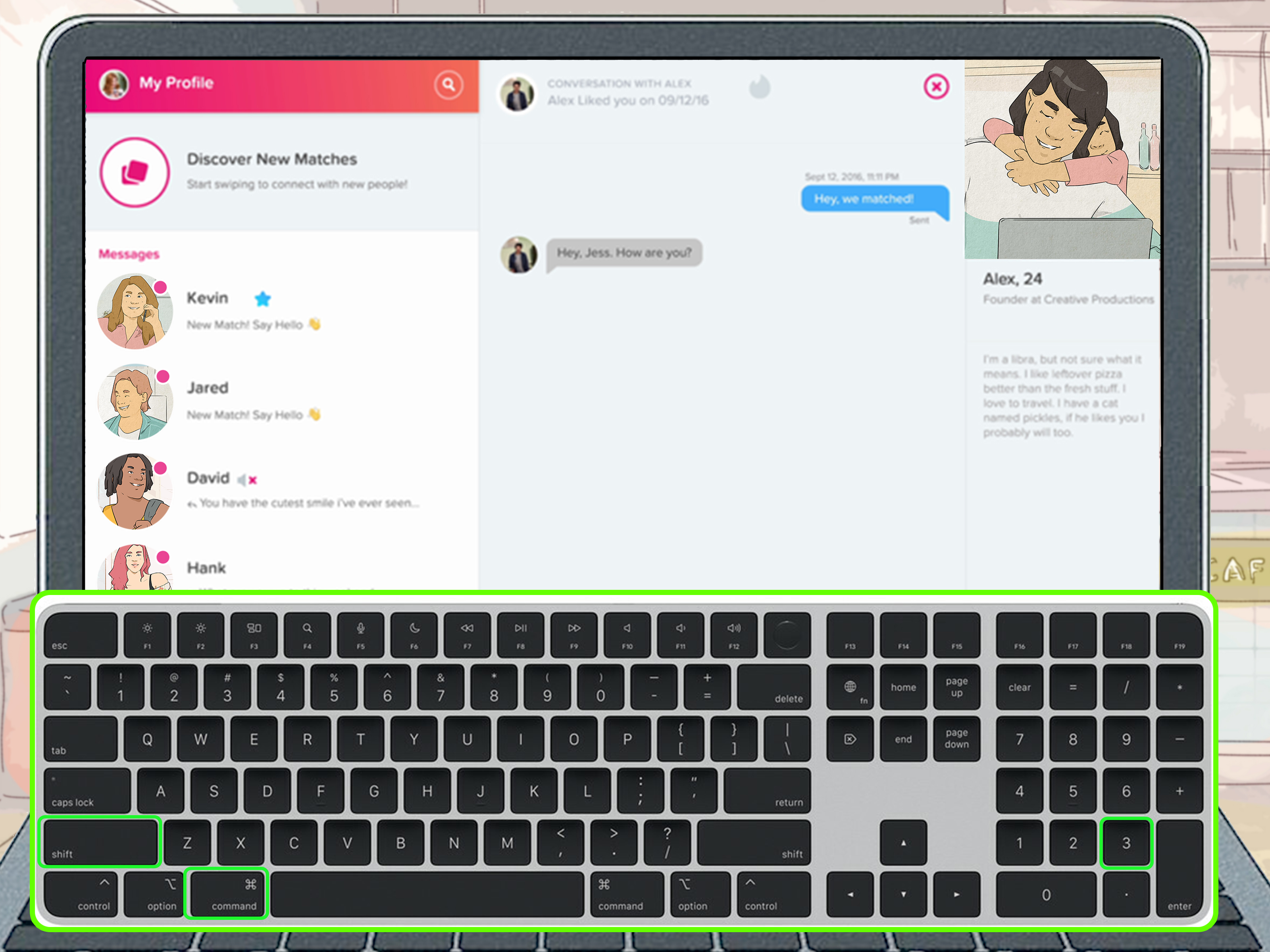
The short answer is simple: Tinder does not currently send screenshot notifications when someone captures a profile, photo, bio, or chat conversation. Unlike Snapchat, which built part of its reputation around screenshot alerts, Tinder has not made screenshot notifications a standard user-facing feature. That means if you take a screenshot on Tinder, the other person is not automatically alerted by the app.
But before you start screenshotting like a courtroom stenographer with a phone, there is a bigger privacy conversation worth having. Just because Tinder does not notify someone does not mean every screenshot is harmless, ethical, or smart. Dating apps contain personal information, photos, location clues, names, identities, and private conversations. A screenshot may feel tiny in the moment, but once it leaves your camera roll, it can travel faster than gossip at a family barbecue.
Does Tinder Notify Screenshots?
No, Tinder does not currently notify users when screenshots are taken. You can screenshot a Tinder profile, match list, message thread, photo, prompt, or bio without the other person receiving a special alert from Tinder.
This applies to the most common situations people ask about:
- Screenshotting a Tinder profile
- Screenshotting Tinder photos
- Screenshotting a Tinder bio
- Screenshotting a Tinder chat
- Screenshotting a match list
- Screenshotting a funny, odd, or concerning message
In normal use, Tinder treats screenshots as a device-level action. Your phone or computer captures what appears on your screen, and Tinder does not appear to send the other person a notification saying, “Someone just saved this moment forever.” There is no dramatic pop-up, no digital siren, and no tiny Tinder detective knocking on their notification panel.
Why Do People Think Tinder Sends Screenshot Notifications?
The confusion usually comes from other apps. Snapchat famously notifies users when someone screenshots snaps, chats, or certain content. Instagram has also tested or used screenshot notifications in limited situations, especially around disappearing direct-message content. Because users move between social apps all day, it is easy to assume every app follows the same privacy rules.
Tinder does not operate the same way. A dating profile is not a disappearing snap, and a Tinder conversation is not treated like a self-destructing message by default. The platform focuses more on matching, messaging, reporting, verification, and safety tools than on screenshot alerts.
Another reason for confusion is that Tinder does use the word “screenshot” in some support and verification contexts. For example, screenshots can help when reporting a fake profile or abusive behavior. Tinder’s verification systems may also involve images or video selfie checks in specific safety features. That is different from a regular user taking a screenshot of someone’s profile or chat.
Can Someone Tell If You Screenshot Their Tinder?
Not through an official Tinder screenshot notification. However, that does not mean they can never find out. People can discover screenshots in indirect ways. If you post the image online, send it to a shared friend, forget to blur the person’s name, or accidentally show your camera roll, the screenshot can still come back to you like a boomerang with social consequences.
There is also the human factor. If you screenshot a conversation and then quote it word for word in another place, someone may realize what happened. If you share a profile in a group chat and that group chat leaks, the original person may eventually see it. Tinder may not notify them, but people are very good at finding things they were never supposed to see. The internet is basically a hallway with too many mirrors.
Does Tinder Notify Screen Recordings?
Tinder does not currently appear to notify users when someone records their screen. In most cases, screen recording is handled by the device operating system, just like screenshots. On iPhone and Android, screen recording tools capture what is visible on your own device. Tinder does not generally display a message to the other person saying that a recording has started.
Still, screen recording can be more sensitive than a single screenshot because it can capture scrolling conversations, profile details, photos, notifications, and other private information in one file. If a screenshot is a snapshot, a screen recording is the full security-camera episode. Use it carefully, especially when private messages are involved.
What Happens When You Screenshot a Tinder Profile?
When you screenshot a Tinder profile, the image is saved to your device, usually in your Photos, Gallery, or Screenshots folder. The other person is not notified by Tinder. They do not receive an alert, badge, email, message, or mysterious “someone captured your profile” warning.
Common reasons people screenshot Tinder profiles include:
- Asking a friend for advice before swiping
- Saving a funny bio
- Keeping a record of suspicious behavior
- Reporting a fake profile or impersonation
- Remembering details before a date
The safest rule is to screenshot only when you have a practical reason, then keep the image private. If you need to share it for advice, blur identifying details such as name, face, workplace, school, social handle, location, and any personal information in the bio.
What Happens When You Screenshot Tinder Messages?
Screenshotting Tinder messages also does not trigger a notification. If you capture a chat, the match will not receive an automatic alert.
This can be useful if someone says something inappropriate, threatening, scam-like, or inconsistent. A screenshot can help you keep a record before unmatching or reporting. Since unmatching can remove the conversation from your view, many users take screenshots when they need proof of a safety issue.
However, message screenshots deserve extra care. A private chat is not the same as a public profile. Even if the message is funny, awkward, or wildly unhinged, sharing it publicly can violate someone’s privacy. If you publish a screenshot on social media, remove identifying details. Better yet, summarize the story without showing the person’s face or name.
Can Tinder Block Screenshots?
Some apps prevent screenshots on certain screens, especially banking apps, password managers, streaming platforms, and secure messaging tools. Tinder generally does not block screenshots of profiles or chats in regular use. If your phone allows screenshots, the capture will usually work.
That said, apps can update their features over time. Tinder may change privacy or safety settings in the future. Operating systems can also change how screenshots, screen recordings, privacy indicators, and sensitive-content protections work. If screenshot privacy is extremely important to you, always check Tinder’s latest official help pages and your app update notes.
Is It Legal to Screenshot Tinder?
In many everyday situations, taking a screenshot for personal reference is not treated the same as publishing or misusing someone’s private information. But legality depends on where you live, what the screenshot contains, how it is used, and whether it includes private, sensitive, copyrighted, defamatory, or identifying information.
The bigger practical issue is not usually the act of taking the screenshot. It is what happens next. Saving a match’s restaurant recommendation for yourself is one thing. Posting someone’s face, name, job, private messages, or personal details to embarrass them is another. If the screenshot contains sensitive information, private conversations, or accusations, sharing it publicly can create serious ethical and legal problems.
When Is It Okay to Take a Tinder Screenshot?
There are reasonable uses for screenshots on Tinder. The key is purpose and privacy. A screenshot can be appropriate when it helps you stay safe, remember important information, or ask for trusted advice without exposing someone unnecessarily.
1. When You Need Safety Evidence
If a match sends threatening, harassing, scam-related, or suspicious messages, taking screenshots can help you document the issue. This may be useful before reporting the account, blocking the user, or seeking help from a trusted person.
2. When You Want a Second Opinion
Online dating can feel like trying to read a menu in a dim restaurant. Sometimes you need a friend to say, “Yes, that bio is charming,” or “No, that person asking for crypto advice after three messages is not your soulmate.” If you share a profile with a friend, keep it private and avoid spreading it beyond that trusted conversation.
3. When You Want to Remember Details
If you have a date planned, a screenshot of agreed details such as time, place, or conversation context can help you remember what was discussed. Still, avoid storing more personal information than you need.
4. When Reporting a Fake Profile
Screenshots can help document impersonation, fake photos, scam attempts, or abusive content. If someone is pretending to be you or someone else, a screenshot of the profile name, photos, bio, and messages may help support a report.
When Should You Avoid Taking or Sharing Tinder Screenshots?
Avoid screenshots when the goal is humiliation, gossip, revenge, or public entertainment at someone else’s expense. Dating is already awkward enough. Nobody needs to become the main character in a viral post because their opening line had the emotional confidence of a wet napkin.
You should be especially careful with screenshots that include:
- Full names
- Faces
- Workplaces or schools
- Social media handles
- Phone numbers or email addresses
- Home neighborhoods or daily routines
- Private messages
- Personal stories or sensitive disclosures
If you must share a screenshot for safety or advice, crop it tightly and blur identifying details. Do not rely on a tiny emoji sticker to hide someone’s identity. Internet users have detective energy, zoom tools, and too much free time.
How to Screenshot Tinder More Respectfully
If you decide a screenshot is necessary, use a privacy-first approach. Think of it as borrowing someone’s digital presence for a specific reason, not claiming ownership of it.
Blur Before Sharing
Remove names, faces, locations, workplaces, schools, social handles, and any unique details that could identify the person. This is especially important if you plan to post the screenshot in a public forum, group, or article.
Keep Screenshots Private
Do not casually forward Tinder screenshots to large group chats. A private joke can become public faster than you can say, “Wait, who invited my coworker to this chat?”
Use Screenshots for Safety, Not Shame
There is a difference between documenting concerning behavior and turning someone’s dating profile into entertainment. If your purpose is safety, evidence, or trusted advice, your screenshot has a clearer reason to exist.
Delete Screenshots You No Longer Need
Your camera roll does not need to become a museum of expired matches. If a screenshot no longer serves a purpose, delete it. This reduces the risk of accidental sharing, cloud syncing, or someone else seeing private content on your device.
How Tinder Privacy Actually Works
Tinder collects and processes data to operate the service, personalize the experience, help users connect, improve safety systems, and enforce its rules. That can include profile information, messages, usage data, location-related information, verification data, and device information depending on settings and features used.
However, Tinder’s privacy systems are not the same as screenshot protection. A platform can offer reporting tools, verification features, moderation systems, and safety resources while still allowing device-level screenshots. In other words, Tinder may help you report a bad actor, but it does not currently act like a nightclub bouncer guarding every screenshot button.
Users should also remember that once something is visible on another person’s screen, it can often be copied in some form. Even if an app blocks screenshots, someone could use another camera to photograph the screen. The best privacy strategy is not assuming perfect technical protection. It is sharing cautiously from the beginning.
Does Tinder Notify When You Report Someone?
Reporting is different from screenshotting. Tinder treats reports as confidential. A user may receive a generic notice that their account is under review or that action was taken, but Tinder does not normally reveal who submitted the report or provide the full contents of the report to that person.
If you are reporting a serious issue, screenshots may help provide context. Include the profile, bio, messages, and any relevant details. Try to report through the proper Tinder tools rather than simply posting the situation online. Public exposure can sometimes create more risk, while a direct report gives the platform a chance to review the account.
Can Someone Screenshot Your Tinder Profile?
Yes. If your profile is visible to another Tinder user, they may be able to screenshot it. You may not know it happened. This is one of the most important privacy realities of dating apps.
That does not mean you need to be terrified of using a dating profile. It means you should build your profile with the assumption that anything visible could be saved. Choose photos and details you would be comfortable having seen outside the app. You do not need to make your profile boring; you just need to avoid giving away unnecessary personal information.
How to Make Your Tinder Profile Safer
Because Tinder does not notify screenshots, profile safety matters. A strong profile can still be fun, warm, and attractive without handing strangers a neatly labeled map of your life.
Avoid Revealing Exact Locations
Do not list your home address, apartment building, regular gym schedule, workplace desk location, or daily routine. Saying you love coffee is fine. Saying you are at the same coffee shop every weekday at 7:15 a.m. is basically writing a calendar invitation for strangers.
Choose Photos Carefully
Check the background of your photos. House numbers, license plates, office badges, school logos, and street signs can reveal more than you intend. A great profile photo should say, “I have a personality,” not “Here is my exact neighborhood.”
Be Careful With Social Handles
Adding an Instagram or other social handle can make you easier to verify, but it can also expose your full name, friends, workplace, family, and location patterns. If privacy matters to you, think before linking or listing outside accounts.
Keep Early Conversations on the Platform
Staying on Tinder at first can help because platform conversations may be easier to report if something goes wrong. Be cautious if someone immediately pushes you to move to another messaging app, especially if they also avoid answering basic questions.
What About Disappearing Photos or Private Media?
Tinder is not designed like a disappearing-photo app. If you share private media, personal details, or sensitive messages with someone, you should assume they may be able to save or record it somehow. Even apps with screenshot alerts cannot fully prevent someone from using another device to capture the screen.
The safest approach is simple: do not send anything you would be devastated to lose control of. That advice may sound like something your most cautious friend would say while labeling leftovers, but it remains true. Digital trust should be earned gradually, not handed over because someone has good lighting in their profile picture.
Common Myths About Tinder Screenshot Notifications
Myth 1: Tinder Notifies Screenshots Like Snapchat
No. Tinder does not currently send screenshot alerts the way Snapchat does.
Myth 2: Tinder Notifies Screenshots of Chats but Not Profiles
No. Tinder does not currently notify users for screenshots of chats or profiles.
Myth 3: Tinder Gold or Platinum Users Can See Screenshots
No. Paid features may offer benefits such as seeing likes, boosts, or other visibility tools, but they do not give users a screenshot-detection dashboard.
Myth 4: Third-Party Apps Can Tell You Who Screenshotted Your Tinder
Be skeptical. Apps or services claiming they can reveal who screenshotted your Tinder are often unreliable, invasive, or risky. Do not give random tools access to your dating account, device, photos, or login credentials.
Best Practices If You Are Worried About Tinder Screenshots
If screenshot privacy worries you, the best defense is thoughtful profile design and cautious communication. You cannot fully control what others capture, but you can control what you reveal.
- Use photos that do not reveal your address, workplace, school, or daily routine.
- Avoid putting phone numbers, emails, or social handles in your bio.
- Do not share financial information or identity documents with matches.
- Keep early chats on Tinder until trust is established.
- Report suspicious profiles instead of engaging endlessly.
- Delete old screenshots you no longer need.
- Blur identifying details before asking friends for advice.
Real-World Experiences: What Tinder Screenshot Situations Usually Look Like
In real dating-app life, screenshots are rarely dramatic spy-movie moments. Most are ordinary, slightly chaotic, and very human. Someone sees a profile with a bio that says, “Fluent in sarcasm and brunch,” and sends it to a friend with the caption, “Is this charming or legally required by dating apps?” Someone else screenshots a restaurant suggestion because they know they will forget it in twelve seconds. Another person captures a suspicious message because the match suddenly started talking about investment opportunities, overseas emergencies, or a “limited-time crypto platform” with the enthusiasm of a badly written scam email.
One common experience is the “friend review” screenshot. A user is unsure whether to swipe right, so they send a profile to a close friend for a second opinion. This can be harmless when done privately, but it becomes questionable when the profile gets passed around a group chat like a trading card. The respectful version is simple: share only with someone you trust, avoid mocking the person, and delete the image afterward.
Another common situation is the “safety record” screenshot. A match says something that feels aggressive, manipulative, or suspicious. The user takes screenshots before reporting or unmatching. This is one of the most practical reasons to capture Tinder content. If a conversation disappears after unmatching, a screenshot may preserve important context. In this case, the screenshot is not about gossip. It is about documentation.
Then there is the “funny message” screenshot. Dating apps produce strange comedy. People send opening lines that sound like fortune cookies, job interviews, or rejected sitcom dialogue. It is understandable to want to show a friend. But funny does not automatically mean fair game for public posting. A good rule is to remove anything that identifies the person. The joke should not require exposing their face, name, job, or location.
Some users also screenshot their own conversations before a date. They may save the meeting place, time, or details about what the person looks like. This can be useful, especially if they are sharing date plans with a trusted friend for safety. If you do this, focus on necessary details. You do not need to archive the entire conversation like you are preparing a documentary series.
A more awkward experience happens when someone forgets that screenshots sync across devices. A Tinder screenshot saved on a phone may appear later on a tablet, laptop, cloud album, or shared photo library. Suddenly, a private dating-app moment appears during a family photo scroll. To avoid this deeply unnecessary sitcom episode, review your cloud backup and shared album settings. Delete screenshots you do not need.
Finally, there is the anxiety experience: people worry someone has screenshotted their profile. The truth is, they might have. That is why the smartest Tinder strategy is to treat your profile as semi-public. You can still be funny, personal, and attractive without revealing your apartment building, workplace badge, daily running route, or every social account you own. Think of your profile as a friendly introduction, not a full identity packet.
The main lesson from real-world Tinder screenshot experiences is balance. Screenshots can help with safety, memory, and advice. They can also violate privacy when used carelessly. Tinder may not notify screenshots, but your choices still matter. Screenshot with a reason, share with restraint, blur generously, and remember that behind every profile is a real person trying to survive online dating just like everyone else.
Conclusion: Tinder Screenshots Are Private, But Not Permission Slips
Tinder does not currently notify users when someone screenshots their profile, photos, bio, or messages. You can take screenshots without triggering an alert, and the other person will not receive a Tinder notification.
But the better question is not only, “Can I screenshot this?” It is also, “Should I screenshot this, and what will I do with it?” Screenshots can be useful for safety, reporting, remembering plans, or getting trusted advice. They become a problem when used to shame, expose, harass, or spread private information.
Use Tinder screenshots the way you would want someone to use screenshots of you: carefully, privately, and with basic human decency. In online dating, that tiny bit of respect can go a long way. And honestly, considering how wild dating apps can get, basic decency is already a premium feature.