For decades, the holodeck has been the gold standard for creative laziness: walk in, say what you want, and let the room do the hard part. No mouse. No endless menus. No dragging tiny gizmos while wondering why the sofa is floating six feet above the floor like it just achieved enlightenment.
That fantasy no longer feels like science fiction with good lighting. Thanks to modern speech recognition, large language models, realtime audio systems, mixed reality design, and AI-assisted 3D tools, creators can now get surprisingly close to a holodeck-like voice interface. You can describe a scene, refine it conversationally, change lighting, move objects, adjust style, and even animate characters using voice-driven workflows. The real breakthrough is not one magic product. It is the stack: speech in, intent understood, scene graph updated, assets generated or retrieved, and feedback returned fast enough that the experience feels alive.
In other words, the holodeck is not here yet, but the waiting room is open, and it already looks pretty cool.
Why This Idea Suddenly Feels Real
A few years ago, building a 3D scene still felt like a punishment invented by a committee of toolbars. You needed modeling knowledge, layout instincts, engine experience, and the emotional resilience to survive import errors. Today, voice can handle a surprising amount of the front-end work.
The reason is simple: several technologies matured at the same time. Speech systems got better at realtime transcription. AI voice got more natural. Language models got better at turning messy human requests into structured instructions. And 3D tools got smarter about helping creators instead of making them file for emotional leave.
That matters because 3D creation has always had a translation problem. Most people think in pictures and speak in plain language. Software, meanwhile, thinks in transforms, materials, meshes, rigs, scene hierarchies, and that one checkbox you always forget until midnight. A voice-controlled 3D scene workflow bridges that gap. It lets a person say, “Build me a cozy sci-fi apartment with rainy windows, warm floor lamps, and a cat sleeping on the couch,” then refine it with follow-ups like, “Make the room narrower,” “Change the couch to brown leather,” or “Add city sounds outside.”
That is the real appeal. The interface starts to feel less like software and more like direction.
What a Holodeck-Like Voice Interface Actually Is
A true holodeck-like system is not just voice search with a prettier haircut. It is a conversational layer on top of a 3D engine or spatial computing environment. The user speaks naturally. The system interprets what they mean. Then it creates, edits, arranges, or animates scene elements in a way that stays editable.
That last part is crucial. A smart system should not merely spit out a pretty result and say, “Best of luck.” It should build a scene you can keep shaping. Objects need names. Materials need labels. Lights need settings. Relationships need structure. Otherwise, you do not have a 3D world-building tool. You have a one-shot surprise machine.
The best version of this interface combines three modes:
1. Command mode
Fast, direct actions like “duplicate this chair,” “make the lamp brighter,” “move the table left,” or “delete the second window.” This is the voice equivalent of keyboard shortcuts, minus the part where you forget them all.
2. Dictation or prompt mode
Longer requests such as “Create a medieval tavern with heavy wooden beams, smoky air, and candlelight.” This is where the system turns descriptive language into scene structure.
3. Conversational refinement mode
The user can keep iterating: “Too dark,” “Make it feel more expensive,” “Swap the medieval look for retro-futurism,” or “Keep the layout but make it daytime.” This is where the experience begins to feel genuinely holodeck-like.
How the System Works Behind the Curtain
If the front end feels magical, the back end is gloriously practical. A natural language 3D design system usually works through a pipeline.
Speech capture and transcription
Your microphone picks up audio. A speech model transcribes it in realtime or near realtime. In a polished interface, the user sees live partial text while speaking, which reduces confusion and builds trust. Nobody enjoys saying “make the room rustic” and discovering the system heard “make the room lobster.”
Intent parsing
The transcript is then interpreted. The system identifies objects, attributes, actions, and spatial relationships. For example, “Put a round oak table near the window and two black chairs across from each other” becomes a structured instruction set with object types, materials, counts, relative placement, and style cues.
Scene graph generation
Once the request is understood, the system maps it to a scene graph. This is the editable blueprint of the world: objects, parents, positions, lighting, camera, audio zones, behaviors, and metadata. If you skip this step, you end up with a dazzling blob that nobody can revise. Very cinematic. Not very useful.
Asset retrieval or generation
Some systems pull from an asset library. Others use generative AI to create geometry, textures, materials, or references. In many real workflows, the smartest approach is hybrid. Retrieve reliable assets when possible, generate new content when needed, and let the user choose whether they want speed, originality, or both.
Layout, lighting, and physics
Now the engine places objects, checks proportions, adjusts collisions, applies lighting, and tunes camera composition. This step is what separates “I asked for a living room” from “Why is the plant inside the refrigerator?” A good system also understands atmosphere. Rain, shadows, reflections, sound, and environmental scale matter just as much as object count.
Feedback loop
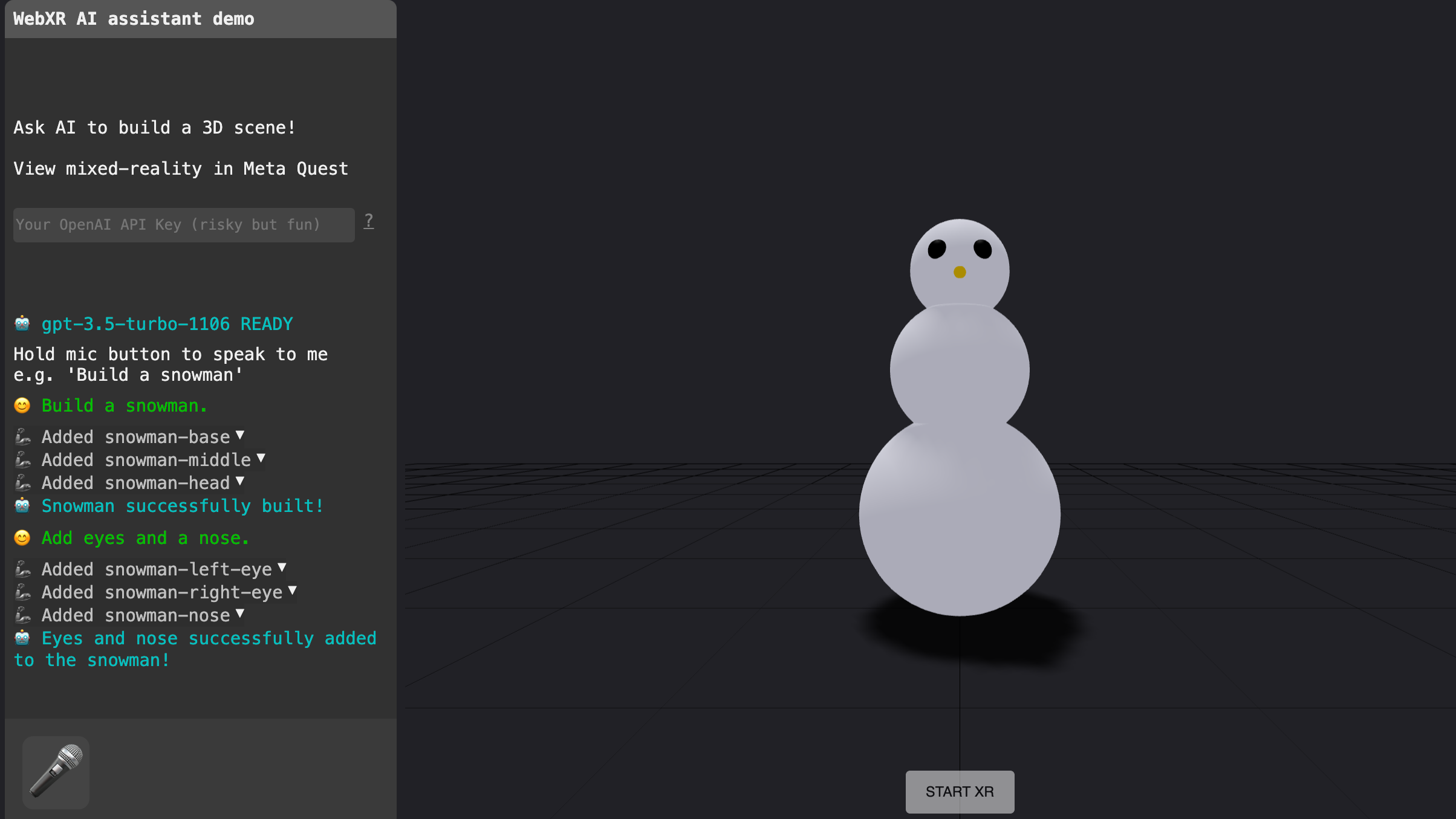
Finally, the system responds. It may speak back, show a preview, highlight changed objects, offer alternatives, or ask clarifying questions. This loop matters because voice interfaces fail when they are silent, vague, or too eager. The user needs confirmation like, “I added three pendant lights over the island,” not passive-aggressive mystery.
The Real Tools Pushing This Forward
The holodeck dream is not coming from one lab alone. It is emerging from a mix of game engines, mixed reality platforms, speech systems, and research prototypes.
Microsoft’s mixed reality design guidance has long treated voice as a serious input method, especially for complex interfaces and hands-free use. That matters because in spatial computing, voice is not a gimmick. It is often the quickest route through layered controls. The “see it, say it” model is especially powerful because it connects visible UI labels to spoken commands, reducing guesswork.
OpenAI’s realtime speech systems make low-latency, speech-to-speech interaction much more practical. This is important because a scene-building assistant should feel responsive, not like it is mailing your request to another century. When conversation is fast enough, voice stops feeling like input and starts feeling like collaboration.
NVIDIA Omniverse and related tools show how this can connect to industrial-grade 3D and simulation workflows. Meanwhile, Audio2Face pushes the character side forward by turning audio into facial animation and lip-sync. That means the system can do more than build rooms. It can populate them with digital humans who react, speak, and look like they belong there.
Unity AI points in a similar direction from the engine side: contextual help, asset support, and lower-friction workflows inside the editor itself. The bigger idea is that 3D authoring should not require creators to leave their environment every five minutes to ask a chatbot what went wrong.
Meta’s XR Voice SDK reinforces the same trend in AR and VR: voice can shortcut controller actions and support more natural interaction. In a headset, that is a huge deal. Menus are slower when your hands are busy, your gaze is moving, or you just want to say the thing and get on with your life.
Adobe Firefly’s scene-based controls show another valuable direction: using simple 3D composition, camera angle, lighting, and depth as steering tools for generative results. That is not a full holodeck, but it proves that users want conversational control plus spatial structure, not just raw prompting.
Research backs this up. Stanford helped establish early foundations for text-to-3D scene generation by showing how natural language can be grounded to objects and spatial layouts. MIT pushed the concept further with work that effectively lets users “speak objects into existence,” combining speech recognition, language models, and 3D generation. More recent XR research has demonstrated voice-driven scene editing, realtime object manipulation, immersive scene creation, and better spatial audio support. Even mainstream reporting now describes conversational world-building features arriving in creator platforms.
Taken together, the pattern is obvious: the industry is moving from manual authoring to AI scene creation with language as the control surface.
What Great Voice-Driven 3D Design Looks Like
Not every voice interface deserves to be called holodeck-like. Some are just menu systems wearing a sci-fi costume. The best ones follow a few rules.
Keep the world editable
Every generated object should remain selectable, movable, renameable, and replaceable. Users need to know what changed and how to change it again.
Show what the system heard
Live transcription, summaries, and change logs are essential. A simple side panel saying “Added: couch, lamp, rug. Updated: lighting to warm evening” can save an incredible amount of frustration.
Mix voice with gaze, hand input, and UI
Voice alone is not enough. Spatial interfaces work best when users can say “move this over here” while looking at the object and pointing to the destination. This combination feels fast, precise, and natural.
Support both short commands and rich prompts
Users need quick edits and long descriptions. “Delete that” and “Turn this empty room into a quiet Japanese-inspired tea space” should both work.
Use audio and visual feedback
In mixed reality, there is no physical click. Feedback matters. Highlights, motion cues, confirmation sounds, and spoken acknowledgments all increase confidence.
Make undo your best friend
Voice interfaces encourage experimentation, which is wonderful until the AI misunderstands “more plants” as “welcome to the rainforest.” Instant undo, version snapshots, and reversible changes are not optional.
Where This Matters Most
The obvious audience is game development and virtual production, but the use cases are much broader.
Architecture and interior design
Clients can walk through a concept and say, “Raise the ceiling,” “Try walnut instead of ash,” or “Make the kitchen feel brighter.” That is much faster than translating taste into fifteen emails and a mood board full of indecision.
Education and training
Teachers can build interactive historical spaces, science labs, or simulations with spoken prompts. Training teams can generate scenario variations quickly instead of rebuilding scenes by hand.
Film, advertising, and previsualization
Directors can block out environments conversationally, testing mood and composition before investing in final assets.
Retail and e-commerce
Brands can create virtual showrooms, product demos, or configuration spaces where the layout evolves through natural language.
Accessible creation tools
This is the most exciting use case of all. Voice lowers the barrier for beginners and can make 3D creation more accessible for people who cannot rely on traditional mouse-and-keyboard workflows.
What Still Gets in the Way
Now for the honest part. A holodeck-like interface is not finished technology. It is a fast-improving direction with some stubborn limitations.
Ambiguity is the big one. Humans are vague on purpose. “Make it nicer” is meaningful in a design meeting and dangerous in a rendering pipeline. Systems need better clarification strategies, preference memory, and examples.
Spatial reasoning is another hurdle. It is one thing to generate a chair. It is another to place six chairs, preserve walkable paths, honor scale, match style, and avoid visual chaos. The system needs taste as well as geometry.
Latency matters too. Even brilliant outputs feel bad if the conversation drags. A holodeck-like interface must feel immediate enough that the user stays inside the creative flow.
Asset quality and consistency can also break immersion. If one object looks like a film prop and the next looks like a forgotten mobile game reward, the illusion collapses.
Trust may be the biggest challenge. Professionals will adopt voice-driven 3D tools when they are fast, editable, predictable, and easy to correct. Nobody wants an assistant that is confident, wrong, and somehow proud of it.
The Future: From Prompting to Directing
The biggest shift is conceptual. We are moving from software that requires users to operate tools manually to systems that let users direct outcomes conversationally. That does not mean traditional interfaces disappear. It means voice becomes the front door, while visual tools remain available for precision work.
In the near future, the best voice-controlled 3D scenes will likely work like this: you describe a world, the system blocks it out, asks one or two useful questions, shows a preview, then lets you refine objects, materials, lighting, sound, and motion through a mix of speech, gaze, hand input, and direct manipulation. Eventually, character behavior, environmental storytelling, and simulation logic will join the same loop.
At that point, you are not just modeling. You are directing space.
Experiences With A Holodeck-Like Voice Interface
The most memorable thing about working with a voice-driven 3D system is how quickly your brain stops thinking about software and starts thinking about scenes. The first few minutes feel technical. You test commands. You watch the transcription. You wonder whether the microphone is hearing you correctly or whether it is about to interpret “mid-century coffee table” as “mystery coffee tornado.” Then something clicks. You speak, the room changes, and the interface starts to feel less like a program and more like a creative partner standing just offstage.
One of the best experiences is speed. You can rough out a space in minutes because language is naturally high bandwidth for intention. Saying “Build a small rooftop bar with string lights, concrete flooring, plants around the edges, and a skyline view” is faster than hunting through categories, dragging props, adjusting coordinates, and trying to remember where the lighting controls live this week. Voice keeps momentum alive. That matters because creative energy is fragile. Once momentum dies, so does the magic.
Another strong experience is emotional. Voice invites a different kind of thinking. People tend to describe mood, story, and atmosphere when they speak. They say things like “make it feel lonely,” “make the hallway more ominous,” or “I want this room to look like a boutique hotel that charges too much for sparkling water.” Those are wonderfully human inputs. Traditional 3D tools are rarely built to accept them directly, but a holodeck-like interface can translate them into choices about light temperature, color palette, scale, clutter, ambient sound, and material finish.
There is also a strange delight in conversational revision. Instead of restarting, you negotiate. “Keep the layout, but make it more futuristic.” “Good, but reduce visual noise.” “Too polished, add wear and tear.” This style of iteration feels more like directing a team than operating a machine. It lowers the intimidation factor for beginners and frees experienced creators to stay in concept mode longer before dropping into technical cleanup.
Of course, the rough edges are memorable too. Sometimes the system nails the vibe and misses the specifics. Sometimes it understands every noun but completely misunderstands the relationships between them. Sometimes you ask for “subtle fog” and get a weather event dramatic enough to cancel flights. These moments are frustrating, but they are also revealing. They show that the challenge is not just generating assets. It is understanding intent, context, and taste.
Still, when the experience works, it feels different from ordinary software. You are not clicking through a stack of tools. You are building an environment through conversation. That shift is powerful. It makes 3D design feel more accessible, more expressive, and oddly more human. The holodeck may still be under construction, but for brief moments, in the right workflow, you can already hear the future answering back.
Conclusion
Making 3D scenes with a holodeck-like voice interface is no longer a fantasy reserved for science fiction fans and people who own suspiciously dramatic capes. The pieces are here: robust speech recognition, low-latency voice models, mixed reality voice design, AI-assisted engines, generative media tools, and research systems that turn natural language into editable spatial worlds.
The real opportunity is not replacing designers. It is removing friction. Voice can help creators sketch faster, iterate more naturally, and communicate intent in the way humans already think: through description, mood, and direction. The winners in this space will be the tools that combine speed with control, magic with editability, and conversation with trust.
That is how the holodeck becomes useful: not as a gimmick, but as the most intuitive creative interface in the room.