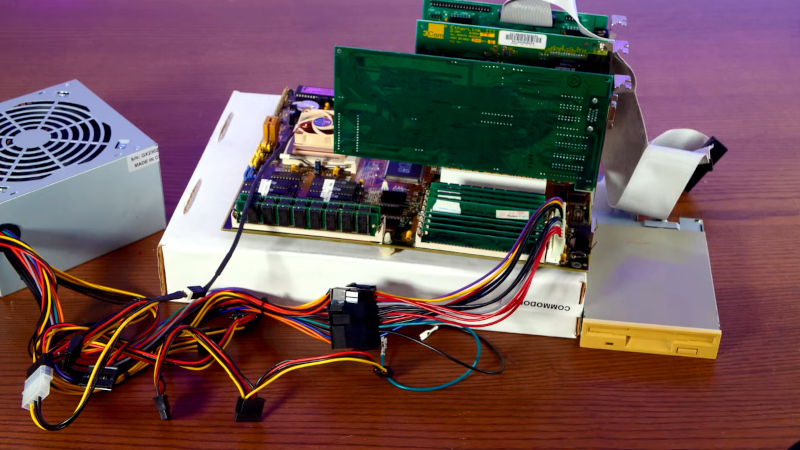
A modern operating system on a 1.44MB floppy sounds like a joke told by someone who still calls the internet “the information superhighway.” Yet with a carefully trimmed Linux kernel, an aggressively configured BusyBox build, strong compression, and absolutely no room for luxury, it remains possible to boot a genuine Linux environment from one humble 3.5-inch disk.
The result will not run a graphical desktop, stream video, or update 47 packages while asking whether you want to restart. It can, however, reach a command prompt, execute shell scripts, edit files, mount basic storage, and demonstrate exactly how little software a computer truly needs.
How Much Space Does a Floppy Actually Provide?
A conventional high-density 3.5-inch floppy stores 1,440 KiB, or 1,474,560 bytes. That total must accommodate the bootloader, Linux kernel, compressed root filesystem, configuration files, utilities, and any writable storage you hope to preserve.
Modern applications treat 1.44MB as statistical noise. A single smartphone photo can consume several floppies. A typical Linux desktop installation requires gigabytes, while even Tiny Core Linux describes a core system measured in roughly 10MBimpressively small by modern standards but still around seven floppy disks before adding applications.
FLOPPINUX demonstrates how extreme optimization changes the equation. Its 2025 build uses a 1,440-KiB image containing an 881-KiB compressed kernel and a 137-KiB compressed toolset, while retaining roughly 253 KiB of free space. That is not merely fitting Linux onto a floppy; it is fitting Linux onto a floppy and somehow finding room behind the couch cushions.
Why This Was Easier in Early Linux
During the 1990s and early 2000s, floppy-based Linux systems were practical rescue tools rather than novelty projects. A technician could carry a bootable disk containing filesystem utilities, hardware diagnostics, networking commands, and enough Unix tools to repair a broken installation.
One famous example was Tom’s Root Boot, usually called tomsrtbt. It packed a substantial command-line rescue environment onto a specially formatted floppy with approximately 1.72MB of capacity. Contemporary reviews praised it as a portable platform for diagnosing and recovering damaged PCs.
Those systems benefited from smaller kernels, simpler hardware expectations, and fewer dependencies. Users did not expect Wi-Fi, Bluetooth, encrypted filesystems, USB 3, modern graphics, containers, sound servers, or seventeen different ways to display an emoji. A minimal kernel could support a modest collection of common devices without carrying decades of additional infrastructure.
Today, the Linux kernel supports an enormous range of processors, buses, filesystems, security mechanisms, virtualization features, and peripheral devices. That versatility is one of Linux’s strengths, but a floppy build must politely decline almost all of it.
The Essential Components of Floppy Linux
1. A Ruthlessly Customized Linux Kernel
A standard distribution kernel has no chance of fitting because it is built to support thousands of hardware combinations. The solution is to compile a custom 32-bit x86 kernel beginning with an extremely small configuration, such as the kernel build system’s tinyconfig target.
Linux uses Kconfig to organize features and dependencies. Networking, device drivers, filesystems, debugging facilities, module support, security options, and processor families can be individually enabled or disabled. For a floppy system, every selected option needs a job description. If it cannot explain why it deserves several kilobytes, it is escorted from the building.
A practical configuration normally keeps the text console, TTY support, ELF executable loading, initramfs support, the required compression decoder, minimal pseudo-filesystems such as /proc and /sys, and drivers for the exact hardware being used. Support for sound, modern graphics, unnecessary network adapters, exotic filesystems, power-management extras, and most debugging features can disappear.
The x86 boot protocol still documents the traditional process used by bootloaders to load a compressed bzImage. It even retains a wonderfully specific warning about switching off the floppy motor before entering the kernel. Nothing says “timeless engineering documentation” quite like advice concerning a spinning plastic disk.
2. BusyBox Instead of a Full GNU Userland
The kernel alone does not provide familiar commands such as ls, mount, cp, vi, or a usable shell. Normally, these are supplied by many separate programs and shared libraries. On a floppy, that approach would fill the disk before the system learned how to say “out of space.”
BusyBox solves the problem by combining numerous Unix utilities into one multi-call executable. Symbolic links or command names tell the same binary whether it should behave as sh, ls, mount, sed, or another enabled applet.
A broadly configured static BusyBox build can exceed one megabyte, so simply compiling BusyBox is not enough. Its configuration must begin near empty, adding only the required shell, init process, editor, file-management commands, mounting tools, and perhaps a few text-processing utilities. BusyBox publishes size comparisons showing that equivalent complete static builds can occupy roughly a megabyte, illustrating why selective configuration is essential.
Static linking is often attractive because the root filesystem does not need separate runtime libraries. It may produce a larger executable than a narrowly dynamic build, but it greatly simplifies booting: one binary arrives with everything it needs instead of searching a miniature filesystem for libraries that were removed to save space.
3. A Compressed Initramfs
The root filesystem usually contains BusyBox, device nodes, startup scripts, configuration files, mount points, and symbolic links for the enabled commands. This directory tree is packed into a CPIO archive and compressed, commonly with XZ when maximum size reduction matters more than decompression speed.
Linux initramfs supports the newc CPIO format and several compression methods, including gzip, XZ, LZMA, LZ4, and Zstandard when the corresponding decompressor is built into the kernel. During boot, the kernel expands the archive into an in-memory root filesystem and starts its initial program.
Running from RAM has an additional benefit: after the slow initial read, commands and files no longer need to be fetched repeatedly from the floppy. This resembles the diskless approach used by lightweight systems such as Alpine Linux, where the operating environment is loaded into memory and can use separate storage for persistent changes.
4. A Small Bootloader and Disk Image
The floppy still needs boot code capable of loading the kernel and initramfs. SYSLINUX has traditionally been a convenient choice for FAT-formatted removable media. A small configuration identifies the kernel, initramfs, and command-line options needed to launch the startup script.
The final image is commonly created as a zero-filled 1,440-KiB file, formatted with a DOS-compatible filesystem, made bootable, and populated with the kernel, root filesystem, and bootloader configuration. The FLOPPINUX workshop uses this straightforward structure rather than inventing an exotic filesystem solely to save three bytes and the builder’s remaining sanity.
Can a Current Linux Kernel Still Do It?
Yes, but the word “current” requires qualification. FLOPPINUX’s notable 2025 build used Linux 6.14.11 and targeted an Intel 486DX with 20MB of RAM. The finished system included a shell, Vi, essential file commands, scripting support, and persistent storage on a standard floppy.
SHORK DISKETTE followed a similar idea, targeting 486SX-class systems with at least 16MiB of RAM. Its automated build compiles BusyBox, creates a minimal root filesystem, builds a tailored Linux kernel, compresses the files, and combines everything with a bootloader in a raw disk image. Optional PATA support can be enabled, although doing so reportedly consumes nearly all remaining space.
The upstream kernel situation is changing, however. Linux 7.1 began phasing out i486 support by deleting relevant configuration choices, and the Linux 7.2 development cycle removed additional i486-specific code, including thousands of lines associated with old floating-point emulation. Builders targeting genuine 486 hardware should therefore preserve a compatible kernel branch instead of assuming every new release will remain suitable.
This does not make floppy Linux impossible. It means a retro build must choose its kernel version deliberately. A maintained modern computer may use a newer kernel, while a real 486 can remain on an older compatible release. “Latest” is not automatically the same as “best,” especially when the machine predates Google, Wi-Fi, and many of the engineers maintaining the code.
What Can Floppy Linux Actually Do?
A successful single-floppy system can provide a functional command-line environment with tools for viewing and editing files, copying data, checking free space, mounting supported media, inspecting basic system information, and running shell scripts.
What it cannot provide is a conventional distribution experience. There is usually no package repository on the disk, no compiler, no manual-page collection, no desktop, no web browser, and very limited hardware support. Networking is possible only by sacrificing space elsewhere or moving components onto another disk.
A two-floppy project such as Ginebra Linux shows what becomes possible when the limit is relaxed. Its first disk contains the kernel and bootloader, while the second carries a BusyBox root filesystem, modules, and networking support. The system copies itself into RAM after the disks are swapped and can add features that would be unrealistic on one disk, including selected network drivers and experimental graphical support.
The difference between one floppy and two is only 1.44MB, yet in this world that increase feels like being handed an empty warehouse.
How to Approach a Build Without Losing a Weekend
Start in an Emulator
QEMU can emulate an x86 PC, floppy controller, and raw disk image, making it the safest place to test early builds. Its documentation supports floppy-backed drives and floppy boot order, so builders can iterate without wearing out physical disks or wondering whether a boot failure came from software, dust, a weak drive belt, or magnetic media last treated kindly during the Clinton administration.
Change One Feature at a Time
Begin with a known working configuration. Add one driver or BusyBox applet, rebuild, check the sizes, and boot again. Enabling ten options simultaneously creates ten suspects when the image overflows or the kernel panics.
Track Every Byte
Keep a size report for the kernel, root filesystem, bootloader files, and remaining disk space. Buildroot’s documentation recommends creating minimal configurations for basic BusyBox systems, and the same discipline applies here: the build should include only what the target requires.
Test the Real Hardware Last
Only after the image boots reliably in emulation should it be written to a physical disk. Check the destination device carefully before using dd; that command is extremely efficient and equally enthusiastic about writing over the wrong drive.
Why Build Linux on a Floppy in 2026?
No sensible administrator would select a floppy as the deployment platform for a new production server. USB drives, CompactFlash cards, network booting, and solid-state storage are faster, larger, and more reliable. The physical Linux floppy driver was described as orphaned years ago because maintainers no longer had dependable hardware for testing, although virtual floppy support and many USB floppy devices remained usable.
The value of the exercise is educational. It strips away the layers normally hidden by a desktop distribution and exposes the fundamental boot path: firmware loads a bootloader, the bootloader loads a kernel, the kernel unpacks early userspace, and an init process creates a usable environment.
It also teaches dependency control. Every feature has a cost. Every library, driver, command, character set, help message, and debugging symbol competes for the same tiny pool of bytes. That makes floppy Linux an unusually honest form of systems engineering. The disk does not care that a feature would be “nice to have.” It has 1,474,560 bytes and the negotiating style of a parking meter.
Experience Notes: What Building Floppy Linux Feels Like
The first surprise reported by builders is that compilation is not the hardest part. A modern workstation can compile a tiny 32-bit kernel quickly. The difficult work is deciding what the finished system should be capable of doing and then tracing every dependency required to make that capability real.
Adding a command may seem harmless until it requires another kernel option, device node, filesystem feature, or BusyBox setting. A shell script may fail because script execution support was disabled. A mount command may exist but be unable to recognize the selected filesystem. An editor may launch correctly, only for terminal behavior to become strange because a supporting feature was removed. Each failure becomes a miniature lesson in how the Linux userspace and kernel cooperate.
The size-checking phase can become strangely addictive. Removing an unneeded help feature might save a few kilobytes. Changing a compression setting might recover several more. A newly enabled driver can consume the entire budget that took an hour to reclaim. Progress is measured in numbers that modern software development usually ignores, and saving 12 KiB feels like receiving a generous research grant.
Emulation provides the cleanest experience. The virtual floppy always spins, never develops a bad sector, and does not make suspicious mechanical noises. Booting the same image on real hardware introduces a second project: vintage-computer restoration. Drives may need cleaning, belts may slip, BIOS settings may be incorrect, and disks may have deteriorated even when they look perfect.
Physical media also changes the emotional impact. A raw image file is merely another file. Writing that image to a real disk, inserting it into a 486, hearing the drive seek, and watching a recent Linux kernel reach a shell creates a connection between several eras of computing. The operating system may have been compiled on a multicore machine with gigabytes of RAM, yet it arrives at its destination through a storage format designed when one megabyte still sounded extravagant.
The final environment is modest, but that modesty is part of its charm. There is no loading animation, notification center, cloud account, or background service checking whether another background service needs attention. The machine displays a prompt and waits. Commands perform visible jobs. Files occupy measurable space. Mistakes are immediate and usually educational.
Builders also tend to discover that the most useful result is not the floppy itself. The real reward is understanding how to construct minimal Linux appliances, rescue systems, embedded images, initramfs environments, and single-purpose virtual machines. Techniques learned under a 1.44MB limit transfer directly to modern systems where smaller images improve boot time, reduce attack surface, simplify maintenance, and lower resource usage.
In that sense, floppy Linux is not merely retrocomputing theater. It is a deliberately ridiculous constraint that produces practical engineering skillsand a boot disk that can be held up during meetings whenever someone claims a 600MB container image is “basically minimal.”
Conclusion
Linux on a floppy remains possible, but only through careful hardware targeting, a tiny custom kernel, a selectively configured BusyBox userland, a compressed initramfs, and relentless size measurement. Projects such as FLOPPINUX and SHORK DISKETTE prove that a genuine, relatively recent Linux environment can still boot from 1.44MB and provide a useful command-line workspace.
It is not a replacement for a modern rescue USB drive, and future upstream kernels will be less friendly to original 486 hardware. Nevertheless, the project remains one of the clearest demonstrations of Linux’s flexibility. Remove everything unnecessary, understand every retained component, and the penguin can still squeeze through a door designed for software from another century.