Note: This guide is about TNT as a Minecraft gameplay block only. It does not discuss real-world explosives, and everything below is intended for safe, in-game building, mining, and experimenting.
Minecraft TNT is the block version of saying, “I could mine this tunnel carefully… or I could let chaos do the paperwork.” Whether you are clearing land, building a dramatic redstone contraption, testing mob traps in Creative mode, or simply discovering why your starter house should not be made of emotional attachment, learning how to blow up TNT in Minecraft is a classic skill.
The good news is that TNT is simple to use. The even better news is that it becomes much more interesting when you understand the different ways to ignite it. In Minecraft, TNT can be activated by direct fire tools, redstone power, flaming projectiles, spreading fire, lava, dispensers, or nearby explosions. Once activated, the TNT becomes “primed,” starts flashing, is affected by gravity, and explodes after a short fuse. That little countdown is your cue to move unless you enjoy respawning with questions.
This guide breaks the topic into three practical methods: lighting TNT directly, activating TNT with redstone, and triggering TNT with fire, projectiles, or chain reactions. Along the way, you will learn when each method works best, how to avoid accidental destruction, and how to use TNT more creatively without turning your Minecraft world into a crater-themed art project.
What Happens When TNT Is Activated?
Before we get to the three main ways to blow up TNT in Minecraft, it helps to know what the game is doing behind the scenes. A placed TNT block is stable until something activates it. Once activated, it turns into primed TNT, which is no longer a normal block. It becomes an entity, meaning it can fall, shift slightly, move with flowing liquid, and eventually explode.
Primed TNT usually gives you only a few seconds before detonation. During that time, it flashes, makes a hissing sound, and politely announces that standing nearby is a poor life choice. TNT explosions can destroy many blocks, damage mobs, damage players, and launch entities. However, its effect depends on the environment. For example, TNT exploding underwater often behaves differently from TNT exploding in open air, especially when it comes to block damage.
In Survival mode, TNT is commonly used for clearing areas, mining certain spaces, creating controlled demolitions, and powering contraptions. In Creative mode, it is often used for testing redstone builds, map design, mini-games, or satisfying the ancient builder’s urge to press one lever and watch a mountain reconsider its career.
Way 1: Blow Up TNT With Flint and Steel or a Fire Charge
The most straightforward way to ignite TNT in Minecraft is to use flint and steel. This method is fast, simple, and perfect when you want direct control. Place the TNT block, hold flint and steel, and use it on the TNT. The block will instantly become primed, start flashing, and explode after its fuse.
How to Use Flint and Steel on TNT
First, place your TNT where you want the explosion. Then equip flint and steel. On PC, you typically right-click the TNT. On consoles or mobile devices, use the normal interact button. Once the TNT is lit, back away quickly. Do not stand there admiring your work like a villain in slow motion. Minecraft physics is not impressed by dramatic pauses.
Flint and steel is popular because it is easy to carry and does not require redstone knowledge. It is ideal for quick jobs, such as removing a small hill, opening up a space, or testing how much damage TNT will do in a controlled area. It is also useful in Creative mode when you want to experiment quickly without building a full ignition system.
Using a Fire Charge Instead
A fire charge can also ignite TNT. It works as another direct fire-based option, and it can be used in certain dispenser setups. Fire charges are less common than flint and steel for everyday TNT use, but they are handy when building automated designs or themed contraptions.
For example, you might place a dispenser facing TNT, load it with a fire charge, and activate the dispenser with redstone. This setup adds a little distance between you and the TNT, which is always nice if your character values having a face.
Best Uses for Direct Ignition
Direct ignition is best for simple TNT tasks. Use it when you are working in open space, testing blast ranges, or clearing blocks without needing a complicated redstone circuit. It is not the safest method for large projects because you must be near the TNT when you light it. If you are igniting multiple TNT blocks, direct lighting can become risky very quickly.
A smart habit is to prepare an escape path before lighting TNT. Build a small wall, dig a quick trench, or stand farther away if the layout allows it. TNT does not care that you “only meant to test one block.” It will explode with the confidence of a block that has never paid property insurance.
Way 2: Blow Up TNT With Redstone
Redstone is the cleanest way to detonate TNT from a distance. If flint and steel is the caveman method, redstone is the “I have a clipboard and a plan” method. Redstone lets you activate TNT using levers, buttons, pressure plates, redstone torches, observers, dispensers, tripwires, and more.
Basic Redstone TNT Setup
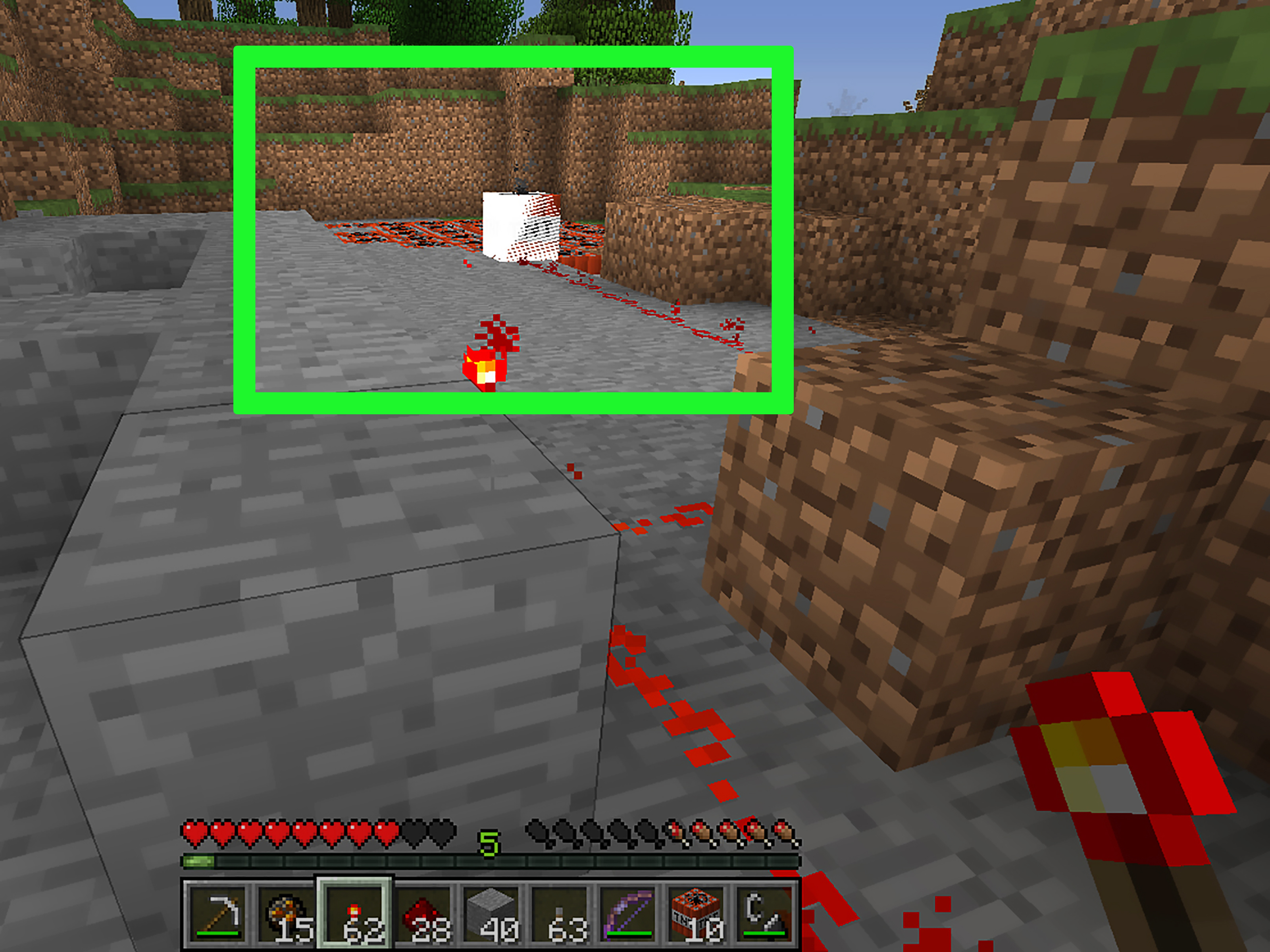
A simple redstone TNT setup only needs three things: TNT, redstone dust, and a power source. Place the TNT, run redstone dust away from it, and connect the dust to a lever or button. When you activate the lever or press the button, the redstone signal reaches the TNT and primes it.
For beginners, a lever is the easiest power source because it stays on after being flipped. A button sends a short pulse, which is often enough to ignite TNT without leaving the circuit permanently powered. Pressure plates can also work, but they are easier to trigger accidentally, especially if mobs are nearby. Nothing says “bad engineering” like a chicken stepping on your demolition switch.
Why Redstone Is Safer
The biggest advantage of redstone is distance. You can stand away from the blast, activate the circuit, and watch from a safer spot. This is helpful when you are clearing a large area, building a TNT cannon in a mini-game, or creating a dramatic entrance for a custom map.
Redstone also gives you timing control. With repeaters, you can delay signals and create sequences. This is useful when you want multiple TNT blocks to explode one after another instead of all at once. Delayed explosions can clear larger spaces more evenly and reduce the chance of unpredictable block scatter.
Example: A Simple Remote TNT Button
Imagine you want to clear a stone wall. Place one TNT block at the base of the wall. Then place redstone dust in a line leading about ten blocks away. At the end of the line, place a stone button on a block. Press the button, step back, and the TNT will activate. This setup gives you enough distance to observe the explosion without being part of the demonstration.
You can improve the design by building a small viewing shelter out of stronger blocks. You can also place water nearby to reduce accidental fire spread or unwanted damage in some designs. However, remember that water can change how TNT affects blocks, so test your setup before using it near anything valuable.
Redstone TNT in Creative Builds
Redstone TNT systems are especially fun in Creative mode. You can build timed fireworks-style explosions, collapsing structures, adventure map traps, mining machines, or mini-game arenas. The key is to test small before going big. A one-block TNT test is research. A 200-block TNT wall is a weather event.
Way 3: Blow Up TNT With Fire, Flaming Projectiles, or Chain Reactions
The third way to blow up TNT in Minecraft is to let another source trigger it. TNT can be activated by fire, lava, flaming arrows, fireballs, nearby explosions, and certain dispenser setups. This method is more flexible, more dramatic, and sometimes more chaotic than the first two.
Using Fire or Lava
TNT can ignite when exposed to spreading fire or lava. This means placing TNT too close to lava is a terrible storage strategy unless your goal is “surprise crater.” Fire-based ignition can be useful in controlled builds, but it is less predictable than flint and steel or redstone because fire spread depends on nearby blocks and game conditions.
If you use fire or lava to activate TNT, keep the area clear and avoid building near wood, wool, leaves, or anything else that burns easily. Minecraft fire has a talent for turning one tiny mistake into a neighborhood-wide barbecue.
Using Flaming Arrows
A flaming arrow can ignite TNT if it hits the block. This is one of the coolest methods because it lets you trigger TNT from a distance with style. You can use a bow enchanted with Flame, or in some cases shoot an arrow through fire or lava so it becomes burning before it reaches the TNT.
This method is great for adventure maps, target challenges, and mini-games. For example, you can place TNT behind a target area and require players to shoot a flaming arrow to open a blocked path. It feels cinematic, like an action movie, except everyone is square and half the cast is made of pixels.
Using Nearby Explosions
TNT can also be triggered by another explosion. If one TNT block explodes near another, the second TNT can become primed, creating a chain reaction. This is how TNT lines, TNT clusters, and large demolition setups work.
Chain reactions are powerful but harder to control. TNT blocks activated by explosions may have different timing than TNT lit directly by redstone or fire. The result can be exciting, messy, and occasionally shaped like regret. If you are using TNT chains, start with short lines and test the spacing before making a giant grid.
Example: A Controlled TNT Chain
To make a simple TNT chain, place several TNT blocks in a line with one-block gaps or directly adjacent, depending on how strong you want the blast pattern to be. Light the first TNT with redstone or flint and steel, then move away. When the first block explodes, it can activate nearby TNT, continuing the chain.
This works well for clearing long tunnels, making dramatic map events, or testing explosion patterns. It is less ideal near houses, farms, storage rooms, pets, villagers, or anything you have named. If your dog is sitting nearby, move the dog first. Always move the dog first.
Important Safety Tips for TNT in Minecraft
TNT is fun because it is powerful, but that power can ruin builds quickly. Before lighting TNT, check your surroundings. Are there chests nearby? Is your base within blast range? Are there villagers, animals, or rare blocks you care about? If yes, pause and reconsider. TNT is not known for gentle negotiation.
Use Creative mode or a backup world when testing large TNT designs. In Survival mode, keep TNT away from storage areas and farms. If you are building a redstone circuit, label your switches mentally before pressing anything. Many players have learned the hard way that “I wonder what this lever does” is Minecraft’s most dangerous sentence.
Also remember that different editions and versions may have small behavior differences. Java Edition and Bedrock Edition are similar in many TNT basics, but details can vary. If you are building something technical, test it in the same edition and version where you plan to use it.
Which TNT Method Should You Use?
If you want speed, use flint and steel. It is simple, reliable, and perfect for small jobs. If you want distance and control, use redstone. It is better for planned demolitions, traps in custom maps, mini-games, and timed builds. If you want style, challenge, or chain reactions, use flaming arrows, fire, lava, or nearby explosions.
The best Minecraft players do not just know how to blow up TNT; they know when not to. TNT can save time, create amazing moments, and make builds more interactive. But it can also erase hours of work in seconds. The trick is to treat TNT like a dramatic assistant: useful, entertaining, and absolutely not allowed near the storage room without supervision.
Extra Experiences: What Players Learn After Using TNT for a While
After spending enough time with TNT in Minecraft, most players develop a sixth sense for danger. You begin to recognize the tiny mistakes before they become enormous holes. A lever placed too close to your house suddenly looks suspicious. A pressure plate near TNT starts feeling less like decoration and more like a legal liability. Even a harmless redstone line can make you squint and ask, “Wait, where does that go?”
One of the biggest lessons is that TNT is best used with planning, not panic. New players often place TNT, light it, and sprint in whatever direction their keyboard allows. Experienced players prepare the area first. They clear valuable blocks, move mobs, create a path out, and decide exactly what the TNT is supposed to accomplish. That small amount of preparation makes the difference between controlled demolition and accidentally inventing a basement.
Another useful experience is learning blast spacing. Placing TNT directly against a wall creates a focused explosion, while spreading TNT out can clear a wider area. In mining projects, players often test different layouts to see which one removes the most blocks without wasting resources. In Creative mode, this experimentation is easy and fun. In Survival mode, where gunpowder and sand take effort to gather, efficient placement matters much more.
Redstone experience also changes how players think about TNT. At first, a redstone TNT setup may feel complicated. But once you understand power sources, dust lines, repeaters, and buttons, TNT becomes part of a larger design language. You can create timed explosions, hidden entrances, collapsing floors for adventure maps, or mini-game challenges where players activate TNT with skill instead of random clicking.
Flaming arrows create a different kind of experience. They are not always the most practical method, but they are incredibly satisfying. Hitting TNT from a distance feels like completing a tiny movie scene. It is especially fun in custom arenas or target games where the goal is precision. A flaming arrow TNT trigger can turn a simple build into something memorable.
Chain reactions teach caution better than almost anything else. The first time you set off a row of TNT, you may think, “That was amazing.” The second time, after it reaches something you did not mean to destroy, you may think, “I have learned.” TNT chains are excellent for spectacle, but they demand space. The more TNT you add, the less control you have once the first block is primed.
Many players also learn to respect water. Water can reduce or change terrain damage from TNT, which makes it useful in some builds and confusing in others. If your TNT did not break blocks the way you expected, the environment may be the reason. Testing in a small area helps you understand how TNT behaves before committing to a large project.
The final experience is emotional: never test TNT near something you love. Not your house, not your automatic farm, not your carefully sorted chest room, and definitely not the village you spent three hours protecting. Minecraft TNT is fun because it is dramatic, but good players know drama belongs in the test field, not next to the family cow. Build a safe testing zone, keep backups for important worlds, and enjoy TNT as one of Minecraft’s most entertaining tools.
Conclusion
Learning the three main ways to blow up TNT in Minecraft gives you more control over one of the game’s most iconic blocks. Flint and steel or fire charges are best for quick direct ignition. Redstone is ideal for safe, remote, and timed explosions. Fire, flaming arrows, lava, and chain reactions add creativity, style, and bigger possibilities.
The secret is not just making TNT explode. That part is easy. The real skill is making it explode exactly when and where you want it to. Use small tests, keep your distance, protect your important builds, and remember: in Minecraft, TNT is a tool, a toy, and occasionally a very loud teacher.